matlab App designer的上位机设计
实现以下需求,在app.serial_port下拉框中选择串口端号、在app.baud_rate下拉框中选择波特率、在app.stop_bit下拉框中选择停止位、在app.check_bit下拉框中选择校验位,在app.serial_switch中设置串口的打开和关闭app.serial_switch有打开和关闭两个值,初始默认是关闭状态,app.Lamp显示串口的打开和关闭的状态;在app.se
matlab App designer的上位机设计
留一个版本的代码,防止代码丢失,在此代码基础上再继续优化。
实现以下需求,在app.serial_port下拉框中选择串口端号、在app.baud_rate下拉框中选择波特率、在app.stop_bit下拉框中选择停止位、在app.check_bit下拉框中选择校验位,在app.serial_switch中设置串口的打开和关闭app.serial_switch有打开和关闭两个值,初始默认是关闭状态,app.Lamp显示串口的打开和关闭的状态;从串口一直接收数据,接收到的数据格式为
acc:0.186 -0.508 -0.841
gyro:0.000 0.000 0.000
angle:-148.870 -10.712 -15.991
mag:-2734 -5881 5819
将接受到的串口数据分别在app.accAxes实时绘制acc的折线图、在app.angleAxes实时绘制angle的折线图、在app.gyrAxes上实时绘制gyro的折线图;在app.serial_print上将串口数据实时打印出来。
要求避免重复重绘影响性能、避免图例和标题反复设置、检查数据完整性、避免绘图冗余和图形显示不直观、避免重复创建图形对象、提升代码性能。
如图是设计视图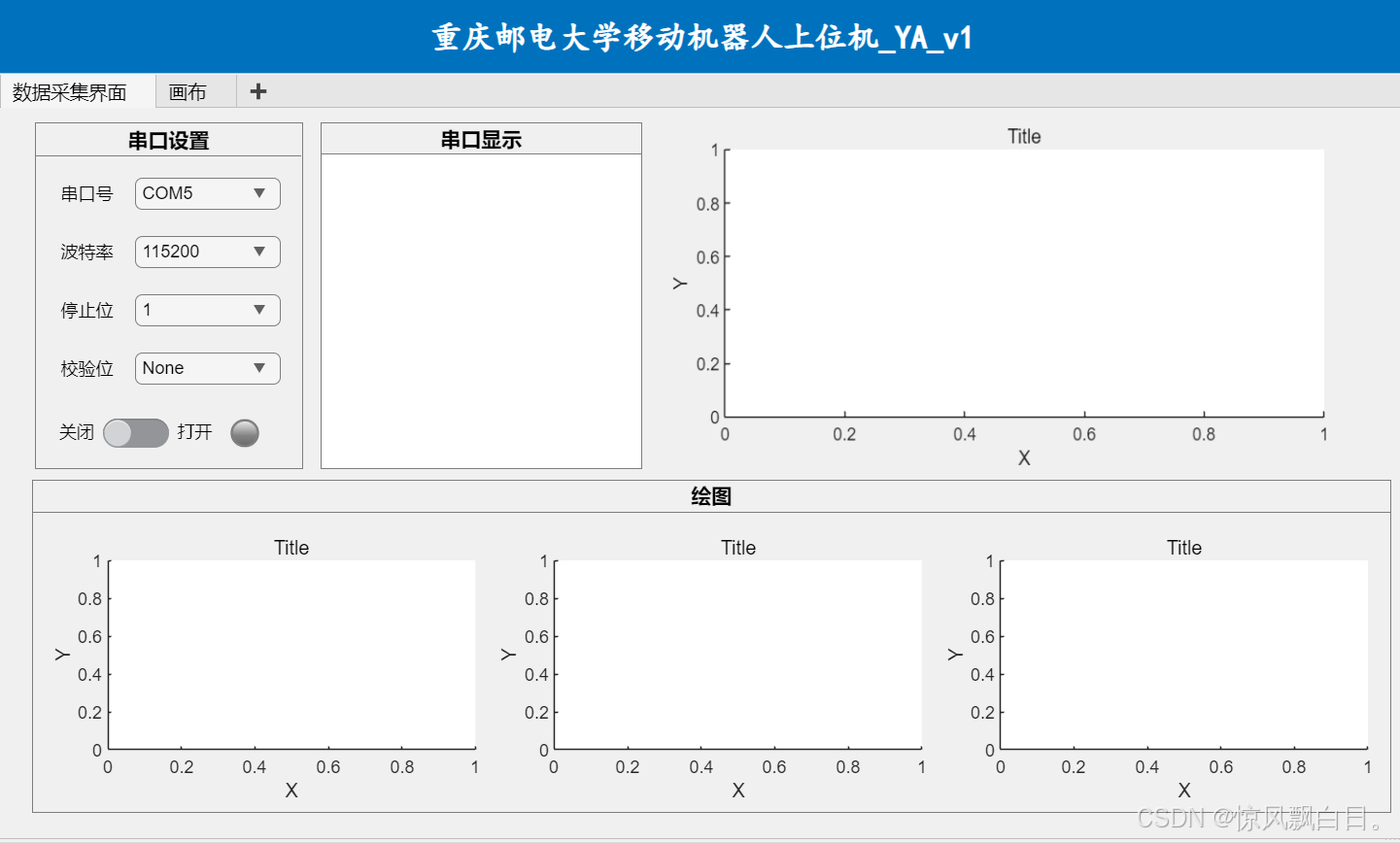
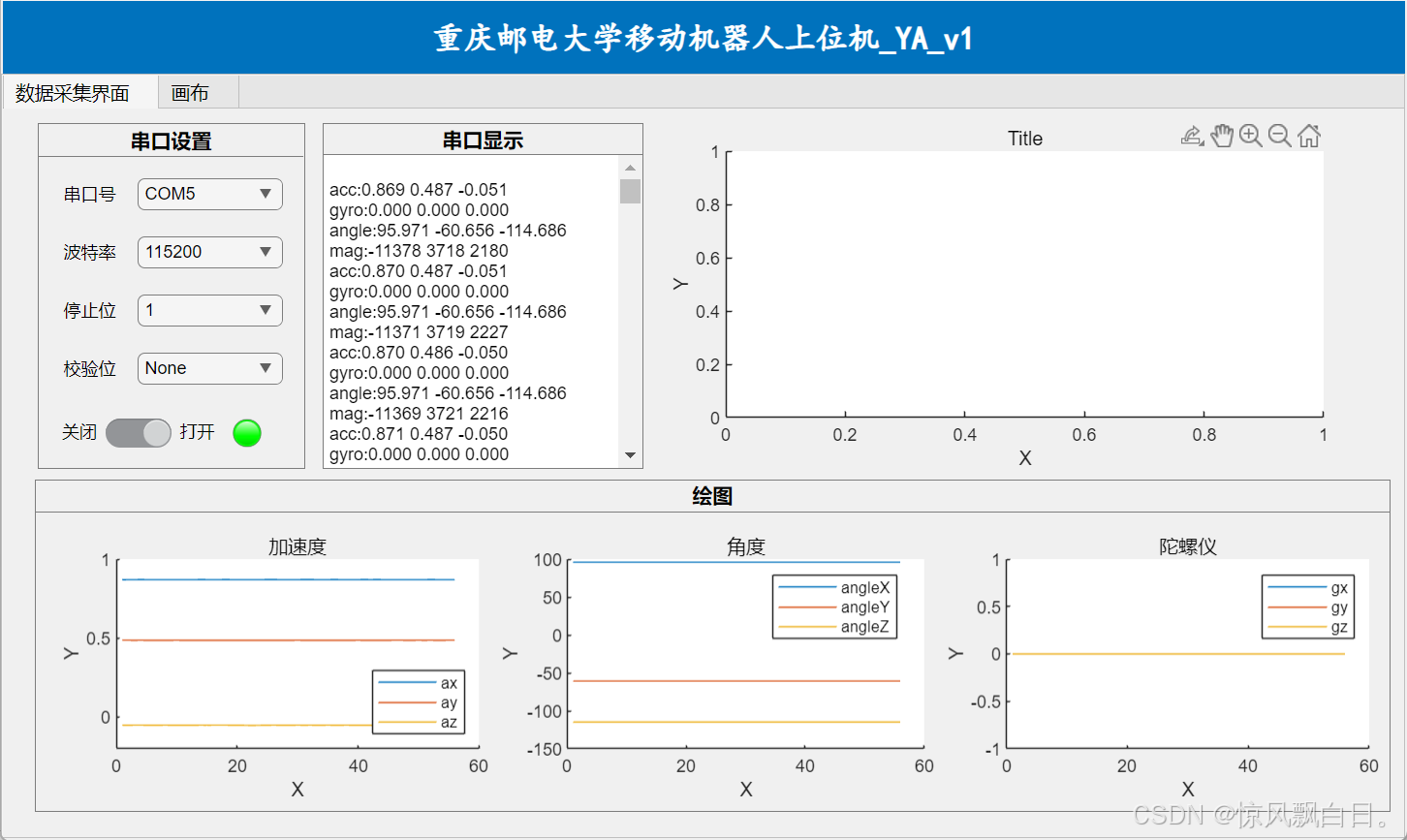
再附上代码视图的代码:
classdef YA_v1 < matlab.apps.AppBase

    % Properties that correspond to app components
    properties (Access = public)
        UIFigure       matlab.ui.Figure
        TabGroup       matlab.ui.container.TabGroup
        Tab            matlab.ui.container.Tab
        Panel_3        matlab.ui.container.Panel
        serial_print   matlab.ui.control.TextArea
        Panel_2        matlab.ui.container.Panel
        gyrAxes        matlab.ui.control.UIAxes
        angleAxes      matlab.ui.control.UIAxes
        accAxes        matlab.ui.control.UIAxes
        Panel          matlab.ui.container.Panel
        Lamp           matlab.ui.control.Lamp
        serial_switch  matlab.ui.control.Switch
        check_bit      matlab.ui.control.DropDown
        Label_4        matlab.ui.control.Label
        stop_bit       matlab.ui.control.DropDown
        Label_3        matlab.ui.control.Label
        baud_rate      matlab.ui.control.DropDown
        Label_2        matlab.ui.control.Label
        serial_port    matlab.ui.control.DropDown
        Label          matlab.ui.control.Label
        UIAxes         matlab.ui.control.UIAxes
        Tab_2          matlab.ui.container.Tab
        YA_v1Label     matlab.ui.control.Label
    end


    properties (Access = private)
        SerialObject   % 串口对象
        SerialTimer    % 定时器,用于绘图刷新
        DataBuffer     % 数据缓冲区
    end

    methods (Access = private)

         function initializeBuffer(app)
         app.DataBuffer = struct('acc', [], 'gyro', [], 'angle', [], 'mag', []);
         end

        function readSerialData(app)
        try
            % 从串口读取数据
            rawData = readline(app.SerialObject);

            % 更新串口显示区域
            app.serial_print.Value = [app.serial_print.Value; string(rawData)];

            % 解析数据
            if startsWith(rawData, "acc:")
                accData = sscanf(rawData, 'acc:%f %f %f');
                app.DataBuffer.acc = [app.DataBuffer.acc; accData'];
            elseif startsWith(rawData, "gyro:")
                gyroData = sscanf(rawData, 'gyro:%f %f %f');
                app.DataBuffer.gyro = [app.DataBuffer.gyro; gyroData'];
            elseif startsWith(rawData, "angle:")
                angleData = sscanf(rawData, 'angle:%f %f %f');
                app.DataBuffer.angle = [app.DataBuffer.angle; angleData'];
            elseif startsWith(rawData, "mag:")
                magData = sscanf(rawData, 'mag:%f %f %f');
                app.DataBuffer.mag = [app.DataBuffer.mag; magData'];
            end
        catch
            % 忽略解析错误
        end
    end

        function updatePlots(app)
        % 更新加速度图
        if ~isempty(app.DataBuffer.acc)
            plot(app.accAxes, app.DataBuffer.acc);
            title(app.accAxes, '加速度');
            legend(app.accAxes, {'ax', 'ay', 'az'}, 'Location', 'best');
        end

        % 更新角度图
        if ~isempty(app.DataBuffer.angle)
            plot(app.angleAxes, app.DataBuffer.angle);
            title(app.angleAxes, '角度');
            legend(app.angleAxes, {'angleX', 'angleY', 'angleZ'}, 'Location', 'best');
        end

        % 更新陀螺仪图
        if ~isempty(app.DataBuffer.gyro)
            plot(app.gyrAxes, app.DataBuffer.gyro);
            title(app.gyrAxes, '陀螺仪');
            legend(app.gyrAxes, {'gx', 'gy', 'gz'}, 'Location', 'best');
        end
    end

        function clearResources(app)
        if ~isempty(app.SerialObject)
            clear app.SerialObject;
        end
        if ~isempty(app.SerialTimer)
            stop(app.SerialTimer);
            delete(app.SerialTimer);
        end
        initializeBuffer(app);
        cla(app.accAxes);
        cla(app.angleAxes);
        cla(app.gyrAxes);
    end
    end


    % Callbacks that handle component events
    methods (Access = private)

        % Value changed function: serial_switch
        function serial_switchValueChanged(app, event)
        if strcmp(app.serial_switch.Value, "打开")

            initializeBuffer(app);

            try
                % 创建串口对象
                app.SerialObject = serialport(app.serial_port.Value, str2double(app.baud_rate.Value), ...
                    'Parity', lower(app.check_bit.Value), ...
                    'StopBits', str2double(app.stop_bit.Value));

                % 配置串口终止符和回调
                configureTerminator(app.SerialObject, "LF");
                configureCallback(app.SerialObject, "terminator", @(src, event)app.readSerialData());

                % 创建定时器用于刷新绘图
                app.SerialTimer = timer('ExecutionMode', 'fixedRate', ...
                                        'Period', 0.1, ...
                                        'TimerFcn', @(~, ~)app.updatePlots());
                start(app.SerialTimer);

                % 更新灯状态
                app.Lamp.Color = 'green';
            catch ME
                uialert(app.UIFigure, ['串口打开失败:', ME.message], '错误');
                app.serial_switch.Value = '关闭';
            end
        else
            % 关闭串口和定时器
            if ~isempty(app.SerialTimer)
                stop(app.SerialTimer);
                delete(app.SerialTimer);
                app.SerialTimer = [];
            end
            if ~isempty(app.SerialObject)
                delete(app.SerialObject); % 释放串口资源
                app.SerialObject = [];
            end

            % 更新灯状态
            app.Lamp.Color = 'red';
        end
        end
    end

    % Component initialization
    methods (Access = private)

        % Create UIFigure and components
        function createComponents(app)

            % Create UIFigure and hide until all components are created
            app.UIFigure = uifigure('Visible', 'off');
            app.UIFigure.Position = [100 100 967 578];
            app.UIFigure.Name = 'MATLAB App';

            % Create YA_v1Label
            app.YA_v1Label = uilabel(app.UIFigure);
            app.YA_v1Label.BackgroundColor = [0 0.4471 0.7412];
            app.YA_v1Label.HorizontalAlignment = 'center';
            app.YA_v1Label.FontName = '楷体';
            app.YA_v1Label.FontSize = 22;
            app.YA_v1Label.FontWeight = 'bold';
            app.YA_v1Label.FontColor = [1 1 1];
            app.YA_v1Label.Position = [2 528 965 51];
            app.YA_v1Label.Text = '重庆邮电大学移动机器人上位机_YA_v1';

            % Create TabGroup
            app.TabGroup = uitabgroup(app.UIFigure);
            app.TabGroup.Position = [1 3 966 526];

            % Create Tab
            app.Tab = uitab(app.TabGroup);
            app.Tab.Title = '数据采集界面';

            % Create UIAxes
            app.UIAxes = uiaxes(app.Tab);
            title(app.UIAxes, 'Title')
            xlabel(app.UIAxes, 'X')
            ylabel(app.UIAxes, 'Y')
            zlabel(app.UIAxes, 'Z')
            app.UIAxes.Position = [459 254 459 238];

            % Create Panel
            app.Panel = uipanel(app.Tab);
            app.Panel.TitlePosition = 'centertop';
            app.Panel.Title = '串口设置';
            app.Panel.FontName = '微软雅黑';
            app.Panel.FontWeight = 'bold';
            app.Panel.FontSize = 14;
            app.Panel.Position = [25 254 184 238];

            % Create Label
            app.Label = uilabel(app.Panel);
            app.Label.HorizontalAlignment = 'right';
            app.Label.Position = [13 178 41 22];
            app.Label.Text = '串口号';

            % Create serial_port
            app.serial_port = uidropdown(app.Panel);
            app.serial_port.Items = {'COM1', 'COM2', 'COM3', 'COM4', 'COM5'};
            app.serial_port.Position = [69 178 100 22];
            app.serial_port.Value = 'COM5';

            % Create Label_2
            app.Label_2 = uilabel(app.Panel);
            app.Label_2.HorizontalAlignment = 'right';
            app.Label_2.Position = [13 138 41 22];
            app.Label_2.Text = '波特率';

            % Create baud_rate
            app.baud_rate = uidropdown(app.Panel);
            app.baud_rate.Items = {'115200', '2400', '9600'};
            app.baud_rate.Position = [69 138 100 22];
            app.baud_rate.Value = '115200';

            % Create Label_3
            app.Label_3 = uilabel(app.Panel);
            app.Label_3.HorizontalAlignment = 'right';
            app.Label_3.Position = [13 98 41 22];
            app.Label_3.Text = '停止位';

            % Create stop_bit
            app.stop_bit = uidropdown(app.Panel);
            app.stop_bit.Items = {'1', '1.5', '2'};
            app.stop_bit.Position = [69 98 100 22];
            app.stop_bit.Value = '1';

            % Create Label_4
            app.Label_4 = uilabel(app.Panel);
            app.Label_4.HorizontalAlignment = 'right';
            app.Label_4.Position = [13 58 41 22];
            app.Label_4.Text = '校验位';

            % Create check_bit
            app.check_bit = uidropdown(app.Panel);
            app.check_bit.Items = {'None', 'odd', 'Even'};
            app.check_bit.Position = [69 58 100 22];
            app.check_bit.Value = 'None';

            % Create serial_switch
            app.serial_switch = uiswitch(app.Panel, 'slider');
            app.serial_switch.Items = {'关闭', '打开'};
            app.serial_switch.ValueChangedFcn = createCallbackFcn(app, @serial_switchValueChanged, true);
            app.serial_switch.Position = [47 15 45 20];
            app.serial_switch.Value = '关闭';

            % Create Lamp
            app.Lamp = uilamp(app.Panel);
            app.Lamp.Position = [134 15 20 20];
            app.Lamp.Color = [0.502 0.502 0.502];

            % Create Panel_2
            app.Panel_2 = uipanel(app.Tab);
            app.Panel_2.TitlePosition = 'centertop';
            app.Panel_2.Title = '绘图';
            app.Panel_2.FontWeight = 'bold';
            app.Panel_2.FontSize = 14;
            app.Panel_2.Position = [23 18 933 229];

            % Create accAxes
            app.accAxes = uiaxes(app.Panel_2);
            title(app.accAxes, 'Title')
            xlabel(app.accAxes, 'X')
            ylabel(app.accAxes, 'Y')
            zlabel(app.accAxes, 'Z')
            app.accAxes.Position = [13 8 300 185];

            % Create angleAxes
            app.angleAxes = uiaxes(app.Panel_2);
            title(app.angleAxes, 'Title')
            xlabel(app.angleAxes, 'X')
            ylabel(app.angleAxes, 'Y')
            zlabel(app.angleAxes, 'Z')
            app.angleAxes.Position = [319 8 300 185];

            % Create gyrAxes
            app.gyrAxes = uiaxes(app.Panel_2);
            title(app.gyrAxes, 'Title')
            xlabel(app.gyrAxes, 'X')
            ylabel(app.gyrAxes, 'Y')
            zlabel(app.gyrAxes, 'Z')
            app.gyrAxes.Position = [625 8 300 185];

            % Create Panel_3
            app.Panel_3 = uipanel(app.Tab);
            app.Panel_3.TitlePosition = 'centertop';
            app.Panel_3.Title = '串口显示';
            app.Panel_3.FontWeight = 'bold';
            app.Panel_3.FontSize = 14;
            app.Panel_3.Position = [221 254 221 238];

            % Create serial_print
            app.serial_print = uitextarea(app.Panel_3);
            app.serial_print.Position = [0 0 221 217];

            % Create Tab_2
            app.Tab_2 = uitab(app.TabGroup);
            app.Tab_2.Title = '画布';

            % Show the figure after all components are created
            app.UIFigure.Visible = 'on';
        end
    end

    % App creation and deletion
    methods (Access = public)

        % Construct app
        function app = YA_v1

            % Create UIFigure and components
            createComponents(app)

            % Register the app with App Designer
            registerApp(app, app.UIFigure)

            if nargout == 0
                clear app
            end
        end

        % Code that executes before app deletion
        function delete(app)

            % Delete UIFigure when app is deleted
            delete(app.UIFigure)
        end
    end
end

魔乐社区(Modelers.cn) 是一个中立、公益的人工智能社区,提供人工智能工具、模型、数据的托管、展示与应用协同服务,为人工智能开发及爱好者搭建开放的学习交流平台。社区通过理事会方式运作,由全产业链共同建设、共同运营、共同享有,推动国产AI生态繁荣发展。
更多推荐



 6
6 0
0- 0


 已为社区贡献1条内容

所有评论(0)