人脸姿态估计预研(二)
人脸姿态估计预研(二)
1. 背景
为什么要写第二篇,因为第一篇写的很简单,自己的思考部分比较少,并且还有一些细节需要补充
2. 算法部分
2.1 到底使用多少个点?
这个确实是一个比较实在的问题,因为博客里LZ也看到不少,基本上都是参考opencv与DLIB那篇博客博客的,下面评论中有很多问题,自然LZ也是有很多疑惑的。首先一个问题便是到底用多少个点?这些点的3D模型怎么得到的,模型应该也是有对应的方向的,怎么对应呢?
因为姿态估计都是近似的使用一个通用人脸的3D模型,所以LZ也就借鉴一下这种做法
首先下载了通用人脸的关键点坐标,因为是3D的,肯定就是68×3的shape
可以得到如下坐标:
self.model_points_68 = np.array([
            [-73.393523, -29.801432, -47.667532],
            [-72.775014, -10.949766, -45.909403],
            [-70.533638, 7.929818, -44.84258],
            [-66.850058, 26.07428, -43.141114],
            [-59.790187, 42.56439, -38.635298],
            [-48.368973, 56.48108, -30.750622],
            [-34.121101, 67.246992, -18.456453],
            [-17.875411, 75.056892, -3.609035],
            [0.098749, 77.061286, 0.881698],
            [17.477031, 74.758448, -5.181201],
            [32.648966, 66.929021, -19.176563],
            [46.372358, 56.311389, -30.77057],
            [57.34348, 42.419126, -37.628629],
            [64.388482, 25.45588, -40.886309],
            [68.212038, 6.990805, -42.281449],
            [70.486405, -11.666193, -44.142567],
            [71.375822, -30.365191, -47.140426],
            [-61.119406, -49.361602, -14.254422],
            [-51.287588, -58.769795, -7.268147],
            [-37.8048, -61.996155, -0.442051],
            [-24.022754, -61.033399, 6.606501],
            [-11.635713, -56.686759, 11.967398],
            [12.056636, -57.391033, 12.051204],
            [25.106256, -61.902186, 7.315098],
            [38.338588, -62.777713, 1.022953],
            [51.191007, -59.302347, -5.349435],
            [60.053851, -50.190255, -11.615746],
            [0.65394, -42.19379, 13.380835],
            [0.804809, -30.993721, 21.150853],
            [0.992204, -19.944596, 29.284036],
            [1.226783, -8.414541, 36.94806],
            [-14.772472, 2.598255, 20.132003],
            [-7.180239, 4.751589, 23.536684],
            [0.55592, 6.5629, 25.944448],
            [8.272499, 4.661005, 23.695741],
            [15.214351, 2.643046, 20.858157],
            [-46.04729, -37.471411, -7.037989],
            [-37.674688, -42.73051, -3.021217],
            [-27.883856, -42.711517, -1.353629],
            [-19.648268, -36.754742, 0.111088],
            [-28.272965, -35.134493, 0.147273],
            [-38.082418, -34.919043, -1.476612],
            [19.265868, -37.032306, 0.665746],
            [27.894191, -43.342445, -0.24766],
            [37.437529, -43.110822, -1.696435],
            [45.170805, -38.086515, -4.894163],
            [38.196454, -35.532024, -0.282961],
            [28.764989, -35.484289, 1.172675],
            [-28.916267, 28.612716, 2.24031],
            [-17.533194, 22.172187, 15.934335],
            [-6.68459, 19.029051, 22.611355],
            [0.381001, 20.721118, 23.748437],
            [8.375443, 19.03546, 22.721995],
            [18.876618, 22.394109, 15.610679],
            [28.794412, 28.079924, 3.217393],
            [19.057574, 36.298248, 14.987997],
            [8.956375, 39.634575, 22.554245],
            [0.381549, 40.395647, 23.591626],
            [-7.428895, 39.836405, 22.406106],
            [-18.160634, 36.677899, 15.121907],
            [-24.37749, 28.677771, 4.785684],
            [-6.897633, 25.475976, 20.893742],
            [0.340663, 26.014269, 22.220479],
            [8.444722, 25.326198, 21.02552],
            [24.474473, 28.323008, 5.712776],
            [8.449166, 30.596216, 20.671489],
            [0.205322, 31.408738, 21.90367],
            [-7.198266, 30.844876, 20.328022]], dtype="double")
为什么要用这么多点呢?LZ个人觉得使用的关键点越多,个别定位不准的点对结果影响就越小,这样相对来说得到的结果就越准确。
放数据确实很难有直观的感觉,放上两张图
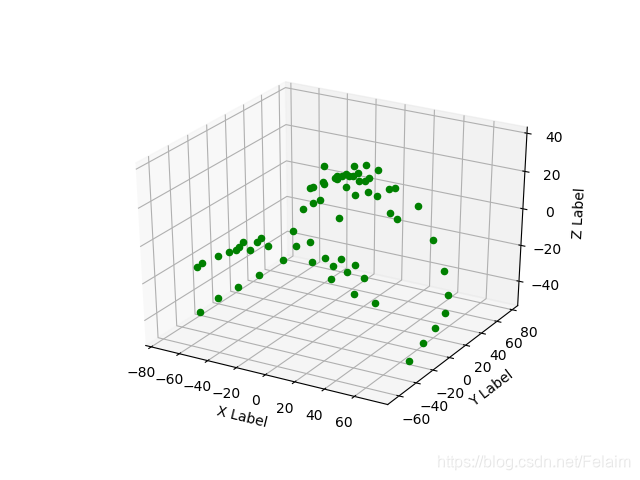 换个角度来看一下,可以看到对应的模型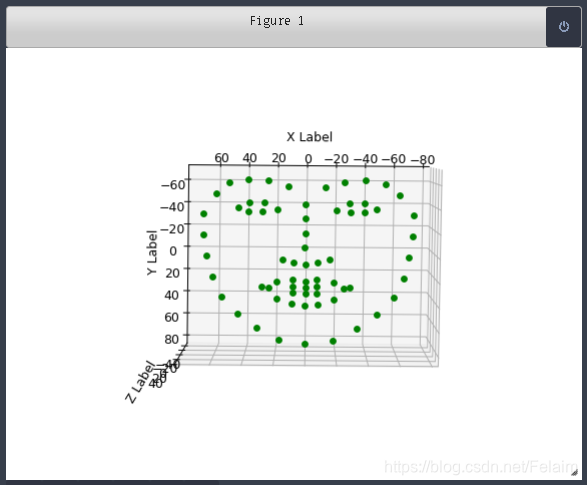
LZ找了一下对应的参数解释: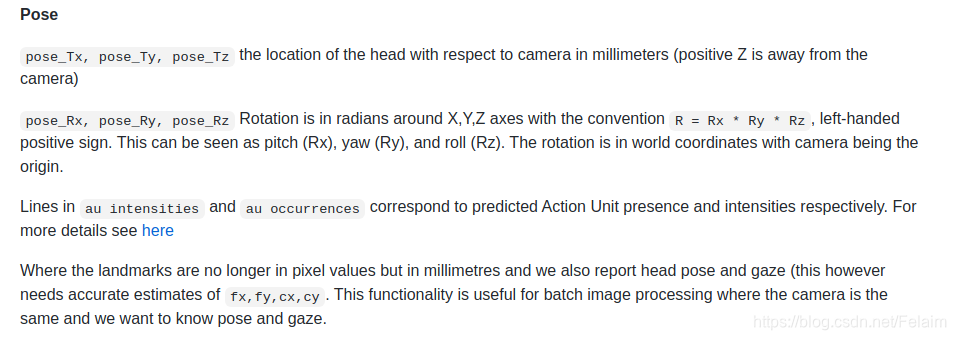
关键点的顺序是: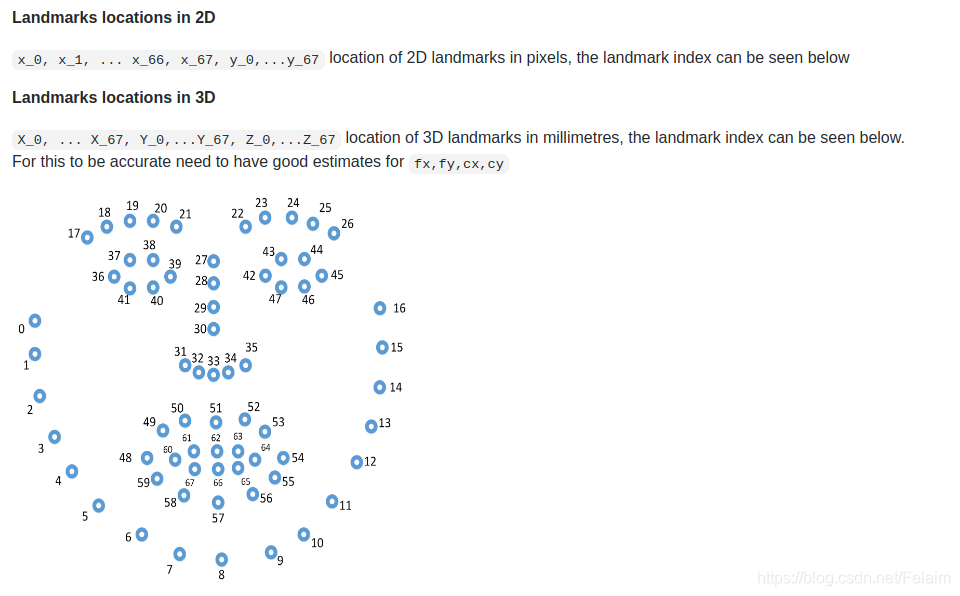 我们可以看到这个模型的顺序和DLIB得到的关键点的顺序是一致的,所以才可以直接使用DLIB的检测的关键点结果来进行估计。
有了68个点的模型,理论上说用三个点以上,都可以使用这个对应的模型来进行姿态估计,主要看你想怎么选点了。
2.2 相机内参的设定
因为在使用pnp进行相机位姿估计的时候,是假设相机已经标定过了,使用张正友的棋盘标定法,matlab都有工具箱,但是在实际应用的场景中,应该不会对每个出厂的摄像头都进行标定操作,所以就需要对相机的内参进行近似,这个在第一篇预研博客中就讲过一部分,但是LZ看了好多博客,也是没有仔细讲过这个近似的问题,并且很多评论也是有很多疑惑,于是LZ就准备再仔细研究一下。
首先我们根据下面这张图,可以知道通过三角函数关系,得到对应的焦距和图像宽度和视场角之间的关系
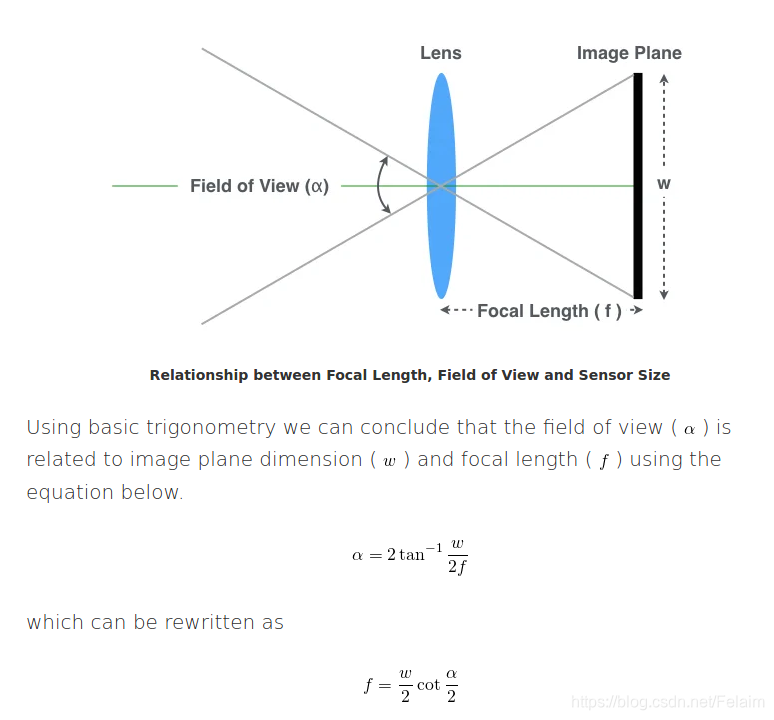
从上面的公式中可以推到,如果我们知道图像的宽度,和视场角 α \alpha α,就可以计算得到对应的焦距了,如果不知道视场角,我们也可以对其进行近似,大多数的webcam和手机的水平视场角是 5 0 ∘ 50^{\circ} 50∘到 7 0 ∘ 70^{\circ} 70∘,一般情况下焦距和图像的宽度满足对应的关系:
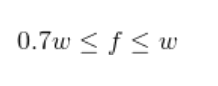
但这种近似非常crude,是不应该用在需要精确焦距的应用中使用,但在平常的使用中,可以进行估计,如果我们的网络摄像头分辨率为1280×720,并且使用校准过程发现焦距在1100和1300之间,那么我们测得的焦距可能是正确的。 但是,如果发现的焦距为12500,则可能是校准错误或镜头异常。
如果我们遇到这样一个问题呢?通常情况下,我们获取的图片可能是1080p的,或者4k的图像,也就是说图像的长宽比为16:9,因此水平视场大于垂直视场,在这种情况下,我们使用哪一个作为规范呢?
在这种情况下,我们使用的是DFOV,即对角线视场,是摄像机传感器对角线和镜头中心所成的角度
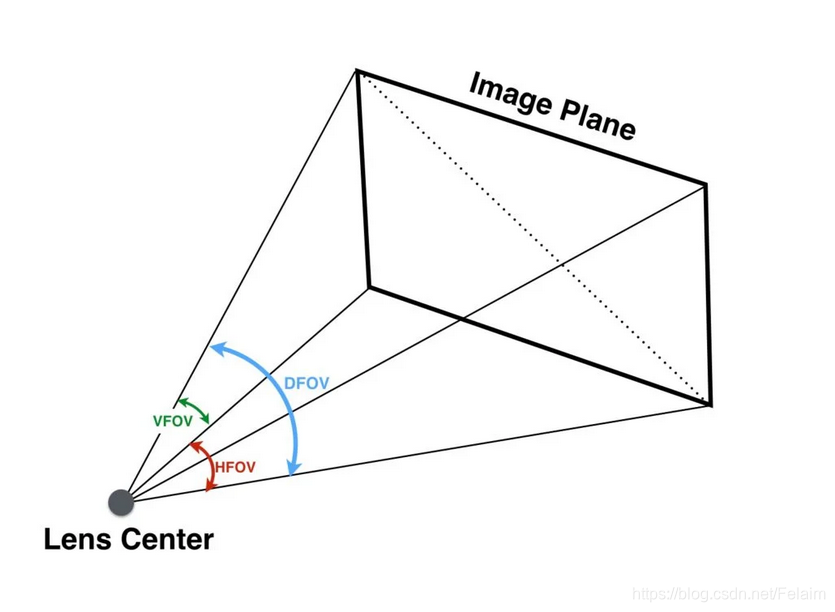
然后,我们就可以按照下面的公式,计算对应的焦距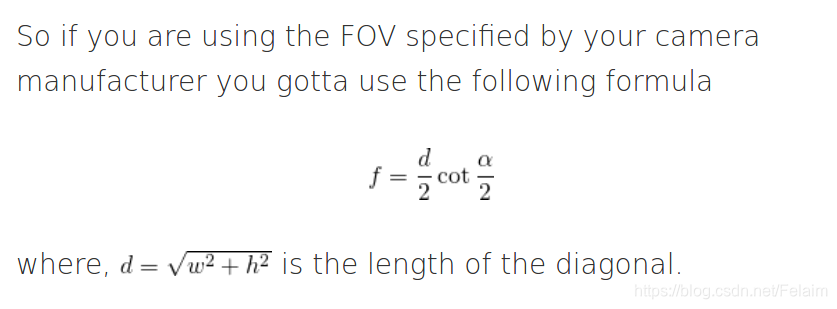 一般情况下,如果使用这种方法,LZ感觉外参的计算还是会不是很准,毕竟内参就是一个近似的值,但是对于外参变化的趋势,还是比较准确的。
LZ使用了三种方式估计相机内参,具体如下,都使用EPNP进行外参估计,估计出来的值会有2-3度的浮动,当然如果需要特别精确的头部姿态,肯定是要进行相机标定的,如果可以接受这个误差的话,LZ觉得下面的三种内参估计的方式对整体实验结果影响不是特别大,尤其是没有ground truth的情况下。。。
# 相机内参估计方法一
        # self.focal_length = self.size[1]
        # self.camera_center = (self.size[1] / 2, self.size[0] / 2)
        # self.camera_matrix = np.array(
        #     [[self.focal_length, 0, self.camera_center[0]],
        #      [0, self.focal_length, self.camera_center[1]],
        #      [0, 0, 1]], dtype="double")
        # 相机内参估计方法二
        # cx = self.size[1] / 2
        # cy = self.size[0] / 2
        # fx = cx / np.tan(60 / 2 * np.pi / 180)
        # fy = fx
        # self.camera_matrix = np.float32([[fx, 0.0, cx],
        #                                  [0.0, fy, cy],
        #                                  [0.0, 0.0, 1.0]])

        # 相机内参估计方法三
        cx = self.size[1] / 2
        cy = self.size[0] / 2
        fx = np.sqrt(self.size[1] * self.size[1] + self.size[0] * self.size[0]) / np.tan(60 / 2 * np.pi / 180) / 2
        fy = fx
        self.camera_matrix = np.float32([[fx, 0.0, cx],
                                         [0.0, fy, cy],
                                         [0.0, 0.0, 1.0]])

        # Assuming no len distortion
        self.dist_coefs = np.zeros((4, 1))
2.3 OpenCV的接口使用
看了一下除了直接使用深度学习的方法,一般都是使用传统方法,OpenCV真的是一个很牛的工具,如果能看懂一部分OpenCV源码的算法,也就很厉害了,算法也懂了,一些代码加速技巧也有,有C++代码的规范,也有cuda的加速,真的是很赞的工具
先看下函数的使用方式
def solvePnP(objectPoints, imagePoints, cameraMatrix, distCoeffs, rvec=None, tvec=None, useExtrinsicGuess=None, flags=None): # real signature unknown; restored from __doc__
"""
solvePnP(objectPoints, imagePoints, cameraMatrix, distCoeffs[, rvec[, tvec[, useExtrinsicGuess[, flags]]]]) -> retval, rvec, tvec
. @brief Finds an object pose from 3D-2D point correspondences.
. This function returns the rotation and the translation vectors that transform a 3D point expressed in the object
. coordinate frame to the camera coordinate frame, using different methods:
. - P3P methods (@ref SOLVEPNP_P3P, @ref SOLVEPNP_AP3P): need 4 input points to return a unique solution.
. - @ref SOLVEPNP_IPPE Input points must be >= 4 and object points must be coplanar.
. - @ref SOLVEPNP_IPPE_SQUARE Special case suitable for marker pose estimation.
. Number of input points must be 4. Object points must be defined in the following order:
. - point 0: [-squareLength / 2, squareLength / 2, 0]
. - point 1: [ squareLength / 2, squareLength / 2, 0]
. - point 2: [ squareLength / 2, -squareLength / 2, 0]
. - point 3: [-squareLength / 2, -squareLength / 2, 0]
. - for all the other flags, number of input points must be >= 4 and object points can be in any configuration.
.
. @param objectPoints Array of object points in the object coordinate space, Nx3 1-channel or
. 1xN/Nx1 3-channel, where N is the number of points. vector\<Point3d\> can be also passed here.
. @param imagePoints Array of corresponding image points, Nx2 1-channel or 1xN/Nx1 2-channel,
. where N is the number of points. vector\<Point2d\> can be also passed here.
. @param cameraMatrix Input camera matrix \f$A = \vecthreethree{f_x}{0}{c_x}{0}{f_y}{c_y}{0}{0}{1}\f$ .
. @param distCoeffs Input vector of distortion coefficients
. \f$(k_1, k_2, p_1, p_2[, k_3[, k_4, k_5, k_6 [, s_1, s_2, s_3, s_4[, \tau_x, \tau_y]]]])\f$ of
. 4, 5, 8, 12 or 14 elements. If the vector is NULL/empty, the zero distortion coefficients are
. assumed.
. @param rvec Output rotation vector (see @ref Rodrigues ) that, together with tvec, brings points from
. the model coordinate system to the camera coordinate system.
. @param tvec Output translation vector.
. @param useExtrinsicGuess Parameter used for #SOLVEPNP_ITERATIVE. If true (1), the function uses
. the provided rvec and tvec values as initial approximations of the rotation and translation
. vectors, respectively, and further optimizes them.
. @param flags Method for solving a PnP problem:
. - **SOLVEPNP_ITERATIVE** Iterative method is based on a Levenberg-Marquardt optimization. In
. this case the function finds such a pose that minimizes reprojection error, that is the sum
. of squared distances between the observed projections imagePoints and the projected (using
. projectPoints ) objectPoints .
. - **SOLVEPNP_P3P** Method is based on the paper of X.S. Gao, X.-R. Hou, J. Tang, H.-F. Chang
. "Complete Solution Classification for the Perspective-Three-Point Problem" (@cite gao2003complete).
. In this case the function requires exactly four object and image points.
. - **SOLVEPNP_AP3P** Method is based on the paper of T. Ke, S. Roumeliotis
. "An Efficient Algebraic Solution to the Perspective-Three-Point Problem" (@cite Ke17).
. In this case the function requires exactly four object and image points.
. - **SOLVEPNP_EPNP** Method has been introduced by F. Moreno-Noguer, V. Lepetit and P. Fua in the
. paper "EPnP: Efficient Perspective-n-Point Camera Pose Estimation" (@cite lepetit2009epnp).
. - **SOLVEPNP_DLS** Method is based on the paper of J. Hesch and S. Roumeliotis.
. "A Direct Least-Squares (DLS) Method for PnP" (@cite hesch2011direct).
. - **SOLVEPNP_UPNP** Method is based on the paper of A. Penate-Sanchez, J. Andrade-Cetto,
. F. Moreno-Noguer. "Exhaustive Linearization for Robust Camera Pose and Focal Length
. Estimation" (@cite penate2013exhaustive). In this case the function also estimates the parameters \f$f_x\f$ and \f$f_y\f$
. assuming that both have the same value. Then the cameraMatrix is updated with the estimated
. focal length.
. - **SOLVEPNP_IPPE** Method is based on the paper of T. Collins and A. Bartoli.
. "Infinitesimal Plane-Based Pose Estimation" (@cite Collins14). This method requires coplanar object points.
. - **SOLVEPNP_IPPE_SQUARE** Method is based on the paper of Toby Collins and Adrien Bartoli.
. "Infinitesimal Plane-Based Pose Estimation" (@cite Collins14). This method is suitable for marker pose estimation.
. It requires 4 coplanar object points defined in the following order:
. - point 0: [-squareLength / 2, squareLength / 2, 0]
. - point 1: [ squareLength / 2, squareLength / 2, 0]
. - point 2: [ squareLength / 2, -squareLength / 2, 0]
. - point 3: [-squareLength / 2, -squareLength / 2, 0]
.
. The function estimates the object pose given a set of object points, their corresponding image
. projections, as well as the camera matrix and the distortion coefficients, see the figure below
. (more precisely, the X-axis of the camera frame is pointing to the right, the Y-axis downward
. and the Z-axis forward).
.
. 
.
. Points expressed in the world frame \f$ \bf{X}_w \f$ are projected into the image plane \f$ \left[ u, v \right] \f$
. using the perspective projection model \f$ \Pi \f$ and the camera intrinsic parameters matrix \f$ \bf{A} \f$:
.
. \f[
. \begin{align*}
. \begin{bmatrix}
. u \\
. v \\
. 1
. \end{bmatrix} &=
. \bf{A} \hspace{0.1em} \Pi \hspace{0.2em} ^{c}\bf{T}_w
. \begin{bmatrix}
. X_{w} \\
. Y_{w} \\
. Z_{w} \\
. 1
. \end{bmatrix} \\
. \begin{bmatrix}
. u \\
. v \\
. 1
. \end{bmatrix} &=
. \begin{bmatrix}
. f_x & 0 & c_x \\
. 0 & f_y & c_y \\
. 0 & 0 & 1
. \end{bmatrix}
. \begin{bmatrix}
. 1 & 0 & 0 & 0 \\
. 0 & 1 & 0 & 0 \\
. 0 & 0 & 1 & 0
. \end{bmatrix}
. \begin{bmatrix}
. r_{11} & r_{12} & r_{13} & t_x \\
. r_{21} & r_{22} & r_{23} & t_y \\
. r_{31} & r_{32} & r_{33} & t_z \\
. 0 & 0 & 0 & 1
. \end{bmatrix}
. \begin{bmatrix}
. X_{w} \\
. Y_{w} \\
. Z_{w} \\
. 1
. \end{bmatrix}
. \end{align*}
. \f]
.
. The estimated pose is thus the rotation (`rvec`) and the translation (`tvec`) vectors that allow transforming
. a 3D point expressed in the world frame into the camera frame:
.
. \f[
. \begin{align*}
. \begin{bmatrix}
. X_c \\
. Y_c \\
. Z_c \\
. 1
. \end{bmatrix} &=
. \hspace{0.2em} ^{c}\bf{T}_w
. \begin{bmatrix}
. X_{w} \\
. Y_{w} \\
. Z_{w} \\
. 1
. \end{bmatrix} \\
. \begin{bmatrix}
. X_c \\
. Y_c \\
. Z_c \\
. 1
. \end{bmatrix} &=
. \begin{bmatrix}
. r_{11} & r_{12} & r_{13} & t_x \\
. r_{21} & r_{22} & r_{23} & t_y \\
. r_{31} & r_{32} & r_{33} & t_z \\
. 0 & 0 & 0 & 1
. \end{bmatrix}
. \begin{bmatrix}
. X_{w} \\
. Y_{w} \\
. Z_{w} \\
. 1
. \end{bmatrix}
. \end{align*}
. \f]
.
. @note
. - An example of how to use solvePnP for planar augmented reality can be found at
. opencv_source_code/samples/python/plane_ar.py
. - If you are using Python:
. - Numpy array slices won't work as input because solvePnP requires contiguous
. arrays (enforced by the assertion using cv::Mat::checkVector() around line 55 of
. modules/calib3d/src/solvepnp.cpp version 2.4.9)
. - The P3P algorithm requires image points to be in an array of shape (N,1,2) due
. to its calling of cv::undistortPoints (around line 75 of modules/calib3d/src/solvepnp.cpp version 2.4.9)
. which requires 2-channel information.
. - Thus, given some data D = np.array(...) where D.shape = (N,M), in order to use a subset of
. it as, e.g., imagePoints, one must effectively copy it into a new array: imagePoints =
. np.ascontiguousarray(D[:,:2]).reshape((N,1,2))
. - The methods **SOLVEPNP_DLS** and **SOLVEPNP_UPNP** cannot be used as the current implementations are
. unstable and sometimes give completely wrong results. If you pass one of these two
. flags, **SOLVEPNP_EPNP** method will be used instead.
. - The minimum number of points is 4 in the general case. In the case of **SOLVEPNP_P3P** and **SOLVEPNP_AP3P**
. methods, it is required to use exactly 4 points (the first 3 points are used to estimate all the solutions
. of the P3P problem, the last one is used to retain the best solution that minimizes the reprojection error).
. - With **SOLVEPNP_ITERATIVE** method and `useExtrinsicGuess=true`, the minimum number of points is 3 (3 points
. are sufficient to compute a pose but there are up to 4 solutions). The initial solution should be close to the
. global solution to converge.
. - With **SOLVEPNP_IPPE** input points must be >= 4 and object points must be coplanar.
. - With **SOLVEPNP_IPPE_SQUARE** this is a special case suitable for marker pose estimation.
. Number of input points must be 4. Object points must be defined in the following order:
. - point 0: [-squareLength / 2, squareLength / 2, 0]
. - point 1: [ squareLength / 2, squareLength / 2, 0]
. - point 2: [ squareLength / 2, -squareLength / 2, 0]
. - point 3: [-squareLength / 2, -squareLength / 2, 0]
"""
pass
使用的函数是solvePnP,主要是为了找到3D到2D之间的关系,使用不同的方法计算得到相机坐标系下的旋转和平移向量
主要有如下的几种方法:
-
SOLVEPNP_ITERATIVE: 这种是迭代方法,使用的算法是Levenberg-Marquardt优化,在这种情况下,函数找到一个使重投影误差最小的姿态,重投影误差也是评估姿态估计的一个指标,具体计算方式是将三维点利用我们计算得到的相机姿态进行投影,得到二维图像屏幕上的点,然后计算投影后的点与原来图像上的点的距离的平方和来进行度量
-
P3P:SOLVEPNP_P3P和SOLVEPNP_AP3P,需要四个点来计算,三个点可以计算得到四个解,再利用第四个点来确定最后的解,使用的点比较少,会导致一个点定位不准,使得计算出来的姿态就会不准,所以也不是很建议使用
-
SOLVEPNP_IPPE:需要至少四个点且必须要共面,只返回唯一的解
-
SOLVEPNP_IPPE_SQUARE:是基于marker的姿态估计,只能输入4组点,还要按照既定的顺序,基于marker的定位对于marker的设计还是有一定技巧的,通常都是正方形或者圆形这种特殊的图形,调用对应的函数可以返回两个解
-
SOLVEPNP_DLS,SOLVEPNP_UPNP在OpenCV现有的实现下,有时候会出现完全错误的结果,如果使用上述flags的话将会使用SOLVEPNP_EPNP的方式进行替代
一些参数的设置:
-
objectPoints:三维空间坐标中的点的坐标,Nx3 1-channel or 1xN/Nx1 3-channel
-
imagePoints:图像坐标系中的点的坐标, Nx2 1-channel or 1xN/Nx1 2-channel
-
cameraMatrix:相机内参矩阵
-
distCoeffs: 畸变参数,这个在代码中默认设置为0,但通常情况下摄像头还是会多多少少出现桶型畸变或枕型畸变的
-
rvec:输出旋转向量
-
tvec:输出平移向量
-
useExtrinsicGuess:这个是使用给定的一个粗略的外参,作为SOLVEPNP_ITERATIVE算法的初始值,如果初始值比较好,可以优化到一个比较好的值,并且速度也会增加,但是LZ觉得这个也许在连续帧中,作为参考值是比较好的一个方法,但是如果是单独独立一帧,用一个初始的参考值,这个LZ觉得意义并没有特别大
-
flags:就是使用上面一些计算位姿的算法,需要注意使用不同算法的点的要求
2.4 旋转向量,旋转矩阵,欧拉角,四元数之间的关系
通过OpenCV对应的接口可以得到三个输出,第一个返回True或者False,基本上正确使用接口返回的都是True,后面两个参数就是旋转向量和平移向量,这两个都是三维向量
但是对于我们来说,这个结果并不是很直观,换句话说,给一个旋转向量,我们无法反应出来到底是怎样一个旋转的状态,所以要转换成比较容易理解的欧拉角
a. 旋转向量->旋转矩阵->欧拉角
- 旋转向量->旋转矩阵
使用Rodrigues公式将旋转向量转成旋转矩阵
(R, j) = cv2.Rodrigues(pose_my[0])
- 旋转矩阵->欧拉角
# Checks if a matrix is a valid rotation matrix.
def isRotationMatrix(R):
    Rt = np.transpose(R)
    shouldBeIdentity = np.dot(Rt, R)
    I = np.identity(3, dtype=R.dtype)
    n = np.linalg.norm(I - shouldBeIdentity)
    return n < 1e-6


# Calculates rotation matrix to euler angles
# The result is the same as MATLAB except the order
# of the euler angles ( x and z are swapped ).
def rotationMatrixToEulerAngles(R):
    assert (isRotationMatrix(R))

    sy = math.sqrt(R[0, 0] * R[0, 0] + R[1, 0] * R[1, 0])

    singular = sy < 1e-6

    if not singular:
        x = math.atan2(R[2, 1], R[2, 2])
        y = math.atan2(-R[2, 0], sy)
        z = math.atan2(R[1, 0], R[0, 0])
    else:
        x = math.atan2(-R[1, 2], R[1, 1])
        y = math.atan2(-R[2, 0], sy)
        z = 0
    x = _radian2angle(x)
    y = _radian2angle(y)
    z = _radian2angle(z)

    return np.array([x, y, z])


def _radian2angle(r):
    return (r / math.pi) * 180
b. 旋转向量->四元数->欧拉角
    def get_euler_angle(self, rotation_vector):
        # calc rotation angles
        theta = cv2.norm(rotation_vector, cv2.NORM_L2)

        # transform to quaterniond
        w = math.cos(theta / 2)
        x = math.sin(theta / 2) * rotation_vector[0][0] / theta
        y = math.sin(theta / 2) * rotation_vector[1][0] / theta
        z = math.sin(theta / 2) * rotation_vector[2][0] / theta

        # pitch (x-axis rotation)
        t0 = 2.0 * (w * x + y * z)
        t1 = 1.0 - 2.0 * (x ** 2 + y ** 2)
        pitch = math.atan2(t0, t1)

        # yaw (y-axis rotation)
        t2 = 2.0 * (w * y - z * x)
        if t2 > 1.0:
            t2 = 1.0
        if t2 < -1.0:
            t2 = -1.0
        yaw = math.asin(t2)

        # roll (z-axis rotation)
        t3 = 2.0 * (w * z + x * y)
        t4 = 1.0 - 2.0 * (y ** 2 + z ** 2)
        roll = math.atan2(t3, t4)

        return pitch, yaw, roll
3. 效果和目前存在的问题
效果图就放一张吧,感觉1080p的头部姿态估计的效果还是可以接受的,但是在4K图上Yaw还是准的,Pitch就不准了,具体原因还在查找中。。。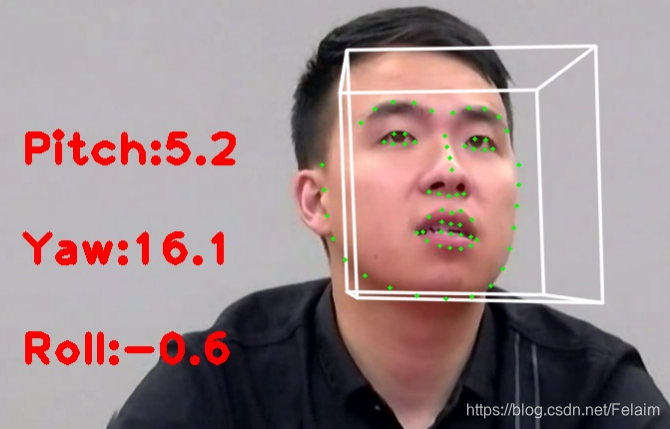
参考地址:

魔乐社区(Modelers.cn) 是一个中立、公益的人工智能社区,提供人工智能工具、模型、数据的托管、展示与应用协同服务,为人工智能开发及爱好者搭建开放的学习交流平台。社区通过理事会方式运作,由全产业链共同建设、共同运营、共同享有,推动国产AI生态繁荣发展。
更多推荐


 4
4 0
0- 0


 已为社区贡献5条内容

所有评论(0)