jquery-viewer(Viewer.js)—— 一个 jQuery 图片展示插件
Viewer.js 是一款强大的图片查看器。我们通过Viewer.js 在页面上添加强大的图片查看功能,同时,这款优秀的插件配置操作起来也非常的方便。
Viewer.js分为2个版本,js版本和jquery版本,下载及用法介绍地址分别为:
- 纯JS版本:GitHub - fengyuanchen/viewerjs: JavaScript image viewer.
1. Installation:
npm install viewerjs
或引用 In browser:
<link href="/path/to/viewer.css" rel="stylesheet">
<script src="/path/to/viewer.js"></script>2. Usage:
new Viewer(element[, options])
- element:(Type: HTMLElement) The target image or container of images for viewing.
- options: (optional, Type: Object) The options for viewing. Check out the available options.3. Example:
<!-- a block container is required --> <div> <img id="image" src="picture.jpg" alt="Picture"> </div> <div> <ul id="images"> <li><img src="picture-1.jpg" alt="Picture 1"></li> <li><img src="picture-2.jpg" alt="Picture 2"></li> <li><img src="picture-3.jpg" alt="Picture 3"></li> </ul> </div> // You should import the CSS file. // import 'viewerjs/dist/viewer.css'; import Viewer from 'viewerjs'; // View an image. const viewer = new Viewer(document.getElementById('image'), { inline: true, viewed() { viewer.zoomTo(1); }, }); // Then, show the image by clicking it, or call `viewer.show()`. // View a list of images. // Note: All images within the container will be found by calling `element.querySelectorAll('img')`. const gallery = new Viewer(document.getElementById('images')); // Then, show one image by click it, or call `gallery.show()`. - jQuery 版本:GitHub - fengyuanchen/jquery-viewer: A jQuery plugin wrapper for Viewer.js.
1. Installation:
npm install jquery-viewer jquery viewerjs
或引用 Include files:<script src="/path/to/jquery.js"></script><!-- jQuery is required -->
<script src="/path/to/viewer.js"></script><!-- Viewer.js is required -->
<link href="/path/to/viewer.css" rel="stylesheet">
<script src="/path/to/jquery-viewer.js"></script>2. Usage:
Initialize with “$.fn.viewer” method.- 2.1 Options (See the available options of Viewer.js):
$().viewer(options);
- 2.2 Methods(See the available methods of Viewer.js):
$().viewer('method', argument1, , argument2, ..., argumentN);- 2.3 Events (See the available events of Viewer.js):
$().on('event', handler);
- 2.4 No conflict:If you have to use other plugin with the same namespace, just call the
$.fn.viewer.noConflictmethod to revert to it.
<script src="other-plugin.js"></script>
<script src="jquery-viewer.js"></script>
<script>
$.fn.viewer.noConflict();
// Code that uses other plugin's "$().viewer" can follow here.
</script>
3. Example:<!-- a block container is required --> <div> <img id="image" src="picture.jpg" alt="Picture"> </div> <div> <ul id="images"> <li><img src="picture-1.jpg" alt="Picture 1"></li> <li><img src="picture-2.jpg" alt="Picture 2"></li> <li><img src="picture-3.jpg" alt="Picture 3"></li> </ul> </div> var $image = $('#image'); $image.viewer({ inline: true, viewed: function() { $image.viewer('zoomTo', 1); } }); // Get the Viewer.js instance after initialized var viewer = $image.data('viewer'); // View a list of images $('#images').viewer();
用法极简说明:
<link  href="/path/to/viewer.css" rel="stylesheet">
<script src="/path/to/viewer.js"></script>

new Viewer(element[, options])   【element: HTMLElement类型,可以是img元素或包含img的元素】
详细见: https://github.com/fengyuanchen/viewerjs/blob/main/README.md
官网展示效果:https://fengyuanchen.github.io/viewerjs/
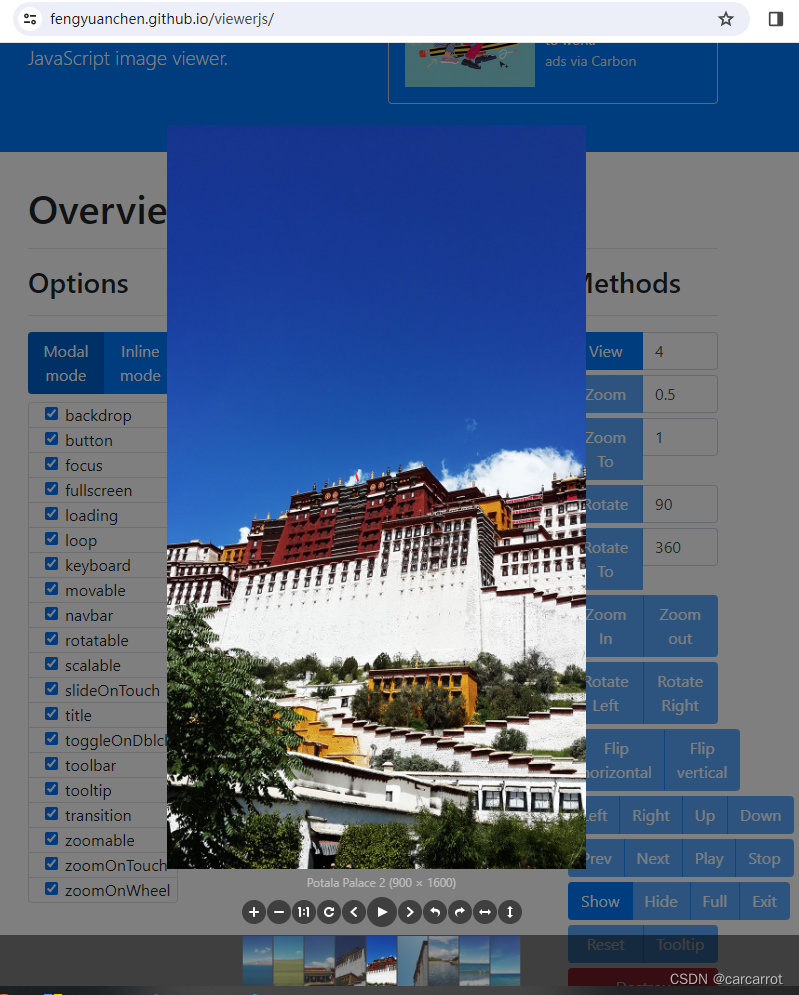
最简单的用法:
    function UploaderShowGridFileEx(currentIndex, img) {
        $("#UploaderHiddenImg").remove();
        if (img.length > 0) {
            $("body").append('<div id="UploaderHiddenImg" style="display:none;"></div>');
            $.each(img, function (index, value) {
                $("#UploaderHiddenImg").append('<img src="' + value.Url + '" alt="' + value.Alt + '"/>');
            });
            var viewer = new Viewer(document.getElementById('UploaderHiddenImg'), {
                initialViewIndex: currentIndex,
                hidden: function () {
                    viewer.destroy();
                    $("#UploaderHiddenImg").remove();
                }
            });
            viewer.show();
        }
    }
魔乐社区(Modelers.cn) 是一个中立、公益的人工智能社区,提供人工智能工具、模型、数据的托管、展示与应用协同服务,为人工智能开发及爱好者搭建开放的学习交流平台。社区通过理事会方式运作,由全产业链共同建设、共同运营、共同享有,推动国产AI生态繁荣发展。
更多推荐


 3
3 0
0- 0


 已为社区贡献4条内容

所有评论(0)