快速上手springboot搭建WebSocket服务器实现聊天(一)
用户连接上该websocket服务器触发该方法,将当前map<userId,session>存入代表该用户进入服务器即用户在。wensocket服务器收到消息时触发,例如当某一用户发送消息时,先将该消息发送到websocket服务器,再由服务器发送。用户断开websocket服务器连接触发该方法,并根据用户id将该用户和该用户的session从在线服务器用户中删除。当用户想给某一用户发消息时,调用
目录
需求:实现一对一对话和广播对话
1、创建websocket
使用@ServerEndpoint将当前类定义为一个WebSocket服务器,注解中的值作为用户连接的url地址
导入依赖
<dependency>
    <groupId>org.springframework.boot</groupId>
    <artifactId>spring-boot-starter-websocket</artifactId>
    <version>2.0.4.RELEASE</version>
</dependency>
代码实现
@Component
@Slf4j
@ServerEndpoint(value = "/ws/{userId}")
public class WebSocket {

    //与某个客户端的连接会话,需要通过它来给客户端发送数据
    private Session session;
        /**
     * 用户ID
     */
    private Integer userId;
    //concurrent包的线程安全Set,用来存放每个客户端对应的MyWebSocket对象。
    //虽然@Component默认是单例模式的,但springboot还是会为每个websocket连接初始化一个bean,所以可以用一个静态set保存起来。
    //  注:底下WebSocket是当前类名
    private static CopyOnWriteArraySet<WebSocket> webSockets =new CopyOnWriteArraySet<>();
    // 用来存在线连接用户信息
    private static ConcurrentHashMap<Integer,Session> sessionPool = new ConcurrentHashMap<Integer,Session>();
    /**
     * 链接成功调用的方法
     */
    @OnOpen
    public void onOpen(Session session,@PathParam("userId" Integer userId)) {
        try {
            this.session = session;
            this.userId = userId;
            webSockets.add(this);
			sessionPool.put(userId, session);
			log.info("【websocket消息】有新的连接,总数为:"+webSockets.size());
		} catch (Exception e) {
            throw new RuntimeException(e);
		}
    }

    /**
     * 链接关闭调用的方法
     */
    @OnClose
    public void onClose() {
        try {
			webSockets.remove(this);
			sessionPool.remove(this.userId);
			log.info("【websocket消息】连接断开,总数为:"+webSockets.size());
		} catch (Exception e) {
		}
    }
    /**
     * 收到客户端消息后调用的方法
     *
     * @param message
     * @param
     */
    @OnMessage
    public void onMessage(String message) {
    	log.info("【websocket消息】收到客户端消息:"+message);
    }

	  /** 发送错误时的处理
     * @param session
     * @param error
     */
    @OnError
    public void onError(Session session, Throwable error) {
        log.error("用户错误,原因:"+error.getMessage());
        error.printStackTrace();
    }


    // 此为广播消息
    public void sendAllMessage(String message) {
    	log.info("【websocket消息】广播消息:"+message);
        for(WebSocket webSocket : webSockets) {
            try {
            	if(webSocket.session.isOpen()) {
            		webSocket.session.getAsyncRemote().sendText(message);
            	}
            } catch (Exception e) {
                e.printStackTrace();
            }
        }
    }

    // 此为单点消息
    public void sendOneMessage(Integer userId, String message) {
        Session session = sessionPool.get(userId);
        if (session != null&&session.isOpen()) {
            try {
            	log.info("【websocket消息】 单点消息:"+message);
                session.getAsyncRemote().sendText(message);
            } catch (Exception e) {
                e.printStackTrace();
            }
        }
    }

    // 此为单点消息(多人)
    public void sendMoreMessage(String[] userIds, String message) {
    	for(String userId:userIds) {
    		Session session = sessionPool.get(userId);
            if (session != null&&session.isOpen()) {
                try {
                	log.info("【websocket消息】 单点消息:"+message);
                    session.getAsyncRemote().sendText(message);
                } catch (Exception e) {
                    e.printStackTrace();
                }
            }
    	}

    }

}
@Configuration
public class WebSocketConfig {
/**
* 注入ServerEndpointExporter,
* 这个bean会自动注册使用了@ServerEndpoint注解声明的Websocket endpoint
*/
@Bean
public ServerEndpointExporter serverEndpointExporter() {
return new ServerEndpointExporter();
}
}注解
@OnOpen
用户连接上该websocket服务器触发该方法,将当前map<userId,session>存入代表该用户进入服务器即用户在
@OnClose
用户断开websocket服务器连接触发该方法,并根据用户id将该用户和该用户的session从在线服务器用户中删除
@OnMessage
wensocket服务器收到消息时触发,例如当某一用户发送消息时,先将该消息发送到websocket服务器,再由服务器发送
@OnError
遇到错误时触发
方法
onOpen、onError、onMessage、onClose与上面四个注解对应。
sendOneMessage
// 此为单点消息
    public void sendOneMessage(Integer userId, String message) {
        Session session = sessionPool.get(userId);
        if (session != null&&session.isOpen()) {
            try {
            	log.info("【websocket消息】 单点消息:"+message);
                session.getAsyncRemote().sendText(message);
            } catch (Exception e) {
                e.printStackTrace();
            }
        }
    }
当用户想给某一用户发消息时,调用该方法,传入接收方用户id以及发送的消息
先从sessionPool中根据key也就是用户id(userId)来获取目标用户id的session会话
目标用户在线即可通过session.getAsyncRemote().sendText(message);发送消息
getAsyncRemote()该方法为异步发送
getBasicRemote()该方法为同步发送,易阻塞
sendAllMessage
public void sendAllMessage(String message) {
    	log.info("【websocket消息】广播消息:"+message);
        for(WebSocket webSocket : webSockets) {
            try {
            	if(webSocket.session.isOpen()) {
            		webSocket.session.getAsyncRemote().sendText(message);
            	}
            } catch (Exception e) {
                e.printStackTrace();
            }
        }
    }
2、实现一对一聊天
controller调用senedOneMessage方法
@Data
@AllArgsConstructor
@NoArgsConstructor
public class Chat {
    @TableId(type = IdType.AUTO)
    private Integer id;
    private Integer userId;
    private Integer targetUserId;
    private LocalDateTime createTime;
    private String content;

}
@PostMapping("send")
public Result sendMessage(@RequestBody Chat chat){
webSocket.sendOneMessage(chat.getTargetUserId(), chat.getContent());
return Result.success();
}3、广播消息
调用sendAllMessage方法
@PostMapping("sendall")
    public Result testMessage(@RequestParam String message){
        webSocket.sendAllMessage(message);
        return Result.success();
    }
4、测试
我们使用websocket在线测试
WebSocket在线测试工具,websocket接口测试工具 - 在线工具-wetools.com微工具

我们分别让id为1、2、3的用户连接服务器
单聊测试
此时我们使用postman调用接口向某一个用户发送消息

我们让用户2向用户3发送消息 打开刚才的在线测试网站
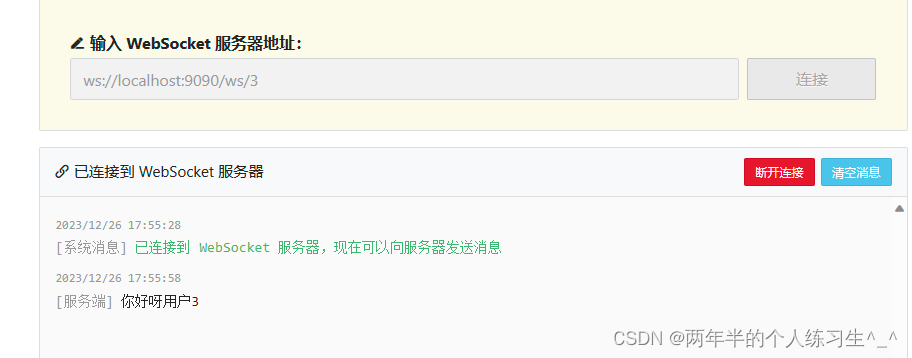
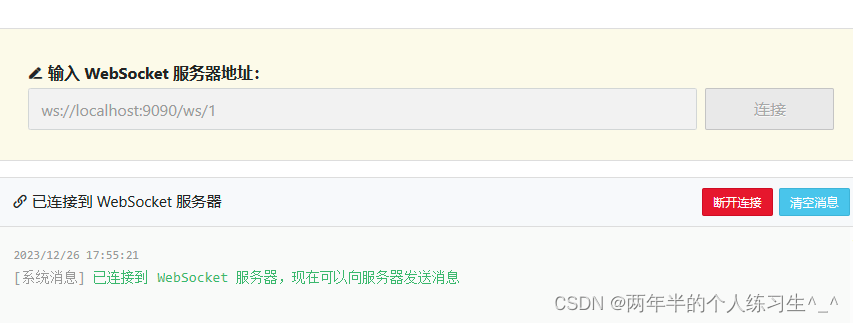
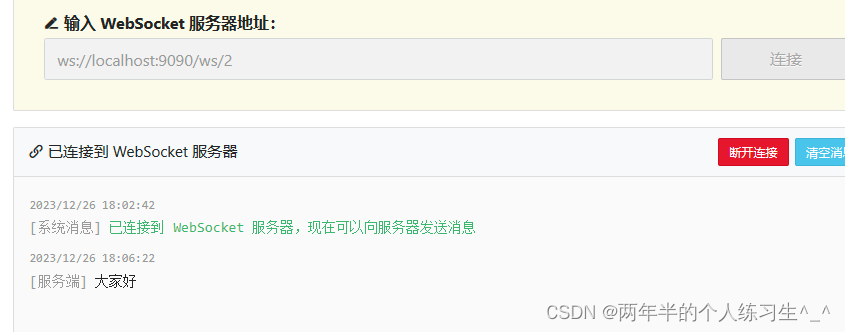
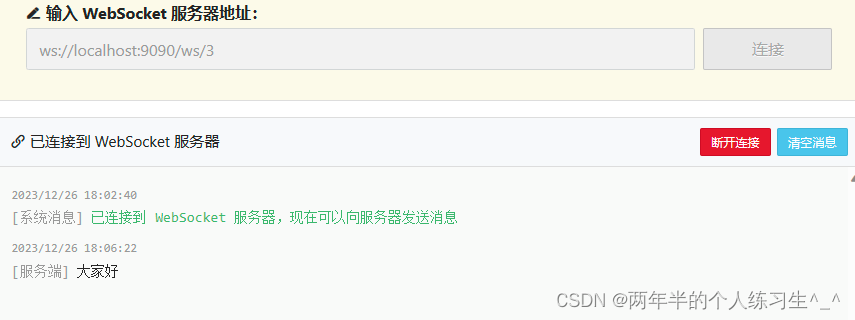
可以看到只有用户3收到了消息,用户1未收到 实现单聊
广播消息
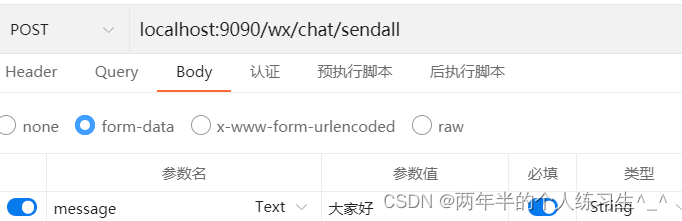
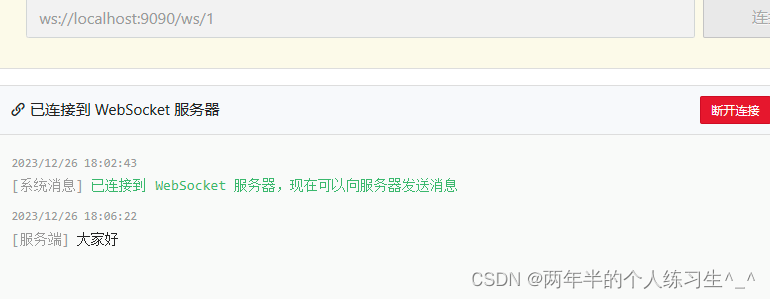
所有的在线用户都收到了

魔乐社区(Modelers.cn) 是一个中立、公益的人工智能社区,提供人工智能工具、模型、数据的托管、展示与应用协同服务,为人工智能开发及爱好者搭建开放的学习交流平台。社区通过理事会方式运作,由全产业链共同建设、共同运营、共同享有,推动国产AI生态繁荣发展。
更多推荐



 23
23 0
0- 0


 已为社区贡献5条内容

所有评论(0)