mybatis连接数据库底层原理
mybatis连接数据库底层原理
Mybatis是如何获取到配置文件中数据库驱动、数据库连接串url、用户名和密码,以及如何与数据库建立连接的?
首先要清楚数据库驱动、连接串url、用户名和密码在哪里可以配置,在三个地方可以对这些属性进行配置,分别如下所示:
1、在mybatis核心配置文件<properties>标签的<property>子标签中配置,如下所示:
<properties>
    <property name="driver" value="com.mysql.jdbc.Driver"/>
    <property name="url" value="jdbc:mysql://127.0.0.1:3306/dbname?characterEncoding=utf-8"/>
    <property name="username" value="root"/>
    <property name="password" value="root"/>
</properties>
2、在java的properties配置文件中配置,如下所示:
在src/main/resources/目录下创建一个properties配置文件,如jdbc.properties,内容如下:
driver=com.mysql.jdbc.Driver
url=jdbc:mysql://127.0.0.1:3306/dbname?characterEncoding=utf-8
username=root
password=root
然后在mybatis核心配置文件的<properties>标签中通过resource或url属性引入该配置文件。
3、在创建SqlSessionFactory时,通过方法参数传入,如下所示:
//指定配置文件,mybatis的核心配置文件
String resource = "mybatisConfig.xml";
//读取配置文件,放在try-catch中,该方法会抛出IOException异常
InputStream stream = Resources.getResourceAsStream(resource);
Properties properties = new Properties();
properties.setProperty("driver","com.mysql.jdbc.Driver");
properties.setProperty("url","jdbc:mysql://127.0.0.1:3306/dbname?characterEncoding=utf-8");
properties.setProperty("username","root");
properties.setProperty("password","root");
SqlSessionFactory factory = new SqlSessionFactoryBuilder().build(stream,properties);
这三种连接数据库属性的配置方式,任选一种即可,也可以三种方式混合使用。Mybatis在加载这些属性时,首先读取第一种方式配置的,其次读取第二种方式配置的,最后读取第三种方式配置的,如果三种方式中存在同名属性,先读取的属性会被后读取的属性覆盖,即第三种配置方式的优先级高于第二种方式,第二种方式的优先级高于第一种方式。
下面简单写一段样例代码来分析Mybatis连接数据库的原理。
Mybatis核心配置文件如下所示:
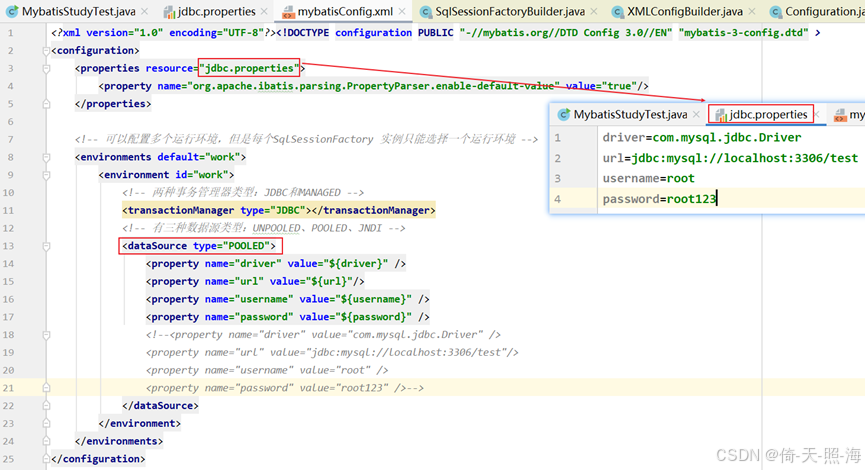
在src/main/resources目录下创建jdbc.properties文件:
driver=com.mysql.jdbc.Driver
url=jdbc:mysql://localhost:3306/test
username=root
password=root123
mybatis配置文件在src/main/resources目录下,假设是mybatisConfig.xml(名称随意)。
<?xml version="1.0" encoding="UTF-8"?><!DOCTYPE configuration PUBLIC "-//mybatis.org//DTD Config 3.0//EN" "mybatis-3-config.dtd" >
<configuration>
    <properties resource="jdbc.properties">
        <property name="org.apache.ibatis.parsing.PropertyParser.enable-default-value" value="true"/>
    </properties>

    <!-- 可以配置多个运行环境,但是每个SqlSessionFactory 实例只能选择一个运行环境 -->
    <environments default="work">
        <environment id="work">
            <!-- 两种事务管理器类型:JDBC和MANAGED -->
            <transactionManager type="JDBC"></transactionManager>
            <!-- 有三种数据源类型:UNPOOLED、POOLED、JNDI -->
            <dataSource type="POOLED">
                <property name="driver" value="${driver}" />
                <property name="url" value="${url}"/>
                <property name="username" value="${username}" />
                <property name="password" value="${password}" />
                <!--<property name="driver" value="com.mysql.jdbc.Driver" />
                <property name="url" value="jdbc:mysql://localhost:3306/test"/>
                <property name="username" value="root" />
                <property name="password" value="root123" />-->
            </dataSource>
        </environment>
    </environments>

    <mappers>
        <!-- 可配置多个mapper -->
        <mapper resource="com/example/mapper/StudentMapper.xml"/>
    </mappers>
</configuration>
如果是spring与mybatis整合,可以将数据源配置放到spring配置文件中。另外,如果mapper接口和mapper配置文件遵循:mapper.java和mapper.xml的文件名相同且在同一个文件夹下,在mybatis配置文件中可以不用配置mapper。
样例代码:
package com.mybatis.study;

import org.apache.ibatis.io.Resources;
import org.apache.ibatis.session.SqlSession;
import org.apache.ibatis.session.SqlSessionFactory;
import org.apache.ibatis.session.SqlSessionFactoryBuilder;

import java.io.IOException;
import java.io.InputStream;

public class MybatisStudyTest {
    public static void main(String[] args) {
        //指定配置文件,mybatis的核心配置文件
        String resource = "mybatisConfig.xml";
        try {
            //读取配置文件
            InputStream stream = Resources.getResourceAsStream(resource);
            //构建SqlSessionFactory
            SqlSessionFactory factory = new SqlSessionFactoryBuilder().build(stream);
            //获取SqlSession
            SqlSession sqlSession = factory.openSession();
            //com.mapper.UserMapper是映射文件的namespace,findUserById是statement的id,
            //与UserMapper接口中的方法同名,此处是查找用户id为10的用户。
            sqlSession.selectOne("com.mapper.UserMapper.findUserById",10);
            //this.userMapper = sqlSession.getMapper(UserMapper.class);
        } catch (IOException e) {
            e.printStackTrace();
        }

    }
}
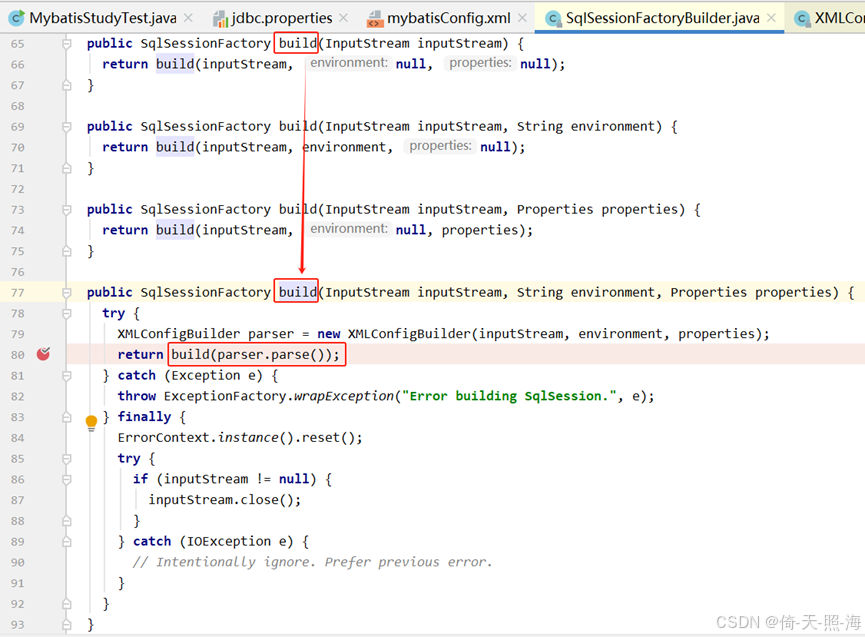
首先从SqlSessionFactoryBuilder的build方法作为入口,在build方法中调用了XMLConfigBuilder的parse方法:
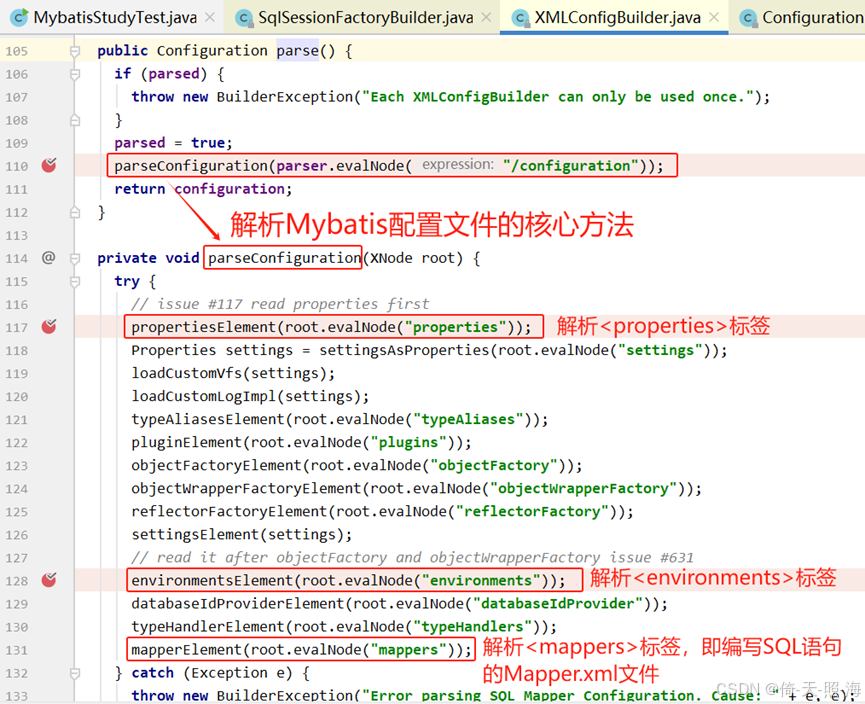
在XMLConfigBuilder的parse方法中调用了parseConfiguration方法,该方法是解析Mybatis配置文件最重要的方法。
此处分两步进行分析:
1、先分析mybatis是如何获取<properties>标签或properties配置文件中数据库连接属性的;
2、再分析mybatis是如何与数据库建立连接的。
1.获取数据库连接属性
重点分析propertiesElement(root.evalNode("properties"))和environmentsElement(root.evalNode("environments"))方法,这两个方法分别解析<properties>和<environments>标签,获取数据库连接属性。
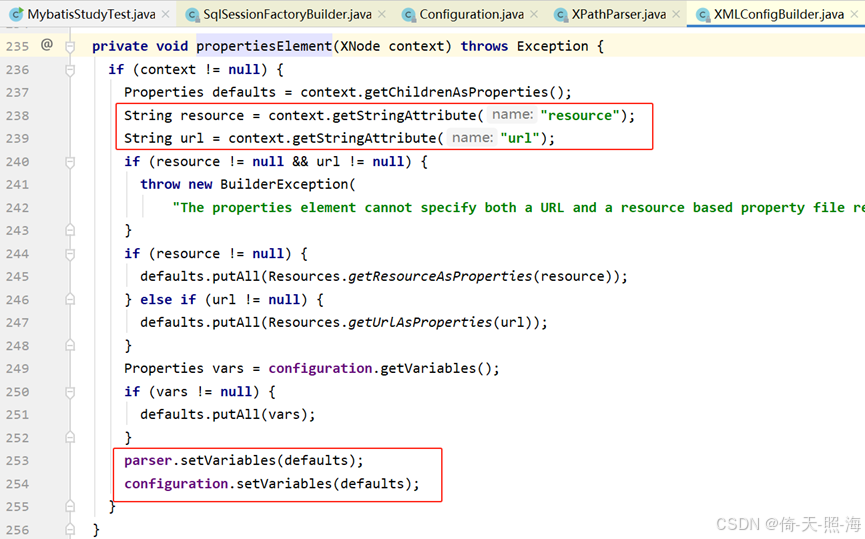
首先看一下propertiesElement方法。如果Mybatis配置文件mybatisConfig.xml定义了<properties>标签,就解析<properties>标签,获取数据库连接属性,并将获取到的属性对象Properties赋值给XPathParser对象的variables属性,后续通过调用XPathParser对象的evalNode()方法再赋值给XNode对象的variables属性。
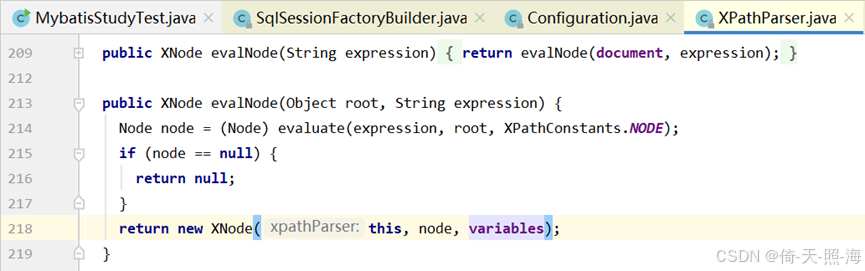
接着分析environmentsElement(root.evalNode("environments"))方法,该方法用于解析mybatis的核心配置文件mybatisConfig.xml中的<environments>标签。
environmentsElement(root.evalNode("environments"));这行代码先执行evalNode方法,调用XNode的evalNode方法,再调用XPathParser的evalNode方法,如下图所示。

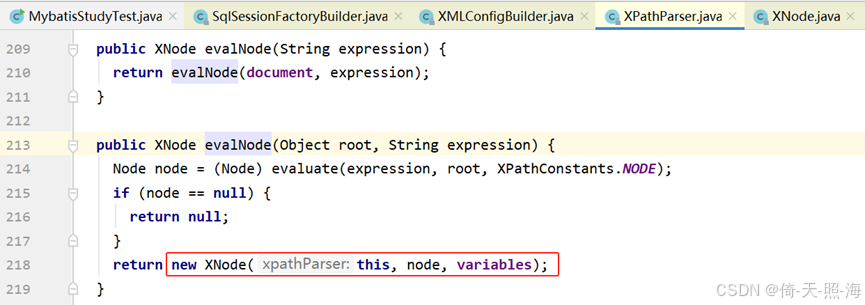
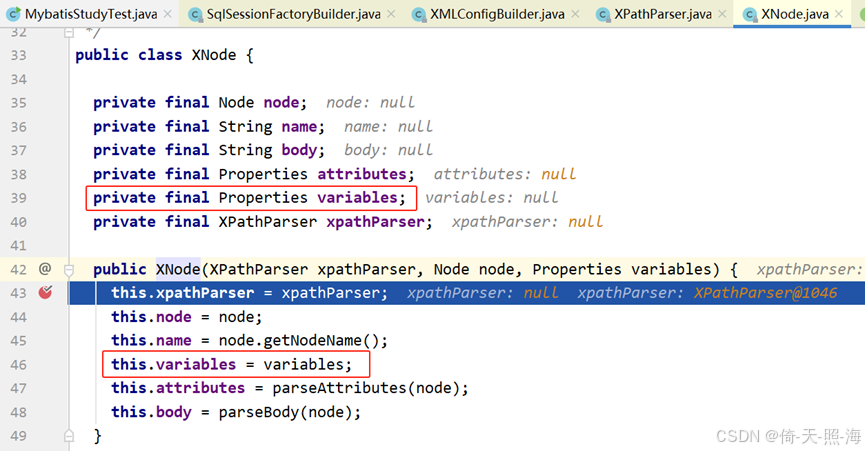
如上图所示,调用XNode的构造函数创建XNode对象之后,就将从<properties>标签解析的数据库连接信息赋值给XNode对象的variables属性了,在environmentsElement方法中会从XNode对象的variables属性中获取数据库连接属性。
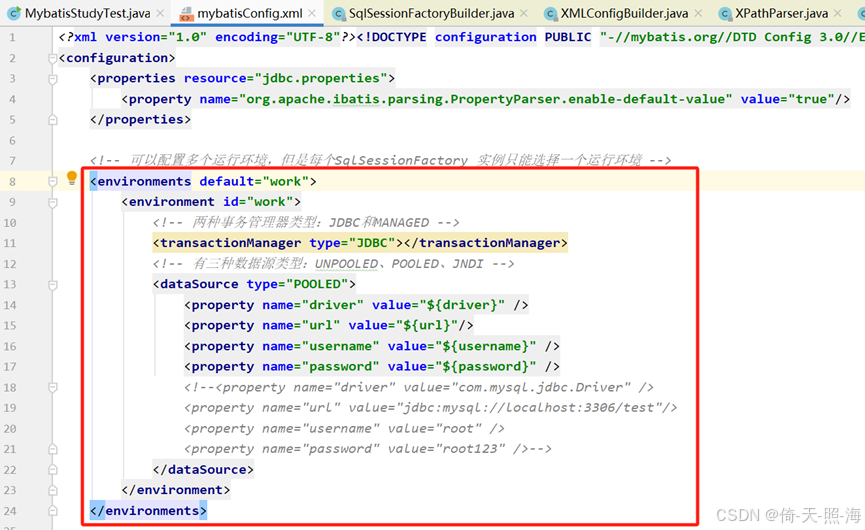
为了方便分析environmentsElement方法,将Mybatis配置文件中的<environments>标签截图放在这里,如下图所示。<environments>标签有一个default属性和一个<environment>子标签,<environment>子标签有一个id属性和<transactionManager >、<dataSource >两个子标签,<transactionManager >标签用于配置事务管理器类型,<dataSource >标签用于配置数据库连接属性。
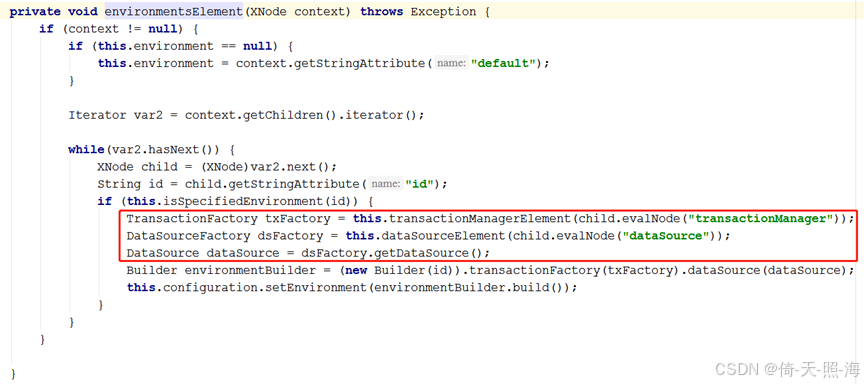
先来看一下DataSourceFactory dsFactory = dataSourceElement(child.evalNode("dataSource"));这行代码中的child.evalNode("dataSource")方法,该方法的作用就是解析< dataSource >标签及其子标签的属性值,获取数据库连接属性,如下图所示。
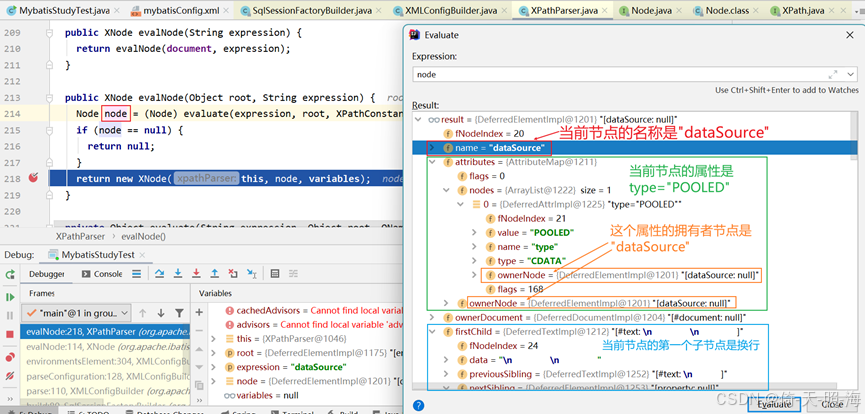
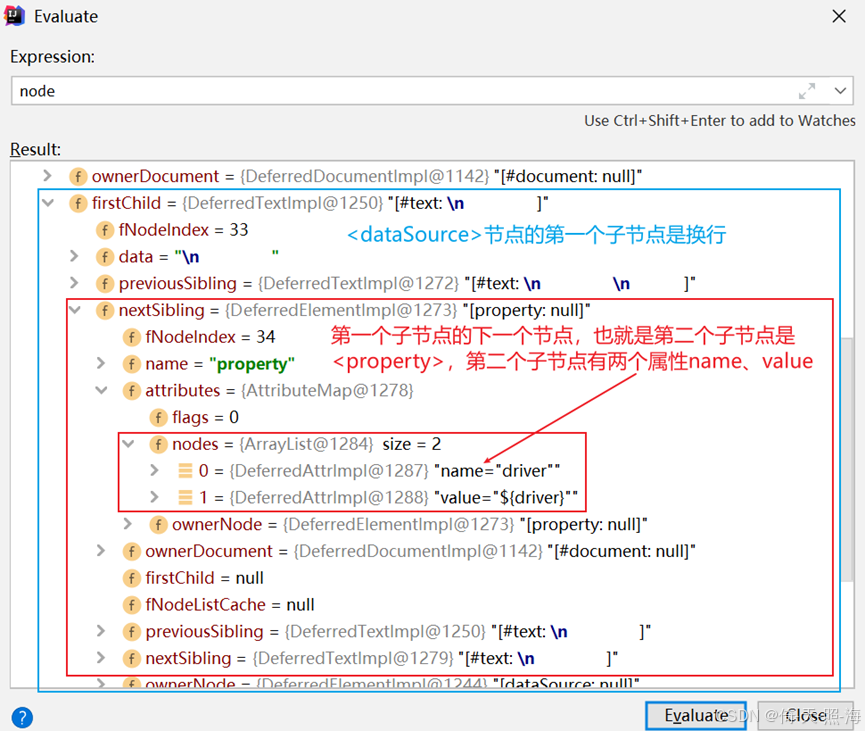
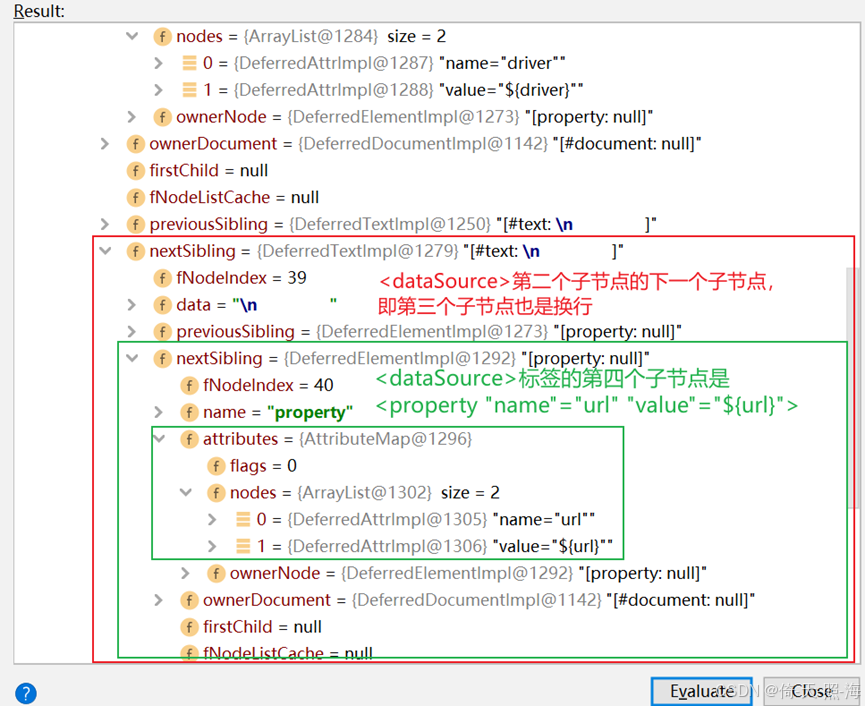
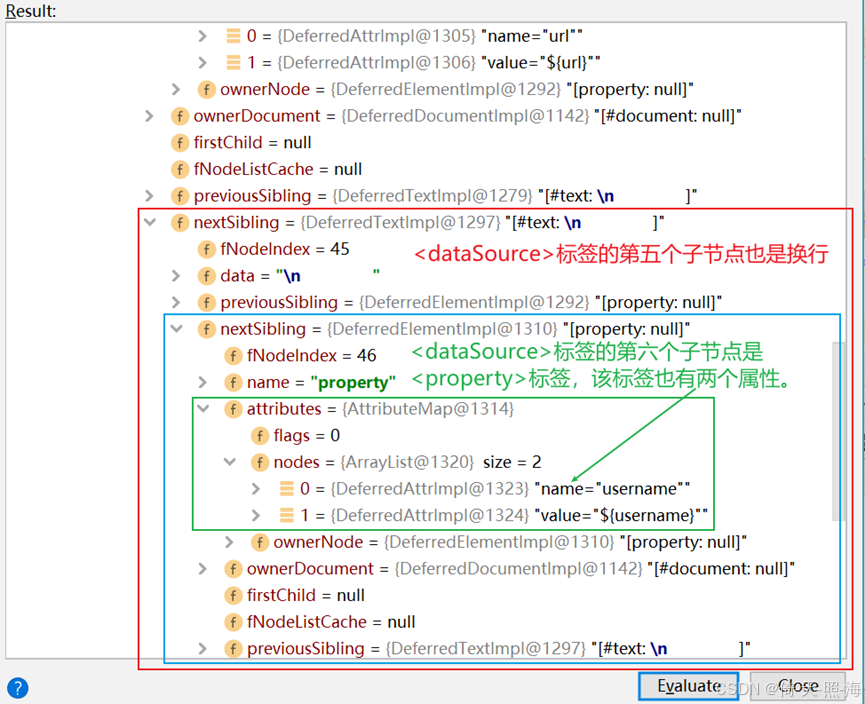
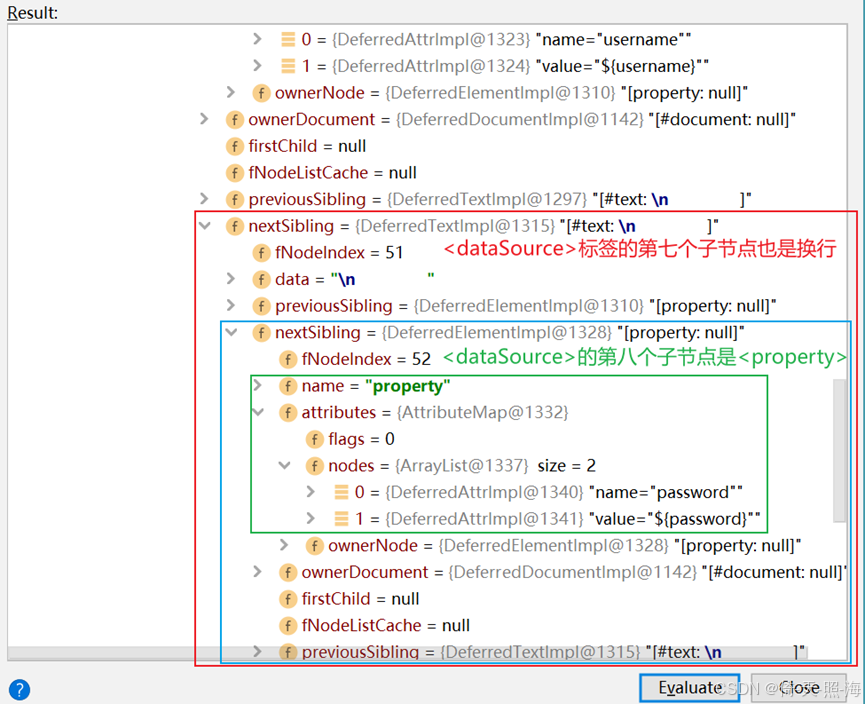
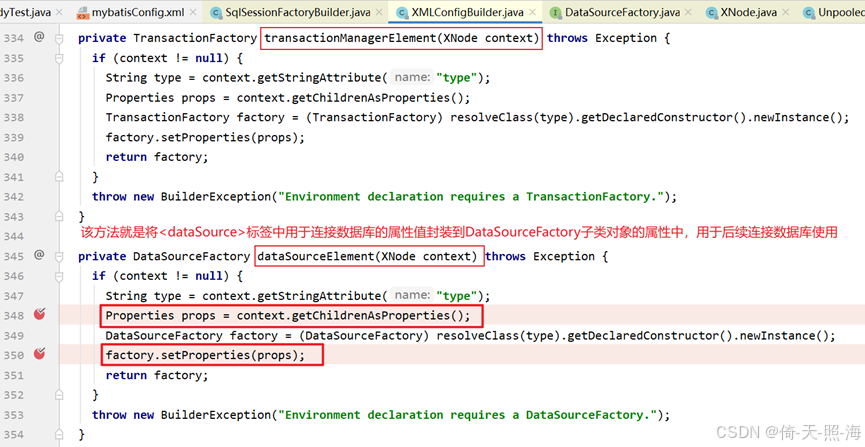
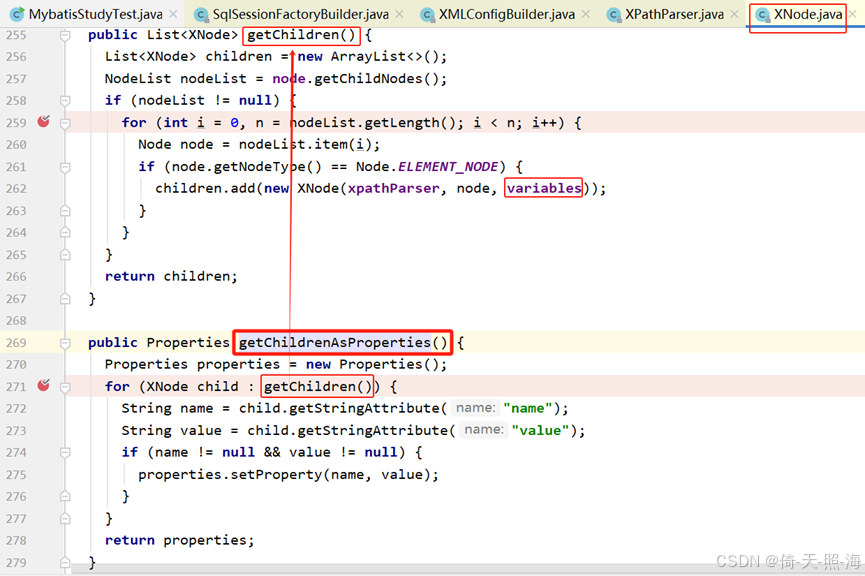
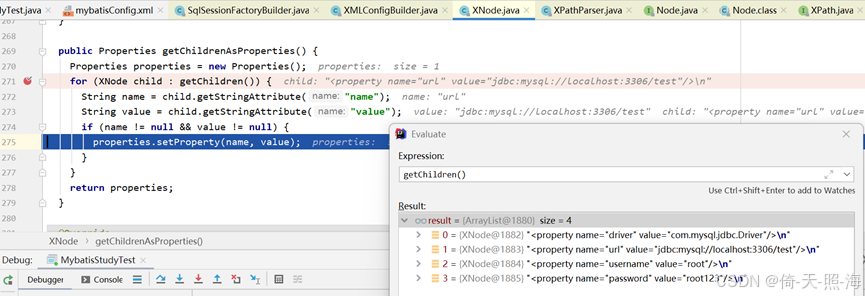
如上图所示,执行完XMLConfigBuilder的dataSourceElement方法中的Properties props = context.getChildrenAsProperties();这一行代码之后,Properties对象中就保存了连接数据库的属性值。再执行factory.setProperties(props);这行代码将这些属性值封装到DataSourceFactory的子类对象的相关属性中,例如UnpooledDataSourceFactory对象的MetaObject属性中,进而填充到DataSource接口的具体实现类中,如下图所示。
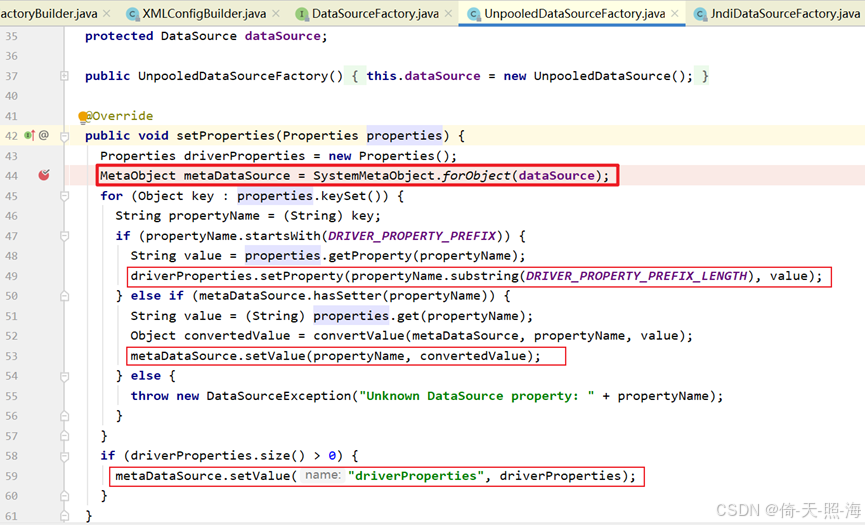
当需要建立数据库连接时,就从DataSource接口的具体实现类中获取数据库连接属性,与数据库建立连接。
2.建立数据库连接
上面分析完了SqlSessionFactory factory = new SqlSessionFactoryBuilder().build(stream);这行代码之后,接下来分析sqlSession.selectOne("com.mapper.UserMapper.findUserById",10)。
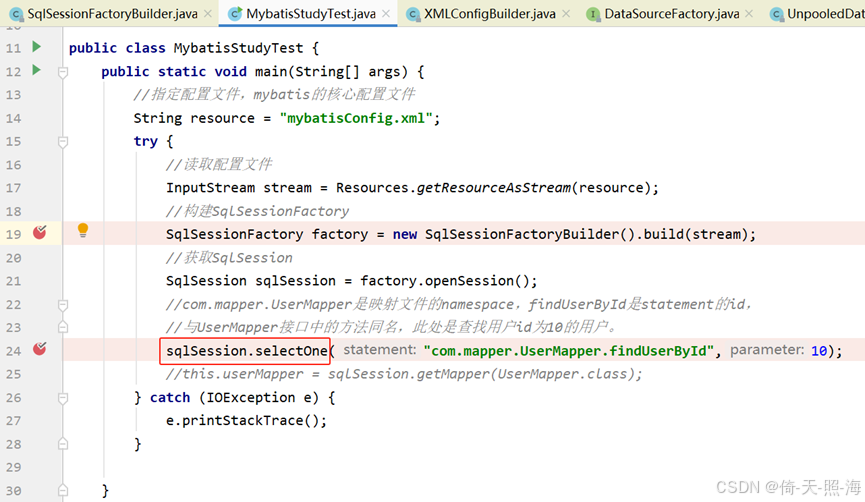
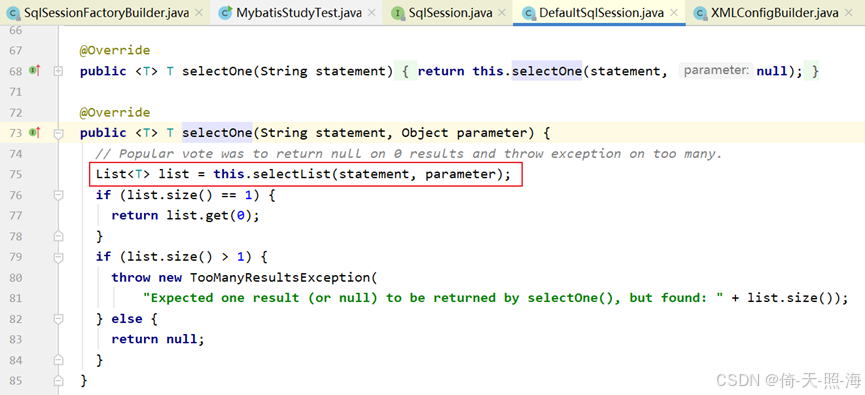
调用DefaultSqlSession的selectList方法:
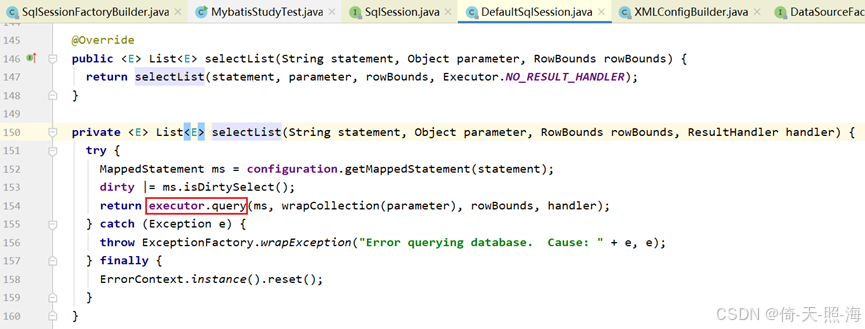
再调用BaseExecutor的queryFromDatabase方法:
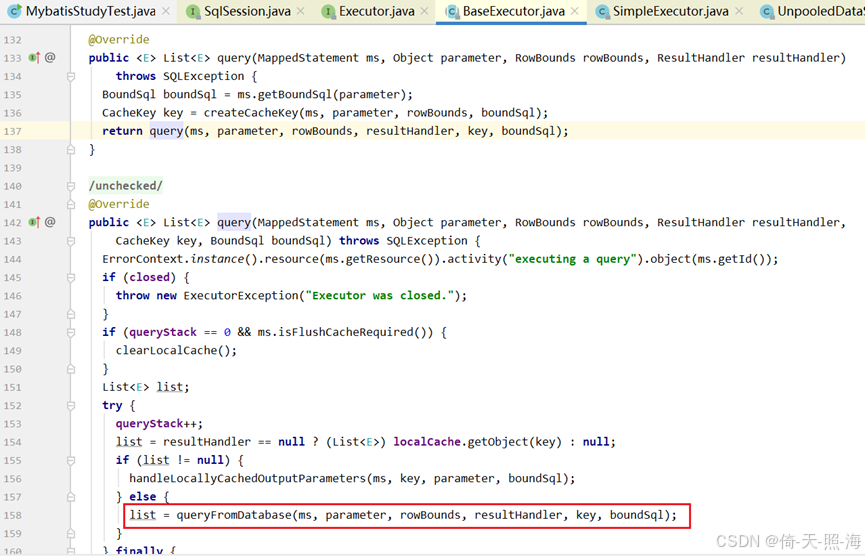
再调用SimpleExecutor的doQuery方法,进而调用prepareStatement方法获取数据库连接。
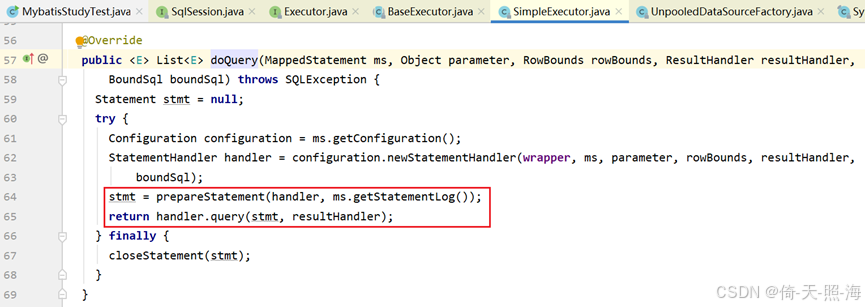
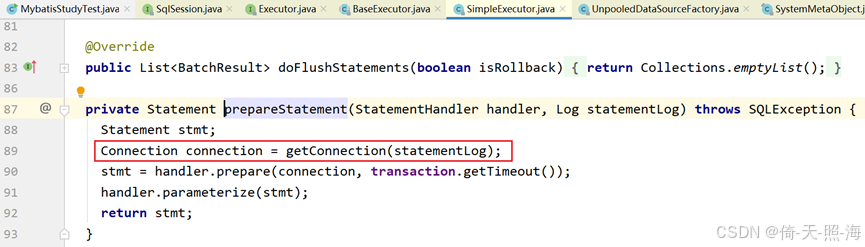
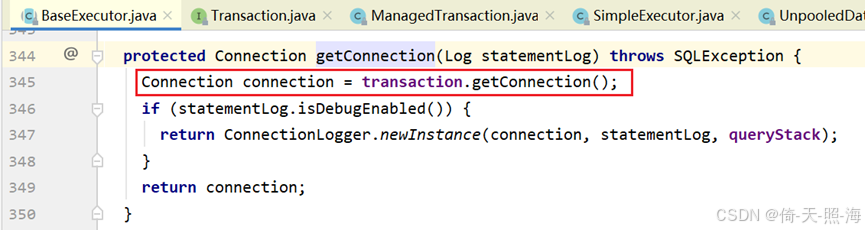

调用DataSource接口具体实现类PooledDataSource的getConnection方法:
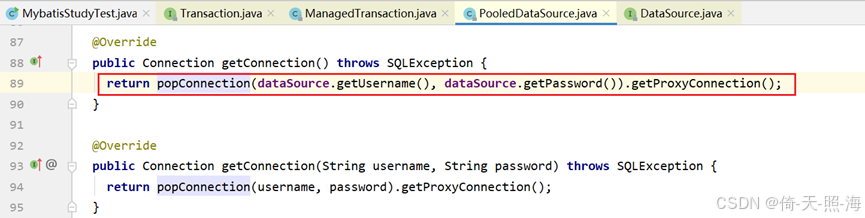
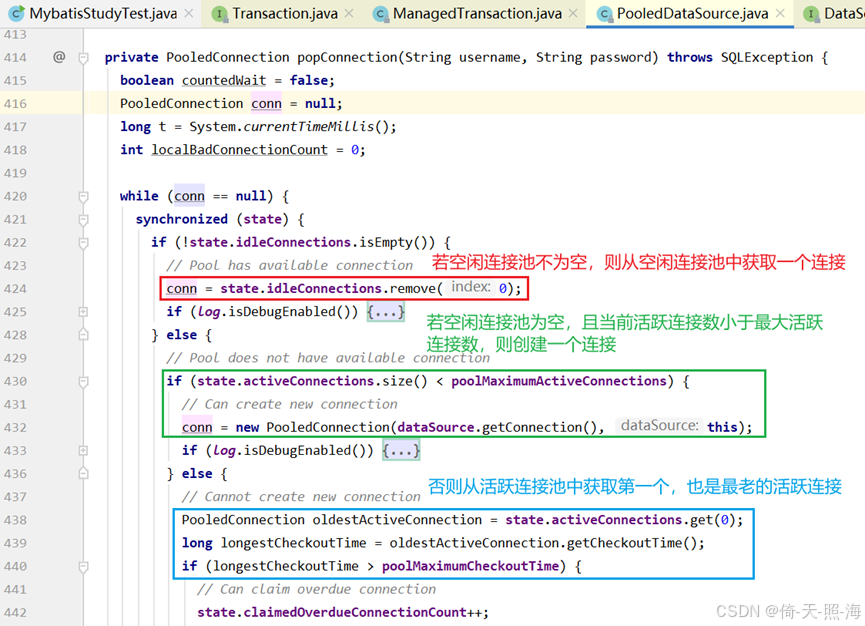
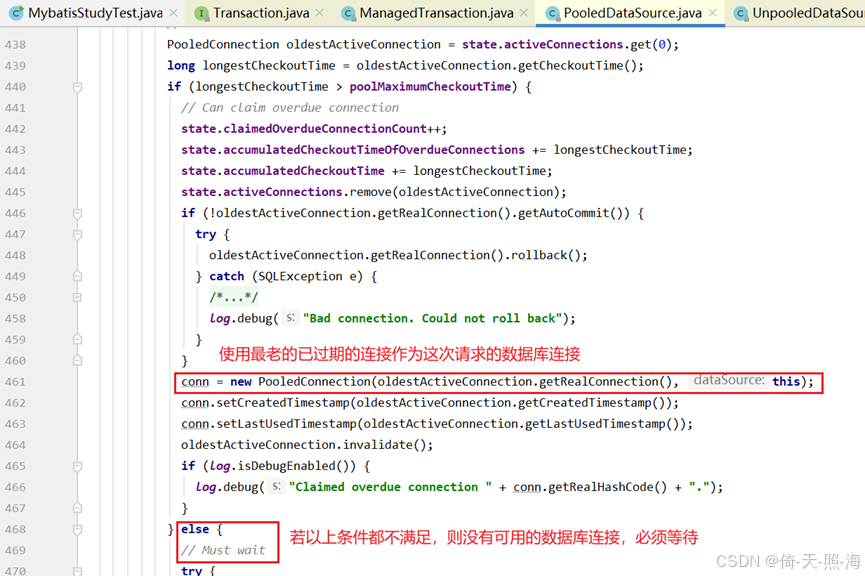
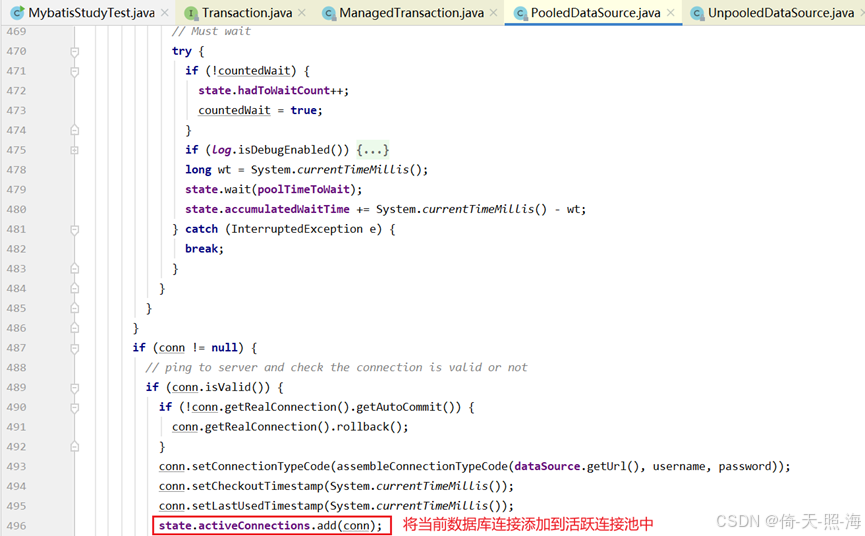
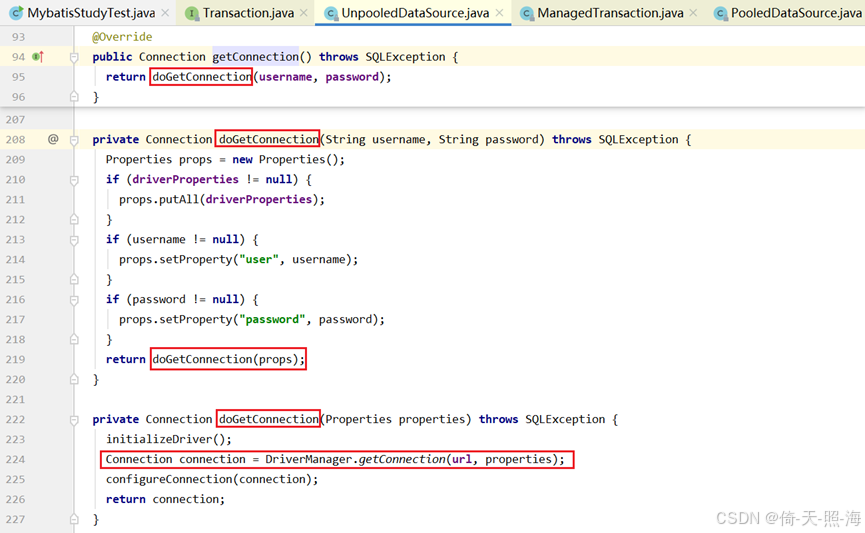
若是新建一个数据库连接,则调用DataSource接口的实现类UnpooledDataSource.getConnection方法创建连接,最终是通过JDBC方式Connection connection = DriverManager.getConnection(url, properties);创建数据库连接,所以Mybatis底层使用的是JDBC,可以理解为Mybatis是通过动态代理与JDBC实现的。
最后附上PooledDataSource.popConnection方法的源码:
private PooledConnection popConnection(String username, String password) throws SQLException {
  boolean countedWait = false;
  PooledConnection conn = null;
  long t = System.currentTimeMillis();
  int localBadConnectionCount = 0;

  while (conn == null) {
    synchronized (state) {
      if (!state.idleConnections.isEmpty()) {
        // Pool has available connection
        conn = state.idleConnections.remove(0);
        if (log.isDebugEnabled()) {
          log.debug("Checked out connection " + conn.getRealHashCode() + " from pool.");
        }
      } else {
        // Pool does not have available connection
        if (state.activeConnections.size() < poolMaximumActiveConnections) {
          // Can create new connection
          conn = new PooledConnection(dataSource.getConnection(), this);
          if (log.isDebugEnabled()) {
            log.debug("Created connection " + conn.getRealHashCode() + ".");
          }
        } else {
          // Cannot create new connection
          PooledConnection oldestActiveConnection = state.activeConnections.get(0);
          long longestCheckoutTime = oldestActiveConnection.getCheckoutTime();
          if (longestCheckoutTime > poolMaximumCheckoutTime) {
            // Can claim overdue connection
            state.claimedOverdueConnectionCount++;
            state.accumulatedCheckoutTimeOfOverdueConnections += longestCheckoutTime;
            state.accumulatedCheckoutTime += longestCheckoutTime;
            state.activeConnections.remove(oldestActiveConnection);
            if (!oldestActiveConnection.getRealConnection().getAutoCommit()) {
              try {
                oldestActiveConnection.getRealConnection().rollback();
              } catch (SQLException e) {
                /*
                   Just log a message for debug and continue to execute the following
                   statement like nothing happened.
                   Wrap the bad connection with a new PooledConnection, this will help
                   to not interrupt current executing thread and give current thread a
                   chance to join the next competition for another valid/good database
                   connection. At the end of this loop, bad {@link @conn} will be set as null.
                 */
                log.debug("Bad connection. Could not roll back");
              }
            }
            conn = new PooledConnection(oldestActiveConnection.getRealConnection(), this);
            conn.setCreatedTimestamp(oldestActiveConnection.getCreatedTimestamp());
            conn.setLastUsedTimestamp(oldestActiveConnection.getLastUsedTimestamp());
            oldestActiveConnection.invalidate();
            if (log.isDebugEnabled()) {
              log.debug("Claimed overdue connection " + conn.getRealHashCode() + ".");
            }
          } else {
            // Must wait
            try {
              if (!countedWait) {
                state.hadToWaitCount++;
                countedWait = true;
              }
              if (log.isDebugEnabled()) {
                log.debug("Waiting as long as " + poolTimeToWait + " milliseconds for connection.");
              }
              long wt = System.currentTimeMillis();
              state.wait(poolTimeToWait);
              state.accumulatedWaitTime += System.currentTimeMillis() - wt;
            } catch (InterruptedException e) {
              break;
            }
          }
        }
      }
      if (conn != null) {
        // ping to server and check the connection is valid or not
        if (conn.isValid()) {
          if (!conn.getRealConnection().getAutoCommit()) {
            conn.getRealConnection().rollback();
          }
          conn.setConnectionTypeCode(assembleConnectionTypeCode(dataSource.getUrl(), username, password));
          conn.setCheckoutTimestamp(System.currentTimeMillis());
          conn.setLastUsedTimestamp(System.currentTimeMillis());
          state.activeConnections.add(conn);
          state.requestCount++;
          state.accumulatedRequestTime += System.currentTimeMillis() - t;
        } else {
          if (log.isDebugEnabled()) {
            log.debug("A bad connection (" + conn.getRealHashCode() + ") was returned from the pool, getting another connection.");
          }
          state.badConnectionCount++;
          localBadConnectionCount++;
          conn = null;
          if (localBadConnectionCount > (poolMaximumIdleConnections + poolMaximumLocalBadConnectionTolerance)) {
            if (log.isDebugEnabled()) {
              log.debug("PooledDataSource: Could not get a good connection to the database.");
            }
            throw new SQLException("PooledDataSource: Could not get a good connection to the database.");
          }
        }
      }
    }

  }

  if (conn == null) {
    if (log.isDebugEnabled()) {
      log.debug("PooledDataSource: Unknown severe error condition.  The connection pool returned a null connection.");
    }
    throw new SQLException("PooledDataSource: Unknown severe error condition.  The connection pool returned a null connection.");
  }

  return conn;
}

魔乐社区(Modelers.cn) 是一个中立、公益的人工智能社区,提供人工智能工具、模型、数据的托管、展示与应用协同服务,为人工智能开发及爱好者搭建开放的学习交流平台。社区通过理事会方式运作,由全产业链共同建设、共同运营、共同享有,推动国产AI生态繁荣发展。
更多推荐


 29
29 0
0- 0


 已为社区贡献2条内容

所有评论(0)