springboot使用自定义注解实现接口返回结果加密
·
springboot使用自定义注解实现接口返回结果加密
1、编写自定义注解
import java.lang.annotation.ElementType;
import java.lang.annotation.Retention;
import java.lang.annotation.RetentionPolicy;
import java.lang.annotation.Target;

@Retention(RetentionPolicy.RUNTIME)
@Target({ElementType.TYPE, ElementType.METHOD})
public  @interface Encrypt {

}
2、 AES加密工具类
import javax.crypto.Cipher;
import javax.crypto.spec.SecretKeySpec;
import java.nio.charset.StandardCharsets;
import java.util.Base64;

public class EncryptionUtils {


        private static final String ALGORITHM = "AES";
        private static final String SECRET_KEY = "**********."; // 替换为您自己的密钥

    /**
     * 加密
     * @param data
     * @return
     */
    public static String encrypt(String data) {
        try {
            SecretKeySpec secretKey = new SecretKeySpec(SECRET_KEY.getBytes(StandardCharsets.UTF_8), ALGORITHM);
            Cipher cipher = Cipher.getInstance(ALGORITHM);
            cipher.init(Cipher.ENCRYPT_MODE, secretKey);
            byte[] encryptedBytes = cipher.doFinal(data.getBytes(StandardCharsets.UTF_8));
            return Base64.getEncoder().encodeToString(encryptedBytes);
        } catch (Exception e) {
            e.printStackTrace();
        }
        return null;
    }
    /**
     * 解密
     * @param encryptedData
     * @return
     */
        public static String decrypt(String encryptedData) {
        try {
            SecretKeySpec secretKey = new SecretKeySpec(SECRET_KEY.getBytes(StandardCharsets.UTF_8), ALGORITHM);
            Cipher cipher = Cipher.getInstance(ALGORITHM);
            cipher.init(Cipher.DECRYPT_MODE, secretKey);
            byte[] decryptedBytes = cipher.doFinal(Base64.getDecoder().decode(encryptedData));
            return new String(decryptedBytes, StandardCharsets.UTF_8);
        } catch (Exception e) {
            e.printStackTrace();
        }
        return null;
    }
3、 实现ResponseBodyAdvice接口
 ResponseBodyAdvice接口用于对响应体进行全局处理。它提供了在响应返回前和后对响应进行修改或增强的能力。
 下面是一个简单的示例,演示如何使用 ResponseBodyAdvice 对响应进行加密处理;
import cn.hutool.core.util.ObjectUtil;
import cn.lili.common.vo.ResultMessage;
import org.springframework.core.MethodParameter;
import org.springframework.http.MediaType;
import org.springframework.http.converter.HttpMessageConverter;
import org.springframework.http.server.ServerHttpRequest;
import org.springframework.http.server.ServerHttpResponse;
import org.springframework.web.bind.annotation.ControllerAdvice;
import org.springframework.web.servlet.mvc.method.annotation.ResponseBodyAdvice;

@ControllerAdvice
public class EncryptResponse  implements ResponseBodyAdvice<ResultMessage> {
    /**
     *   判断是否支持对该方法进行响应体处理
     * @param returnType the return type
     * @param converterType the selected converter type
     * @return
     */
    @Override
    public boolean supports(MethodParameter returnType, Class<? extends HttpMessageConverter<?>> converterType) {

        //判断类是否包含 EncryptDecrypt 注解
        final Class<?> containingClass = returnType.getContainingClass();
        if (containingClass.isAnnotationPresent(Encrypt.class)) {
            return  true;
        }
        //判断方法上是否包含 EncryptDecrypt 注解
        if (returnType.hasMethodAnnotation(Encrypt.class)){
            return  true;
        }
        return  false;
    }
    /**
     * 在响应体写入前对响应进行修改或增强
     * @param body the body to be written
     * @param returnType the return type of the controller method
     * @param selectedContentType the content type selected through content negotiation
     * @param selectedConverterType the converter type selected to write to the response
     * @param request the current request
     * @param response the current response
     * @return
     */
    @Override
    public ResultMessage beforeBodyWrite(ResultMessage body, MethodParameter returnType, MediaType selectedContentType, Class<? extends HttpMessageConverter<?>> selectedConverterType, ServerHttpRequest request, ServerHttpResponse response) {

        if (200 ==  body.getCode() && ObjectUtil.isNotNull(body.getResult())) {
            String encrypt = EncryptionUtils.encrypt(String.valueOf(body.getResult()));
            body.setResult(encrypt);
        }
        return body;
    };
4、 测试
1、在类上或者方法上添加@Encrypt注解
2、使用测试工具进行测试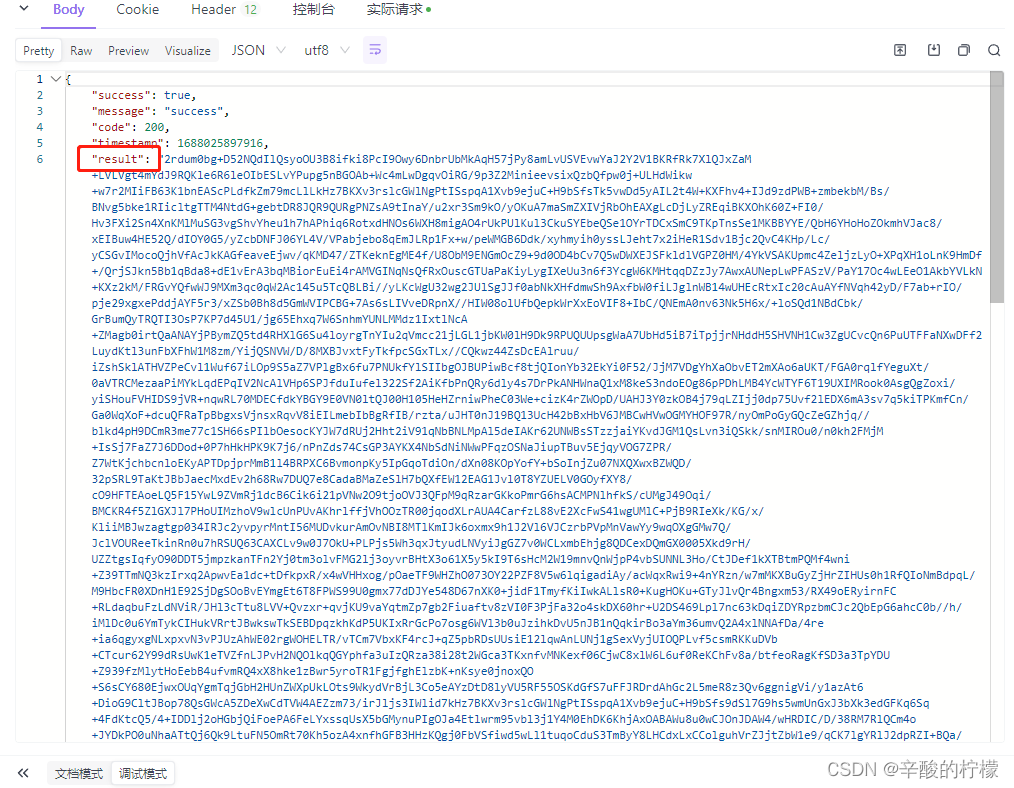 result就是经过加密的结果

魔乐社区(Modelers.cn) 是一个中立、公益的人工智能社区,提供人工智能工具、模型、数据的托管、展示与应用协同服务,为人工智能开发及爱好者搭建开放的学习交流平台。社区通过理事会方式运作,由全产业链共同建设、共同运营、共同享有,推动国产AI生态繁荣发展。
更多推荐


 0
0 0
0- 0


 已为社区贡献1条内容

所有评论(0)