【创建springboot-maven项目搭建mybatis框架】(超详细)
1.创建Spring Boot项目,相关参数2. 创建数据库3. 在IntelliJ IDEA中配置Database面板4. 添加数据库编程的依赖5. 关于Mybatis框架6. Mybatis编程:插入相册数据
目录
3. 在IntelliJ IDEA中配置Database面板
1. 创建Spring Boot项目,相关参数
项目名称:
csmall-product(自己取个名称)Group:
cn.teduArtifact:
csmall-productPackage:
cn.csmall.productJava版本:1.8
创建项目时勾选的依赖项:无
Spring Boot版本:
2.5.9(自行在pom.xml中修改)
2. 创建数据库
登录MySQL客户端,创建mall_pms数据库,命令如下:
create database mall_pms;
3. 在IntelliJ IDEA中配置Database面板

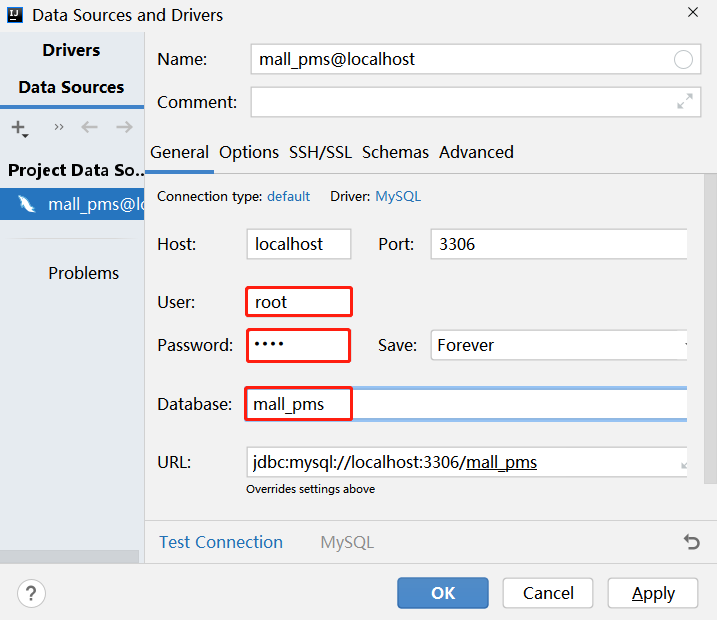
4. 添加数据库编程的依赖
在pom.xml文件的<dependencies>标签内添加:
<!-- Mybatis整合Spring Boot的依赖项 -->
<dependency>
    <groupId>org.mybatis.spring.boot</groupId>
    <artifactId>mybatis-spring-boot-starter</artifactId>
    <version>2.2.2</version>
</dependency>
<!-- MySQL的依赖项 -->
<dependency>
    <groupId>mysql</groupId>
    <artifactId>mysql-connector-java</artifactId>
    <scope>runtime</scope>
</dependency> 当添加数据库编程的依赖项(以上的mybatis-spring-boot-starter)后,无论是测试,还是尝试启动项目,都会报错:
Caused by: org.springframework.boot.autoconfigure.jdbc.DataSourceProperties\$DataSourceBeanCreationException: Failed to determine a suitable driver class这是因为在执行Spring Boot测试,或启动项目时,只要项目中添加了数据库编程的依赖,就会自动读取连接数据库的配置,但是,目前还没有添加这些配置,所以报错!
在src/main/resources下的application.properties中添加连接数据库的配置信息,此配置文件是Spring Boot项目默认的主配置文件。
添加的配置信息如下:
# 连接数据库的配置
spring.datasource.url=jdbc:mysql://localhost:3306/mall_pms?useUnicode=true&characterEncoding=utf-8&serverTimezone=Asia/Shanghai
spring.datasource.username=root
spring.datasource.password=root
注意:添加以上配置后,无论是启动项目,还是执行Spring Boot测试,都不会报告错误,但是,本质上只是读取了以上配置,并不代表以上配置是正确的!
可以在Spring Boot测试类中添加测试方法,以检验以上配置是否正确:
@Autowired
DataSource dataSource; // 数据源,导包时使用java.sql包

@Test
void getConnection() throws Throwable {
    dataSource.getConnection(); // 获取与数据库的连接对象,会执行连接到数据库的操作
}
如果配置信息中,连接数据库的URL中的主机名错误,则会出现:
Caused by: java.net.UnknownHostException: localhast如果配置信息中,连接数据库的端口号错误,导致无法连接上,则会出现:
Caused by: java.net.ConnectException: Connection refused: connect另外,如果MySQL服务没有启动,也会导致以上错误!
如果配置信息中,数据库名称错误,则会出现:
java.sql.SQLSyntaxErrorException: Unknown database 'm0ll_pms'如果配置信息中,服务器时区值错误,则会出现:
Caused by: java.time.zone.ZoneRulesException: Unknown time-zone ID: Asia/Beijing如果配置信息中,连接数据库的用户名或密码错误,则会出现:
java.sql.SQLException: Access denied for user 'root1234'@'localhost' (using password: YES)
java.sql.SQLException: Access denied for user 'root'@'localhost' (using password: YES)
java.sql.SQLException: Access denied for user 'root'@'localhost' (using password: NO)5. 关于Mybatis框架
Mybatis框架是主流的用于处理数据库编程的框架,主要用于简化数据库编程。
使用Mybatis框架,除了首次的“一次性”配置以外,主要的代码量在于:设计抽象方法、配置抽象方法映射的SQL语句。
6. Mybatis编程:插入相册数据
插入相册数据需要执行的SQL语句大致是:
insert into pms_album (name, description, sort) values (?, ?, ?)提示:以上字段列表中,由于pms_album表的id是自动编号的,则不需要写上id字段名,在values部分也不需要写id字段的值。
使用Mybatis时,抽象方法必须设计在接口中,通常,此类接口使用Mapper作为接口名的最后一个单词。
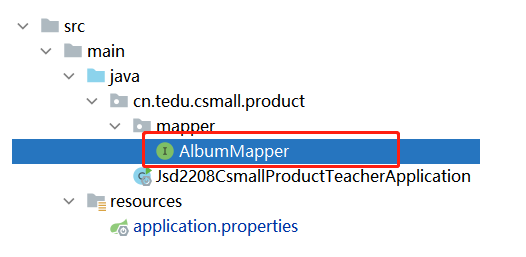
则在项目的根包(创建项目后就已经自动创建好的包)下创建mapper.AlbumMapper接口:
package cn.tedu.csmall.product.mapper;

public interface AlbumMapper {
}
然后,在接口中声明“插入相册数据”的抽象方法,即:
xx xx(xx);
在使用Mybatis时,如果执行的是增、删、改操作,始终使用int作为返回值类型,表示“受影响的行数”,或者,也可以使用void,但不推荐。
关于方法的名称,阿里巴巴的《Java开发手册》提出了参考:
1) 获取单个对象的方法用 get 做前缀。
2) 获取多个对象的方法用 list 做前缀。
3) 获取统计值的方法用 count 做前缀。
4) 插入的方法用 save/insert 做前缀。
5) 删除的方法用 remove/delete 做前缀。
6) 修改的方法用 update 做前缀。
关于参数列表,应该根据SQL语句中的参数来设计,如果需要执行的SQL语句中的参数较多,且具有相关性,应该进行封装,本次需要执行“插入相册数据”,则可以使用“相册”数据的实体类作为参数。
关于MySQL中的字段类型与Java中的数据类型的对应关系:
| MySQL中的数据类型 | Java中的数据类型 |
|---|---|
tinyint / smallint / int |
Integer |
bigint |
Long |
char / varchar / text系列 |
String |
decimal |
BigDecimal |
datetime |
LocalDateTime |
为了便于编写Xxx类,先在pom.xml中添加lombok依赖:
<!-- Lombok的依赖项,主要用于简化POJO类的编写 -->
<dependency>
    <groupId>org.projectlombok</groupId>
    <artifactId>lombok</artifactId>
    <version>1.18.20</version>
    <scope>provided</scope>
</dependency>
此依赖项可以通过注解,在编译期生成某些代码,例如:Setters & Getters、hashCode()、equals()、toString()、无参数构造方法、全参数构造方法等。
在根包下创建pojo.entity.Album类:
package cn.tedu.csmall.product.pojo.entity;

import lombok.Data;

import java.io.Serializable;
import java.time.LocalDateTime;

@Data
public class Album implements Serializable {

    private Long id;
    private String name;
    private String description;
    private Integer sort;
    private LocalDateTime gmtCreate;
    private LocalDateTime gmtModified;

}接下来,在AlbumMapper接口中添加抽象方法:
int insert(Album album);然后,在src/main/resources下创建mapper文件夹,并在此文件夹中粘贴得到AlbumMapper.xml文件,关于此文件:
- 根标签必须是
<mapper>- 根标签上必须配置
namespace属性,取值为对应的接口的全限定名- 使用
<insert>/<delete>/<update>/<select>标签配置SQL语句,每个这类标签必须配置id属性,取值为抽象方法的名称,在标签内配置SQL语句
则AlbumMapper.xml配置为:
<?xml version="1.0" encoding="UTF-8" ?>
<!DOCTYPE mapper PUBLIC "-//mybatis.org//DTD Mapper 3.0//EN" "http://mybatis.org/dtd/mybatis-3-mapper.dtd">

<mapper namespace="cn.tedu.csmall.product.mapper.AlbumMapper">

    <insert id="insert">
        INSERT INTO pms_album (
            name, description, sort
        ) VALUES (
            #{name}, #{description}, #{sort}
        )
    </insert>

</mapper>最后,还需要完成首次使用Mybatis时的一次性配置,主要有2处:
使得Mybatis明确Mapper接口的位置
- 【推荐】在配置类上使用
@MapperScan配置Mapper接口的根包
- 在根包下,且添加了
@Configuration的类,就是配置类- 【不推荐】在各Mapper接口上添加
@Mapper注解使得Mybatis明确配置SQL语句的XML文件的位置
在
application.properties中配置# 使用Mybatis时,配置SQL语句的XML文件的位置 mybatis.mapper-locations=classpath:mapper/*.xml
至此,“插入相册数据”的功能开发完成,应该在src/test/java下的根包下,创建mapper.AlbumMapperTests测试类,编写并执行测试:
package cn.tedu.csmall.product.mapper;

import cn.tedu.csmall.product.pojo.entity.Album;
import org.junit.jupiter.api.Test;
import org.springframework.beans.factory.annotation.Autowired;
import org.springframework.boot.test.context.SpringBootTest;

@SpringBootTest
public class AlbumMapperTests {

    @Autowired
    AlbumMapper mapper;

    @Test
    void insert() {
        Album album = new Album();
        album.setName("测试数据");
        album.setDescription("测试数据的简介");
        album.setSort(99); // 注意:sort值必须是[0, 255]之间的

        int rows = mapper.insert(album);
        System.out.println("插入数据完成,受影响的行数:" + rows);
    }

}
注意:测试类的名称不要与被测试的接口名称相同!
如果@MapperScan的包配置错误,导致Mybatis找不到Mapper接口,会出现错误:
Caused by: org.springframework.beans.factory.NoSuchBeanDefinitionException: No qualifying bean of type 'cn.tedu.csmall.product.mapper.AlbumMapper' available: expected at least 1 bean which qualifies as autowire candidate. Dependency annotations: {@org.springframework.beans.factory.annotation.Autowired(required=true)}如果代码中存在发下某种错误:
- 在XML中
<mapper>标签的namespace值有误 - 在XML中
<insert>这类标签的id值有误 - 在
application.properties中配置的XML文件的位置有误
会出现错误:
org.apache.ibatis.binding.BindingException: Invalid bound statement (not found): cn.tedu.csmall.product.mapper.AlbumMapper.insert
如果SQL语句中的字段名拼写错误,会出现类似以下错误:
Caused by: java.sql.SQLSyntaxErrorException: Unknown column 'descripton' in 'field list'如果SQL语句中的参数值中#{}中的名称拼写错误(不是类中的属性名),会出现类似以下错误:
Caused by: org.apache.ibatis.reflection.ReflectionException: There is no getter for property named 'descripton' in 'class cn.tedu.csmall.product.pojo.entity.Album'个人主页:居然天上楼
感谢你这么可爱帅气还这么热爱学习~~
人生海海,山山而川
你的点赞👍 收藏⭐ 留言📝 加关注✅
是对我最大的支持与鞭策


魔乐社区(Modelers.cn) 是一个中立、公益的人工智能社区,提供人工智能工具、模型、数据的托管、展示与应用协同服务,为人工智能开发及爱好者搭建开放的学习交流平台。社区通过理事会方式运作,由全产业链共同建设、共同运营、共同享有,推动国产AI生态繁荣发展。
更多推荐


 1
1 0
0- 0


 已为社区贡献1条内容

所有评论(0)