配置自己的Maven(详细版)和pom.xml配置
下载maven(我是3.8.8)
配置环境
修改maven-conf-settinngs.xml如下:(下面有总体代码)
1.修改缓存路径在 <localRepository>/path/to/local/repo</localRepository>
下面设置新地址为D盘,他会自动建包

<localRepository>D:\repo</localRepository>
2.配置国内阿里镜像在 <!-- mirrors —— </mirrors>标签里添加
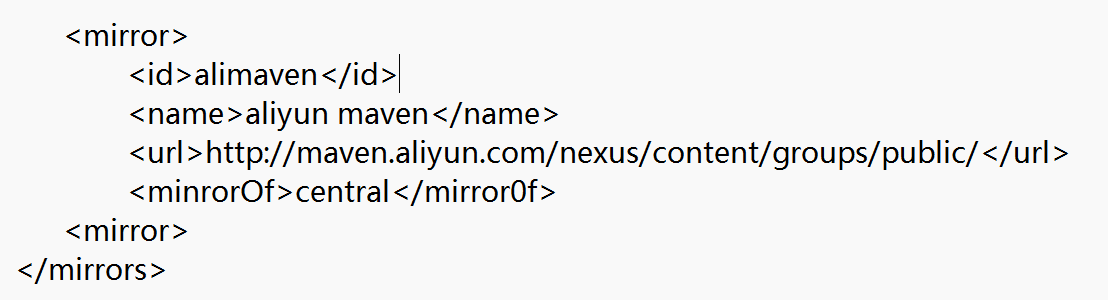
<mirror>
<id>alimaven</id>
<name>aliyun maven</name>
<url>http://maven.aliyun.com/nexus/content/groups/public/</url>
<minrorOf>central</mirror0f>
<mirror>
3.配置jdk17构建项目
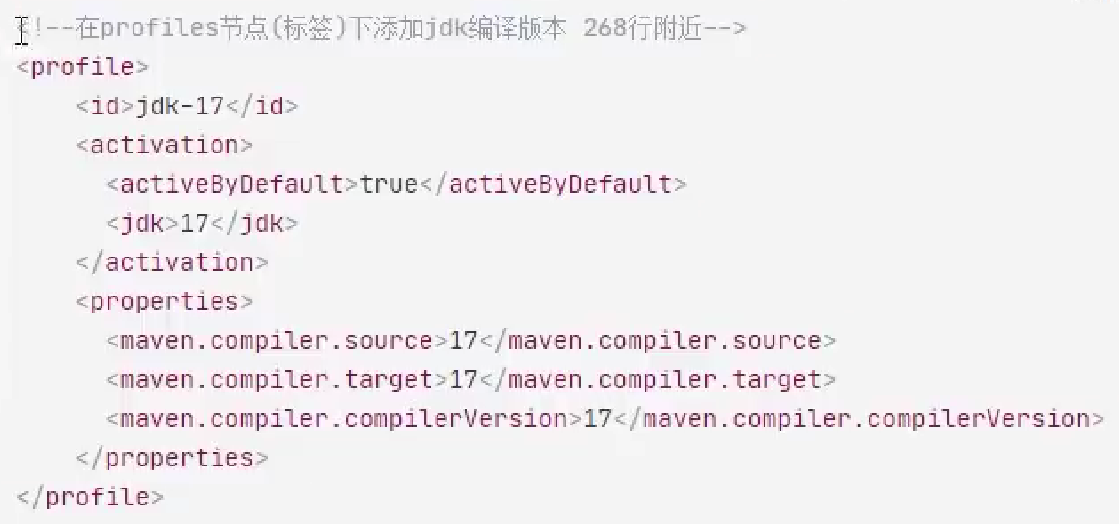
<profile>
<id>jdk-17</id>
<cactivation>
<activeByDefault>true</activeByDefault>
<jdk>17</jdk>
</activation>
<properties>
<maven.compiler.source>17</maven.compiler.source>
<maven.compiler.target>17</maven.compiler.target>
<maven.compiler.compilerVersion>17</maven.compiler.compilerVersion>
</properties>
</profile>
全部代码:
<settings xmlns="http://maven.apache.org/SETTINGS/1.2.0" xmlns:xsi="http://www.w3.org/2001/XMLSchema-instance" xsi:schemaLocation="http://maven.apache.org/SETTINGS/1.2.0 https://maven.apache.org/xsd/settings-1.2.0.xsd">
<!-- 设置本地仓库路径 -->
<localRepository>D:\repo</localRepository>
<pluginGroups> </pluginGroups>
<proxies> </proxies>
<servers> </servers>
<mirrors>
<!-- 添加阿里云镜像 -->
<mirror>
<id>aliyunmaven</id>
<mirrorOf>central</mirrorOf>
<name>阿里云公共仓库</name>
<url>https://maven.aliyun.com/repository/public</url>
</mirror>
<mirror>
<id>maven-default-http-blocker</id>
<mirrorOf>external:http:*</mirrorOf>
<name>Pseudo repository to mirror external repositories initially using HTTP.</name>
<url>http://0.0.0.0/</url>
<blocked>true</blocked>
</mirror>
</mirrors>
<profiles>
<profile>
<id>jdk-17</id>
<activation>
<activeByDefault>true</activeByDefault>
<jdk>17</jdk>
</activation>
<properties>
<maven.compiler.source>17</maven.compiler.source>
<maven.compiler.target>17</maven.compiler.target>
<maven.compiler.compilerVersion>17</maven.compiler.compilerVersion>
</properties>
<!-- 添加阿里云仓库配置 -->
<repositories>
<repository>
<id>aliyun</id>
<url>https://maven.aliyun.com/repository/public</url>
<releases>
<enabled>true</enabled>
</releases>
<snapshots>
<enabled>false</enabled>
</snapshots>
</repository>
</repositories>
<pluginRepositories>
<pluginRepository>
<id>aliyun-plugin</id>
<url>https://maven.aliyun.com/repository/public</url>
<releases>
<enabled>true</enabled>
</releases>
<snapshots>
<enabled>false</enabled>
</snapshots>
</pluginRepository>
</pluginRepositories>
</profile>
</profiles>
<!-- 激活jdk-17配置 -->
<activeProfiles>
<activeProfile>jdk-17</activeProfile>
</activeProfiles>
</settings>
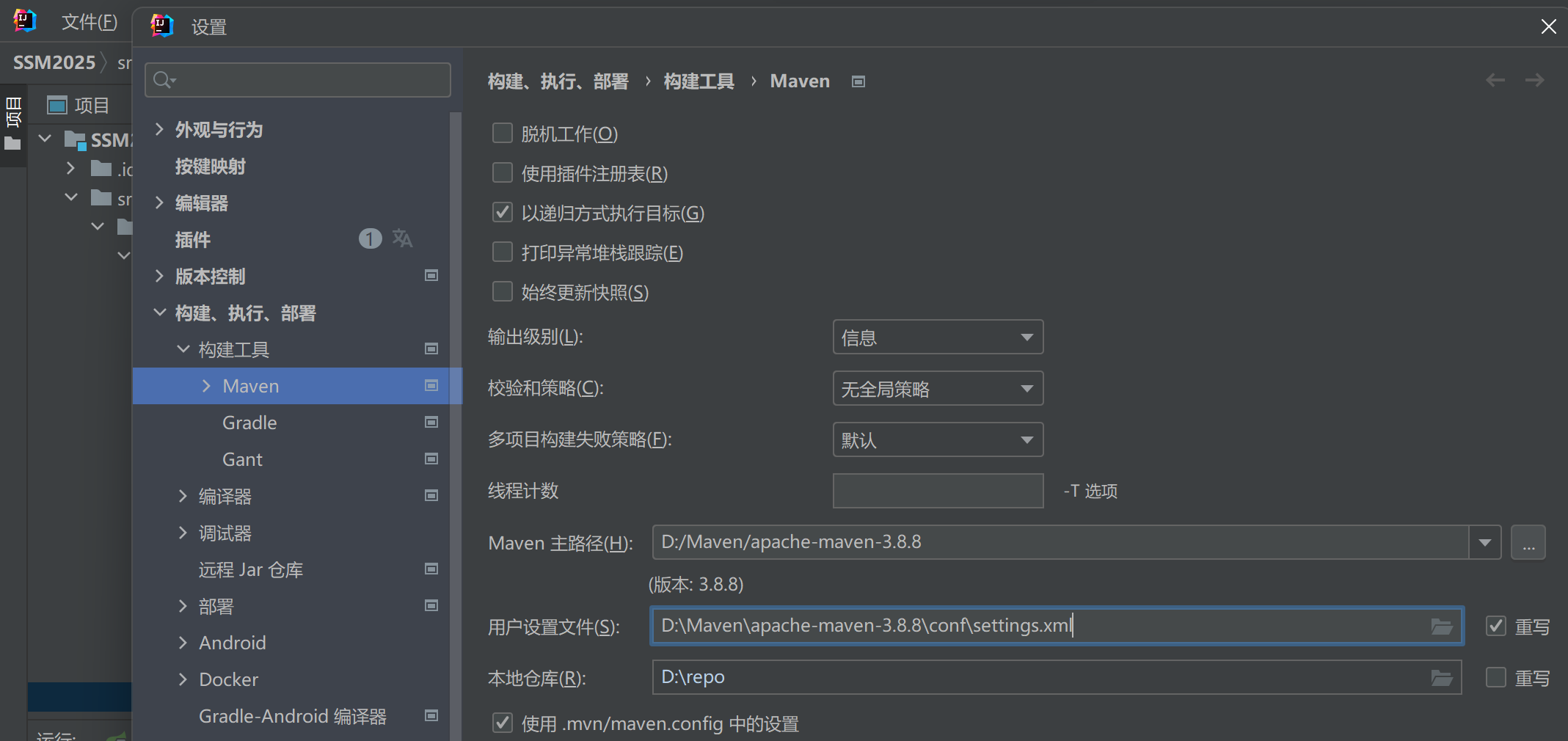
IDEA的配置(选择你的settings.xml会自动识别你在xml里配置的本地仓库)
---------------------------------------------------------------------------------------------------------------------------------
maven里的pom.xml,配置知识点(G A V P):
g a v packaging(packaging重点关注)
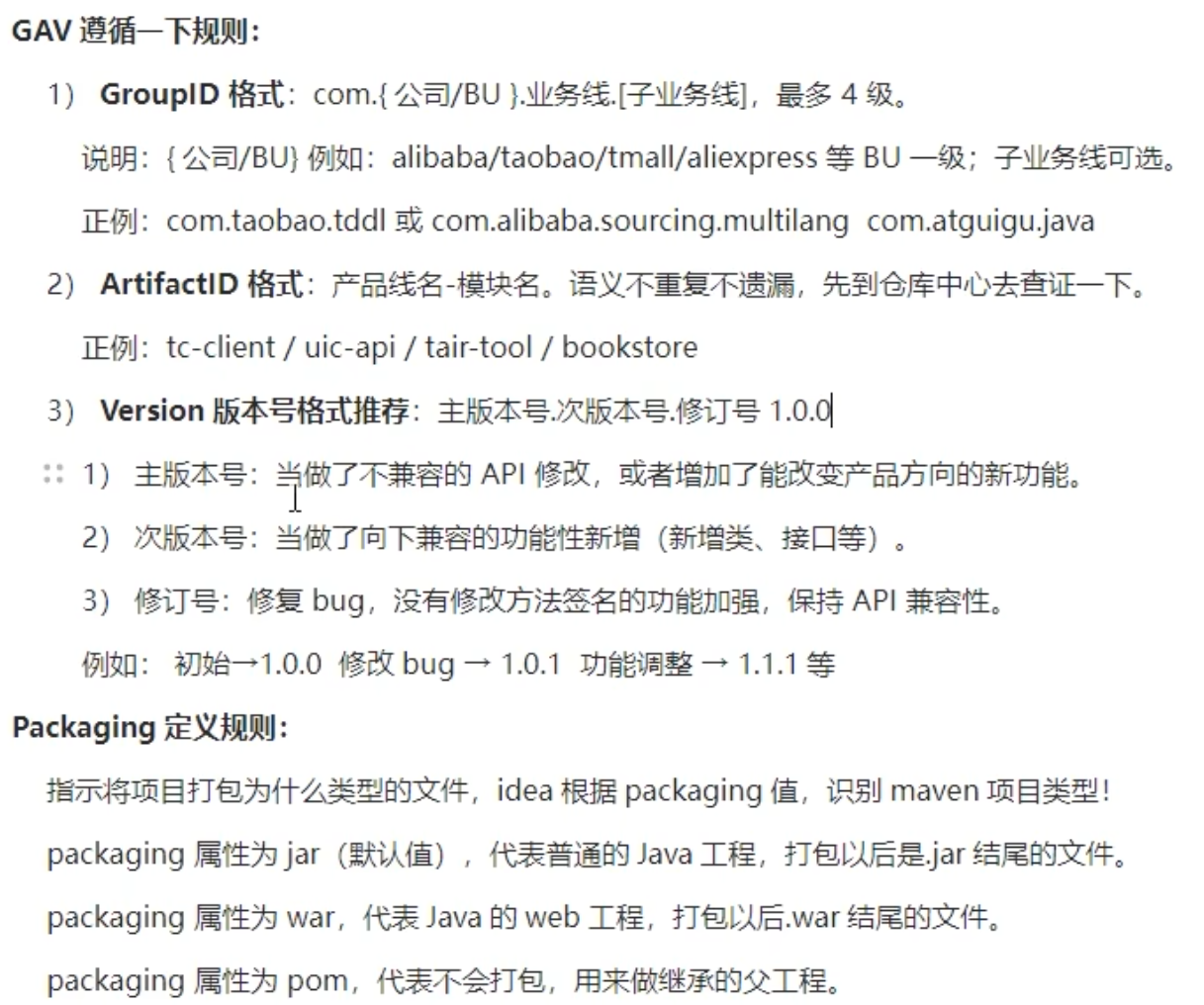
pom.xml里可以配置依赖包
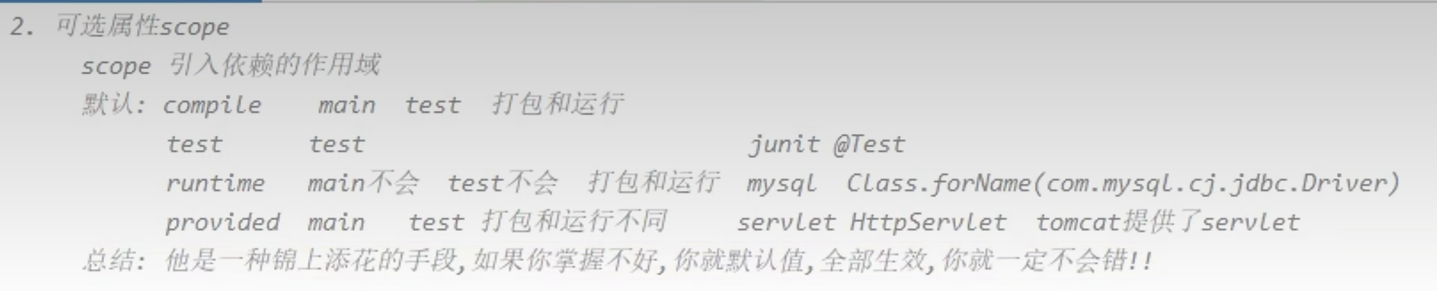
用法:
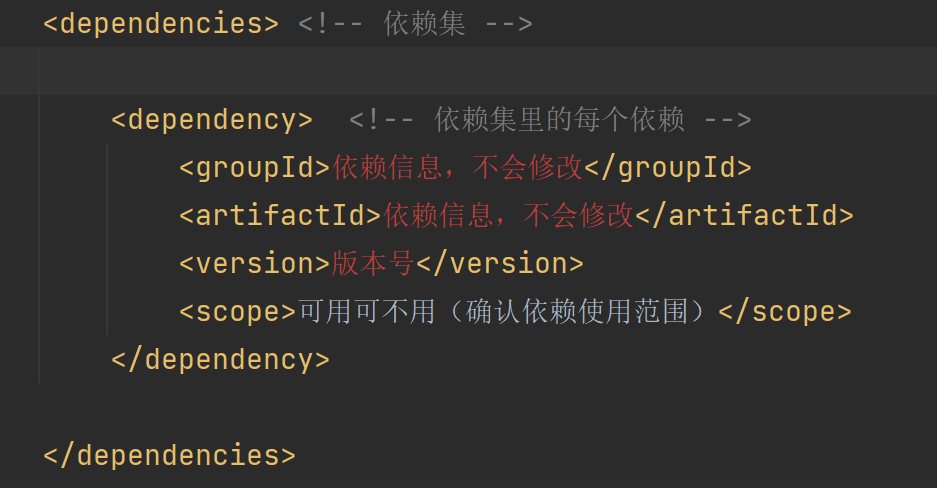
遇到的问题maven和idea版本不兼容:
考虑到你正在学习SSM并准备学习Spring Boot,我强烈推荐升级IDEA而不是降级Maven。这是因为:
- Spring Boot 3.x已经要求Java 17作为最低版本,这是行业发展趋势
- IDEA 2021对Java 17的支持不够完善,可能会遇到各种兼容性问题
- 降级Maven只能解决当前问题,但会在学习Spring Boot时再次遇到兼容性问题
- 新版IDEA (如2023.2或2023.3)能够同时很好地支持SSM和Spring Boot开发
- 新版IDEA内置的Maven工具链已经针对Java 17和Spring Boot进行了优化
如果考虑学习路径的连贯性和未来发展,升级IDEA是更有价值的投资。这样你可以无缝过渡到Spring Boot学习,不会因为工具链问题而中断学习过程。
依赖下载失败问题:
- 网络问题,无法连接到maven仓库(检查网络连接和maven仓库服务状态)
- 依赖版本号错误,或者依赖没有正确定义(检查版本是否存在,对应)
- maven缓存被污染或者损坏,导致maven无法使用现有依赖,也无法下载新的依赖(
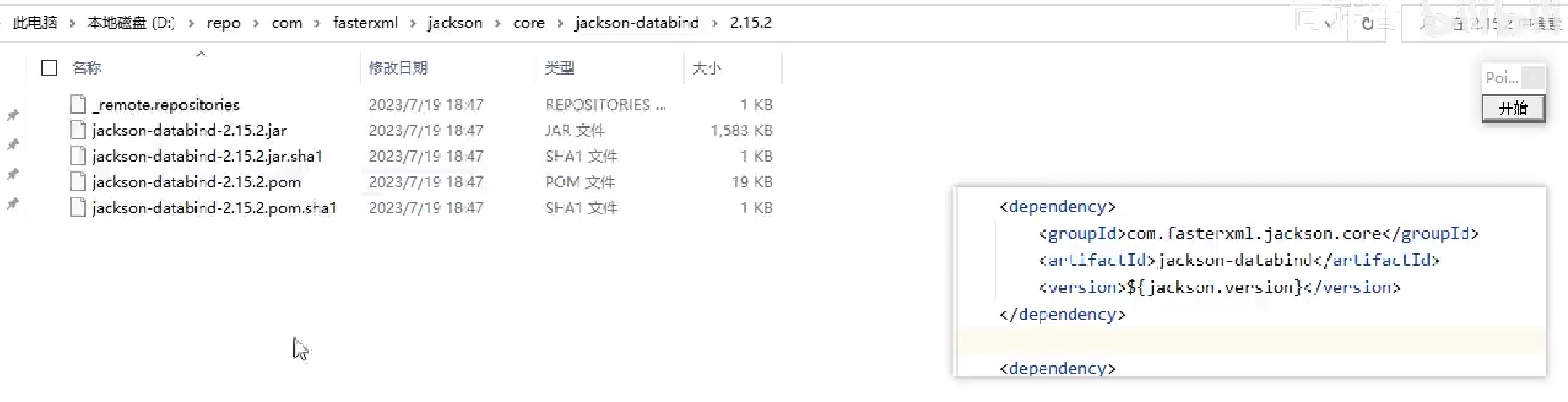
进入你的maven缓存文件夹-从依赖第一个com开始查找文件夹-直到进入版本号位置,如果有个lastUpdated文件,删除此缓存文件,有他就无法下载新的依赖
)
maven构建分为命令构建和可视化构建
构建就是把你的项目打包成jar包然后部署到本地maven里
命令构建:
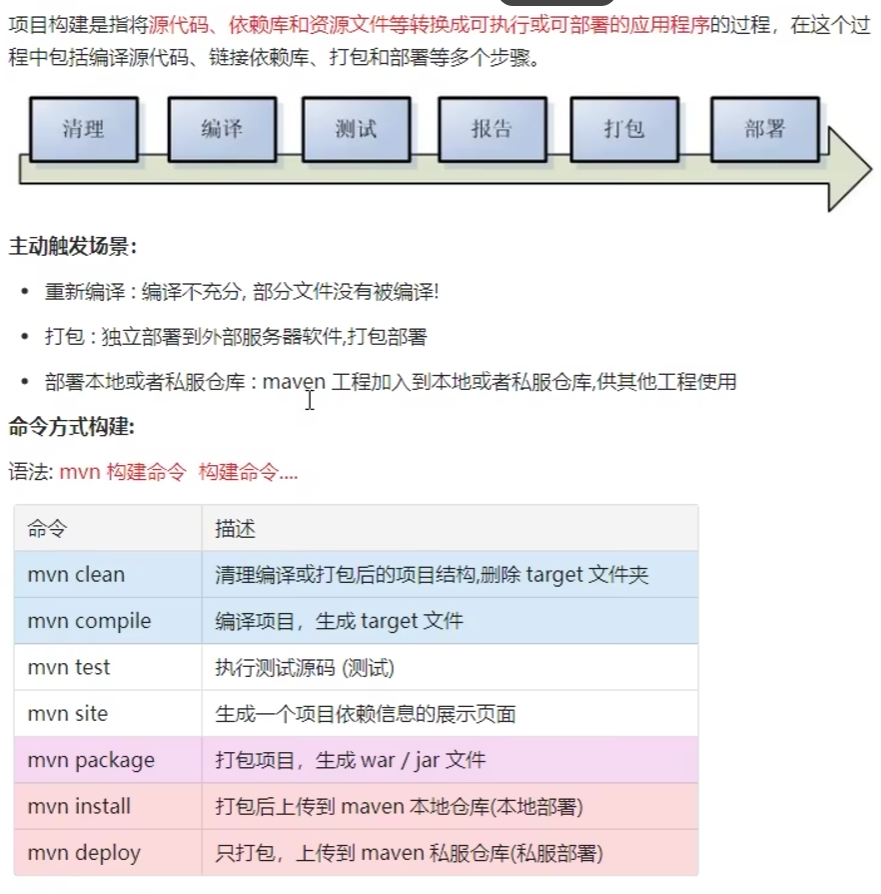
可视化构建:
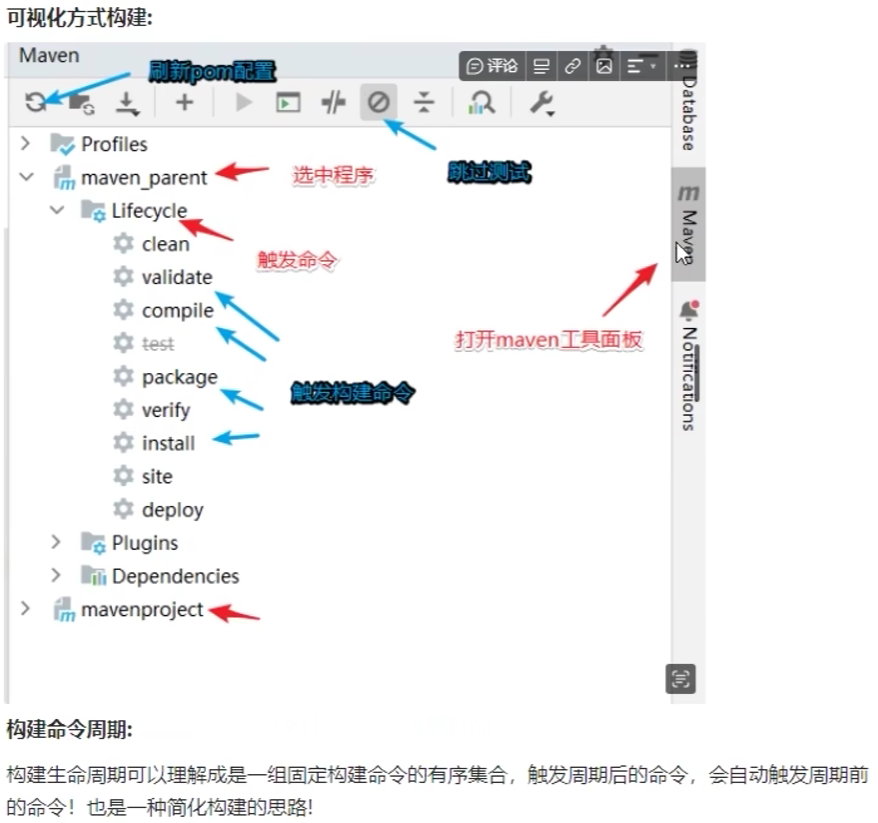
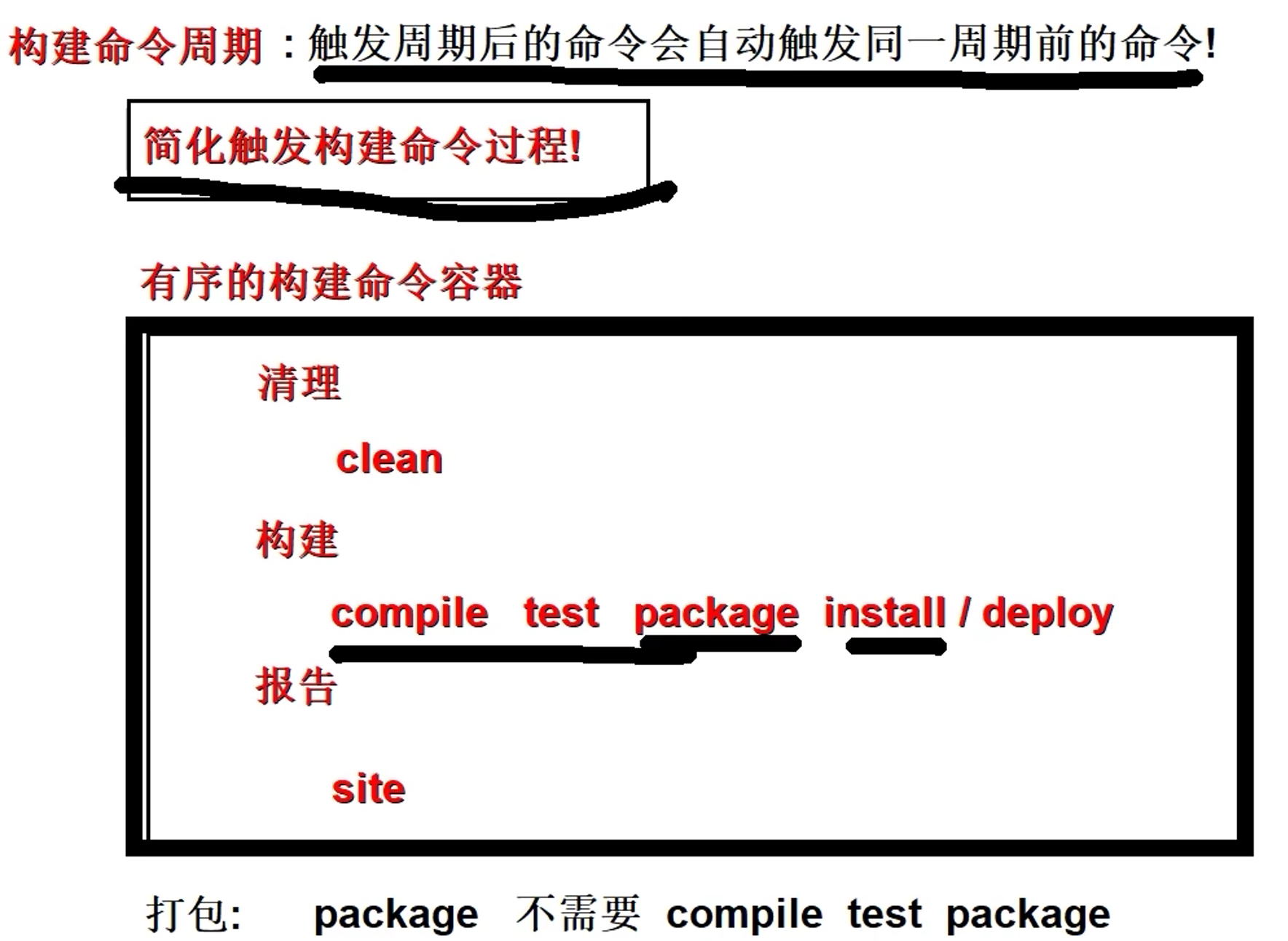
构建有三个周期,清理,构建,报告。构建会自动触发之前的命令
继承
父工程可以管理子工程的依赖版本 使用<dependencyManagement>标签

聚合
父maven管理子maven构建。使用<modules>标签

魔乐社区(Modelers.cn) 是一个中立、公益的人工智能社区,提供人工智能工具、模型、数据的托管、展示与应用协同服务,为人工智能开发及爱好者搭建开放的学习交流平台。社区通过理事会方式运作,由全产业链共同建设、共同运营、共同享有,推动国产AI生态繁荣发展。
更多推荐


 21
21 0
0- 0


 已为社区贡献1条内容

所有评论(0)