linux系统远程工具,Linux系统必备远程桌面工具 -- NoMachine
玩Linux系统,会经常用到远程桌面软件。 我一直用的2个是Xmanager和VNC。 今天看到一个新软件:NoMachine。 NoMachine NX是一个快速的终端服务器和虚拟桌面软件,基于X11协议。据说速度比VNC还快,甚至可以在只有10k的带宽环境下运行。 而且画面也比VNC的清楚。
使用NoMachine需要配置服务端和客户端。
一.服务端
服务端需要安装3个包:
nxserver-3.4.0-12.i386.rpm
nxnode-3.4.0-11.i386.rpm
nxclient-3.4.0-7.i386.rpm
Linux 32bit的下载地址是:
下面是NoMachine网页的上一个使用说明:
1. Download the RPMs
2. Change your working directory to the location where you saved the package and install it by running from a console:
# sudo rpm -i nxclient-3.4.0-7.x86_64.rpm
# sudo rpm -i nxnode-3.4.0-14.x86_64.rpm
# sudo rpm -i nxserver-3.4.0-14.x86_64.rpm
If you don't have the sudo utility installed, log on as superuser ("root") and run the commands without sudo.
Note: clickherefor detailed instructions on how to install the NX Client, NX Node and NX Server packages. The NX service can be controlled by the command /usr/NX/bin/nxserver --status|--start|--stop|--restart. Additional commands are available to configure the server. Try /usr/NX/bin/nxserver --help for more information. Please, don't forget to download and read the NX Server Administrator's Guide availablehere.
[root@rac2 /]# mkdir /windows
[root@rac2 /]# mount -o username=dave,password=888 //192.168.6.80/tmp /windows
[root@rac2 /]#cd windows/
[root@rac2 windows]# ls
nxclient-3.4.0-7.i386.rpmnxnode-3.4.0-14.i386.rpmnxserver-3.4.0-14.i386.rpm
[root@rac2 windows]#ls -lrt
total 17033
-rwxrwSrwx 1 root root 6928970 Nov 11 18:53 nxserver-3.4.0-14.i386.rpm
-rwxrwSrwx 1 root root 6033923 Nov 11 18:53 nxnode-3.4.0-14.i386.rpm
-rwxrwSrwx 1 root root 4477229 Nov 11 18:54 nxclient-3.4.0-7.i386.rpm
[root@rac2 windows]#rpm -ivh *.rpm
error: failed to stat /mnt: Host is down
Preparing...########################################### [100%]
1:nxclient########################################### [ 33%]
Showing file: /usr/NX/share/documents/client/cups-info
CUPS Printing Backend
The NX Client set-up procedure detected that your "IPP CUPS" printing
backend doesn't allow printing from the NX session. In order to have
printing support in your NX system, you need to set proper permissions
on the IPP backend.Please execute:
chmod 755 /usr/lib/cups/backend/ipp
2:nxnode########################################### [ 67%]
NX> 700 Starting: install node operation at: Thu Nov 11 18:58:13 2010.
NX> 700 Autodetected system 'RedHat'.
NX> 700 Install log is '/usr/NX/var/log/install'.
NX> 700 Creating configuration in /usr/NX/etc/node.cfg.
NX> 700 Inspecting local CUPS environment.
NX> 700 Generating CUPS entries in: /usr/NX/etc/node.cfg.
NX> 700 Installation of version: 3.4.0-14 completed.
NX> 700 Bye.
3:nxserver########################################### [100%]
NX> 700 Installing: server at: Thu Nov 11 18:58:27 2010.
NX> 700 Autodetected system: redhat.
NX> 700 Install log is: /usr/NX/var/log/install.
NX> 700 Creating configuration file: /usr/NX/etc/server.cfg.
NX> 723 Cannot start NX statistics:
NX> 709 NX statistics are disabled for this server.
NX> 700 Version '3.4.0-14' installation completed.
NX> 700 Showing file: /usr/NX/share/documents/server/install-notices
...
NX> 700 Bye.
[root@rac2 windows]#
上面有提示我们执行脚本:
[root@rac1 windows]# chmod 755 /usr/lib/cups/backend/ipp
查看NXserver:
[root@rac2 Server]# /usr/NX/bin/nxserver --status
NX> 900 Connecting to server ...
NX> 110 NX Server is running.
NX> 999 Bye.
[root@rac2 Server]#
二.客户端
Windows客户端下载:
安装完之后去连服务端即可。
运行之后,看配置:
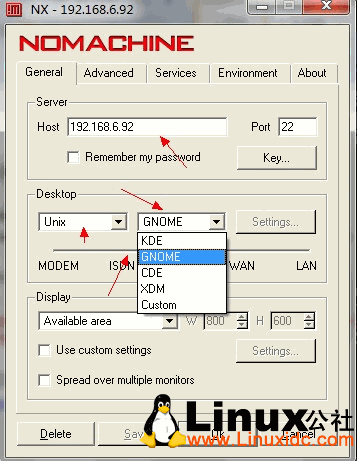
在这里我们需要输入Host和 远程桌面类型。 现在基本用的是KDE和GNOME。 如果Linux只安装了一个,就要选对。
下面还有一个选择网络类型的。
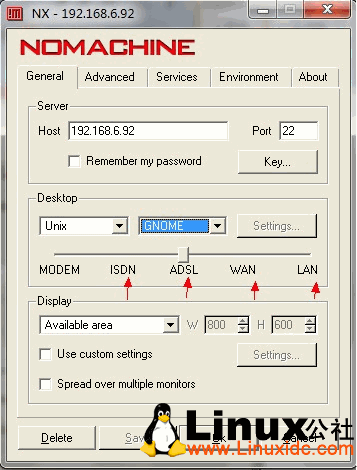
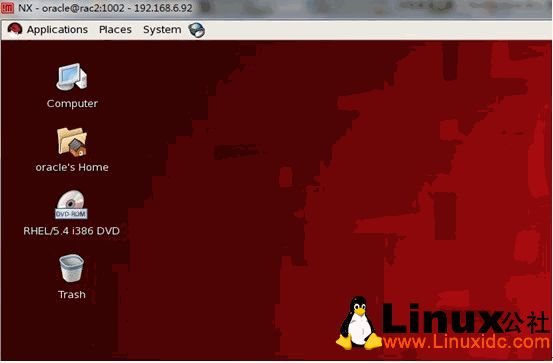
连接之后的画面:
这里有两点注意的地方:
1.不能用root用户进行连接
2.如果遇到一下问题,请检查环境变量:
To launch a desktop session, KDE or GNOME, the corresponding
commands, either startkde or gnome-session must be set in the PATH.
If the command is not available in the PATH, an error message like:"Cannot run 'startkde'. Please check that the requested application is in
the system PATH and that you have the rights to execute it."
NoMachine官网对这个错误做了说明:


魔乐社区(Modelers.cn) 是一个中立、公益的人工智能社区,提供人工智能工具、模型、数据的托管、展示与应用协同服务,为人工智能开发及爱好者搭建开放的学习交流平台。社区通过理事会方式运作,由全产业链共同建设、共同运营、共同享有,推动国产AI生态繁荣发展。
更多推荐


 1
1 0
0- 0


 已为社区贡献4条内容

所有评论(0)