maven springboot 分环境打包jar,根据不同环境生成不同脚本
背景我的springboot 项目要部署到多个环境,每个环境的数据库等配置都不一样,我希望不同环境打包不同的jar包,jar包名根据环境区分,并且我的项目里写了启动的shell脚本,这个shell脚本的内容根据不同环境也会不一样。需求按不同环境的配置来打包jar包名按不同环境来命令jar包内不能包含别的环境的配置文件,(否则反编译jar包可以看到别的环境的配置,我们公司业务是一个城市一个环境,各个
背景
我的springboot 项目要部署到多个环境,每个环境的数据库等配置都不一样,我希望不同环境打包不同的jar包,jar包名根据环境区分,并且我的项目里写了启动的shell脚本,这个shell脚本的内容根据不同环境也会不一样。
需求
- 按不同环境的配置来打包
- jar包名按不同环境来命名
- jar包内不能包含别的环境的配置文件,(否则反编译jar包可以看到别的环境的配置,我们公司业务是一个城市一个环境,各个城市间的配置不希望泄露)
- 启动shell脚本中的内容会根据不同环境来修改脚本内的内容
实现
pom.xml 配置多个profile
 <profiles>
        <profile>
            <id>test</id>
            <properties>
                <env>test</env>
            </properties>
        </profile>
        <profile>
            <id>handan</id>
            <properties>
                <env>handan</env>
            </properties>
        </profile>
        <profile>
            <id>baoji</id>
            <properties>
                <env>baoji</env>
            </properties>
        </profile>
        <profile>
            <id>eerduosi</id>
            <properties>
                <env>eerduosi</env>
            </properties>
        </profile>

        <profile>
            <id>haiyan</id>
            <properties>
                <env>haiyan</env>
            </properties>
        </profile>
        <profile>
            <id>dev</id>
            <properties>
                <env>dev</env>
            </properties>

        </profile>
        <profile>
            <id>local</id>
            <properties>
                <env>local</env>
            </properties>
            <activation>
                <activeByDefault>true</activeByDefault>
            </activation>
        </profile>
    </profiles>
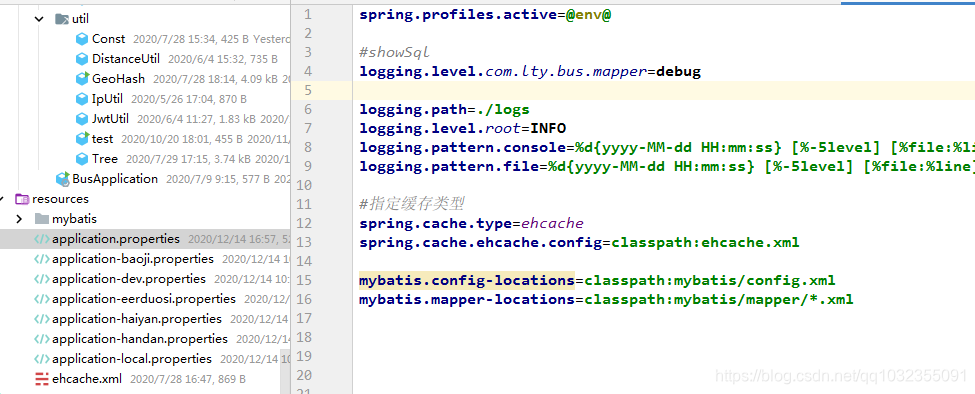
application.properties 配置spring.profiles.active 读取pom中的环境变量
spring.profiles.active=@env@
pom 指定生成的jar包名
<build>
    <finalName>bus-${env}</finalName>
</build>
这样就可以分环境打包了,打包命令 mvn package -P [环境名]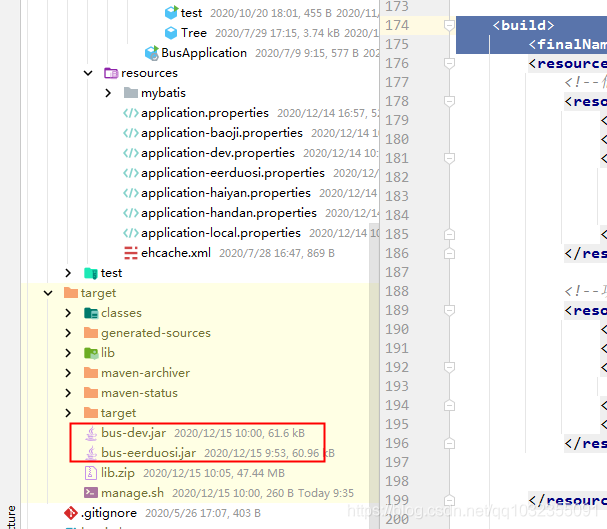
或者在idea中勾选环境打包,这就相当于上面的 mvn package -P 命令: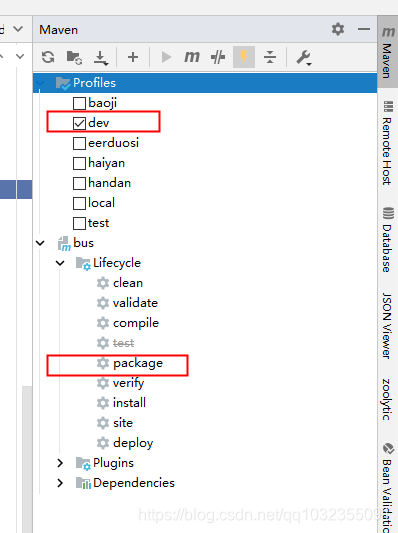
光这样还是不行的,我发现jar包中会把所有的application-xxx.properties都打进去,所以打包还要排除其他环境的application-xxx.properties配置。pom添加如下配置,相当于resource目录下只要所有的xml、application.properties、application-${env}.properties 文件。env就是当前打包的环境。
注意filtering设置true,因为application.properties文件中有变量 @env@ 要替换
 <build>
  <finalName>bus-${env}</finalName>
  <resources>
      <!--他城市的配置文件不打进包,保证安全性-->
      <resource>
          <directory>src/main/resources/</directory>
          <filtering>true</filtering>
          <includes>
              <include>**/*.xml</include>
              <include>application.properties</include>
              <include>application-${env}.properties</include>
          </includes>
      </resource>
  </resources>
 </build>
最后我写了shell脚本,启动jar包的,但是不同环境的jar包名不一样,shell中的内容就不一样,我要用pom中的env环境变量去替换shell脚本中的字符串
shell源码如下: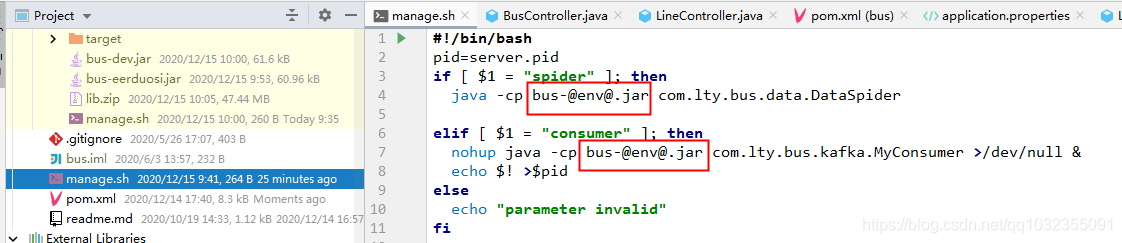
pom中添加如下,注意开启filtering,这个表示shell 中的 @env@ 字符串要被替换成pom profile 中设定的值
 <build>
  <finalName>bus-${env}</finalName>
  <resources>
    <resource>
        <directory>${basedir}</directory>
        <filtering>true</filtering>
        <includes>
            <include>**/*.sh</include>
        </includes>
        <targetPath>${project.build.directory}</targetPath>
    </resource>
  </resources>
这是最后打包后的shell文件内容,我们看到已经替换了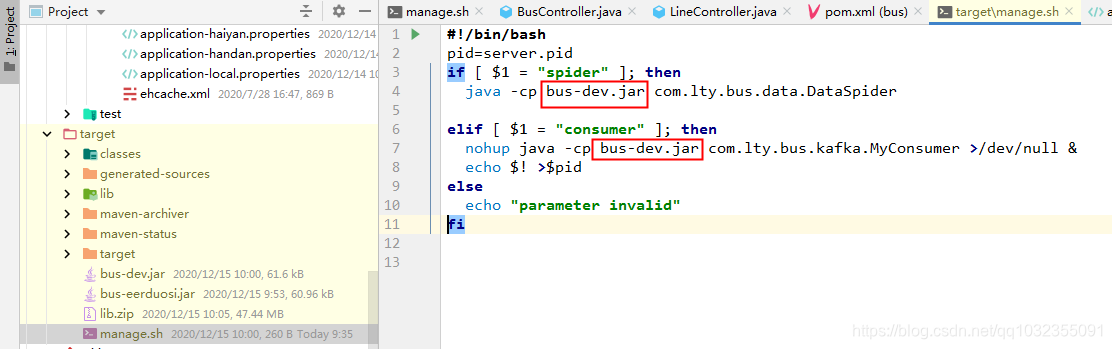
项目代码结构
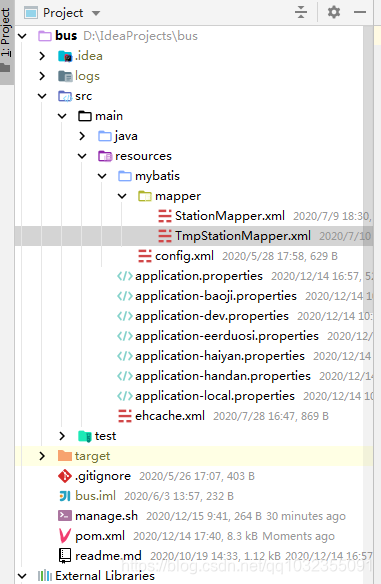
pom.xml 完整配置
<?xml version="1.0" encoding="UTF-8"?>
<project xmlns="http://maven.apache.org/POM/4.0.0"
         xmlns:xsi="http://www.w3.org/2001/XMLSchema-instance"
         xsi:schemaLocation="http://maven.apache.org/POM/4.0.0 http://maven.apache.org/xsd/maven-4.0.0.xsd">
    <modelVersion>4.0.0</modelVersion>

    <groupId>com.lty</groupId>
    <artifactId>bus</artifactId>
    <version>1.0</version>


    <parent>
        <groupId>org.springframework.boot</groupId>
        <artifactId>spring-boot-starter-parent</artifactId>
        <version>2.1.3.RELEASE</version>
        <relativePath/>

    </parent>

    <profiles>
        <profile>
            <id>test</id>
            <properties>
                <env>test</env>
            </properties>
        </profile>
        <profile>
            <id>handan</id>
            <properties>
                <env>handan</env>
            </properties>
        </profile>
        <profile>
            <id>baoji</id>
            <properties>
                <env>baoji</env>
            </properties>
        </profile>
        <profile>
            <id>eerduosi</id>
            <properties>
                <env>eerduosi</env>
            </properties>
        </profile>

        <profile>
            <id>haiyan</id>
            <properties>
                <env>haiyan</env>
            </properties>
        </profile>
        <profile>
            <id>dev</id>
            <properties>
                <env>dev</env>
            </properties>

        </profile>
        <profile>
            <id>local</id>
            <properties>
                <env>local</env>
            </properties>
            <activation>
                <activeByDefault>true</activeByDefault>
            </activation>
        </profile>
    </profiles>


    <dependencies>
        <dependency>
            <groupId>org.springframework.boot</groupId>
            <artifactId>spring-boot-starter-web</artifactId>
        </dependency>
        <dependency>
            <groupId>org.mybatis.spring.boot</groupId>
            <artifactId>mybatis-spring-boot-starter</artifactId>
            <version>1.3.2</version>
        </dependency>
        <!--        <dependency>-->
        <!--            <groupId>org.springframework.boot</groupId>-->
        <!--            <artifactId>spring-boot-starter-jdbc</artifactId>-->
        <!--        </dependency>-->
        <!--        <dependency>-->
        <!--            <groupId>com.alibaba</groupId>-->
        <!--            <artifactId>druid-spring-boot-starter</artifactId>-->
        <!--            <version>1.1.10</version>-->
        <!--        </dependency>-->
        <dependency>
            <groupId>org.postgresql</groupId>
            <artifactId>postgresql</artifactId>
            <version>42.2.2</version>
        </dependency>
        <dependency>
            <groupId>com.alibaba</groupId>
            <artifactId>druid</artifactId>
            <version>1.1.9</version>
        </dependency>

        <dependency>
            <groupId>com.alibaba</groupId>
            <artifactId>fastjson</artifactId>
            <version>1.2.47</version>
        </dependency>
        <dependency>
            <groupId>org.springframework.boot</groupId>
            <artifactId>spring-boot-devtools</artifactId>
            <scope>runtime</scope>
            <optional>true</optional>
        </dependency>
        <dependency>
            <groupId>org.projectlombok</groupId>
            <artifactId>lombok</artifactId>
            <optional>true</optional>
        </dependency>
        <dependency>
            <groupId>org.springframework.boot</groupId>
            <artifactId>spring-boot-starter-data-redis</artifactId>
        </dependency>
        <!--        <dependency>-->
        <!--            <groupId>com.baomidou</groupId>-->
        <!--            <artifactId>mybatis-plus-boot-starter</artifactId>-->
        <!--            <version>3.1.0</version>-->
        <!--        </dependency>-->
        <dependency>
            <groupId>com.auth0</groupId>
            <artifactId>java-jwt</artifactId>
            <version>3.4.1</version>
        </dependency>

        <dependency>
            <groupId>org.apache.kafka</groupId>
            <artifactId>kafka-clients</artifactId>
            <version>2.1.0</version>
        </dependency>
        <dependency>
            <groupId>org.springframework.boot</groupId>
            <artifactId>spring-boot-starter-cache</artifactId>
        </dependency>

        <dependency>
            <groupId>net.sf.ehcache</groupId>
            <artifactId>ehcache</artifactId>
            <version>2.10.6</version>
        </dependency>
        <dependency>
            <groupId>org.gavaghan</groupId>
            <artifactId>geodesy</artifactId>
            <version>1.1.3</version>
        </dependency>


        <dependency>
            <groupId>redis.clients</groupId>
            <artifactId>jedis</artifactId>
            <version>2.9.0</version>
        </dependency>

        <!-- swagger -->
        <!--        <dependency>-->
        <!--            <groupId>io.springfox</groupId>-->
        <!--            <artifactId>springfox-swagger-ui</artifactId>-->
        <!--            <version>2.8.0</version>-->
        <!--        </dependency>-->
        <!--        <dependency>-->
        <!--            <groupId>io.springfox</groupId>-->
        <!--            <artifactId>springfox-swagger2</artifactId>-->
        <!--            <version>2.8.0</version>-->
        <!--        </dependency>-->

    </dependencies>

    <build>
        <finalName>bus-${env}</finalName>
        <resources>
            <!--他城市的配置文件不打进包,保证安全性-->
            <resource>
                <directory>src/main/resources/</directory>
                <filtering>true</filtering>
                <includes>
                    <include>**/*.xml</include>
                    <include>application.properties</include>
                    <include>application-${env}.properties</include>
                </includes>
            </resource>

            <!--项目根目录下的shell 脚本打进target目录-->
            <resource>
                <directory>${basedir}</directory>
                <filtering>true</filtering>
                <includes>
                    <include>**/*.sh</include>
                </includes>
                <targetPath>${project.build.directory}</targetPath>
            </resource>


        </resources>

        <plugins>
            <plugin>
                <groupId>org.apache.maven.plugins</groupId>
                <artifactId>maven-jar-plugin</artifactId>
                <version>2.6</version>
                <configuration>
                    <archive>
                        <manifest>
                            <addClasspath>true</addClasspath>
                            <classpathPrefix>lib/</classpathPrefix>
                            <mainClass>com.lty.bus.BusApplication</mainClass>
                        </manifest>
                    </archive>
                </configuration>
            </plugin>
            <plugin>
                <groupId>org.apache.maven.plugins</groupId>
                <artifactId>maven-dependency-plugin</artifactId>
                <executions>
                    <execution>
                        <id>copy-dependencies</id>
                        <phase>package</phase>
                        <goals>
                            <goal>copy-dependencies</goal>
                        </goals>
                        <configuration>
                            <outputDirectory>${project.build.directory}/lib</outputDirectory>
                            <excludeTransitive>false</excludeTransitive>
                            <stripVersion>false</stripVersion>
                            <includeScope>runtime</includeScope>
                        </configuration>
                    </execution>
                </executions>
            </plugin>


        </plugins>
    </build>
</project>

魔乐社区(Modelers.cn) 是一个中立、公益的人工智能社区,提供人工智能工具、模型、数据的托管、展示与应用协同服务,为人工智能开发及爱好者搭建开放的学习交流平台。社区通过理事会方式运作,由全产业链共同建设、共同运营、共同享有,推动国产AI生态繁荣发展。
更多推荐


 1
1 0
0- 0


 已为社区贡献4条内容

所有评论(0)