jquery进度条_jQuery进度栏
jquery进度条
Introduction
介绍
A frequently asked question goes something like this: "I am running a long process in the background and I want to alert my client when the process finishes. How can I send a message to the browser?" Unfortunately, the short answer is "You can't." This is a restriction of the HTTP client / server protocol. The only time the server can send information to the client is in response to a request. So it follows that we need a way for the client to request a progress report and a way for the server to send the progress report. This article sets up the two parts of the application and builds them step-by-step so you can see exactly how this can be done. We use jQuery and AJAX in a way that allows the client script to call the server-side script and to get back an indicator of progress.
一个经常被问到的问题是这样的:“我在后台运行一个很长的进程,我想在进程结束时提醒我的客户端。如何向浏览器发送消息?” 不幸的是,简短的答案是“你不能。” 这是HTTP客户端/服务器协议的限制。 服务器只能向客户端发送信息的时间是响应请求。 因此,我们需要一种方法,让客户端请求进度报告,并让服务器发送进度报告。 本文设置了应用程序的两个部分,并逐步构建了它们,因此您可以确切地了解如何完成此工作。 我们使用jQuery和AJAX的方式允许客户端脚本调用服务器端脚本并获取进度指示器。
The Visual Effect in the Browser
浏览器中的视觉效果
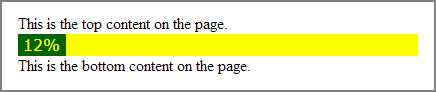
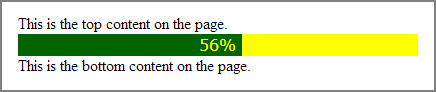
When we first load the client web page, we will have an area reserved for the progress bar. As progress occurs (as indicated by the signal from the server) our progress bar will become visible and move across from left to right until the process is completed. At the end, it will say "All Done" then it will fade from view and collapse out of the web page. Here are screen-capture examples of the visual effects. We used very bright colors for this example; your choice of size and color would be made with your design goals in mind. These are settable via CSS.
首次加载客户端网页时,将为进度栏保留一个区域。 随着进度的发生(如服务器发出的信号所示),我们的进度条将变为可见,并从左向右移动直到该过程完成。 最后,它会说“ All Done”(全部完成),然后它会从视图中淡出并折叠出网页。 这是视觉效果的屏幕截图示例。 在此示例中,我们使用了非常鲜艳的颜色; 您选择尺寸和颜色时会考虑您的设计目标。 这些可以通过CSS设置。
Before the process starts:
在过程开始之前:



The Server-Side Script
服务器端脚本
First we will build a simulation of the server side of the two-part application. The server will sense the progress of our long-running job and will return a single value to the client - an integer, representing the percentage of completion. In order to simulate the progress, we will use a simple counter which we will keep in the PHP session. By storing the counter in the session, we can add to it on each request to the server-side script, creating the same effect we might see if the server-side script were taking an actual measurement of our progress toward a goal. Have a look at line 15. It's only there to simulate some kind of variation in the reported progress. In real life, this "counting" scenario would be replaced by some programmatic method of determining the percentage of progress toward our goal. The determination, however it is made, would be set into a positive integer of range 1-99 which is echo'ed to the browser output stream (and therefore returned to the client-side jQuery script that called our progress monitor).
首先,我们将对两部分应用程序的服务器端进行仿真。 服务器将检测到我们长期运行的工作的进度,并将向客户端返回一个值-一个整数,表示完成百分比。 为了模拟进度,我们将使用一个简单的计数器,该计数器将保留在PHP会话中。 通过将计数器存储在会话中,我们可以将其添加到服务器端脚本的每个请求中,从而产生与服务器端脚本是否正在实际衡量实现目标的效果相同的效果。 看一下第15行。它只是用来模拟报告进度中的某种变化。 在现实生活中,这种“计数”方案将由确定目标实现进度百分比的某些编程方法代替。 但是,确定将被设置为范围1-99的正整数,该整数将回显到浏览器输出流(并因此返回到称为我们的进度监视器的客户端jQuery脚本)。
<?php // demo/jquery_progress_bar_server.php
error_reporting(E_ALL);

// SESSION ALLOWS US TO HAVE STATIC VARIABLES
session_start();

// IF THIS IS THE FIRST STEP, SET THE PROGRESS BAR TO ZERO
if (empty($_SESSION['progress']))
{
    $_SESSION['progress'] = 0;
}

// INCREMENT THE PROGRESS COUNTER
$advance = 10;
$advance = rand(5,10);
$_SESSION['progress'] += $advance;


// IF THIS IS THE LAST STEP, ELIMINATE THE SESSION VARIABLE
if ($_SESSION['progress'] > 99)
{
    unset($_SESSION['progress']);
    session_write_close();
    die('100');
}

// RETURN THE PROGRESS
echo $_SESSION['progress'];
The Client-Side Script
客户端脚本
Once we have the server side of the application running, it's time to build the client side (the part that runs in the client's browser). For this we use a conventional HTML5 web page. These notes apply to the snippet below.
一旦我们运行了应用程序的服务器端,就可以构建客户端(在客户端浏览器中运行的部分)了。 为此,我们使用常规HTML5网页。 这些说明适用于下面的代码段。
Line 8: This loads the latest "minified" jQuery framework.
第8行:这将加载最新的“最小化” jQuery框架。
Line 11-13: This starts the progress bar when the document.ready event fires. In a real-world example, this might be started by a browser event, such as a mouse click. But for our tests, it is nice to be able to refresh the browser and see the progress bar started immediately. The script here tells the browser to run the loadProgressBar() function, and to address it to the div named #progressBar. In theory it would be possible to have multiple progress bars on the page, but for this demonstration, one will do. Note that for this example to work, the document.ready event handler is not required. I only put it into the script as a placeholder since some other event might be the initial trigger for the progress bar.
第11-13行:触发document.ready事件时,将启动进度栏。 在实际示例中,这可能是由浏览器事件(例如鼠标单击)启动的。 但是对于我们的测试,很高兴能够刷新浏览器并看到进度栏立即开始。 此处的脚本告诉浏览器运行loadProgressBar()函数,并将其寻址到名为#progressBar的div。 从理论上讲,页面上可以有多个进度条,但是对于此演示,可以这样做。 请注意,要使此示例正常工作,不需要document.ready事件处理程序。 我只将其作为占位符放入脚本中,因为其他一些事件可能是进度条的初始触发器。
Line 16: Sets the interval value to 1,000 milliseconds (one second). Each time the interval timer expires, the script will call the server-side script for an update on the progress. There is no hard-and-fast rule about a one-second interval; you can choose any values that makes sense for your needs. You might want to experiment with faster or slower values.
第16行:将间隔值设置为1,000毫秒(一秒)。 每次间隔计时器到期时,脚本都会调用服务器端脚本以更新进度。 关于一秒的间隔,没有严格的规定; 您可以选择任何适合您需求的值。 您可能要尝试使用更快或更慢的值。
Line 17: Sets the interval timer to call the function loadProgressBar() every time the intval expires.
第17行:设置间隔定时器到调用函数loadProgressBar()每次INTVAL期满时间。
Line 22: Defines the loadProgressBar() function. The function takes one argument called "element." This is the name of the outer wrapper div that encapsulates the progress bar.
第22行:定义loadProgressBar()函数。 该函数采用一个称为“元素”的参数。 这是封装进度条的外部包装div的名称。
Line 23: Every time loadProgressBar() is run, it calls the server-side script and retrieves an integer representing the percentage of completion of the background task. This value is assigned to the JavaScript variable percent.
第23行:每次运行loadProgressBar()时,它都会调用服务器端脚本并检索一个整数,该整数表示后台任务的完成百分比。 此值分配给JavaScript变量percent 。
Line 24-28: If the percentage indicates that the progress is not yet complete, we recompute the width of the progress bar and animate the movement of the dark green background across the bar from left to right.
第24-28行:如果百分比表示进度尚未完成,我们将重新计算进度条的宽度,并在深绿色背景上从左到右动画化进度条。
Line 29-36: When the percentage indicates that progress is complete, we are finished with the progress bar. We take the following steps.
第29-36行:当百分比表示进度完成时,我们将显示进度条。 我们采取以下步骤。
1. We remove the interval timer -- there is no need to call this function again.
1.我们删除了间隔计时器-无需再次调用此函数。
2. We remove the background color from the progress bar.
2.我们从进度栏中删除背景色。
3. We set the alignment to "center" and write "All Done!" in the middle of the progress bar
3.我们将对齐方式设置为“居中”,然后输入“全部完成!”。 在进度条中间
4. We use jQuery fade() and hide() functionality to cause the progress bar to act like the Cheshire Cat, disappearing from view.
4.我们使用jQuery fade()和hide()功能使进度条像柴郡猫一样从视图中消失。
Line 43-47: Our CSS defines the size and color of #progressBar div.
第43-47行:我们CSS定义了#progressBar div的大小和颜色。
Line 49-57: Our CSS defines the div inside the #progressBar div. It starts with a width of zero (which grows with each call to the loadProgressBar() function) and a background-color of dark green. With this styling and the jQuery .animate() function, we can produce the visual effect of a progress bar that slides more-or-less smoothly across the screen.
第49-57行:我们CSS在#progressBar div中定义了div。 它以零宽度(随每次对loadProgressBar()函数的调用而增加)的宽度开始,并以深绿色作为背景色。 通过这种样式和jQuery .animate()函数,我们可以产生进度条的视觉效果,该进度条在屏幕上或多或少地平滑滑动。
<!DOCTYPE html>
<html dir="ltr" lang="en-US">
<head>
<meta charset="utf-8" />
<meta name="robots" content="noindex, nofollow" />
<meta name="viewport" content="width=device-width, initial-scale=1.0">
<script type="text/javascript" src="https://code.jquery.com/jquery-latest.min.js"></script>
<script>
$(document).ready(function(){
loadProgressBar($('#progressBar'));
});
// SET INTERVAL IN MILLISECONDS TO REPEAT THE FUNCTION
var intval = 1000;
var pBLoader = setInterval(function(){ loadProgressBar($("#progressBar")); }, intval);
// A VARIABLE TO HOLD THE RESPONSE FROM THE BACKGROUND SCRIPT
var percent = 0;
function loadProgressBar(element) {
$.get("jquery_progress_bar_server.php", function(percent){
if (percent <= 99){
var pbWidth = percent * element.width() / 100;
element.find('div').animate({ width:pbWidth }, 333);
element.find('div').html(percent + "% ");
} else{
clearInterval(pBLoader);
element.css('background-color', 'transparent' );
element.find('div').css('text-align', 'center' );
element.find('div').html("All Done!");
element.fadeTo(3000, 0.2, function(){
element.hide('slow');
});
}
});
}
</script>
<style type="text/css">
#progressBar {
width:400px;
height:22px;
background-color:yellow;
}
#progressBar div {
height:100%;
color:yellow;
font-family:verdana;
text-align:right;
line-height:22px; /* same as #progressBar height if we want text middle aligned */
width:0;
background-color:darkgreen;
}
</style>
<title>HTML5 Page with jQuery Progress Bar</title>
</head>
<body>
<div>This is the top content on the page.</div>
<div id="progressBar">
<div></div>
</div>
<div>This is the bottom content on the page.</div>
</body>
</html>
Try It!
试试吧!
Click here to see it in action! You can copy these scripts and install them on your own server. You might want to experiment with different colors and animation speeds. While this looks very simple - just a few lines of code - it gives a strong visual cue. With an "intelligent" server-side script you can reassure the client that progress is occurring, even if there is nothing to see until the process has been completed.
单击此处查看实际效果! 您可以复制这些脚本并将其安装在自己的服务器上。 您可能要尝试使用不同的颜色和动画速度。 尽管这看起来很简单-只需几行代码-但它具有很强的视觉提示。 使用“智能”服务器端脚本,即使在完成该过程之前也没什么可看的,您可以向客户端保证进度正在发生。
My Favorite Lazy Alternative
我最喜欢的懒惰替代品
Lazy programmers always seem to come up with really great alternatives to hard-working programmers' solutions. Their work gives almost 100% of the same results, but with much less work, and in the craft of programming, "lazy" is a virtue! So what might be a good alternative to the jQuery/AJAX interaction in this example? How about a spinner that appears at the time an upload is started and disappears when the upload is finished? The concept is just like the example above, but instead of calling a background script for a progress indicator, we can just load an image like this at the start of the upload, and hide it at the end. Easy!
懒惰的程序员似乎总是想出辛勤工作的程序员解决方案的绝佳替代方案。 他们的工作几乎提供了相同结果的100%,但工作却少得多,在编程技术中,“懒惰”是一种美德! 那么,在此示例中,什么可能是jQuery / AJAX交互的一个很好的选择? 上传开始时出现的微调框,上传完成后消失的微调框怎么样? 该概念与上面的示例类似,但是我们无需在进度指示器中调用背景脚本,而只需在上传开始时加载这样的图像,然后在结束时将其隐藏即可。 简单!
https://v.cdn.vine.co/w/ccf87cd9-assets/images/loading_black.gif
https://v.cdn.vine.co/w/ccf87cd9-assets/images/loading_black.gif
Please give us your feedback!
请给我们您的反馈意见!
If you found this article helpful, please click the "thumb's up" button below. Doing so lets the E-E community know what is valuable for E-E members and helps provide direction for future articles. If you have questions or comments, please add them. Thanks!
如果您发现本文有帮助,请单击下面的“竖起大拇指”按钮。 这样做可以使EE社区了解对EE成员有价值的内容,并为将来的文章提供指导。 如果您有任何问题或意见,请添加。 谢谢!
翻译自: https://www.experts-exchange.com/articles/14519/A-jQuery-Progress-Bar.html
jquery进度条

魔乐社区(Modelers.cn) 是一个中立、公益的人工智能社区,提供人工智能工具、模型、数据的托管、展示与应用协同服务,为人工智能开发及爱好者搭建开放的学习交流平台。社区通过理事会方式运作,由全产业链共同建设、共同运营、共同享有,推动国产AI生态繁荣发展。
更多推荐


 0
0 0
0- 0


 已为社区贡献5条内容


所有评论(0)