nacos-config-spring-boot-starter 配置动态变更
官方地址: Nacos Config Spring Boot 0.3.1
nacos-config-spring-boot-starter 配置动态变更
1、命名空间
如果命名空间(namespace)是默认的 public 则可以不指定,如果是其他命名空间必须在 application.properties 中指定如: nacos.config.namespace=2022-4-1-dev,一个项目只能引用一个命名空间,命名空间一般常分为 默认(public 不可删)、自定义(dev、prod、test)

2、nacos 配置中心添加配置
如果是默认的 DEFAULT_GROUP 分组可以不指定,nacos 配置中心对应 springboot 配置
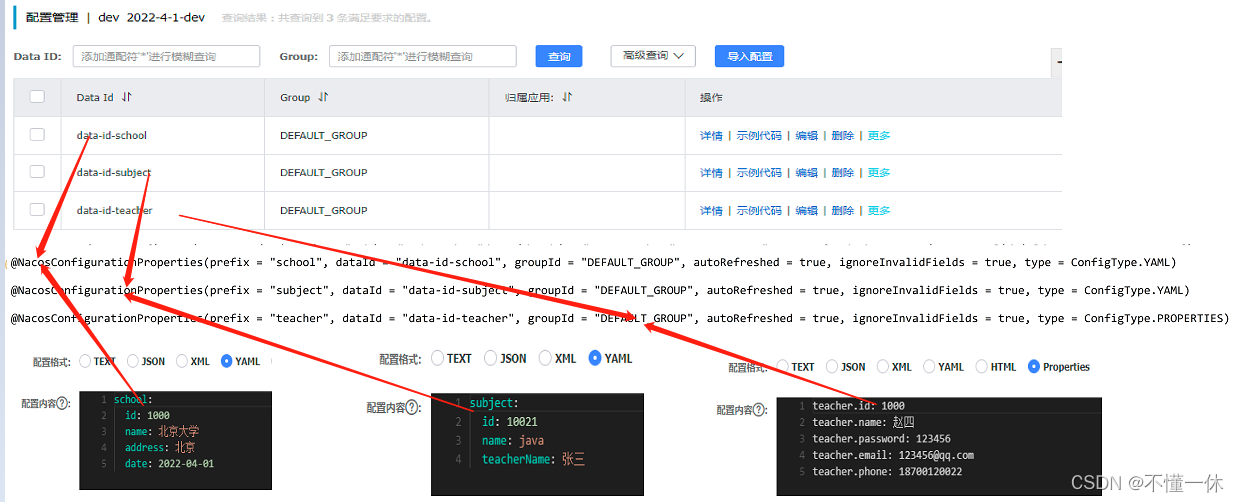
3、导入依赖
        <dependency>
            <groupId>org.springframework.boot</groupId>
            <artifactId>spring-boot-starter-web</artifactId>
        </dependency>
     <dependency>
         <groupId>com.alibaba.boot</groupId>
         <artifactId>nacos-config-spring-boot-starter</artifactId>
         <version>0.2.10</version>
     </dependency>
4、nacos 动态注入实体类
-
启动 Nacos Server ,默认地址 http://127.0.0.1:8848/nacos/
-
项目 application.properties 指定 Nacos Serve 地址
nacos.config.server-addr=127.0.0.1:8848 -
配置命名空间
nacos.config.namespace=2022-4-1-dev -
如果配置 bootstrap.properties 配置预加载
nacos.config.bootstrap.enable=true,则必须配置预加载文件nacos.config.data-ids
bootstrap.properties 配置:如下配置预加载文件
server.port=20000
nacos.config.bootstrap.enable=true
# 主配置服务器地址
nacos.config.server-addr=127.0.0.1:8848
# 如果 nacos conf/bootstrap.properties 中配置信息 nacos.core.auth.enabled=true 开启鉴权需要配置用户名密码
nacos.config.username=nacos
nacos.config.password=nacos
# 主配置 data-id
nacos.config.data-ids=data-id-school,data-id-subject,data-id-teacher
nacos.config.namespace=2022-4-1-dev
# 主配置 group-id
nacos.config.group=DEFAULT_GROUP
# 主配置 配置文件类型
nacos.config.type=yaml
# 主配置 最大重试次数
nacos.config.max-retry=10
# 主配置 开启自动刷新
nacos.config.auto-refresh=true
# 主配置 重试时间
nacos.config.config-retry-time=2333
# 主配置 配置监听长轮询超时时间
nacos.config.config-long-poll-timeout=46000
# 主配置 开启注册监听器预加载配置服务(除非特殊业务需求,否则不推荐打开该参数)
nacos.config.enable-remote-sync-config=true
其中 @NacosPropertySource 和 @NacosConfigurationProperties 类似springboot 的 @PropertySource 和 @ConfigurationProperties,springboot 的注解不支持动态刷新
// @NacosPropertySource(dataId = "data-id-student", groupId = "DEFAULT_GROUP", autoRefreshed = true, type = ConfigType.YAML)
@NacosConfigurationProperties(prefix = "student", dataId = "data-id-student", groupId = "DEFAULT_GROUP", autoRefreshed = true, ignoreInvalidFields = true, type = ConfigType.YAML)
public class Student {
    // @Value("${student.id}")
    private int id;
    // @Value("${student.name}")
    private String name;
    // @Value("${student.password}")
    private String password;
    // @Value("${student.email}")
    @Email // javax.validation.constraints.Email 类
    @NacosValue(value = "${teacher.email:123456@qq.com}", autoRefreshed = true)
    private String email;
}
使用 spring-boot的注解 @ConfigurationProperties ,但是无法接收到nacos的配置更新,想要自动更新需要实现 nacos 客户端监听器或使用 @NacosConfigurationProperties 注解
可以使用 spring-boot 的注解 @Value 替代 @NacosValue 注解,同样是无法实现 nacos 自动更新,需要实现 nacos客户端件铜器自行实现
5、注意点
@NacosConfigurationProperties(prefix = "student", dataId = "data-id-student", groupId = "DEFAULT_GROUP", autoRefreshed = true, ignoreInvalidFields = true, type = ConfigType.YAML)
@NacosConfigurationProperties 注解不支持配置 namespace,默认使用 application.properties 中配置的 nacos.config.namespace,如下可以指定多个命名空间
nacos.config.bootstrap.enable=true
# 主配置服务器地址
nacos.config.server-addr=127.0.0.1:8848

# 主配置 data-id
nacos.config.data-id=data-id-student
nacos.config.namespace=2022-4-1-prod
# 主配置 group-id
nacos.config.group=DEFAULT_GROUP
# 主配置 配置文件类型
nacos.config.type=yaml

nacos.config.ext-config[0].data-id=data-id-teacher
nacos.config.ext-config[0].group=DEFAULT_GROUP
nacos.config.ext-config[0].namespace=2022-4-1-dev
nacos.config.ext-config[0].type=properties

nacos.config.ext-config[1].data-id=data-id-school
nacos.config.ext-config[1].group=DEFAULT_GROUP
nacos.config.ext-config[1].namespace=2022-4-1-dev
nacos.config.ext-config[1].type=yaml

nacos.config.ext-config[2].data-id=data-id-subject
nacos.config.ext-config[2].group=DEFAULT_GROUP
nacos.config.ext-config[2].namespace=2022-4-1-dev
nacos.config.ext-config[2].type=yaml
如下使用,@ConfigurationProperties 注解支持多命名空间,但不支持刷新
@NacosConfigurationProperties(prefix = "student", dataId = "data-id-student", groupId = "DEFAULT_GROUP", autoRefreshed = true, ignoreInvalidFields = true, type = ConfigType.YAML)
@ConfigurationProperties(prefix = "school")
@ConfigurationProperties(prefix = "subject")
@ConfigurationProperties(prefix = "teacher")
demo 地址:https://gitee.com/LingYunYe/nacos-example-study/tree/master/nacos-springboot-config-examples

魔乐社区(Modelers.cn) 是一个中立、公益的人工智能社区,提供人工智能工具、模型、数据的托管、展示与应用协同服务,为人工智能开发及爱好者搭建开放的学习交流平台。社区通过理事会方式运作,由全产业链共同建设、共同运营、共同享有,推动国产AI生态繁荣发展。
更多推荐


 5
5 0
0- 0


 已为社区贡献12条内容

所有评论(0)