ajax 弹窗 提交表单,织梦自定义表单ajax提交及弹窗提示
废话不多说!直接进入主题!第一:我们先对织梦自定义表单进行ajax改造,将form元素的属性action、enctype、method去掉,添加id="form",form元素就变为引入jquery库,点击【这里】引用提交按钮增加 onclick="add_ajax()" 并把 type="submit" 修改为 type="button"例如:把ajax代码放在页面最底部(不能放在jquery.
废话不多说!直接进入主题!
第一:
我们先对织梦自定义表单进行ajax改造,将form元素的属性action、enctype、method去掉,添加id="form",form元素就变为
引入jquery库,点击【这里】引用
提交按钮增加 onclick="add_ajax()" 并把 type="submit" 修改为 type="button" 例如:
把ajax代码放在页面最底部(不能放在jquery库之前)
$.ajax({
type: "POST",
url: "/plus/diy.php",//提交到后台文件
data: $('#form').serialize(),//表单传值
success: function(data) {
alert(data);//弹窗显示PHP返回的值,如不需要显示,注释掉这行即可
$('#form')[0].reset();//提交后清除表单填写的值
}
});
return false;
}
到这里ajax提交后台就完成了!简单粗暴!
——
然而实际应用会发现,提示框与预期的不一样了!
下面我们接着来改造。
引用下面的css样式.win { display: none; }
.mask-layer { position: fixed; width: 100%; height: 100%; opacity: 0.5; filter: alpha(opacity=50); background-color: black; z-index: 99998; top: 0px; left: 0px; }
.window-panel { position: fixed; z-index: 99999; top: 50%; left: 50%; background-color: white; border-radius: 4px; }
.window-panel .title-panel { position: absolute; height: 36px; width: 100%; border-radius: 4px 4px 0 0; }
.window-panel .title { position: absolute; height: 36px; width: 100%; text-align: center; border-radius: 4px 4px 0 0; line-height: 36px; vertical-align: middle; background-color: whitesmoke; /*标题背景色*/ border-bottom: 1px solid rgb(233, 233, 233); z-index: 1; }
.window-panel h3 { font-size: 16px; margin: 0; }
.window-panel .close-btn { display: block; text-align: center; vertical-align: middle; position: absolute; width: 36px; height: 36px; line-height: 36px; right: 0px; text-decoration: none; font-size: 24px; color: black; background-color: #DBDBDB; border-radius: 2px; z-index: 1; }
.window-panel .close-btn:hover { background-color: #ccc; }
.window-panel .body-panel { position: absolute; width: 100%; top: 36px; border-radius: 0 0 4px 4px; z-index: 1; }
.window-panel .content, .window-panel .btns { text-align: center; }
.window-panel .content { padding: 18px 5px 0px 5px; font-size: 16px; min-height: 40px; line-height: 22px; }
.window-panel .w-btn { display: inline-block; width: 60px; height: 26px; line-height: 26px; background-color: #DE5923; color: white; cursor: pointer; text-align: center; border-radius: 2px; text-decoration: none; margin: 0 10px 0px 10px; border: none; }
.window-panel .w-btn:hover { background-color: #DA3E00; }
.window-panel .w-btn:focus { outline: 0 none; }
接着在引用如下JS(放在jq之后)var win = new function () {
// 确认框和提示框宽度
this.width = 300;
// 确认框和提示框高度
this.height = 172;
// 手动关闭窗体
this.close = function () {
$('.win iframe').remove();
$('.win').remove();
};
// 打开窗体
this.open = function (width, height, title, url, closed) {
this._close = function () {
this.close();
if ($.isFunction(closed)) closed();
};
var html = '
var jq = $(html);
jq.find(".window-panel").height(height).width(width).css("margin-left", -width / 2).css("margin-top", -height / 2);
jq.find(".title").find(":header").html(title);
jq.find(".body-panel").height(height - 36).attr("src", url);
jq.appendTo('body').fadeIn();
$(".win .window-panel").focus();
};
// 显示消息框
function messageBox(html, title, message) {
win.close();
var jq = $(html);
jq.find(".window-panel").height(win.height).width(win.width).css("margin-left", -win.width / 2).css("margin-top", -win.height / 2);
jq.find(".title-panel").height(win.height);
jq.find(".title").find(":header").html(title);
jq.find(".body-panel").height(win.height - 36);
jq.find(".content").html(message.replace('\r\n', '
'));
jq.appendTo('body').show();
$(".win .w-btn:first").focus();
}
// 确认框
this.confirm = function (title, message, selected) {
this._close = function (r) {
this.close();
if ($.isFunction(selected)) selected(r);
};
var html = '
确定取消
messageBox(html, title, message);
};
// 提示框
this.alert = function (title, message, closed) {
this._close = function () {
this.close();
if ($.isFunction(closed)) closed();
};
var html = '
确定
messageBox(html, title, message);
}
// 提示框
this.alertEx = function (message) {
this.alert('系统提示', message);
}
};
然后我们在第一步中的第四条的ajax代码稍微改动下function add_ajax(){
$.ajax({
type: "POST",
url: "/plus/diy.php",//提交到后台文件
data: $('#form').serialize(),//表单传值
success: function(data) {
win.alert('系统提示', data);//弹窗显示PHP返回的值
$('#form')[0].reset();//提交后清除表单填写的值
}
});
return false;
}
最终效果如图
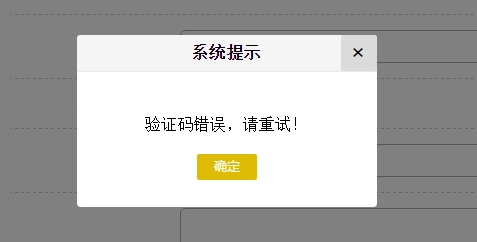
现在如果需要修改alert样式,直接修改上面提到的样式,或者重新构造alert弹窗的结构,就去修改JS代码!
附上alert弹窗demo
https://pan.baidu.com/s/10E7myIzUAGImHkV67SMb1A

魔乐社区(Modelers.cn) 是一个中立、公益的人工智能社区,提供人工智能工具、模型、数据的托管、展示与应用协同服务,为人工智能开发及爱好者搭建开放的学习交流平台。社区通过理事会方式运作,由全产业链共同建设、共同运营、共同享有,推动国产AI生态繁荣发展。
更多推荐


 0
0 0
0- 0


 已为社区贡献7条内容

所有评论(0)