springboot配置监听redis的key的变化
·
1.确认redis已经开启下面功能
修改配置文件中notify-keyspace-events ""改成notify-keyspace-events KEA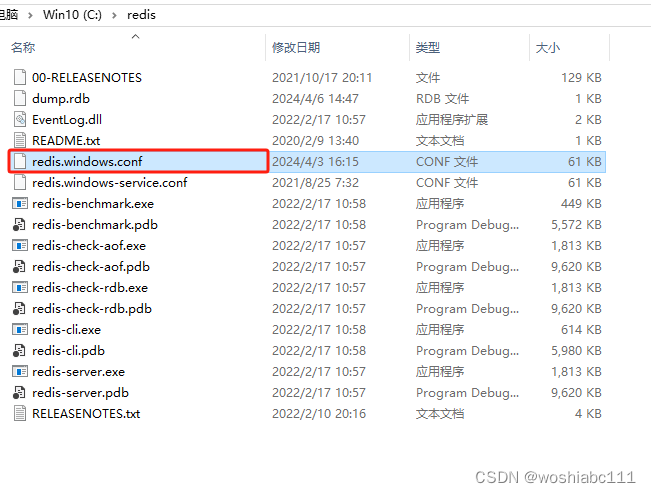
也可选择点击redis-cli.exe使用命令行修改
config set notify-keyspace-events KEA
2.pom.xml中的redis和application.yml的配置
<!--redis-->
<dependency>
  		<groupId>org.springframework.boot</groupId>
  		<artifactId>spring-boot-starter-data-redis</artifactId>
</dependency>
<dependency>
      	<groupId>redis.clients</groupId>
      	<artifactId>jedis</artifactId>
</dependency>
spring:
  redis:
    database: 0
    host: 127.0.0.1
    port: 6379
    # 连接超时时间(毫秒)
    timeout: 10000
    lettuce:
      pool:
        # 最大连接数
        max-active: 8
        # 连接池最大阻塞等待时间(使用负值表示没有限制)
        max-wait: -1
        # 连接池中的最大空闲连接
        max-idle: 2
        # 连接池中的最小空闲连接
        min-idle: 0
3.写RedisConfig类
package com.ruoyi.EnableScheduling;

import java.time.Duration;

import org.springframework.beans.factory.annotation.Autowired;
import org.springframework.beans.factory.annotation.Value;
import org.springframework.boot.autoconfigure.data.redis.RedisProperties;
import org.springframework.context.annotation.Bean;
import org.springframework.context.annotation.Configuration;
import org.springframework.data.redis.connection.RedisConnectionFactory;
import org.springframework.data.redis.connection.RedisStandaloneConfiguration;
import org.springframework.data.redis.connection.jedis.JedisClientConfiguration;
import org.springframework.data.redis.connection.jedis.JedisConnectionFactory;
import org.springframework.data.redis.listener.PatternTopic;
import org.springframework.data.redis.listener.RedisMessageListenerContainer;

import redis.clients.jedis.JedisPoolConfig;


@Configuration
public class RedisConfig {

	@Value("${spring.redis.host}")
	private String redisHost;

	@Value("${spring.redis.port}")
	private int redisPort;

	@Value("${spring.redis.timeout}")
	private int redisTimeout;

//	@Value("${spring.redis.password}")
//	private String redisAuth;

//	@Value("${spring.redis.database}")
//	private int redisDb;
//
//	@Value("${spring.redis.pool.max-active}")
//	private int maxActive;
//
//	@Value("${spring.redis.pool.max-wait}")
//	private int maxWait;
//
//	@Value("${spring.redis.pool.max-idle}")
//	private int maxIdle;
//
//	@Value("${spring.redis.pool.min-idle}")
//	private int minIdle;

	@Autowired
	RedisProperties redisProperties;


	@Bean
	public RedisConnectionFactory connectionFactory() {
		JedisPoolConfig poolConfig = new JedisPoolConfig();
		poolConfig.setMaxTotal(8);
	    poolConfig.setMaxIdle(2);
	    poolConfig.setMaxWaitMillis(-1);
	    poolConfig.setMinIdle(0);
	    poolConfig.setTestOnBorrow(true);
	    poolConfig.setTestOnReturn(false);
	    poolConfig.setTestWhileIdle(true);

	    JedisClientConfiguration clientConfig = JedisClientConfiguration.builder()
	            .usePooling().poolConfig(poolConfig).and().readTimeout(Duration.ofMillis(redisTimeout)).build();

	    // 单点redis
	    RedisStandaloneConfiguration redisConfig = new RedisStandaloneConfiguration();
	    redisConfig.setHostName(redisHost);
	    //redisConfig.setPassword(RedisPassword.of(redisAuth));
	    redisConfig.setPort(redisPort);
	    redisConfig.setDatabase(0);

	    return new JedisConnectionFactory(redisConfig,clientConfig);
	}

	@Autowired
    private RedisUpdateAndAddListener redisUpdateAndAddListener;


	@Bean
	RedisMessageListenerContainer container(RedisConnectionFactory connectionFactory) {
		 RedisMessageListenerContainer container = new RedisMessageListenerContainer();
	     container.setConnectionFactory(connectionFactory());
	     //监听所有的key的set事件
//	      '__key*__:*'#对所有库键空间通知
//	      '__keyspace@0__:*' #是对db0数据库键空间通知
//	      '__keyspace@0__:test*' #是对db0数据库,key前缀为test所有键的键空间通知
	     container.addMessageListener(redisUpdateAndAddListener, new PatternTopic("__keyevent@*__:set"));
	     System.out.println("监听事件启动!----------------------------------");
	     return container;
	}

}
4.写RedisUpdateAndAddListener类
package com.ruoyi.EnableScheduling;

import org.springframework.data.redis.connection.Message;
import org.springframework.data.redis.connection.MessageListener;
import org.springframework.stereotype.Component;


@Component
public class RedisUpdateAndAddListener implements MessageListener {

	@Override
	public void onMessage(Message message, byte[] pattern) {
		// TODO Auto-generated method stub
		 String topic = new String(pattern);
	     String msg = new String(message.getBody());
	     System.out.println("收到key更新或修改,消息主题是:"+ topic+",消息内容是:"+msg);
	}
}
在Another Redis Desktop Manager客户端中修改key的值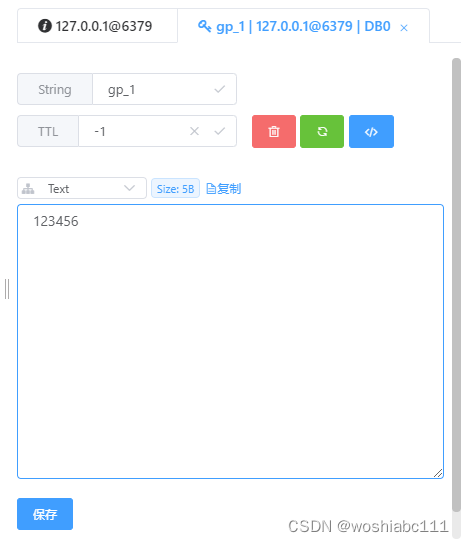
返回结果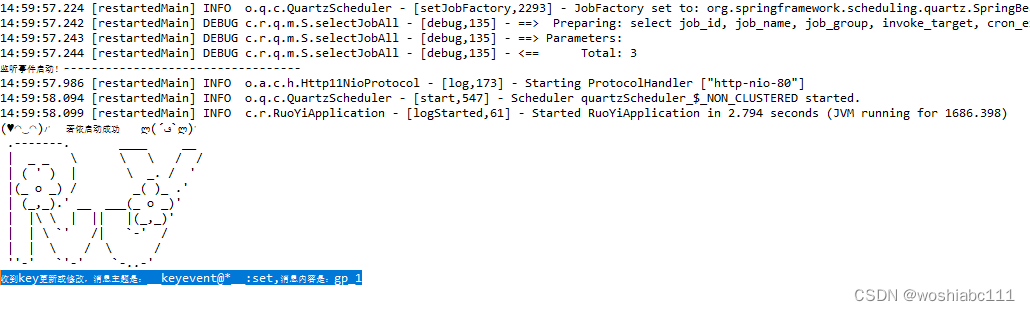 收到key更新或修改,消息主题是:keyevent@*:set,消息内容是:gp_1

魔乐社区(Modelers.cn) 是一个中立、公益的人工智能社区,提供人工智能工具、模型、数据的托管、展示与应用协同服务,为人工智能开发及爱好者搭建开放的学习交流平台。社区通过理事会方式运作,由全产业链共同建设、共同运营、共同享有,推动国产AI生态繁荣发展。
更多推荐


 5
5 0
0- 0


 已为社区贡献4条内容

所有评论(0)