八个数据标注文件操作的奇技淫巧
一:polygon2bbox
二:maskImg2json
三.保存四边形矩形框bbox标注信息
四.保存不规则边框polygon标注信息
五:将labelImg标注的xml BBox文件转成json文件
六:voc中txt格式的,也转为json格式
七:labelme标注的json文件,打印到原图image上
八:labelme的json数据转换成coco数据读取所需的json文件
前言:在做视觉图像处理中,尤其是AI领域,会经常与标注数据打交道。其中常用的标注软件也就是labelImg和labelme,与之对应的就是csv文件和json文件用于保存标签,有时候也会在VOC中用到txt文件形式。所以,标注数据的操作也成了必备入门技能之一。
温馨提示:重代码提醒,建议收藏后需要时候慢慢学习。
一:polygon2bbox
任务描述:
采用labelme标注的图像是多边形Polygon,转为矩形标注BBox xmin,ymin,xmax,ymax 读取数据是json文件
#######################
# 任务描述:
# 采用labelme标注的图像是多边形Polygon,转为矩形标注BBox xmin,ymin,xmax,ymax
# 公众号:小白CV
#######################

import os
import json
import numpy as np
import PIL.Image
import PIL.ImageDraw
import base64
from PIL import Image
import io
import cv2
import matplotlib.pyplot as plt

def polygons_to_mask(img_shape, polygons):
    mask = np.zeros(img_shape, dtype=np.uint8)
    mask = PIL.Image.fromarray(mask)
    xy = list(map(tuple, polygons))
    PIL.ImageDraw.Draw(mask).polygon(xy=xy, outline=1, fill=1)
    mask = np.array(mask, dtype=bool)
    return mask

def mask2box(mask):  # [x1,y1,w,h]
    '''从mask反算出其边框
    mask:[h,w]  0、1组成的图片
    1对应对象,只需计算1对应的行列号(左上角行列号,右下角行列号,就可以算出其边框)
    '''
    index = np.argwhere(mask == 1)
    rows = index[:, 0]
    clos = index[:, 1]
    # 解析左上角行列号
    left_top_r = np.min(rows)  # y
    left_top_c = np.min(clos)  # x

    # 解析右下角行列号
    right_bottom_r = np.max(rows)
    right_bottom_c = np.max(clos)

    # return [(left_top_r,left_top_c),(right_bottom_r,right_bottom_c)]
    # return [(left_top_c, left_top_r), (right_bottom_c, right_bottom_r)]
    return [left_top_c, left_top_r, right_bottom_c, right_bottom_r]  # [x1,y1,x2,y2]

def getbbox(points):
    # 多边形变矩形框bbox
    # img = np.zeros([self.height,self.width],np.uint8)
    # cv2.polylines(img, [np.asarray(points)], True, 1, lineType=cv2.LINE_AA)  # 画边界线
    # cv2.fillPoly(img, [np.asarray(points)], 1)  # 画多边形 内部像素值为1
    polygons = points

    mask = polygons_to_mask([1024, 1024], polygons)
    return mask2box(mask)  # [x1,y1,w,h]

# 构建COCO的annotation字段
def annotation(points):

    bbox = list(map(float, getbbox(points)))

    return bbox

# 法一
def data_transfer(json_path):
    bbox_list = []
    with open(json_path, 'r') as fp:
        #print(json_path)

        data = json.load(fp)  # 加载json文件
        for shapes in data['shapes']:

            points = shapes['points']
            points.append([points[0][0], points[1][1]])
            points.append([points[1][0], points[0][1]])

            bbox = annotation(points)
            bbox_list.append(bbox)

    return bbox_list

def contour_label(json_path, image):
    with open(json_path, 'r') as fp:
        #print(json_path)

        data = json.load(fp)  # 加载json文件
        for shapes in data['shapes']:
            points = shapes['points']
            contour = np.array([points])
            contour = np.trunc(contour).astype(int)
            #print(contour, type(contour))
            #print("***")
            cv2.drawContours(image, [contour], 0, (0, 0, 255), 2)  # cv2.FILLED填充
    return image

# 法二:
def simple_label(json_path, image):
    with open(json_path, 'r') as fp:
        #print(json_path)

        data = json.load(fp)  # 加载json文件
        for shapes in data['shapes']:
            points = np.array(shapes['points'])

            y, x, y2, x2 = np.min(points[:, 1]), np.min(points[:, 0]), np.max(points[:, 1]), np.max(points[:, 0])
            print(y, x, y2, x2)
            cv2.rectangle(image, (int(x), int(y)), (int(x2), int(y2)), (0, 0, 255), thickness=2)

    return image

if __name__=="__main__":
    labelme_json = r"E:\temp\label"
    png_json = r"E:\temp\image"

    for (path, dirs, files) in os.walk(labelme_json):
        for filename in files:
            zhong_json_path = os.path.join(path, filename)

            img = cv2.imread(os.path.join(png_json, filename.replace(".json", ".jpg")))
            img_bbox = img.copy()
            img_contour = img.copy()
            img_simple_bbox = img.copy()

            zhong_contour_image = contour_label(zhong_json_path, img_contour)
            zhong_bbox_list = data_transfer(zhong_json_path)

            plt.figure(figsize=[15, 5])

            plt.subplot(131)
            plt.title("contour")
            plt.imshow(zhong_contour_image)

            for box in zhong_bbox_list:
                x, y, x2, y2 = box
                cv2.rectangle(img_bbox, (int(x), int(y)), (int(x2), int(y2)), (0, 0, 255), thickness=2)

            plt.subplot(132)
            plt.title("Method 1:mask2box")
            plt.imshow(img_bbox)

            simple_image = simple_label(zhong_json_path, img_simple_bbox)
            plt.subplot(133)
            plt.title("Method 2:np.min[:, 1], np.max(points[:, 0])")
            plt.imshow(img_bbox)

            plt.show()
展示结果如下:
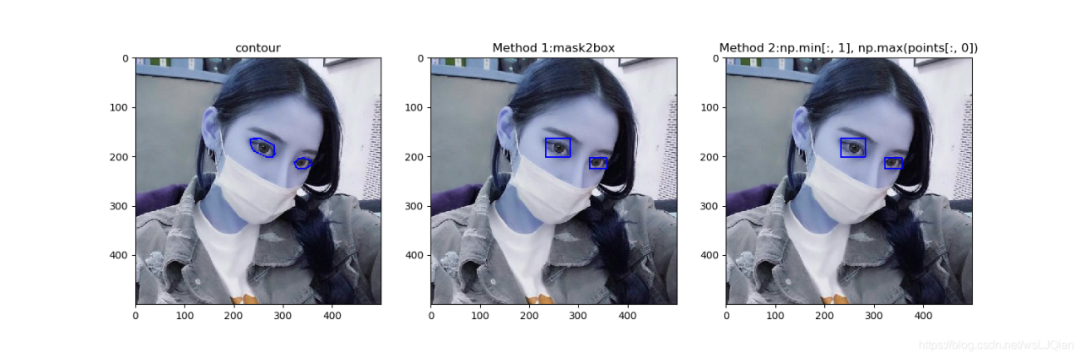
方法1和方法2都在上面了。这里把简单点的方法单独抽出来做展示,推荐这个:
def data_transfer(json_path):
    bbox_list = []
    with open(json_path, 'r') as fp:
        #print(json_path)

        data = json.load(fp)  # 加载json文件
        for shapes in data['shapes']:

            points = np.array(shapes['points'])
            bbox = [np.min(points[:, 1]), np.min(points[:, 0]), np.max(points[:, 1]), np.max(points[:, 0])]
            #print(bbox)

            bbox_list.append(bbox)

    return bbox_list
二:maskImg2json
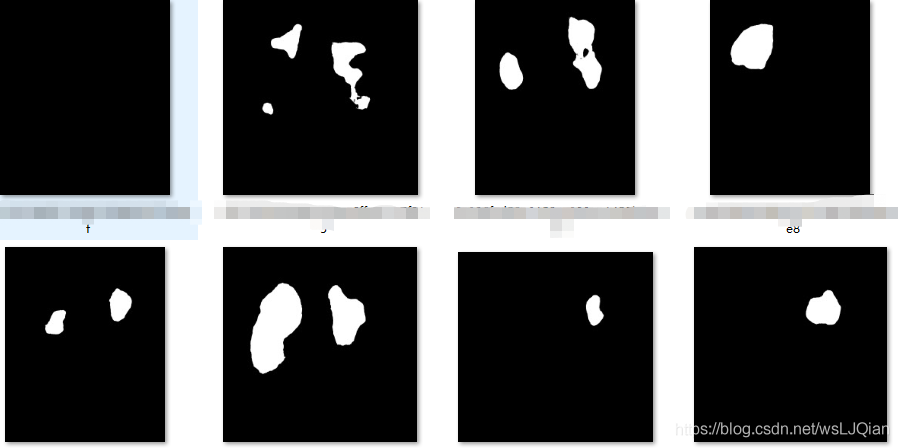
有时候没法直接获取标注的json文件,只有黑白色的mask图像。这里需要将mask,转为labelme标注的json文件
################
# 有时候没法直接获取标注的json文件,只有黑白色的mask图像
# 这里需要将mask,转为labelme标注的json文件
##################

import os
import cv2
import json

def mask2json():
    mask_path = r"Z:\results\mask_pd_qlj"
    save_json_path = r"Z:\results\label/"
    label = "TB"

    for (path, dirs, files) in os.walk(mask_path):
        for filename in files:
            A = dict()
            listbigoption=[]

            prefile_path = os.path.join(path, filename)
            print(prefile_path)
            pred_seged = cv2.imread(prefile_path, 0)

            try:
                _, contours, _ = cv2.findContours(pred_seged, cv2.RETR_EXTERNAL, cv2.CHAIN_APPROX_NONE)
            except:
                contours, _ = cv2.findContours(pred_seged, cv2.RETR_EXTERNAL, cv2.CHAIN_APPROX_NONE)

            print(len(contours))
            if len(contours) != 0:
                for contour in contours:

                    if len(contour)>=3:
                        listobject = dict()
                        listxy = []
                        for e in contour:
                            listxy.append(e[0].tolist())
                            #print(e,e[0][0],e[0][1])
                            #x, y = e[0][0], e[0][1]
                        print(listxy)

                        listobject['points'] = listxy
                        listobject['line_color'] = 'null'
                        listobject['label'] = label
                        listobject['fill_color'] = 'null'
                        listbigoption.append(listobject)

                A['lineColor'] = [0, 255, 0, 128]
                A['imageData'] = 'imageData'
                A['fillColor'] = [255, 0, 0, 128]
                A['imagePath'] = filename
                A['shapes'] = listbigoption
                A['flags'] = {}
                with open(save_json_path + filename.replace(".png", ".json"), 'w') as f:
                    json.dump(A, f)
if __name__=="__main__":
    mask2json()
三.保存四边形矩形框bbox标注信息
任意四边形坐标标记格式:tl_x,tl_y,tr_x,tr_y,br_x,br_y,bl_x,bl_y。从左上点开始顺时针旋转的四个顶点的坐标,如下图所示:
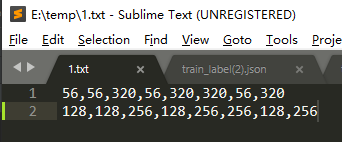
将TXT文档中标注信息,存储到labelme标注的json文件内,代码如下:
import json
import base64
from PIL import Image
import io
import os
import cv2
import numpy as np


def generate_json(file_dir, file_name):
    str_json = {}
    shapes = []
    # 读取坐标
    fr = open(os.path.join(file_dir, file_name))
    for line in fr.readlines():  # 逐行读取,滤除空格等
        print(line.strip())
        print(type(line.strip()))
        lineArr = line.strip().split(',')
        print("lineArr:", lineArr)
        points = []
        points.append([float(lineArr[0]), float(lineArr[1])])
        points.append([float(lineArr[2]), float(lineArr[3])])
        points.append([float(lineArr[4]), float(lineArr[5])])
        points.append([float(lineArr[6]), float(lineArr[7])])
        print(points)  # 从左上点开始顺时针旋转的四个顶点的坐标
        shape = {}
        shape["label"] = "plate_1"
        shape["points"] = points
        shape["line_color"] = []
        shape["fill_color"] = []
        shape["flags"] = {}
        shapes.append(shape)
    str_json["version"] = "3.14.1"
    str_json["flags"] = {}
    str_json["shapes"] = shapes
    str_json["lineColor"] = [0, 255, 0, 128]
    str_json["fillColor"] = [255, 0, 0, 128]
    picture_basename = file_name.replace('.txt', '.png')
    str_json["imagePath"] = picture_basename
    img = cv2.imread(os.path.join(file_dir, picture_basename))
    str_json["imageHeight"] = img.shape[0]
    str_json["imageWidth"] = img.shape[1]
    str_json["imageData"] = base64encode_img(os.path.join(file_dir, picture_basename))
    return str_json


def base64encode_img(image_path):
    src_image = Image.open(image_path)
    output_buffer = io.BytesIO()
    src_image.save(output_buffer, format='JPEG')
    byte_data = output_buffer.getvalue()
    base64_str = base64.b64encode(byte_data).decode('utf-8')
    return base64_str

if __name__=="__main__":
    """
    txt文件和图像(png)文件,均存储在下面这个文件夹下
    生成的json文件,也保存到这个文件夹下
    """
    file_dir = r"E:\temp"
    file_name_list = [file_name for file_name in os.listdir(file_dir) \
                      if file_name.lower().endswith('txt')]

    for file_name in file_name_list:
        str_json = generate_json(file_dir, file_name)
        json_data = json.dumps(str_json, indent=2, ensure_ascii=False)
        jsonfile_name = file_name.replace(".txt", ".json")
        f = open(os.path.join(file_dir, jsonfile_name), 'w')
        f.write(json_data)
        f.close()
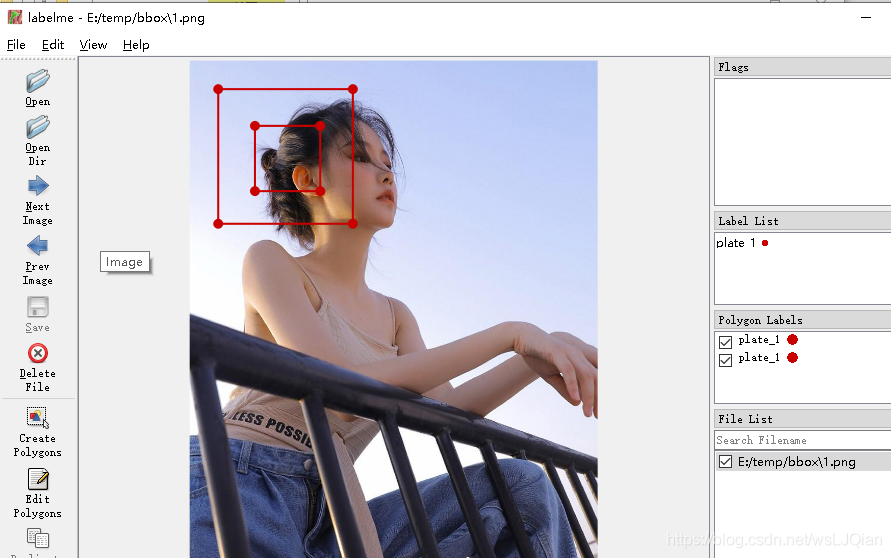
检验下生成的json,是否成功。用labelme打开,查看标注结果,进行检验:
四.保存不规则边框polygon标注信息
这里与bbox的区别就在于:
bbox只有四个坐标点,按顺时针一次排布;
polygon是大于2个点都可以的,坐标的排序也是按照顺时针进行排布的。
所以,在poly中坐标点的数量是不固定的。在读取时候,依次将坐标点存储进来就行
import json
import base64
from PIL import Image
import io
import os
import cv2
import numpy as np

def generate_json(file_dir, file_name):
    str_json = {}
    shapes = []
    # 读取坐标
    fr = open(os.path.join(file_dir, file_name))
    for line in fr.readlines():  # 逐行读取,滤除空格等
        print(line.strip())
        print(type(line.strip()))
        lineArr = line.strip().split(',')
        print("lineArr:", lineArr)
        points = []
        for i in range(0, len(lineArr), 2):
            points.append([float(lineArr[i]), float(lineArr[i+1])])
        print(points)  # 从左上点开始顺时针旋转的四个顶点的坐标
        shape = {}
        shape["label"] = "plate_1"
        shape["points"] = points
        shape["line_color"] = []
        shape["fill_color"] = []
        shape["flags"] = {}
        shapes.append(shape)
    str_json["version"] = "3.14.1"
    str_json["flags"] = {}
    str_json["shapes"] = shapes
    str_json["lineColor"] = [0, 255, 0, 128]
    str_json["fillColor"] = [255, 0, 0, 128]
    picture_basename = file_name.replace('.txt', '.png')
    str_json["imagePath"] = picture_basename
    img = cv2.imread(os.path.join(file_dir, picture_basename))
    str_json["imageHeight"] = img.shape[0]
    str_json["imageWidth"] = img.shape[1]
    str_json["imageData"] = base64encode_img(os.path.join(file_dir, picture_basename))
    return str_json


def base64encode_img(image_path):
    src_image = Image.open(image_path)
    output_buffer = io.BytesIO()
    src_image.save(output_buffer, format='JPEG')
    byte_data = output_buffer.getvalue()
    base64_str = base64.b64encode(byte_data).decode('utf-8')
    return base64_str

if __name__=="__main__":
    """
    txt文件和图像(png)文件,均存储在下面这个文件夹下
    生成的json文件,也保存到这个文件夹下
    """
    file_dir = r"E:\temp\polygon"
    file_name_list = [file_name for file_name in os.listdir(file_dir) \
                      if file_name.lower().endswith('txt')]

    for file_name in file_name_list:
        str_json = generate_json(file_dir, file_name)
        json_data = json.dumps(str_json, indent=2, ensure_ascii=False)
        jsonfile_name = file_name.replace(".txt", ".json")
        with open(os.path.join(file_dir, jsonfile_name), 'w') as f:
            f.write(json_data)
同样,labelme打开,查看标注结果:
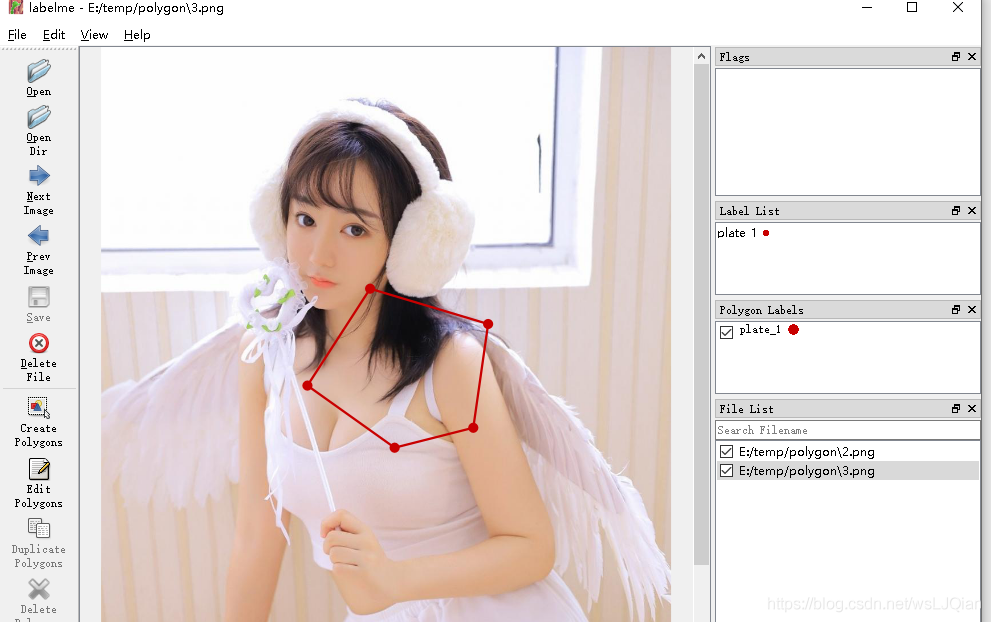
参考链接:https://blog.csdn.net/skye_95/article/details/103635846
五:将labelImg标注的xml BBox文件转成json文件
labelImg只能标注矩形框标签,比较的单一。但是labelme就比较的丰富,能够标注不规则图形。将labelImg标注的BBox标签文件xml,转为labelme格式的json文件
###########################
# labelImg只能标注矩形框标签,比较的单一。但是labelme就比较的丰富,能够标注不规则图形
# 将labelImg标注的BBox标签文件xml,转为labelme格式的json文件
##########################

from xml.etree import ElementTree as et
import json
import glob
import os

def readxml_et(xml_file, save_json_path):
    tree = et.ElementTree(file=xml_path)
    root = tree.getroot()
    A = dict()
    listbigoption = []
    for child_root in root:
        if child_root.tag == 'filename':
            imagePath = child_root.text
        if child_root.tag == 'object':
            listobject = dict()
            for xylabel in child_root:
                if xylabel.tag == 'name':
                    label = xylabel.text
                if xylabel.tag == 'bndbox':
                    xmin = int(xylabel.find('xmin').text)
                    ymin = int(xylabel.find('ymin').text)
                    xmax = int(xylabel.find('xmax').text)
                    ymax = int(xylabel.find('ymax').text)
                    listxy=[[xmin,ymin],[xmax,ymin],[xmax,ymax],[xmin,ymax]]

                    listobject['points'] = listxy
                    listobject['line_color'] = 'null'
                    listobject['label'] = label
                    listobject['fill_color'] = 'null'
                    listbigoption.append(listobject)
                # print(listbigoption)
    A['lineColor'] = [0, 255, 0, 128]
    A['imageData'] = 'imageData'
    A['fillColor'] = [255, 0, 0, 128]
    A['imagePath'] = imagePath
    A['shapes'] = listbigoption
    A['flags'] = {}
    with open(save_json_path + imagePath.replace(".png", ".json"), 'w') as f:
        json.dump(A, f)

if __name__=='__main__':
    labelme_xml_path = r'F:\xml_labels'
    save_json_path = r"F:\labels/"
    for root, dirs, files in os.walk(labelme_xml_path):
        for filename in files:  # 遍历所有文件
            xml_path = os.path.join(root, filename)
            print(xml_path)
            readxml_et(xml_path, save_json_path)
六:voc中txt格式的,也转为json格式
from xml.etree import ElementTree as et
import json
import glob
import os

def readxml_et(file_path, save_json_path):
    A = dict()
    listbigoption = []
    with open(file_path, "r") as f:
        for line in f.readlines():
            listobject = dict()
            line = line.strip('\n')  # 去掉列表中每一个元素的换行符

            x_center = int(float(line.split(" ")[1]) * 512)
            y_center = int(float(line.split(" ")[2]) * 512)
            x_shift = int(float(line.split(" ")[3]) * 512)
            y_shift = int(float(line.split(" ")[4]) * 512)

            xmin = x_center - x_shift
            xmax = x_center + x_shift
            ymin = y_center - y_shift
            ymax = y_center + y_shift
            listxy=[[xmin,ymin],[xmax,ymin],[xmax,ymax],[xmin,ymax]]

            listobject['points'] = listxy
            listobject['line_color'] = 'null'
            listobject['label'] = "jie_jie"
            listobject['fill_color'] = 'null'
            listbigoption.append(listobject)

    A['lineColor'] = [0, 255, 0, 128]
    A['imageData'] = 'imageData'
    A['fillColor'] = [255, 0, 0, 128]
    A['imagePath'] = os.path.basename(file_path).replace(".txt", ".png")
    A['shapes'] = listbigoption
    A['flags'] = {}
    with open(save_json_path + os.path.basename(file_path).replace(".txt", ".json"), 'w') as f:
        json.dump(A, f)

if __name__=='__main__':
    labelme_xml_path = r'F:\txt_label'
    save_json_path = r"F:\labels/"
    for root, dirs, files in os.walk(labelme_xml_path):
        for filename in files:  # 遍历所有文件
            xml_path = os.path.join(root, filename)
            print(xml_path)
            readxml_et(xml_path, save_json_path)
七:labelme标注的json文件,打印到原图image上
import numpy as np
import cv2
import os

import json
def loadFont(path):
    with open(path, 'r', encoding='utf8')as fp:
        json_data = json.load(fp)
    return json_data

def genarete_mask_label(label_info, filename):
    shapes = label_info['shapes']
    mask_temp = np.zeros((512, 512))
    for i in range(len(shapes)):
        points = shapes[i]["points"]
        contour = np.array([points])
        contour = np.trunc(contour).astype(int)
        print(contour, type(contour))
        print("***")
        cv2.drawContours(mask_temp, [contour], 0, (255, 255, 255), cv2.FILLED)  # 填充
    print(r"G:\NCP_ResUNet\V_TEST\data\2_1\mask/" + filename.replace(".json",".png"))
    cv2.imwrite(r"G:\NCP_ResUNet\V_TEST\data\2_1\mask/" +  filename.replace(".json",".png"), mask_temp)

def draw_mask_image(label_info, filepath):
    shapes = label_info['shapes']
    raw_PATH = filepath.replace(".json", ".png").replace("labels", "images")
    print(raw_PATH)
    raw_temp = cv2.imread(raw_PATH)
    for i in range(len(shapes)):
        points = shapes[i]["points"]
        contour = np.array([points])
        contour = np.trunc(contour).astype(int)
        print(contour, type(contour))
        print("***")
        cv2.drawContours(raw_temp, [contour], 0, (0, 0, 255), 1)   # 勾勒边界
    print(filepath.replace(".json", ".png").replace("labels", "label_png"))
    cv2.imwrite(filepath.replace(".json", ".png").replace("labels", "label_png"), raw_temp)

if __name__ == '__main__':
    # 路径中不要有中文字符
    raw_path = r"F:\labels"
    for root, dirs, files in os.walk(raw_path):
        for filename in files:  # 遍历所有文件
            filepath=os.path.join(root,filename)
            if filename[len(filename) - 4:len(filename)] == 'json':
                label_info = loadFont(filepath)
                print(label_info)
                draw_mask_image(label_info, filepath)
八:labelme的json数据转换成coco数据读取所需的json文件
普通的由labelme标注生成的文件,一个json对应一个标注图。单coco数据集要求将训练集和验证集的所有标签汇集在一个json文件内
#######################
# 普通的由labelme标注生成的文件,一个json对应一个标注图
# 单coco数据集要求将训练集和验证集的所有标签汇集在一个json文件内
######################

# -*- coding:utf-8 -*-
# !/usr/bin/env python

import argparse
import json
import matplotlib.pyplot as plt
import skimage.io as io
import cv2
from labelme import utils
import numpy as np
import glob
import PIL.Image
import os

class MyEncoder(json.JSONEncoder):
    def default(self, obj):
        if isinstance(obj, np.integer):
            return int(obj)
        elif isinstance(obj, np.floating):
            return float(obj)
        elif isinstance(obj, np.ndarray):
            return obj.tolist()
        else:
            return super(MyEncoder, self).default(obj)

class labelme2coco(object):
    def __init__(self, labelme_json=[], save_json_path='./tran.json'):
        '''
        :param labelme_json: 所有labelme的json文件路径组成的列表
        :param save_json_path: json保存位置
        '''
        self.labelme_json = labelme_json
        self.save_json_path = save_json_path
        self.images = []
        self.categories = []
        self.annotations = []
        # self.data_coco = {}
        self.label = []
        self.annID = 1
        self.height = 0
        self.width = 0

        self.save_json()

    # 由json文件构建COCO
    def data_transfer(self):
        for num, json_file in enumerate(self.labelme_json):
            print(json_file)
            with open(json_file, 'r') as fp:
                data = json.load(fp)  # 加载json文件
                self.images.append(self.image(json_file, data, num))
                for shapes in data['shapes']:
                    label = shapes['label']
                    if label not in self.label:
                        self.categories.append(self.categorie(label))
                        self.label.append(label)
                    points = shapes['points']
                    points.append([points[0][0],points[1][1]])
                    points.append([points[1][0],points[0][1]])
                    self.annotations.append(self.annotation(points, label, num))
                    self.annID += 1

    # 构建COCO的image字段
    def image(self, json_file, data, num):
        """
        {
            "height": 1024,
            "width": 1024,
            "id": 1,
            "file_name": "1.2.156.112536.2.560.7050106199066.1346626203150.42_2519_3027_0.140_0.140.png"
        },
        """
        image = {}
        #img = utils.img_b64_to_arr(data['imageData'])  # 解析原图片数据
        #print(data['imagePath'])
        #img=io.imread(os.path.join(r"F:\lingjun2019\detectron2\Dataset_DR\database\images",data['imagePath'])) # 通过图片路径打开图片
        img = io.imread(os.path.join(r"F:\database\images", os.path.basename(json_file).replace(".json", ".png")))
        #img = cv2.imread(data['imagePath'], 0)
        height, width = img.shape[:2]
        #print(height,width)
        #height, width = data['imageHeight'], data['imageWidth']
        img = None
        image['height'] = height
        image['width'] = width
        image['id'] = num + 1
        #image['file_name'] = data['imagePath'].split('/')[-1]
        image['file_name'] = os.path.basename(json_file).replace(".json", ".png")

        self.height = height
        self.width = width

        return image

    # 构建类别
    def categorie(self, label):
        """
        "categories": [
        {
            "supercategory": "component",
            "id": 1,
            "name": "TB"
        }
        ],
        """
        categorie = {}
        categorie['supercategory'] = 'component'
        categorie['id'] = len(self.label) + 1  # 0 默认为背景
        categorie['name'] = label
        return categorie

    # 构建COCO的annotation字段
    def annotation(self, points, label, num):
        """
        {
            "segmentation": [
            ],
            "iscrowd": 0,
            "image_id": 5,
            "bbox": [
            ],
            "area": 37101.0,
            "category_id": 1,
            "id": 1
        },
        """
        annotation = {}
        annotation['segmentation'] = [list(np.asarray(points).flatten())]
        annotation['iscrowd'] = 0
        annotation['image_id'] = num + 1
        # annotation['bbox'] = str(self.getbbox(points)) # 使用list保存json文件时报错(不知道为什么)
        # list(map(int,a[1:-1].split(','))) a=annotation['bbox'] 使用该方式转成list
        annotation['bbox'] = list(map(float, self.getbbox(points)))
        annotation['area'] = annotation['bbox'][2] * annotation['bbox'][3]
        annotation['category_id'] = self.getcatid(label)
        #annotation['category_id'] = 1
        annotation['id'] = self.annID
        return annotation

    def getcatid(self, label):
        for categorie in self.categories:
            if label == categorie['name']:
                return categorie['id']
        return 1

    def getbbox(self, points):
        # img = np.zeros([self.height,self.width],np.uint8)
        # cv2.polylines(img, [np.asarray(points)], True, 1, lineType=cv2.LINE_AA)  # 画边界线
        # cv2.fillPoly(img, [np.asarray(points)], 1)  # 画多边形 内部像素值为1
        polygons = points

        mask = self.polygons_to_mask([self.height, self.width], polygons)
        return self.mask2box(mask)

    def mask2box(self, mask):   # [x1,y1,w,h]
        '''从mask反算出其边框
        mask:[h,w]  0、1组成的图片
        1对应对象,只需计算1对应的行列号(左上角行列号,右下角行列号,就可以算出其边框)
        '''
        # np.where(mask==1)
        index = np.argwhere(mask == 1)
        rows = index[:, 0]
        clos = index[:, 1]
        # 解析左上角行列号
        left_top_r = np.min(rows)  # y
        left_top_c = np.min(clos)  # x

        # 解析右下角行列号
        right_bottom_r = np.max(rows)
        right_bottom_c = np.max(clos)

        # return [(left_top_r,left_top_c),(right_bottom_r,right_bottom_c)]
        # return [(left_top_c, left_top_r), (right_bottom_c, right_bottom_r)]
        # return [left_top_c, left_top_r, right_bottom_c, right_bottom_r]  # [x1,y1,x2,y2]
        return [left_top_c, left_top_r, right_bottom_c - left_top_c,
                right_bottom_r - left_top_r]  # [x1,y1,w,h] 对应COCO的bbox格式

    def polygons_to_mask(self, img_shape, polygons):
        mask = np.zeros(img_shape, dtype=np.uint8)
        mask = PIL.Image.fromarray(mask)
        xy = list(map(tuple, polygons))
        PIL.ImageDraw.Draw(mask).polygon(xy=xy, outline=1, fill=1)
        mask = np.array(mask, dtype=bool)
        return mask

    def data2coco(self):
        data_coco = {}
        data_coco['images'] = self.images           # 构建COCO的image字段
        data_coco['categories'] = self.categories   # 构建COCO的categories字段(标注类别数量和类别name信息)
        data_coco['annotations'] = self.annotations # 构建COCO的annotations字段
        return data_coco

    def save_json(self):
        self.data_transfer()
        self.data_coco = self.data2coco()
        # 保存json文件
        json.dump(self.data_coco, open(self.save_json_path, 'w'), indent=4, cls=MyEncoder)  # indent=4 更加美观显示

if __name__=='__main__':
    labelme_json = glob.glob(r'F:\database\label/*.json')

    labelme2coco(labelme_json, r'F:\database\annotations/train_label.json')

魔乐社区(Modelers.cn) 是一个中立、公益的人工智能社区,提供人工智能工具、模型、数据的托管、展示与应用协同服务,为人工智能开发及爱好者搭建开放的学习交流平台。社区通过理事会方式运作,由全产业链共同建设、共同运营、共同享有,推动国产AI生态繁荣发展。
更多推荐


 7
7 0
0- 0


 已为社区贡献20条内容

所有评论(0)