pyqt6编辑器内播放音频以及绘制
主要用到了QSoundEffect来播放音频,QPainter来绘制图像的
每次触发鼠标点击事件mousePressEvent,都会记录当前的坐标用来绘制,并且播放次音频
点击事件触发的时候,还会触发绘制事件,paintEvent
每次都会重绘,循环已有的坐标self._holes,然后绘制所有的像素点
def paintEvent(self, e):
super().paintEvent(e)
painter = QPainter(self.viewport())
for hole in self._holes:
painter.drawPixmap(hole - self._offset, self._bullet)
若是修改到只要最后的坐标,每次都只在last time鼠标的坐标绘制
def paintEvent(self, e):
super().paintEvent(e)
painter = QPainter(self.viewport())
if len(self._holes) > 0:
self._holes = [self._holes[-1]]
for hole in self._holes:
painter.drawPixmap(hole - self._offset, self._bullet)
from PyQt6.QtWidgets import *
from PyQt6.QtGui import *
from PyQt6.QtCore import *
from PyQt6.QtMultimedia import QSoundEffect
class PlainTextEdit(QPlainTextEdit):
def __init__(self):
super().__init__()
self._holes = []
self._bullet = QPixmap(r"C:\Users\10696\Desktop\access\examples-_\src\10 QPainter Python example\bullet.png")
size = self._bullet.size()
self._offset = QPoint(size.width() // 2, size.height() // 2)
self.effect = QSoundEffect()
self.effect.setSource(QUrl.fromLocalFile(r"C:\Users\10696\Desktop\access\examples-_\src\10 QPainter Python example\shot.wav"))
self.effect.setVolume(0.26)
def mousePressEvent(self, e):
self._holes.append(e.pos())
super().mousePressEvent(e)
self.viewport().update()
self.effect.play()
def paintEvent(self, e):
super().paintEvent(e)
painter = QPainter(self.viewport())
for hole in self._holes:
painter.drawPixmap(hole - self._offset, self._bullet)
app = QApplication([])
text = PlainTextEdit()
text.setPlainText("Click with the mouse below to shoot ;-)")
# The rest of the code is as for the normal version of the text editor.
class MainWindow(QMainWindow):
def closeEvent(self, e):
if not text.document().isModified():
return
answer = QMessageBox.question(
window, None,
"You have unsaved changes. Save before closing?",
QMessageBox.StandardButton.Save | QMessageBox.StandardButton.Discard \
| QMessageBox.StandardButton.Cancel
)
if answer & QMessageBox.StandardButton.Save:
save()
elif answer & QMessageBox.StandardButton.Cancel:
e.ignore()
app.setApplicationName("Text Editor")
window = MainWindow()
window.setCentralWidget(text)
file_path = None
menu = window.menuBar().addMenu("&File")
open_action = QAction("&Open")
def open_file():
global file_path
path = QFileDialog.getOpenFileName(window, "Open")[0]
if path:
text.setPlainText(open(path).read())
file_path = path
open_action.triggered.connect(open_file)
open_action.setShortcut(QKeySequence.StandardKey.Open)
menu.addAction(open_action)
save_action = QAction("&Save")
def save():
if file_path is None:
save_as()
else:
with open(file_path, "w") as f:
f.write(text.toPlainText())
text.document().setModified(False)
save_action.triggered.connect(save)
save_action.setShortcut(QKeySequence.StandardKey.Save)
menu.addAction(save_action)
save_as_action = QAction("Save &As...")
def save_as():
global file_path
path = QFileDialog.getSaveFileName(window, "Save As")[0]
if path:
file_path = path
save()
save_as_action.triggered.connect(save_as)
menu.addAction(save_as_action)
close = QAction("&Close")
close.triggered.connect(window.close)
menu.addAction(close)
help_menu = window.menuBar().addMenu("&Help")
about_action = QAction("&About")
help_menu.addAction(about_action)
def show_about_dialog():
text = "<center>" \
"<h1>Text Editor</h1>" \
"⁣" \
"<img src=icon.svg>" \
"</center>" \
"<p>Version 31.4.159.265358<br/>" \
"Copyright © Company Inc.</p>"
QMessageBox.about(window, "About Text Editor", text)
about_action.triggered.connect(show_about_dialog)
window.show()
app.exec()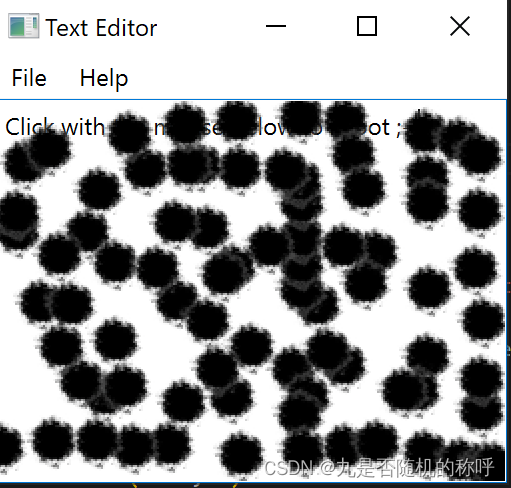

魔乐社区(Modelers.cn) 是一个中立、公益的人工智能社区,提供人工智能工具、模型、数据的托管、展示与应用协同服务,为人工智能开发及爱好者搭建开放的学习交流平台。社区通过理事会方式运作,由全产业链共同建设、共同运营、共同享有,推动国产AI生态繁荣发展。
更多推荐


 0
0 0
0- 0


 已为社区贡献18条内容

所有评论(0)