机器视觉之YOLO12研究记录(连接网络摄像头检测目标)
·
有了自定义模型,就可以使用模型进行应用了,为了测试我这里将yolo12s.pt转为onnx模型,便于在java中调用他进行目标识别。
一、java调用onnx模型进行目标识别代码:以下代码实现单张图片的目标识别,用于后续调用。
import ai.onnxruntime.*;
import mycmf.yolo.tools.Java2MatTools;

import org.opencv.core.*;
import org.opencv.core.Point;
import org.opencv.highgui.HighGui;
import org.opencv.imgproc.Imgproc;

import com.alibaba.fastjson2.JSONObject;

import java.awt.Font;
import java.nio.FloatBuffer;
import java.text.DecimalFormat;
import java.text.SimpleDateFormat;
import java.util.*;
import java.util.List;

/*
 * onnxruntime-1.20.0.jar
 * onnxruntime-engine-0.25.0.jar
 * ---------------------------------
 *      有GPU换为gpu版
 * ---------------------------------
 * onnxruntime_gpu-1.20.0.jar
 * --------------------------
 * CUDA下载地址:需严格匹配CUDA 12.2 (cuda_12.2.0_536.25_windows.exe)3GB
 * https://developer.nvidia.com/cuda-12-2-0-download-archive     下载地址
 * cnDNN选择对应CUDA 12.x和cuDNN 8.9.2的版本;
 * https://developer.nvidia.com/rdp/cudnn-archive   下载地址
 * 选择对应CUDA 12.x和cuDNN 8.9.2的版本;
下载压缩包后,解压并将以下文件拷贝到CUDA安装目录:
bin\ → CUDA_PATH\v12.2\bin\
include\ → CUDA_PATH\v12.2\include\
lib\ → CUDA_PATH\v12.2\lib\ 27。
 * */

public class onnxSeek {
	    public static OrtEnvironment env;
	    public static OrtSession session;
	    public static JSONObject names;
	    public static long count;
	    public static long channels;
	    public static long netHeight;
	    public static long netWidth;
	    public static  float srcw;
	    public static  float srch;
	    public static float confThreshold = 0.25f;
	    public static float nmsThreshold = 0.5f;
	    static Mat src;

	    public static void load(String path) {
	         String weight = path;
	        try{
	            env = OrtEnvironment.getEnvironment();
	            OrtSession.SessionOptions sessionOptions = new OrtSession.SessionOptions();
	            //sessionOptions.addCUDA(0); // 使用第一个GPU设备
	            session = env.createSession(weight, sessionOptions);
	            OnnxModelMetadata metadata = session.getMetadata();
	            Map<String, NodeInfo> infoMap = session.getInputInfo();
	            TensorInfo nodeInfo = (TensorInfo)infoMap.get("images").getInfo();
	            String nameClass = metadata.getCustomMetadata().get("names");
	            System.out.println("getProducerName="+metadata.getProducerName());
	            System.out.println("getGraphName="+metadata.getGraphName());
	            System.out.println("getDescription="+metadata.getDescription());
	            System.out.println("getDomain="+metadata.getDomain());
	            System.out.println("getVersion="+metadata.getVersion());
	            System.out.println("getCustomMetadata="+metadata.getCustomMetadata());
	            System.out.println("getInputInfo="+infoMap);
	            System.out.println("nodeInfo="+nodeInfo);
	            System.out.println("nameClass="+nameClass);
	            names = JSONObject.parseObject(nameClass.replace("\"","\"\""));
	            count = nodeInfo.getShape()[0];//1 模型每次处理一张图片
	            channels = nodeInfo.getShape()[1];//3 模型通道数
	            netHeight = nodeInfo.getShape()[2];//640 模型高
	            netWidth = nodeInfo.getShape()[3];//640 模型宽
	            //System.out.println(names.get(0));
	            // 加载opencc需要的动态库
	            System.loadLibrary(Core.NATIVE_LIBRARY_NAME);
	        }
	        catch (Exception e){
	            //e.printStackTrace();
	            //System.exit(0);
	        }
	    }


	    public static Map<Object, Object> predict(String imgPath) throws Exception {
	        //src=Imgcodecs.imread(imgPath);
	        src = Java2MatTools.imagePath2Mat(imgPath);
	        //return predictor();
	        //System.out.print(src);
	        return predictor();
	    }

	    public static Map<Object, Object> predict(Mat mat) throws Exception {
	        src=mat;
	        return predictor();
	    }


	    public static OnnxTensor transferTensor(Mat dst){
	        Imgproc.cvtColor(dst, dst, Imgproc.COLOR_BGR2RGB);
	        dst.convertTo(dst, CvType.CV_32FC1, 1. / 255);
	        float[] whc = new float[ Long.valueOf(channels).intValue() * Long.valueOf(netWidth).intValue() * Long.valueOf(netHeight).intValue() ];
	        dst.get(0, 0, whc);
	        float[] chw = whc2cwh(whc);
	        OnnxTensor tensor = null;
	        try {
	            tensor = OnnxTensor.createTensor(env, FloatBuffer.wrap(chw), new long[]{count,channels,netWidth,netHeight});
	        }
	        catch (Exception e){
	            e.printStackTrace();
	            System.exit(0);
	        }
	        return tensor;
	    }


	    //宽 高 类型 to 类 宽 高
	    public static float[] whc2cwh(float[] src) {
	        float[] chw = new float[src.length];
	        int j = 0;
	        for (int ch = 0; ch < 3; ++ch) {
	            for (int i = ch; i < src.length; i += 3) {
	                chw[j] = src[i];
	                j++;
	            }
	        }
	        return chw;
	    }

	    public static Map<Object, Object> predictor() throws Exception{
	        srcw = src.width();
	        srch = src.height();
	        //System.out.println("width:"+srcw+" hight:"+srch);
	        //System.out.println("resize: \n width:"+netWidth+" hight:"+netHeight);
	        float scaleW=srcw/netWidth;
	        float scaleH=srch/netHeight;
	        // resize
	        Mat dst=new Mat();
	        Imgproc.resize(src, dst, new Size(netWidth, netHeight));
	        // 转换成Tensor数据格式
	        OnnxTensor tensor = transferTensor(dst);
	        OrtSession.Result result = session.run(Collections.singletonMap("images", tensor));
	        //System.out.println("res_Data: "+result.get(0));
	        OnnxTensor res = (OnnxTensor)result.get(0);
	        float[][][] dataRes = (float[][][])res.getValue();
	        float[][] data = dataRes[0];

	        // 将矩阵转置
	        // 先将xywh部分转置
	        float rawData[][]=new float[data[0].length][6];
	        //System.out.println(data.length-1);
	        for(int i=0;i<4;i++){
	            for(int j=0;j<data[0].length;j++){
	                rawData[j][i]=data[i][j];
	            }
	        }
	        // 保存每个检查框置信值最高的类型置信值和该类型下标
	        for(int i=0;i<data[0].length;i++){
	            for(int j=4;j<data.length;j++){
	                if(rawData[i][4]<data[j][i]){
	                    rawData[i][4]=data[j][i];           //置信值
	                    rawData[i][5]=j-4;                  //类型编号
	                }
	            }
	        }
	        List<ArrayList<Float>> boxes=new LinkedList<ArrayList<Float>>();
	        ArrayList<Float> box=null;
	        // 置信值过滤,xywh转xyxy
	        for(float[] d:rawData){
	            // 置信值过滤
	            if(d[4]>confThreshold){
	                // xywh(xy为中心点,w宽,h高)转x1、y1、x2、y2(检测框左上角和右下角点坐标)
	                d[0]=d[0]-d[2]/2;
	                d[1]=d[1]-d[3]/2;
	                d[2]=d[0]+d[2];
	                d[3]=d[1]+d[3];
	                // 根据所有检测框box置信值大小的进行插入法排序,保存boxes里
	                box=new ArrayList<Float>();
	                for(float num:d) {
	                    box.add(num);
	                }
	                if(boxes.size()==0){
	                    boxes.add(box);
	                }else {
	                    int i;
	                    for(i=0;i<boxes.size();i++){
	                        if(box.get(4)>boxes.get(i).get(4)){
	                            boxes.add(i,box);
	                            break;
	                        }
	                    }
	                    // 插入到最后
	                    if(i==boxes.size()){
	                        boxes.add(box);
	                    }
	                }
	            }
	        }

	        // 每个框分别有x1、x1、x2、y2、conf、class
	        //System.out.println(boxes);

	        // 非极大值抑制
	        int[] indexs=new int[boxes.size()];
	        Arrays.fill(indexs,1);                       //用于标记1保留,0删除
	        for(int cur=0;cur<boxes.size();cur++){
	            if(indexs[cur]==0){
	                continue;
	            }
	            ArrayList<Float> curMaxConf=boxes.get(cur);   //当前框代表该类置信值最大的框
	            for(int i=cur+1;i<boxes.size();i++){
	                if(indexs[i]==0){
	                    continue;
	                }
	                float classIndex=boxes.get(i).get(5);
	                // 两个检测框都检测到同一类数据,通过iou来判断是否检测到同一目标,这就是非极大值抑制
	                if(classIndex==curMaxConf.get(5)){
	                    float x1=curMaxConf.get(0);
	                    float y1=curMaxConf.get(1);
	                    float x2=curMaxConf.get(2);
	                    float y2=curMaxConf.get(3);
	                    float x3=boxes.get(i).get(0);
	                    float y3=boxes.get(i).get(1);
	                    float x4=boxes.get(i).get(2);
	                    float y4=boxes.get(i).get(3);
	                    //将几种不相交的情况排除。提示:x1y1、x2y2、x3y3、x4y4对应两框的左上角和右下角
	                    if(x1>x4||x2<x3||y1>y4||y2<y3){
	                        continue;
	                    }
	                    // 两个矩形的交集面积
	                    float intersectionWidth =Math.max(x1, x3) - Math.min(x2, x4);
	                    float intersectionHeight=Math.max(y1, y3) - Math.min(y2, y4);
	                    float intersectionArea =Math.max(0,intersectionWidth * intersectionHeight);
	                    // 两个矩形的并集面积
	                    float unionArea = (x2-x1)*(y2-y1)+(x4-x3)*(y4-y3)-intersectionArea;
	                    // 计算IoU
	                    float iou = intersectionArea / unionArea;
	                    // 对交并比超过阈值的标记
	                    indexs[i]=iou>nmsThreshold?0:1;
	                    //System.out.println(cur+" "+i+" class"+curMaxConf.get(5)+" "+classIndex+"  u:"+unionArea+" i:"+intersectionArea+"  iou:"+ iou);
	                }
	            }
	        }


	        List<ArrayList<Float>> resBoxes=new LinkedList<ArrayList<Float>>();
	        for(int index=0;index<indexs.length;index++){
	            if(indexs[index]==1) {
	                resBoxes.add(boxes.get(index));
	            }
	        }
	        boxes=resBoxes;
	        //System.out.println("boxes.size【目标个数】: "+boxes.size());
	        for(ArrayList<Float> box1:boxes){
	            box1.set(0,box1.get(0)*scaleW);
	            box1.set(1,box1.get(1)*scaleH);
	            box1.set(2,box1.get(2)*scaleW);
	            box1.set(3,box1.get(3)*scaleH);
	        }
	        //System.out.println("boxes: "+boxes);
	        //detect(boxes);
	        Map<Object,Object> map=new HashMap<Object,Object>();
	        map.put("boxes",boxes);
	        map.put("classNames",names);
	        //System.out.print(boxes);
	        return map;
	    }


	    public static Mat showDetect(Map<Object,Object> map){
	        List<ArrayList<Float>> boxes=(List<ArrayList<Float>>)map.get("boxes");
	        JSONObject names=(JSONObject) map.get("classNames");
	        Imgproc.resize(src,src,new Size(srcw,srch));
	        int cc = 0;
	        //获取当前时间
            SimpleDateFormat sdf = new SimpleDateFormat("yyyy-MM-dd HH:mm:ss");
            String timeNow = sdf.format(new Date());

	        // 画框,加数据
	        for(ArrayList<Float> box:boxes){
	            float x1=box.get(0);
	            float y1=box.get(1);
	            float x2=box.get(2);
	            float y2=box.get(3);
	            float config=box.get(4);
	            String className=(String)names.get((int)box.get(5).intValue());;
	            Point point1=new Point(x1,y1);
	            Point point2=new Point(x2,y2);
	            Imgproc.rectangle(src,point1,point2,new Scalar(0,0,255),1);
	            String conf=new DecimalFormat("#.###").format(config);
	            Imgproc.putText(src,timeNow ,new Point(20,20),0,0.5,new Scalar(255,0,0),1); //左上角写系统时间
	            Imgproc.putText(src,className+" "+conf,new Point(x1,y1-5),0,0.5,new Scalar(255,0,0),1);
	            System.out.println("目标:" + cc + " 标签:" + className + " 坐标:" +  x1 +" / " + y1  +" / "+ x2 +" / " + y2 + " CONF=" + conf);
	            cc++;
	        }
	        //HighGui.imshow("image",src); //弹出图片显示界面
	        //HighGui.waitKey();
	        return src;
	    }


	    public static void main(String[] args) throws Exception {
	        String modelPath="E:\\yoloTrain\\test\\best.onnx";
	        String path     ="E:\\yoloTrain\\test\\0006.png";
	        onnxSeek.load(modelPath);
	        Map<Object,Object> map=onnxSeek.predict(path);
	        showDetect(map);
	        session.close();
	    }
}
二、java读取RTSP视频流,截取图片,交给yolo识别。这里我连接的是大华的摄像头,没有使用大华专用SDK,直接使用FFmpeg抓流,感觉更加通用。
import java.awt.AlphaComposite;
import java.awt.Graphics2D;
import java.awt.image.BufferedImage;
import java.awt.image.DataBufferByte;
import java.text.DecimalFormat;
import java.util.ArrayList;
import java.util.List;
import java.util.Map;
import java.util.Timer;
import java.util.TimerTask;
import org.bytedeco.ffmpeg.global.avutil;
import org.bytedeco.ffmpeg.presets.avcodec;
import org.bytedeco.javacv.CanvasFrame;
import org.bytedeco.javacv.FFmpegFrameGrabber;
import org.bytedeco.javacv.Frame;
import org.bytedeco.javacv.Java2DFrameConverter;
import org.opencv.core.CvType;
import org.opencv.core.Mat;
import com.alibaba.fastjson2.JSONObject;
import mycmf.yolo.onnxSeek;
import java.awt.event.WindowAdapter;
import java.awt.event.WindowEvent;
public class _DHSeek {

	 private int fann  = 3    ;
	 private int aispc = 40*1 ; //40为每1秒AI识别一次
	 private int aisp  = 0    ;
	 private boolean isFace= false ;

	 public String captureChannelPicture(int fan , String tit ,String channelUrl, String type) {
		FFmpegFrameGrabber grabber = new FFmpegFrameGrabber(channelUrl);
        Java2DFrameConverter converter = new Java2DFrameConverter();
        this.fann = fan;
        if(fann==3) {
          String modelPath="E:\\yoloTrain\\onnx\\yolov12s.onnx";
          onnxSeek.load(modelPath);  //加载目标检测模型
        }
	    try {
	        if("RTSP".equals(type)) {
	            grabber.setOption("rtsp_transport", "tcp"); // 使用TCP传输协议
	        }
	        int wid = grabber.getImageWidth();
	        int hig = grabber.getImageHeight();
	        if(wid < 640) { wid = 640; }
	        if(hig < 480) { hig = 480; }
	        if(fann==1) {
	           if(channelUrl.indexOf("subtype=0")>0) {   wid = 1920; hig = 1080; } //主码流
	           if(channelUrl.indexOf("subtype=1")>0) {   wid = 640;  hig = 480;  } //辅码流
	        }
	        grabber.setImageWidth(wid);      // 设置分辨率宽度
	        grabber.setImageHeight(hig);     // 设置分辨率高度
	        grabber.setTimeout(1000*10);     // 设置超时时间(毫秒)
	        grabber.setFrameRate(25);        // 设置帧率为10帧/秒, 来控制视频播放速度。该值决定了每秒应显示多少帧。
	        grabber.setNumBuffers(25);       // 设置缓冲区数量为5
	        grabber.setVideoBitrate(10000);  // 设置比特率控制视频编码的质量和文件大小,1000000为1Mbps
	        //grabber.setPixelFormat(avutil.AV_PIX_FMT_YUV420P); //变黑白
	        //grabber.setVideoCodec(avcodec.AV_CODEC_ID_H265);
	        grabber.setAudioStream(Integer.MIN_VALUE);
	        grabber.setOption("probesize", "32");  //设置探测数据大小为 32 字节
	        //grabber.setOption("threads", "1");   //单线程
	        grabber.setOption("thread_type", "slice");  // 使用切片级多线程
	        grabber.setOption("fflags", "nobuffer");
	        grabber.setOption("strict","experimental");
	        grabber.setVideoOption("preset", "ultrafast"); // 设置视频选项为"ultrafast"
	        grabber.setVideoOption("tune", "zerolatency"); // 设置视频选项为"zerolatency"
	        grabber.setVideoOption("crf", "50");
	        CanvasFrame canvas = new CanvasFrame(tit + " Camera Preview");
            canvas.setDefaultCloseOperation(javax.swing.JFrame.EXIT_ON_CLOSE);
            canvas.setCanvasSize(grabber.getImageWidth(), grabber.getImageHeight());
            grabber.start(); // 启动抓取器

            // 添加窗口关闭监听器
            canvas.addWindowListener(new WindowAdapter() {
                @Override
                public void windowClosing(WindowEvent e) {
                    super.windowClosing(e);
                    // 在这里添加你想要在窗口关闭时执行的代码
                    System.out.println("窗口正在关闭...");
                    // 例如,你可以在这里调用一些清理资源的方法或者保存数据的操作
                    try {
						grabber.stop();
					} catch (org.bytedeco.javacv.FFmpegFrameGrabber.Exception e1) {
						// TODO Auto-generated catch block
						//e1.printStackTrace();
					}  // 释放资源:ml-citation{ref="2,3" data="citationList"}
                    try {
						grabber.close();
					} catch (org.bytedeco.javacv.FrameGrabber.Exception e1) {
						// TODO Auto-generated catch block
						//e1.printStackTrace();
					}
                    canvas.dispose();
                    System.out.println("窗口关闭了...");
                }
            });


	        // 抓取第一帧(可能需要多试几次才能获取有效帧)
            /*
	        for (int i = 0; i < 5; i++) {
	            Frame frame = grabber.grabImage();
	            if (frame != null) {
	                BufferedImage bufferedImage = converter.getBufferedImage(frame);
	                String uuid = UUID.randomUUID().toString().replace("-", "");
	                String filePath = "d:/temp/base64/" + uuid + ".jpg";
	                javax.imageio.ImageIO.write(bufferedImage, "jpg", new File(filePath));
	                return filePath;
	            }
	        }
	        */

            Timer timer=new Timer();
            timer.schedule(new TimerTask() {
                @Override
                public void run() {
                	//System.out.println(aisp + "  " + channelUrl);
                	try {
                	    Frame frame = grabber.grabImage(); // 抓取视频帧
                	    if (frame != null) {
                        	if(fann==1) {
                        	  canvas.showImage(frame);       // 更新窗口显示
                        	  //System.out.println("抓取到图片");
                        	}
                        	if(fann==3) { aisp++; }
        	                if(fann==3 && aisp > aispc) { aisp = 0 ;
        	                	Mat capImg=new Mat();
        	                	BufferedImage bufferedImage = converter.getBufferedImage(frame);
        	                	capImg = BufImg2Mat(bufferedImage,BufferedImage.TYPE_3BYTE_BGR ,CvType.CV_8UC3);
        	                	//System.out.println(capImg.width() + " / " + capImg.height());
        	                	try {
        							Map<Object,Object> mapp = onnxSeek.predict(capImg); //加载图片
        							Mat nImg = onnxSeek.showDetect(mapp); //目标检测,并框出目标
        	                    	canvas.showImage(mat2BI(nImg));
        	                    	List<ArrayList<Float>> boxes=(List<ArrayList<Float>>)mapp.get("boxes");
        	                    	JSONObject names=(JSONObject) mapp.get("classNames");
        	                    	int objSize = boxes.size();
        	                    	if(objSize>0) {
        	                    		System.out.println("boxes.size【目标个数】: "+objSize);
        		                    	for(ArrayList<Float> box:boxes){
        		            	            float x1=box.get(0);
        		            	            float y1=box.get(1);
        		            	            float x2=box.get(2);
        		            	            float y2=box.get(3);
        		            	            float config=box.get(4);
        		            	            String tags=(String)names.get((int)box.get(5).intValue());;
        		            	            String conf=new DecimalFormat("#.###").format(config);
        		            	            System.out.println("视频目标 "+tags+" 坐标:" +  x1 +" / " + y1  +" / "+ x2 +" / " + y2 + " 制信值=" + conf);
        		            	            //if(tags.equals("person")) {  isFace = true ;}
        		            	        }
        	                    	}
        						} catch (Exception e) {
        							// TODO Auto-generated catch block
        							//e.printStackTrace();
        						}
        	                }
                        }
                	} catch (Exception e) {
						// TODO Auto-generated catch block
						//e.printStackTrace();
					}
                }
            }, 0,25); //500:每0.5秒检测一次

            //grabber.stop();
	        //grabber.close();
	    } catch (Exception e) {
	        //log.error("抓取RTSP图片失败:{}", e.toString());
	    	//e.printStackTrace();
	    } finally {
            try {
                //grabber.stop();  // 释放资源:ml-citation{ref="2,3" data="citationList"}
                //grabber.close();
            } catch (Exception e) {
                //e.printStackTrace();
            }
        }
	    return null;
	}

    private static BufferedImage mat2BI(Mat mat){
        int dataSize =mat.cols()*mat.rows()*(int)mat.elemSize();
        byte[] data=new byte[dataSize];
        mat.get(0, 0,data);
        int type=mat.channels()==1?BufferedImage.TYPE_BYTE_GRAY:BufferedImage.TYPE_3BYTE_BGR;
        if(type==BufferedImage.TYPE_3BYTE_BGR){
            for(int i=0;i<dataSize;i+=3){
                byte blue=data[i+0];
                data[i+0]=data[i+2];
                data[i+2]=blue;
            }
        }
        BufferedImage image=new BufferedImage(mat.cols(),mat.rows(),type);
        image.getRaster().setDataElements(0, 0, mat.cols(), mat.rows(), data);

        return image;
    }


	/**
	 * BufferedImage转换成Mat
	 *
	 * @param original 要转换的BufferedImage
	 * @param imgType  bufferedImage的类型 如 BufferedImage.TYPE_3BYTE_BGR
	 * @param matType  转换成mat的type 如 CvType.CV_8UC3
	 */
    private static Mat BufImg2Mat(BufferedImage original, int imgType, int matType) {
		if (original == null) {
			throw new IllegalArgumentException("original == null");
		}

		// Don't convert if it already has correct type
		if (original.getType() != imgType) {

			// Create a buffered image
			BufferedImage image = new BufferedImage(original.getWidth(), original.getHeight(), imgType);

			// Draw the image onto the new buffer
			Graphics2D g = image.createGraphics();
			try {
				g.setComposite(AlphaComposite.Src);
				g.drawImage(original, 0, 0, null);
			} finally {
				g.dispose();
			}
		}

		byte[] pixels = ((DataBufferByte) original.getRaster().getDataBuffer()).getData();
		Mat mat = Mat.eye(original.getHeight(), original.getWidth(), matType);
		mat.put(0, 0, pixels);
		return mat;
	}


	public static void main(String[] args) throws org.bytedeco.javacv.FFmpegFrameGrabber.Exception {

        String rtspUrld = "rtsp://admin:1111111@10.11.1.1:554/cam/realmonitor?channel=1&subtype=1"; // 替换实际地址

               _DHSeek DHS = new _DHSeek();
               DHS.captureChannelPicture(1 , "D" , rtspUrld, "RTSP");     //大厅

	}

}
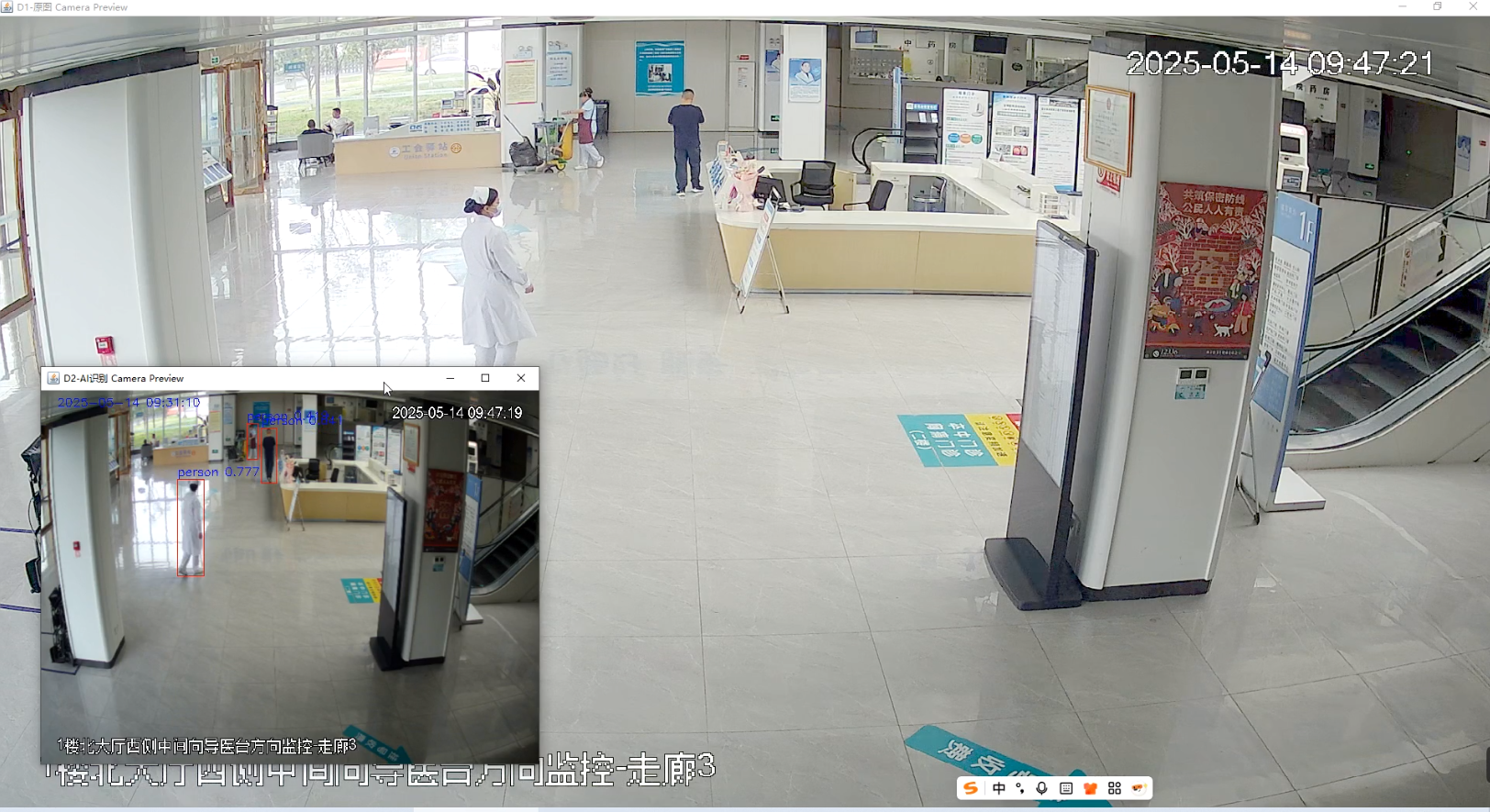
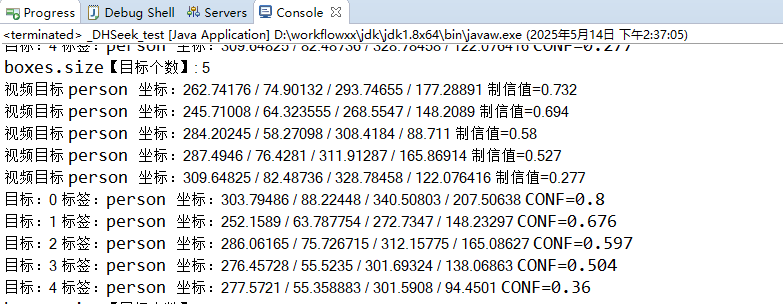
以上代码做了点优化,每隔一秒才抓取图片交给yolo识别,避免延迟过大。根据你的机器性能自行调整间隔。

魔乐社区(Modelers.cn) 是一个中立、公益的人工智能社区,提供人工智能工具、模型、数据的托管、展示与应用协同服务,为人工智能开发及爱好者搭建开放的学习交流平台。社区通过理事会方式运作,由全产业链共同建设、共同运营、共同享有,推动国产AI生态繁荣发展。
更多推荐


 4
4 0
0- 0


 已为社区贡献4条内容

所有评论(0)