Qt 3D 音频播放器 Example
Qt 3D渲染和Qt Quick 2
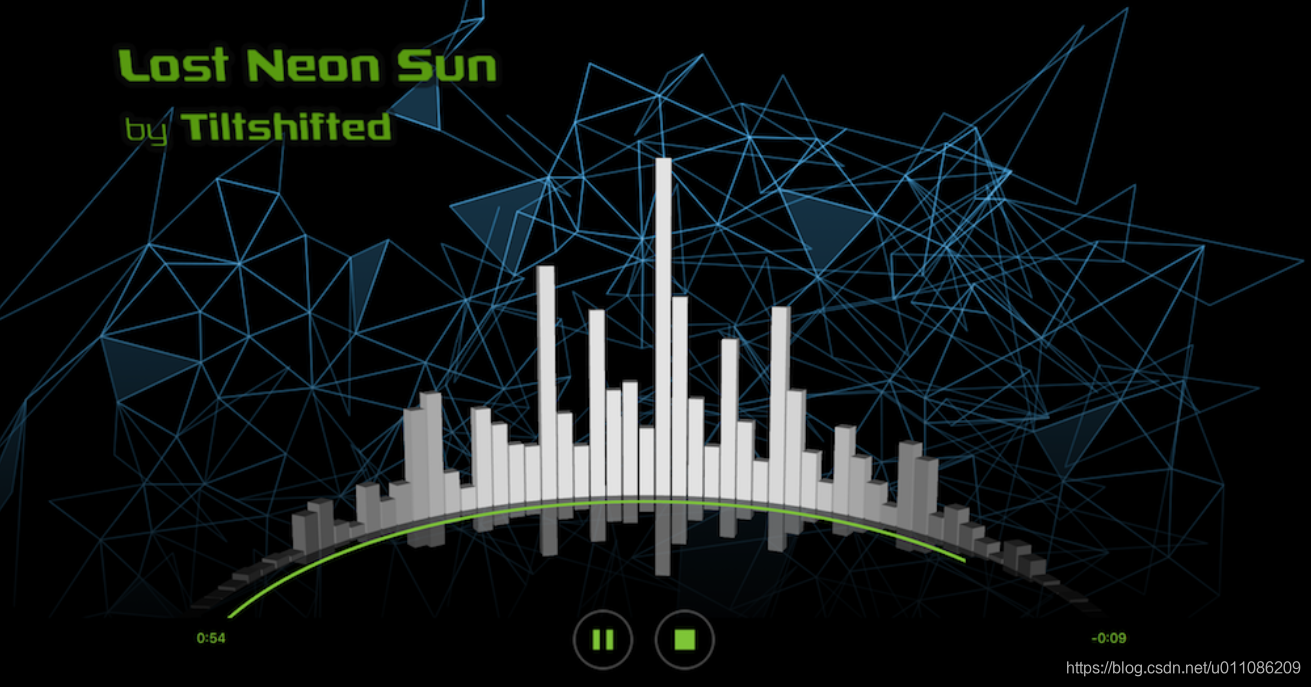
实现将Qt 3D渲染与Qt Quick 2D元素结合使用的应用程序。该示例使用媒体播放器播放音乐,并将音乐的进度作为可视化进度条。
运行实例:
要从Qt Creator运行示例,请打开“欢迎”模式,然后从“示例”中选择示例。有关更多信息,请访问构建和运行示例。
Qt Quick 2D实现
该audio-visualizer-qml/main.qml示例中的Qt快速实现MediaPlayer用于播放音频内容。
MediaPlayer {
    id: mediaPlayer
    autoPlay: true
    volume: 0.5
    source: "qrc:/music/tiltshifted_lost_neon_sun.mp3"
}播放器由playButton和和c {stopButton}控制。基于单击的按钮state,mainview更改。
使用该Scene3D类型渲染3D内容。音频可视化器的状态保留在中mainview。它会传递给visualizerbar动画所需的。
Scene3D {
    anchors.fill: parent

    Visualizer {
        id: visualizer
        animationState: mainview.state
        numberOfBars: 120
        barRotationTimeMs: 8160 // 68 ms per bar
    }
}
Qt 3D实施
该示例的3D元素是在中创建的audio-visualizer-qml/Visualizer.qml。摄像机设置为固定位置,以正确的角度显示可视化的条形图。
Camera {
    id: camera
    projectionType: CameraLens.PerspectiveProjection
    fieldOfView: 45
    aspectRatio: 1820 / 1080
    nearPlane: 0.1
    farPlane: 1000.0
    position: Qt.vector3d(0.014, 0.956, 2.178)
    upVector: Qt.vector3d(0.0, 1.0, 0.0)
    viewCenter: Qt.vector3d(0.0, 0.7, 0.0)
}ANodeInstantiator用于创建使音乐大小可视化的小节。
// Bars
CuboidMesh {
    id: barMesh
    xExtent: 0.1
    yExtent: 0.1
    zExtent: 0.1
}

NodeInstantiator {
    id: collection
    property int maxCount: parent.numberOfBars
    model: maxCount

    delegate: BarEntity {
        id: cubicEntity
        entityMesh: barMesh
        rotationTimeMs: sceneRoot.barRotationTimeMs
        entityIndex: index
        entityCount: sceneRoot.numberOfBars
        entityAnimationsState: animationState
        magnitude: 0
    }
}该visualizer还包含一个Entity显示进度。该元素具有曲线形状的网格,并根据播放曲目的持续时间在某个级别上旋转以显示进度。
// Progress
Mesh {
    id: progressMesh
    source: "qrc:/meshes/progressbar.obj"
}

Transform {
    id: progressTransform
    property real defaultStartAngle: -90
    property real progressAngle: defaultStartAngle
    rotationY: progressAngle
}

Entity {
    property Material progressMaterial: PhongMaterial {
        ambient: "#80C342"
        diffuse: "black"
    }

    components: [progressMesh, progressMaterial, progressTransform]
}在audio-visualizer-qml/BarEntity.qml其中有用于旋转条形和更改条形颜色的动画。这些条在遵循环形的水平上旋转。同时,条形的颜色是动态的。
QQ2.NumberAnimation {
    id: angleAnimation
    target: angleTransform
    property: "barAngle"
    duration: rotationTimeMs
    loops: QQ2.Animation.Infinite
    running: true
    from: startAngle
    to: 360 + startAngle
}
QQ2.SequentialAnimation on barColor {
    id: barColorAnimations
    running: false

    QQ2.ColorAnimation {
        from: lowColor
        to: highColor
        duration: animationDuration
    }

    QQ2.PauseAnimation {
        duration: animationDuration
    }

    QQ2.ColorAnimation {
        from: highColor
        to: lowColor
        duration: animationDuration
    }
}
每首音乐的播放时长都从一个单独的.raw文件中读取,该文件基于正在播放的曲目。但歌曲播放时,高度将按比例缩放以突出显示当前播放的位置。播放完成后,将刷新播放器播放音乐信息。

魔乐社区(Modelers.cn) 是一个中立、公益的人工智能社区,提供人工智能工具、模型、数据的托管、展示与应用协同服务,为人工智能开发及爱好者搭建开放的学习交流平台。社区通过理事会方式运作,由全产业链共同建设、共同运营、共同享有,推动国产AI生态繁荣发展。
更多推荐


 0
0 0
0- 0


 已为社区贡献1条内容

所有评论(0)