Google的Resonance音频:在移动设备和台式机上实现高保真声音
Google’s new Resonance Audio SDK for Unity lets you render hundreds of simultaneous 3D sound sources in the highest fidelity for your XR, 3D and 360 video projects on Android, iOS, Windows, MacOS, and Linux. This SDK includes two Unity-exclusive features: Ambisonic Soundfield Recording and Geometric Reverb Baking.
Google全新的Unity Resonance Audio SDK,可让您以最高保真度渲染数百个同时3D声源,以支持Android,iOS,Windows,MacOS和Linux上的XR,3D和360视频项目。 该SDK包含Unity独有的两项功能:Ambisonic声场录音和Geometric Reverb Baking。
With Resonance Audio, some of the biggest audio challenges for immersive and interactive experiences have been solved. It enables you to deliver realistic, impactful sound on multiple platforms – including mobile – without compromising audio quality or running out of CPU resources. As well, with the Resonance Audio SDK for Unity you can author ambisonic clips, combine ambisonic and spatialized clips, generate realistic reverb based on scene geometry and acoustic surface materials, and deliver a host of other impressive audio effects.
借助Resonance Audio,解决了沉浸式和交互式体验面临的一些最大的音频挑战。 它使您能够在多个平台(包括移动平台)上提供逼真的,有影响力的声音,而不会影响音频质量或CPU资源。 同样,使用Unity的Resonance Audio SDK,您可以创作歧义片段,组合歧义片段和空间片段,基于场景几何体和声学表面材质生成逼真的混响,以及提供许多其他令人印象深刻的音频效果。
聆听共鸣音频的力量 (Hear the power of Resonance Audio in action)
Audio Factory is a VR experience that showcases the features and capabilities of the Resonance Audio SDK. Experience spatial audio in this exhilarating clip from Audio Factory.
Audio Factory是一种VR体验,展示了Resonance Audio SDK的功能。 在Audio Factory的这款令人振奋的剪辑中体验空间音频。
Resonance Audio in Google’s Audio Factory VR app. App available for free on Daydream and SteamVR.
Google的Audio Factory VR应用中的Resonance Audio。 可在Daydream和SteamVR上免费使用该应用程序。
The technology behind Resonance Audio is already powering the top Made with Unity VR apps on Daydream and also all YouTube 360 videos where spatial audio is present.
Resonance Audio背后的技术已经为Daydream以及所有存在空间音频的YouTube 360视频中的顶级Unity Unity应用提供了支持。

|
|

|
The Turning Forest |
|
|
|
|
|
转身森林 |
It’s time to bring high-fidelity, spatial audio that scales to your Unity projects. Learn more about Resonance Audio’s features and check out the resources below to help you get up and running.
现在是时候为您的Unity项目带来可缩放的高保真空间音频了。 了解有关Resonance Audio功能的更多信息,并查看以下资源以帮助您启动和运行。
共振音频入门 (Getting Started with Resonance Audio)
Here’s how to get started with Resonance Audio in your project:
这是在您的项目中开始使用Resonance Audio的方法:
-
Make sure you have Unity 2017.1 or later installed. If not, install Unity.
确保已安装Unity 2017.1或更高版本。 如果没有, 请安装Unity 。
-
Download the Resonance Audio SDK for Unity.
-
Learn more by visiting Google’s Resonance Audio and Developer Guides for Unity.
通过访问Google的《 Resonance音频和Unity 开发人员指南》了解更多信息。
-
Join the discussion in our Unity Forum.
加入我们的Unity论坛中的讨论。
共鸣音频:概述和功能 (Resonance Audio: Overview and Features)
这个怎么运作 (How it works)
Audio spatializers are typically CPU-intensive and the cost increases with each audio source. In contrast, Resonance Audio’s spatializer is efficient and it scales well as audio sources are added to a scene. Resonance Audio accomplishes this through a unique design, where each audio source clip is converted into ambisonic format.
音频空间化器通常占用大量CPU,并且每个音频源的成本都会增加。 相反,Resonance Audio的空间化器效率很高,并且在将音频源添加到场景中时可以很好地缩放。 Resonance Audio通过独特的设计实现了这一点,在该设计中,每个音频源片段都被转换为歧义格式。
This format maintains enough spatial information to be able to effectively spatialize the source later. All sources are then mixed together. The “expensive” spatialization step is then applied just once to the mix of all sources. This allows hundreds of simultaneous high-fidelity sources to be handled per CPU core, even on mobile devices.
此格式维护了足够的空间信息,以便以后可以有效地对源进行空间化。 然后将所有来源混合在一起。 然后,将“昂贵”的空间化步骤仅应用到所有来源的混合中一次。 这样,即使在移动设备上,每个CPU内核也可以同时处理数百个高保真源。
Ambisonic解码器:将Ambisonic片段与空间化片段组合 (Ambisonic Decoder: Combining ambisonic clips with spatialized clips)
Resonance Audio includes an Ambisonic Decoder plugin. With it, developers can create rich audio experiences using both ambisonic clips and more traditional audio clips, due to Resonance Audio’s ambisonics support. First-order ambisonics are mixed into the global internal ambisonic representation, which is already generated for all spatialized audio sources. The spatialization step is then applied just once to the mix of all audio sources.
Resonance Audio包含一个Ambisonic Decoder插件。 借助Resonance Audio的ambisonics支持,开发人员可以使用歧义剪辑和更传统的音频剪辑创建丰富的音频体验。 一阶混响混合到全局内部混响表示中,该表示已为所有空间音频源生成。 然后将空间化步骤仅应用于所有音频源的混合一次。
Ambisonic声场录音:在Unity Editor中创作剪辑 (Ambisonic Soundfield Recording: Authoring clips in the Unity Editor)
Ambisonics are an exciting advance for XR (AR/VR) audio because they project sounds above and below the listener as well as on the horizontal plane. Think of them as the audio equivalent of 360 videos, where XR ambiences rotate correctly as you turn your head, and perform in other interesting and creative ways during an XR experience.
Ambisonics是XR(AR / VR)音频的一项令人振奋的进步,因为它们可以将声音投射到听众的上方和下方以及水平面上。 可以将它们视为与360度视频等效的音频,其中XR氛围会随着您的转动而正确旋转,并在XR体验期间以其他有趣且富有创意的方式表现。
But one typical issue with using ambisonics has been that these clips were difficult to record and author. Now with the Unity-exclusive Ambisonic Soundfield recording tool in the Resonance Audio SDK, sound designers can use Unity to author ambisonic clips. This feature allows you to place many ambient audio sources in a scene, and then bake out one ambisonic clip based on the mix of the original clips.
但是使用歧义音色的一个典型问题是这些片段难以记录和编写。 现在,借助Resonance Audio SDK中Unity专有的Ambisonic Soundfield录音工具,声音设计人员可以使用Unity来创作歧义片段。 此功能使您可以在场景中放置许多环境音频源,然后根据原始剪辑的混合烘焙一个歧义剪辑。
The newly created ambisonic clip is much “cheaper” to play back than several audio sources. It also retains enough relative positional information to realistically simulate where each sound originated and have those sounds rotate correctly as you turn your head in an XR experience.
与几个音频源相比,新创建的立体声混响剪辑要“便宜”得多。 它还保留了足够的相对位置信息,以真实地模拟每种声音的起源,并在您旋转XR体验时使这些声音正确旋转。
几何混响烘焙:计算音频反射和混响 (Geometric Reverb Baking: Calculating audio reflections and reverb)
Also exclusive to Unity, this feature lets developers generate realistic reverb based on the geometry and associated acoustic surface materials in a scene. Resonance Audio also supports direct sound propagation, occlusion, near-field effects, sound source spread, and directivity-shaping for sound sources and listeners.
此功能也是Unity独有的功能,可让开发人员根据场景中的几何形状和相关的声学表面材质生成逼真的混响。 Resonance Audio还支持直接的声音传播,遮挡,近场效果,声源传播以及声源和听众的指向性整形。
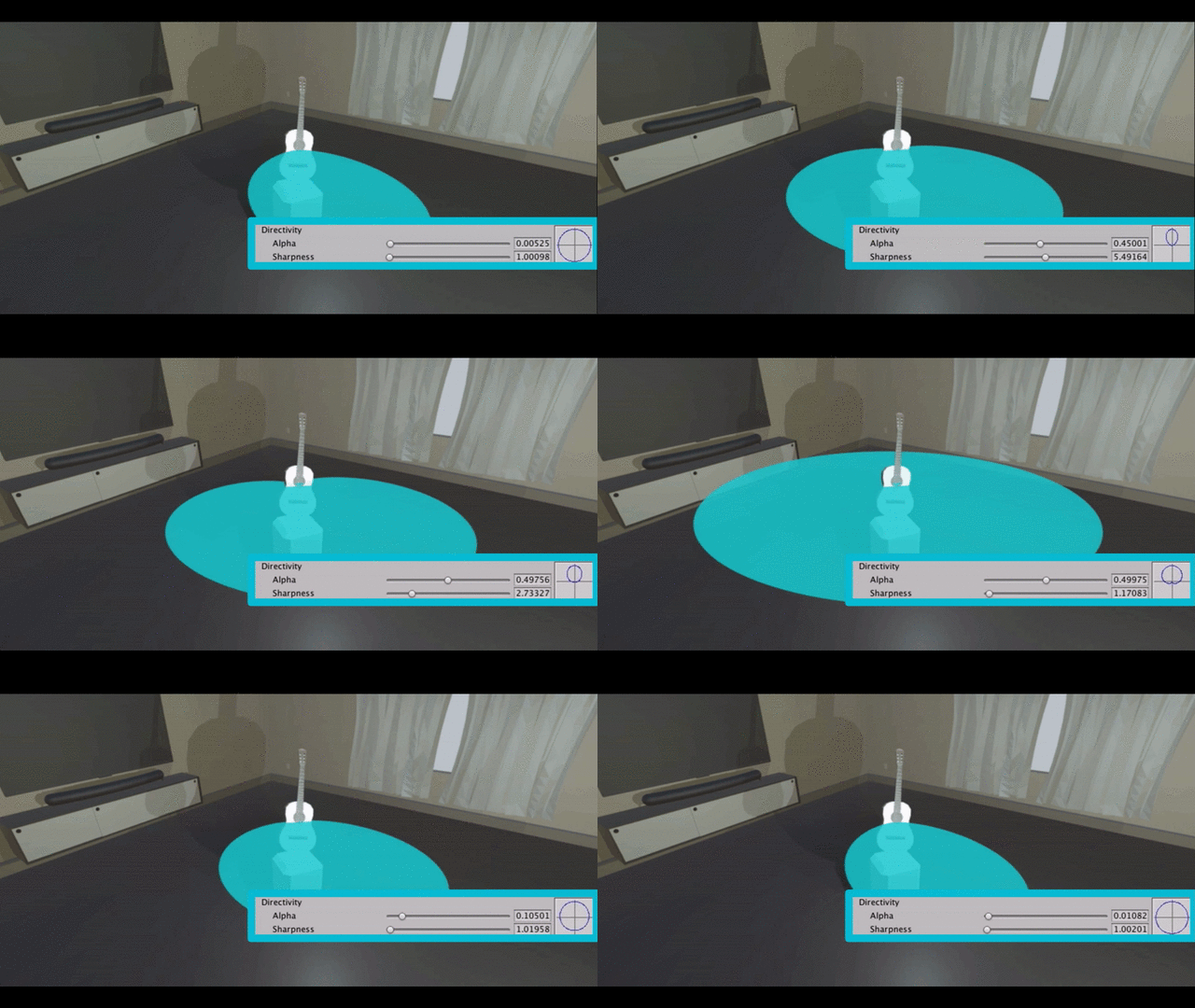
Resonance Audio’s sound directivity customization
Resonance Audio的声音指向性定制
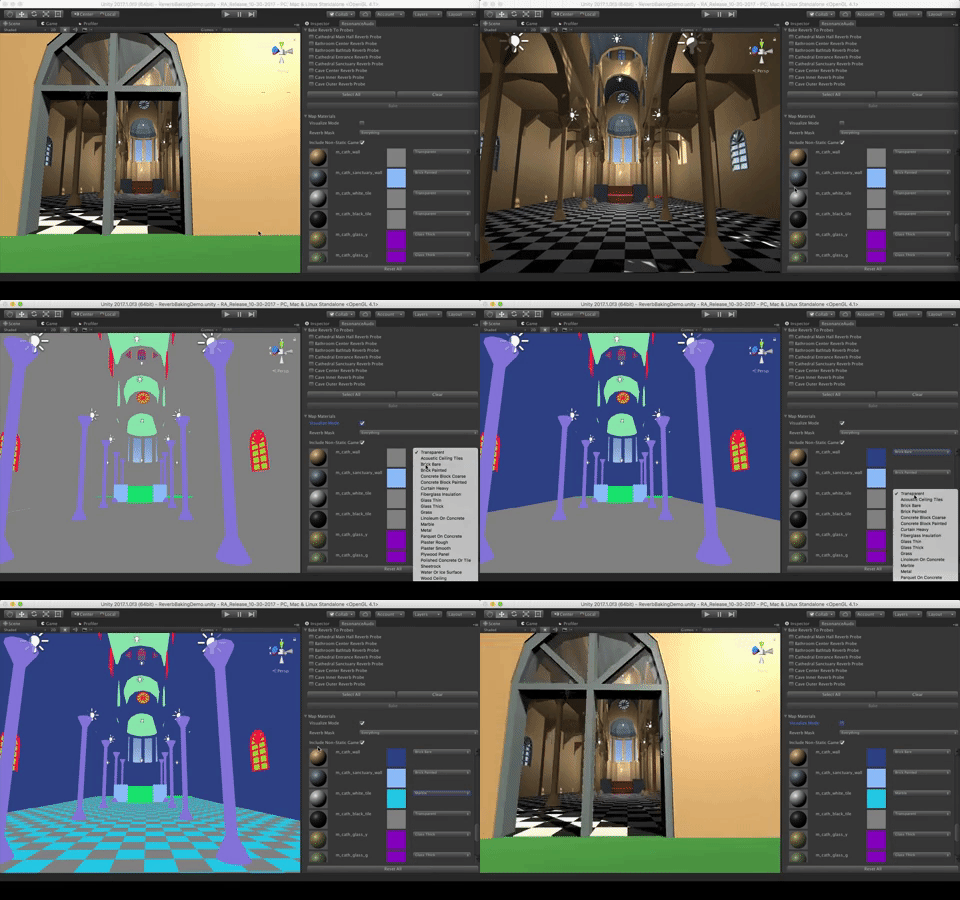
Resonance Audio’s Geometric Reverb Baking in Unity
共鸣音频的几何混响烘焙
Environmental audio, or modeling how the environment affects authored sounds, has been another ongoing challenge. Initially, environmental modeling was simplified and often used the “shoebox” model, which basically assumed there was a rectangular room around the listener and audio sources. Now, with the Resonance Audio SDK, you can use actual scene geometry to model all of these environmental effects more realistically.
环境音频或模拟环境如何影响创作的声音,是另一个持续的挑战。 最初,简化了环境建模,并经常使用“鞋盒”模型,该模型基本上假定听众和音频源周围有一个矩形空间。 现在,借助Resonance Audio SDK,您可以使用实际的场景几何图形来更逼真的建模所有这些环境效果。
跨平台支持:一次构建,随处部署 (Cross-platform support: Build once, deploy everywhere)
The Resonance Audio SDK for Unity supports development for Android, iOS, Windows, MacOS, and Linux platforms.
用于Unity的Resonance Audio SDK支持针对Android,iOS,Windows,MacOS和Linux平台的开发。
让我们进入音频循环! (Keep us in the audio loop!)
It’s time to bring high-fidelity Resonance Audio to your Unity projects to wow your users with truly immersive and realistic sound and effects. So get started now by installing the Resonance Audio SDK for Unity and joining the discussion in the Unity Forum. We can’t wait to hear from you – and hear your results!
现在是将高保真共鸣音频带入Unity项目的时候了,以真正沉浸式和逼真的声音和效果让用户赞叹不已。 因此,现在就开始安装Resonance Audio SDK for Unity,并加入Unity论坛中的讨论。 我们迫不及待想收到您的来信,并听听您的结果!

|
|
|

魔乐社区(Modelers.cn) 是一个中立、公益的人工智能社区,提供人工智能工具、模型、数据的托管、展示与应用协同服务,为人工智能开发及爱好者搭建开放的学习交流平台。社区通过理事会方式运作,由全产业链共同建设、共同运营、共同享有,推动国产AI生态繁荣发展。
更多推荐


 0
0 0
0- 0


 已为社区贡献10条内容


所有评论(0)