如何在后端调用Dify工作流的API?超详细教程
·
一、概述
本文将详细介绍如何在后端调用Dify工作流API,实现文件上传和工作流执行功能。Dify是一款开源的LLM应用开发平台,通过其API可以轻松集成AI能力到自己的应用中。
二、环境准备
2.1 安装依赖库
pip install requests
2.2 获取Dify API密钥
-
登录Dify平台
-
进入工作流页面,点击访问API
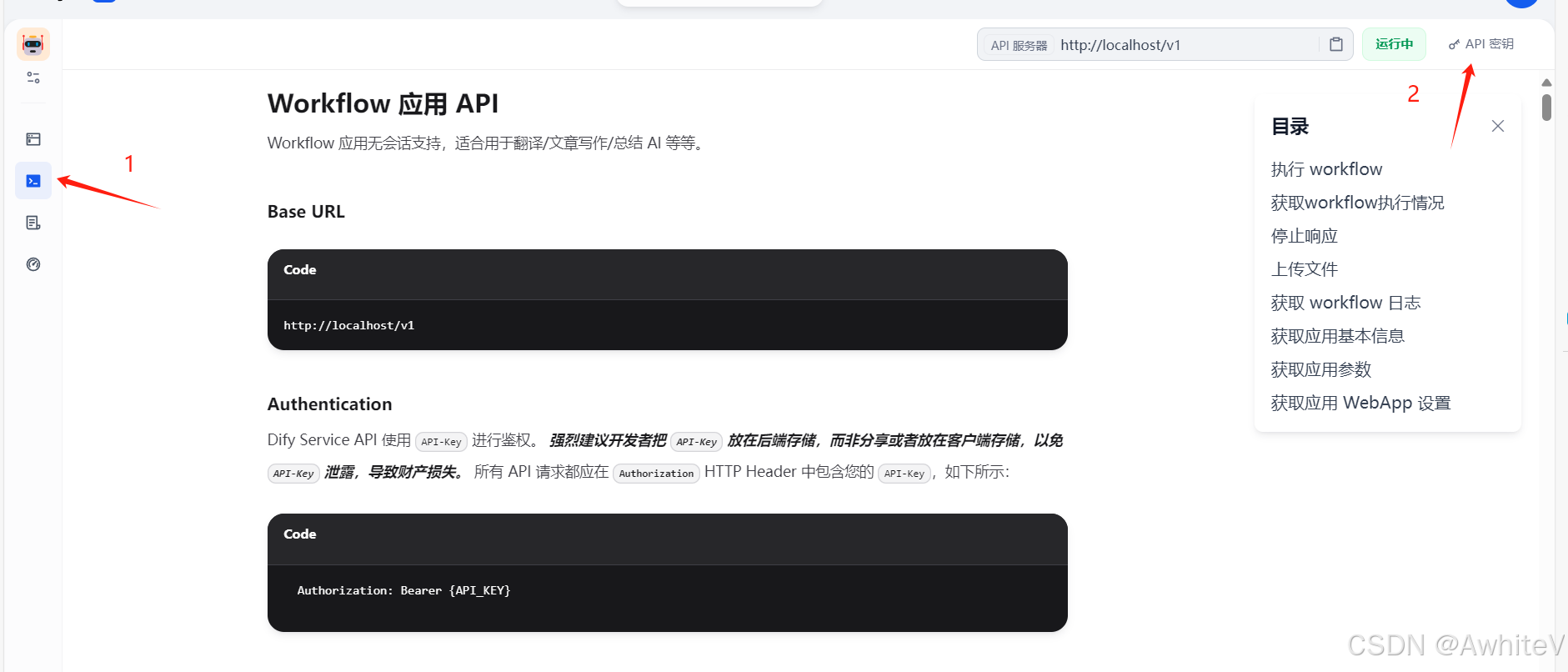
-
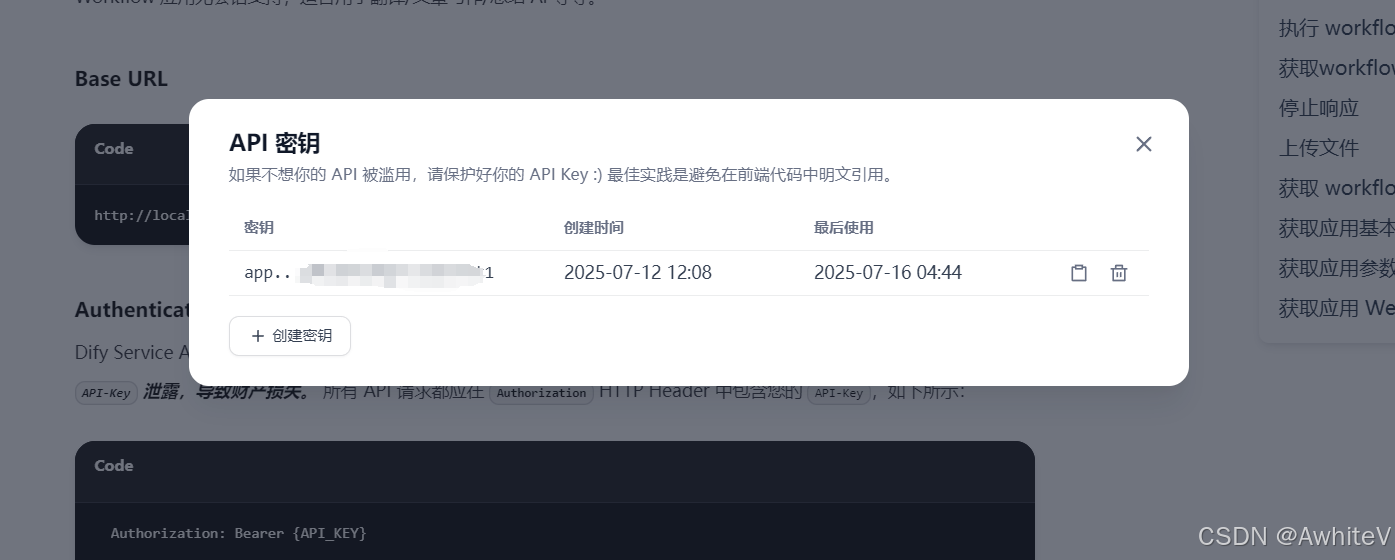
创建新的API密钥并保存(重要:请勿向任何人泄露您的API密钥)
三、代码实现
3.1 Dify API客户端类
import requests
import json
import os

class DifyAPIClient:
    """通用Dify API客户端"""

    def __init__(self, api_key, base_url="http://127.0.0.1"):
        self.api_key = api_key
        self.base_url = base_url
        self.headers = {
            'Authorization': f'Bearer {api_key}',
            'Content-Type': 'application/json'
        }
3.2 文件上传功能
	"""这里的user填你的dify用户名"""
    def upload_file(self, file_path, user="xxx"):
        """上传文件到Dify"
        upload_url = f"{self.base_url}/v1/files/upload"

        with open(file_path, 'rb') as f:
            files = {'file': (os.path.basename(file_path), f, 'text/plain')}
            data = {'user': user}

            response = requests.post(upload_url, headers={'Authorization': f'Bearer {self.api_key}'},
                                   files=files, data=data, timeout=60)

        if response.status_code in [200, 201]:
            result = response.json()
            print(f"✅ 文件上传成功: {result['name']}")
            return result['id']
        else:
            print(f"❌ 文件上传失败: {response.status_code}")
            return None
3.3 工作流执行功能
    def run_workflow(self, workflow_inputs, file_id=None, timeout=300):
        """执行工作流"""
        workflow_url = f"{self.base_url}/v1/workflows/run"

        # 构建请求数据
        data = {
            "inputs": workflow_inputs,
            "response_mode": "blocking",
            "user": "你的dify用户名"
        }

        # 如果有文件,添加到inputs中
        if file_id:
            data["inputs"]["file"] = {
                "type": "document",
                "transfer_method": "local_file",
                "upload_file_id": file_id
            }

        print(f"🔄 调用工作流...")
        print(f"输入参数: {json.dumps(data['inputs'], ensure_ascii=False, indent=2)}")

        try:
            response = requests.post(workflow_url, headers=self.headers,
                                   json=data, timeout=timeout)

            if response.status_code == 200:
                result = response.json()
                print("✅ 工作流执行成功!")
                return result.get('answer', result)
            else:
                print(f"❌ 工作流执行失败: {response.status_code}")
                print(f"错误信息: {response.text}")
                return None

        except requests.exceptions.Timeout:
            print("❌ 请求超时")
            return None
        except Exception as e:
            print(f"❌ 执行异常: {e}")
            return None
四、使用示例
4.1 配置参数(隐私保护版)
def main():
    """主函数 - 在这里修改你的配置"""

    # ========== 配置区域 ==========
    API_KEY = "app-**************************"  # 你的API密钥(已模糊处理)
    BASE_URL = "http://127.0.0.1"          # Dify服务地址
    FILE_PATH = "./3001.txt"                  # 文件路径

    # 工作流输入参数 - 根据你的工作流配置修改
    WORKFLOW_INPUTS = {
        "requirement": "测试工程师,成都,7-12k,全职"      # 示例参数
    }

    # 是否使用文件
    USE_FILE = False                  # True: 上传文件, False: 不使用文件
    TIMEOUT = 300                     # 超时时间(秒)
    # ==============================
4.2 执行流程
    # 创建客户端
    client = DifyAPIClient(API_KEY, BASE_URL)

    # 上传文件(如果需要)
    file_id = None
    if USE_FILE and FILE_PATH:
        if not os.path.exists(FILE_PATH):
            print(f"❌ 文件不存在: {FILE_PATH}")
            return

        print(f"📤 上传文件: {FILE_PATH}")
        file_id = client.upload_file(FILE_PATH)
        if file_id is None:
            return

    # 执行工作流
    print(f"🚀 执行工作流...")
    result = client.run_workflow(WORKFLOW_INPUTS, file_id, TIMEOUT)
五、效果演示
-
整体工作流和所需参数
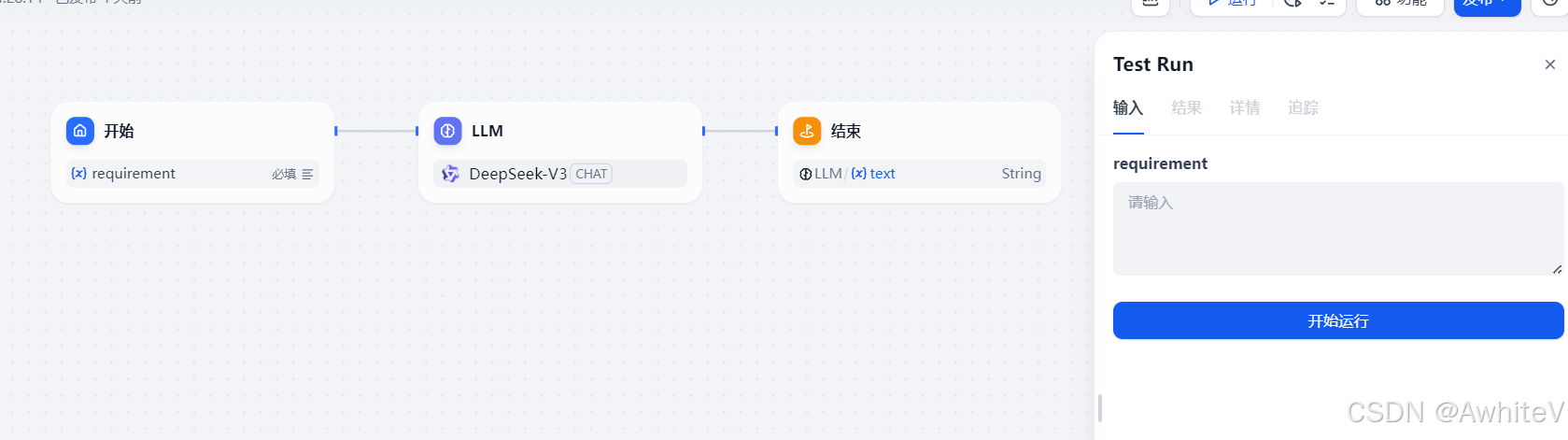
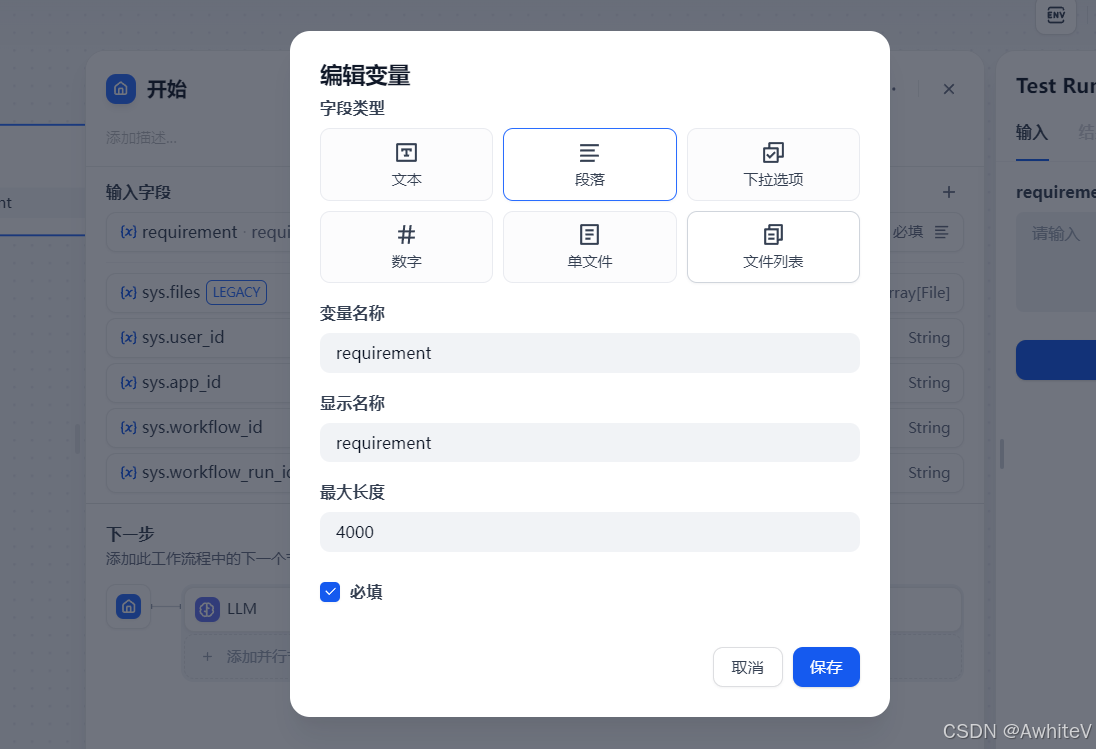
所需参数为字符串类型的“requirement”,招聘需求
-
Dify工作流执行结果
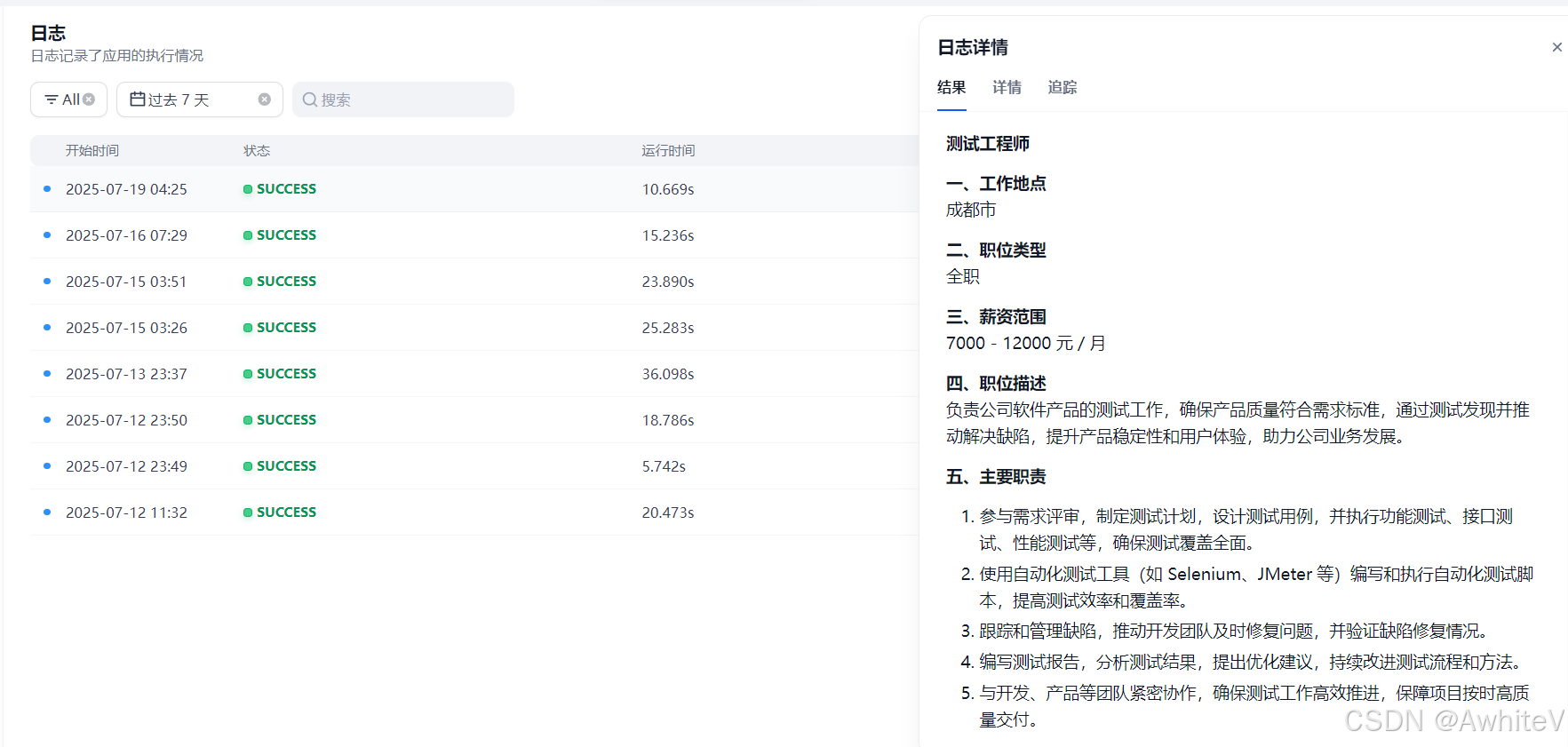
-
后端返回结果
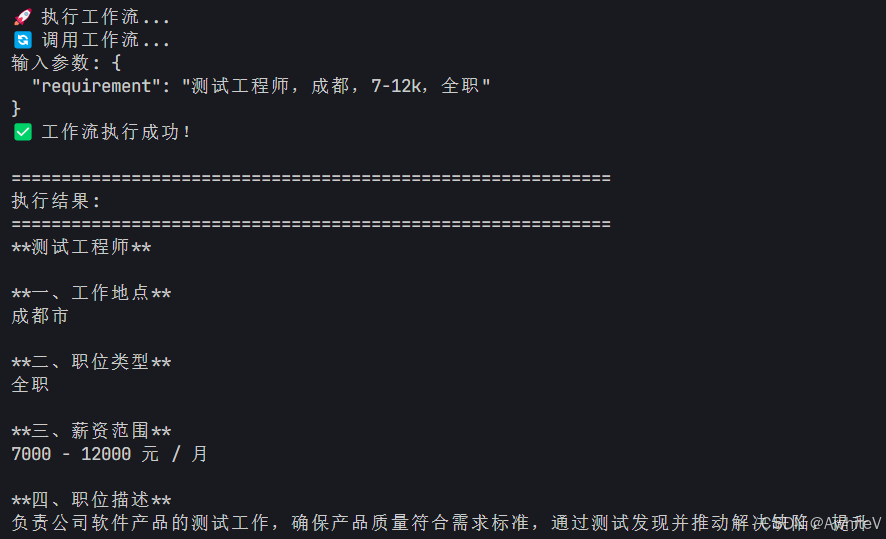
六、隐私保护建议
-
API密钥安全:
- 绝对不要将API密钥提交到代码仓库
- 建议使用环境变量存储API密钥:
import os API_KEY = os.environ.get('DIFY_API_KEY') - 定期轮换API密钥以降低泄露风险
-
用户信息保护:
- 示例代码中的
user参数(如"weijunyu")建议替换为实际业务中的用户标识 - 确保所有用户数据传输和存储符合数据保护法规
- 示例代码中的
-
日志安全:
- 避免在日志中记录完整的API密钥或敏感信息
- 考虑使用日志脱敏工具处理敏感数据
七、注意事项
- 文件类型:目前代码中文件类型固定为
text/plain,如需上传其他类型文件,需修改files参数中的MIME类型 - 超时设置:根据工作流复杂度调整超时时间,复杂工作流建议设置更长超时
- 错误处理:代码中已包含基本错误处理,可根据实际需求扩展
- Dify服务地址:如果Dify部署在远程服务器,需将
BASE_URL修改为实际服务器地址
八、完整代码
若需完整代码请④我。

魔乐社区(Modelers.cn) 是一个中立、公益的人工智能社区,提供人工智能工具、模型、数据的托管、展示与应用协同服务,为人工智能开发及爱好者搭建开放的学习交流平台。社区通过理事会方式运作,由全产业链共同建设、共同运营、共同享有,推动国产AI生态繁荣发展。
更多推荐


 26
26 0
0- 0


 已为社区贡献4条内容

所有评论(0)