vue内置组件keep-alive多级路由缓存最佳实践
在我们的业务中,我们常常会有列表页跳转详情页,详情页可能还会继续跳转下一级页面,当我们返回上一级页面时,我想保持前一次的所有查询条件以及页面的当前状态。一想到页面缓存,在vue中我们就想到keep-alive这个vue的内置组件,在keep-alive这个内置组件提供了一个include的接口,只要路由name匹配上就会缓存当前组件。你或多或少看到不少很多处理这种业务代码,本文是一篇笔者关于缓存多页面的解决实践方案,希望看完在业务中有所思考和帮助。
正文开始…
业务目标
首先我们需要确定需求,假设A是列表页,A-1是详情页,A-1-1,A-1-2是详情页的子级页面,B是其他路由页面
我们用一个图来梳理一下需求

大概就是这样的,一图胜千言
然后我们开始,主页面大概就是下面这样
pages/list/index.vue我们暂且把这个当成A页面模块吧
<template><div class="list-app"><div><a href="javascript:void(0)" @click="handleToHello">to hello</a></div><el-form ref="form" :model="condition" label-width="80px" inline><el-form-item label="姓名"><el-inputv-model="condition.name"clearableplaceholder="请输入搜索姓名"></el-input></el-form-item><el-form-item label="地址"><el-select v-model="condition.address" placeholder="请选择地址"><el-optionv-for="item in tableData":key="item.name":label="item.address":value="item.address"></el-option></el-select></el-form-item><el-form-item><el-button @click="featchList">刷新</el-button></el-form-item></el-form><el-table:data="tableData"style="width: 100%"row-key="id"borderlazy:load="load":tree-props="{ children: 'children', hasChildren: 'hasChildren' }"><el-table-column prop="date" label="日期"> </el-table-column><el-table-column prop="name" label="姓名"> </el-table-column><el-table-column prop="address" label="地址"> </el-table-column><el-table-column prop="options" label="操作"><template slot-scope="scope"><a href="javascript:void(0);" @click="handleView">查看详情</a><a href="javascript:void(0);" @click="handleEdit(scope.row)">编辑</a></template></el-table-column></el-table><!--分页--><el-pagination@current-change="handleChangePage"backgroundlayout="prev, pager, next":total="100"></el-pagination><!--弹框--><list-modaltitle="编辑"width="50%"v-model="formParams":visible.sync="dialogVisible"@refresh="featchList"></list-modal></div>
</template>
我们再看下对应页面的业务js
<!--pages/list/index.vue-->
<script> import { sourceDataMock } from '@/mock';
import ListModal from './ListModal';

export default {name: 'list',components: {ListModal,},data() {return {tableData: [],cacheData: [], // 缓存数据condition: {name: '',address: '',page: 1,},dialogVisible: false,formParams: {date: '',name: '',address: '',},};},watch: {// eslint-disable-next-line func-names'condition.name': function (val) {if (val === '') {this.tableData = this.cacheData;} else {this.tableData = this.cacheData.filter(v => v.name.indexOf(val) > -1);}},},created() {this.featchList();},methods: {handleToHello() {this.$router.push('/hello-world');},handleChangePage(val) {this.condition.page = val;this.featchList();},handleSure() {this.dialogVisible = false;},load(tree, treeNode, resolve) {setTimeout(() => {resolve(sourceDataMock().list);}, 1000);},handleView() {this.$router.push('/detail');},handleEdit(row) {this.formParams = { ...row };this.dialogVisible = true;console.log(row);},featchList() {console.log('----start load data----', this.condition);const list = sourceDataMock().list;// 深拷贝一份数据this.cacheData = JSON.parse(JSON.stringify(list));this.tableData = list;},},
}; </script>
以上业务代码主要做了以下几件事情
1、用mockjs模拟了一份列表数据
2、根据条件筛选对应的数据,分页操作
3、从当前页面跳转子页面,或者跳转其他页面,还有打开编辑弹框
首先我们要确认几个问题,当前页面的几个特殊条件:
1、当前页面的条件变化,页面要更新
2、分页器切换,页面就需要更新
3、点击编辑弹框修改数据也是要更新
当我从列表去详情页,我从详情页返回时,此时要缓存当前页的所有数据以及页面状态,那要该怎么做呢?
我们先看下主页面 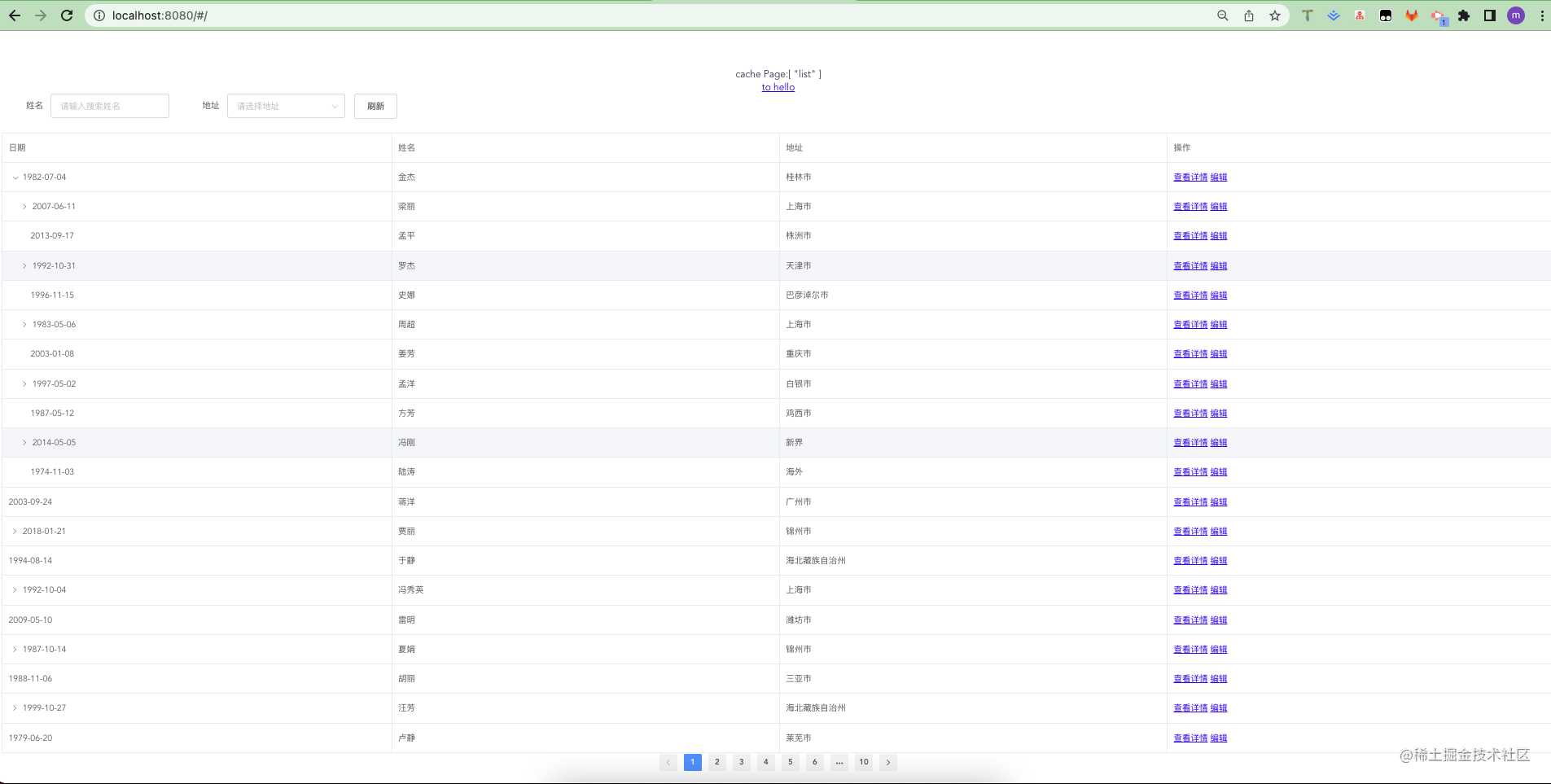
大概需求已经明白,其实就是需要缓存条件以及分页状态,还有我展开子树也需要缓存
我的大概思路就是,首先在路由文件的里放入一个标识cache,这个cache装载的就是当前的路由name
import Vue from 'vue';
import Router from 'vue-router';
import HelloWorld from '@/components/HelloWorld';
import List from '@/pages/list';
import Detail from '@/pages/detail';
Vue.use(Router);

export default new Router({routes: [{path: '/hello-world',name: 'HelloWorld',component: HelloWorld,},{path: '/',name: 'list',component: List,meta: {cache: ['list'],},},{path: '/detail',name: 'detail',component: Detail,meta: {cache: [],},},],
});
然后我们在App.vue中的router-view中加入keep-alive,并且include指定对应路由页面
<template><div id="app">cache Page:{{ cachePage }}<keep-alive :include="cachePage"><router-view /></keep-alive></div>
</template>
我们看下cachePage是从哪里来的,我们通常把这种公用的变量放在全局store中管理
import store from '@/store';
export default {name: 'App',computed: {cachePage() {return store.state.global.cachePage;},},
};
当我们进入这个页面时就要根据路由上设置的meta去确认当前页面是否有缓存的name,所以本质上也就成了,我如何设置keep-alive中的include值
import store from '@/store';
export default {...methods: {cacheCurrentRouter() {const { meta } = this.$route;if (meta) {if (meta.cache) {store.commit('global/setGlobalState', {cachePage: [...new Set(store.state.global.cachePage.concat(meta.cache)),],});} else {store.commit('global/setGlobalState', {cachePage: [],});}}},},created() {this.cacheCurrentRouter();this.$watch('$route', () => {this.cacheCurrentRouter();});},
};
我们注意到,我们是根据$route的meta.cache然后去修改store中的cachePage的
然后我们去store/index.js看下
// store/index.js
import Vue from 'vue';
import Vuex from 'vuex';
import { gloablMoudle } from './modules';
Vue.use(Vuex);
const initState = {};
const store = new Vuex.Store({state: initState,modules: {global: gloablMoudle,},
});
export default store;
我们继续找到最终设置cachePage的modules/global/index.js
// modules/global/index.js
export const gloablMoudle = {namespaced: true,state: {cachePage: [],},mutations: {setGlobalState(state, payload) {Object.keys(payload).forEach((key) => {if (Reflect.has(state, key)) {state[key] = payload[key];}});},},
};
所以我们可以看到mutations有这样的一段设置state的操作setGlobalState
这块代码可以给大家分享下,为什么我要循环payload获取对应的key,然后再从state中判断是否有key,最后再赋值?
在业务中我们看到不少这样的代码
export const gloablMoudle = {namespaced: true,state: {a: [],b: []},mutations: {seta(state, payload) {state.a = payload},setb(state, payload) {state.b = payload},...},actions: {actA({commit, state}, payload) {commit('seta', payload)},actB({commit, state}, payload) {commit('setb', payload)}...}...
};
在具体业务中大概就下面这样
store.dispatch('actA', {})
store.dispatch('actB', {})
所以你会看到如此重复的代码,写多了,貌似会越来越多,有没有可以一劳永逸呢?
因此上面一块代码,你可以优化成下面这样
export const gloablMoudle = {namespaced: true,state: {a: [],b: []},mutations: {setState(state, payload) { Object.keys(payload).forEach(key => { if (Reflect.has(state, key)) { state[key] = payload[key]} })},},actions: {setActionState({commit, state}, payload) {commit('setState', payload)}}
};
在业务代码里你就这样做
store.dispatch('setActionState', {a: [1,2,3]})
store.dispatch('setActionState', {b: [1,2,3]})
或者是下面这样
store.commit('setState', {a: [1,2,3]})
store.commit('setState', {b: [1,2,3]})
所以你会看到我这个文件会非常的小,同样达到目的,而且维护成本会降低很多,达到了我们代码设计的高内聚,低耦合,一劳永逸的抽象思想。
回到正题,我们已经设置的全局store的cachePage
我们注意到在created里面我们除了有去更新cachePage,还有去监听路由的变化,当我们切换路由去详情页面,我们是要根据路由标识更新cachePage的。
import store from '@/store';
export default { ...methods: {cacheCurrentRouter() {const { meta } = this.$route;if (meta) {if (meta.cache) {store.commit('global/setGlobalState', {cachePage: [...new Set(store.state.global.cachePage.concat(meta.cache)),],});} else {store.commit('global/setGlobalState', {cachePage: [],});}}},},created() {this.cacheCurrentRouter();// 监听路由,根据路由判断当前是否应该要缓存this.$watch('$route', () => {this.cacheCurrentRouter();});},
};
我们看下最终的效果
当我们从当前页面切换到tohello页面时,再回来,当前页面就会重新被激活,然后重新再次缓存
如果我需要detial/index.vue也需要缓存,那么我只需要在路由文件新增当前路由名称即可
export default new Router({routes: [{path: '/hello-world',name: 'HelloWorld',component: HelloWorld,},{path: '/',name: 'list',component: List,meta: {cache: ['list'],},},{path: '/detail',name: 'detail',component: Detail,meta: {cache: ['detail'], // 这里的名称就是当前路由的名称},},],
});
所以无论多少级页面,跳转哪些页面,都可以轻松做到缓存,而且核心代码非常简单
keep-alive揭秘
最后我们看下vue中这个内置组件keep-alive有什么特征,以及他是如何实现缓存路由组件的
从官方文档知道,当一个组件被keep-alive缓存时
1、该组件不会重新渲染
2、不会触发created,mounted钩子函数
3、提供了一个可触发的钩子函数activated函数【当前组件缓存时会激活该钩子】
4、deactivated离开当前缓存组件时触发
我们注意到keep-alive提供了3个接口props
- include,被匹配到的路由组件名(注意必须时组件的
name) - exclude,排序不需要缓存的组件
- max 提供最大缓存组件实例,设置这个可以限制缓存组件实例
不过我们注意,keep-alive并不能缓在函数式组件里使用,也就是是申明的纯函数组件不会有作用
我们看下keep-alive这个内置组件是怎么缓存组件的
在vue2.0源码目录里看到/core/components/keep-alive.js
首先我们看到,在created钩子里绑定了两个变量cache,keys
created () {this.cache = Object.create(null)this.keys = []},
然后我们会看到有在mounted和updated里面有去调用cacheVNode
...
mounted () {this.cacheVNode()this.$watch('include', val => {pruneCache(this, name => matches(val, name))})this.$watch('exclude', val => {pruneCache(this, name => !matches(val, name))})
},
我们可以看到首先在mounted里就是cacheVNode(),然后就是监听props的变化
methods: {cacheVNode() {const { cache, keys, vnodeToCache, keyToCache } = thisif (vnodeToCache) {const { tag, componentInstance, componentOptions } = vnodeToCachecache[keyToCache] = {name: getComponentName(componentOptions),tag,componentInstance,}keys.push(keyToCache)// prune oldest entryif (this.max && keys.length > parseInt(this.max)) {pruneCacheEntry(cache, keys[0], keys, this._vnode)}this.vnodeToCache = null}}},
上面一段代码大的大意就是,如果有vnodeToCache存在,那么就会将组件添加到cache对象中,并且如果有max,则会对多余的组件进行销毁
在render里,我们看到会获取默认的slot,然后会根据slot获取根组件
首先会判断路由根组件上的是否有name,没有就不缓存,直接返回vnode
render () {const slot = this.$slots.defaultconst vnode: VNode = getFirstComponentChild(slot)const componentOptions: ?VNodeComponentOptions = vnode && vnode.componentOptionsif (componentOptions) {// check patternconst name: ?string = getComponentName(componentOptions)const { include, exclude } = thisif (// not included(include && (!name || !matches(include, name))) ||// excluded(exclude && name && matches(exclude, name))) {return vnode}...}
当再次访问时,就会从当前缓存对象里去找,直接执行
vnode.componentInstance = cache[key].componentInstance,组件实例会从cache对象中寻找
render () {const slot = this.$slots.defaultconst vnode: VNode = getFirstComponentChild(slot)const componentOptions: ?VNodeComponentOptions = vnode && vnode.componentOptionsconst { cache, keys } = thisconst key: ?string = vnode.key == null// same constructor may get registered as different local components// so cid alone is not enough (#3269)? componentOptions.Ctor.cid + (componentOptions.tag ? `::${componentOptions.tag}` : ''): vnode.keyif (cache[key]) {// vnode.componentInstance 从cache对象中寻找vnode.componentInstance = cache[key].componentInstance// make current key freshestremove(keys, key)// 在删除的时候会有用到keyskeys.push(key)} else {// delay setting the cache until updatethis.vnodeToCache = vnodethis.keyToCache = key}vnode.data.keepAlive = true}return vnode || (slot && slot[0])}
总结
keep-alive缓存多级路由,主要思路根据路由的meta标识,然后在App.vue组件中keep-alive包裹router-view路由标签,我们通过全局store变量去控制includes判断当前路由是否该被缓存,同时需要监听路由判断是否有需要缓存,通过设置全局cachePage去控制路由的缓存* 优化store数据流代码,可以减少代码,提高的代码模块的复用度* 当一个组件被缓存时,加载该缓存组件时是会触发activated钩子,当从一个缓存组件离开时,会触发deactivated,在特殊场景可以在这两个钩子函数上做些事情* 简略剖析keep-alive实现原理,从默认插槽中获取组件实例,然后会根据是否有name,include以及exclude,判断是否每次返回vnode,如果include有需要缓存的组件,则会从cache对象中获取实例对vnode.componentInstance进行重新赋值优先从缓存对象中获取* 本文示例 code example
最后
整理了一套《前端大厂面试宝典》,包含了HTML、CSS、JavaScript、HTTP、TCP协议、浏览器、VUE、React、数据结构和算法,一共201道面试题,并对每个问题作出了回答和解析。
有需要的小伙伴,可以点击文末卡片领取这份文档,无偿分享
部分文档展示:


文章篇幅有限,后面的内容就不一一展示了
有需要的小伙伴,可以点下方卡片免费领取

魔乐社区(Modelers.cn) 是一个中立、公益的人工智能社区,提供人工智能工具、模型、数据的托管、展示与应用协同服务,为人工智能开发及爱好者搭建开放的学习交流平台。社区通过理事会方式运作,由全产业链共同建设、共同运营、共同享有,推动国产AI生态繁荣发展。
更多推荐


 0
0 0
0- 0


 已为社区贡献5条内容

所有评论(0)