vue中根据文件地址实现预览excel文件
·
最近接到一个需求要实现excel文件的预览(.xlsx文件预览);后端只返回了一个对应的文件地址;随后浏览了许多博客,第一次先是采用了xlsx插件实现的预览;
参考博客:文档在线预览(四)使用js前端实现word、excel、pdf、ppt 在线预览
以下是我的代码:分为父子组件形式
// 父组件
<template>
    <el-dialog
      title="文件预览"
      :visible.sync="dialogVisible"
      width="90%"
      append-to-body
      :before-close="handleClose"
      class="file-dialog"
    >
     <excelPreview ref="excelPreview" />
    </el-dialog>
</template>
<script>
import moment from 'moment';
import * as XLSX from 'xlsx';
import excelPreview from './excelPreview.vue';

export default {
  // 组件注册
  components: { excelPreview},
  data() {
    return {
      dataForm: {
        type: '',
        time: [],
      },
      excel: null,
      dialogVisible: false,
      loading: false,
    };
  },
  methods: {
    create(type) {
      dataForm.startTime = moment(dataForm.time[0]).format('YYYY-MM-DD HH:mm:ss');
      dataForm.endTime = moment(dataForm.time[1]).format('YYYY-MM-DD HH:mm:ss');
      this.loading = true;
      this.$post(请求接口, dataForm).then((res) => {
        const url = res;
         this.getFileFromUrl(url, dataForm.type);
      });
    },
    handleClose() {
      this.dialogVisible = false;
    },
    getFileFromUrl(url) {
      const _this = this;

      // fetch 获取处理到文件预览 根据文件地址将文件转为二进制流
      fetch(url)
        .then((response) => response.blob())
        .then((blob) => {
          const reader = new FileReader();
          reader.onload = function () {
            const arrayBuffer = this.result;
            const data = new Uint8Array(arrayBuffer);
            const workbook = XLSX.read(data, { type: 'array' }); // 表格对象
            const sheetNames = workbook.SheetNames; // 获取到所有表格
            const worksheet = workbook.Sheets[sheetNames[0]];
            const excelData = XLSX.utils.sheet_to_json(worksheet, { header: 1 });
            console.log(worksheet, 'worksheet');
            _this.$nextTick(() => {
// 调用子组件赋值
              _this.$refs.excelPreview.getData(excelData);
            });
            // 现在你可以对二进制数据进行处理,比如上传到服务器或者解析成其他格式
          };
          reader.readAsArrayBuffer(blob);
        })
        .catch((error) => {
          console.error('文件加载失败:', error);
        });
    },
    onPreview(url, name) {
      const elink = document.createElement('a');
      elink.target = '_blank';
      elink.download = name;
      elink.style.display = 'none';
      elink.href = url;
      document.body.appendChild(elink);
      elink.click();
      document.body.removeChild(elink);

      setTimeout(() => {
        this.loading = false;
      }, 2000);
    },
  },
};
</script>
<style scoped lang="scss">
.dataTable {
  /* margin-top: 20px; */
  margin: 20px;
  height: 100%;
  min-height: 750px;
  display: flex;
  align-items: center;
  justify-content: center;
  .box {
    height: 100%;
  }
}
</style>
// 子组件
<template>
  <div>
    <div v-if="excelData">
      <table border="1">
        <thead>
          <tr>
            <th v-for="(cell, index) in excelData[0]" :key="index">{{ cell }}</th>
          </tr>
        </thead>
        <tbody>
          <tr v-for="(row, rowIndex) in excelData.slice(1)" :key="rowIndex">
            <td v-for="(cell, cellIndex) in row" :key="cellIndex">{{ cell }}</td>
          </tr>
        </tbody>
      </table>
    </div>
  </div>
</template>

<script>

export default {
  data() {
    return {
      excelData: null,
    };
  },
  methods: {
    getData(jsonSheet) {
      this.excelData = jsonSheet;
    },
  },
};
</script>
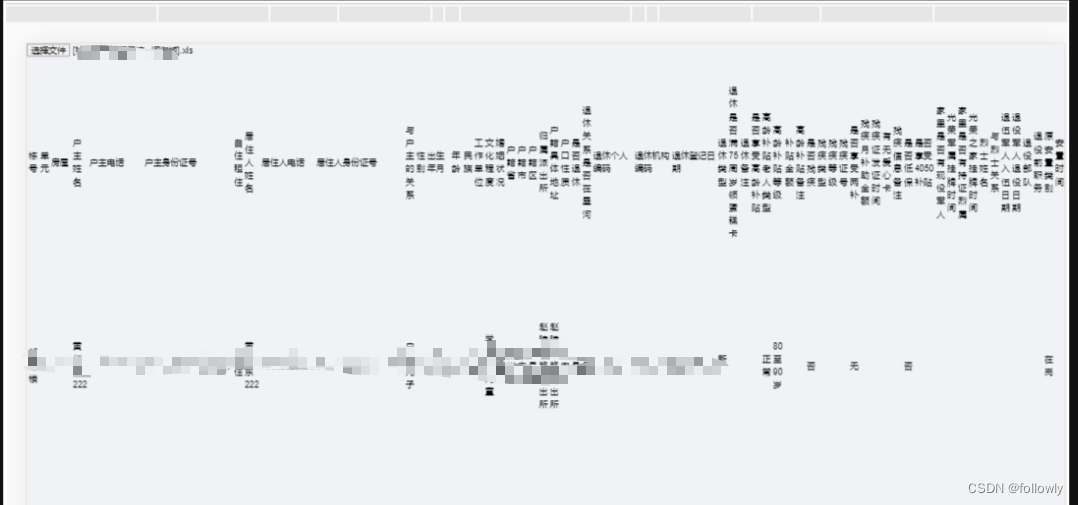
但是这样发现有个弊端;就是实现渲染的excel格式错乱不好看;大概效果如下:影响预览效果
随后浏览github上发现有个很不错的插件;可以直接通过文件地址实现预览;
那就是----vue-office插件这是那位大佬的插件地址
支持多种文件(docx、excel、pdf)预览的vue组件库,支持vue2/3。也支持非Vue框架的预览。
功能特色
- 一站式:提供word(.docx)、pdf、excel(.xlsx, .xls)多种文档的在线预览方案,有它就够了
- 简单:只需提供文档的src(网络地址)即可完成文档预览
- 体验好:选择每个文档的最佳预览方案,保证用户体验和性能都达到最佳状态
安装
#docx文档预览组件
npm install @vue-office/docx vue-demi@0.14.6

#excel文档预览组件
npm install @vue-office/excel vue-demi@0.14.6

#pdf文档预览组件
npm install @vue-office/pdf vue-demi@0.14.6
如果是vue2.6版本或以下还需要额外安装 @vue/composition-api
npm install @vue/composition-api以下是我实现的代码
<template>
  <div v-loading="loading" class="dataTable">
    <el-form :model="dataForm" label-width="80px" class="box">
      <el-row style="display: flex; flex-wrap: wrap">
        <el-col :sm="12" :md="10">
          <el-form-item label="查询时间">
            <el-date-picker
              v-model="dataForm.time"
              style="width: 100%"
              format="yyyy-MM-dd"
              value-format="yyyy-MM-dd HH:mm:ss"
              type="daterange"
              range-separator="-"
              start-placeholder="开始日期"
              end-placeholder="结束日期"
            >
            </el-date-picker>
          </el-form-item>
        </el-col>
        <el-col :sm="12" :md="4">
          <div label=" " style="padding-left: 12px; display: flex; width: 100%">
            <el-button class="el-icon-view" @click="create(1)">预览报表</el-button>
            <el-button type="primary" class="el-icon-finished" @click="create(2)">生成报表
            </el-button>
          </div>
        </el-col>
      </el-row>
    </el-form>
    <el-dialog
      title="文件预览"
      :visible.sync="dialogVisible"
      width="90%"
      append-to-body
      :before-close="handleClose"
      class="file-dialog"
    >
      <vue-office-excel
        v-if="dialogVisible"
        :src="excel"
        style="height: 900px; width: 100%"
        @rendered="renderedHandler"
        @error="errorHandler"
      />
    </el-dialog>
  </div>
</template>
<script>
import moment from 'moment';
import VueOfficeExcel from '@vue-office/excel';
// 引入VueOfficeExcel组件
// 引入相关样式
import '@vue-office/excel/lib/index.css';

export default {
  // 组件注册
  components: { VueOfficeExcel },
  data() {
    return {
      dataForm: {
        type: '',
        time: [],
      },
      excel: null,
      dialogVisible: false,
      loading: false,
    };
  },
  methods: {
    renderedHandler() {
      console.log('渲染完成');
    },
    errorHandler() {
      console.log('渲染失败');
    },
    create(type) {
      if (this.dataForm.type === '') {
        this.$message('请选择要生成的报表类型');
        return;
      }
      if (this.dataForm.time === '' || this.dataForm.time.length === 0) {
        this.$message('请选择要生成的报表的时间');
        return;
      }
      const dataForm = {
        ...this.dataForm,
      };
      dataForm.startTime = moment(dataForm.time[0]).format('YYYY-MM-DD HH:mm:ss');
      dataForm.endTime = moment(dataForm.time[1]).format('YYYY-MM-DD HH:mm:ss');
      this.loading = true;
      this.$post('/statistics/overview', dataForm).then((res) => {
        const url = res;
        if (type === 1) {
          this.dialogVisible = true;
          this.excel = url;
          this.loading = false;
        } else {
          this.onPreview(url);
        }
      });
    },
    handleClose() {
      this.dialogVisible = false;
    },
    onPreview(url, name) {
      const elink = document.createElement('a');
      elink.target = '_blank';
      elink.download = name;
      elink.style.display = 'none';
      elink.href = url;
      document.body.appendChild(elink);
      elink.click();
      document.body.removeChild(elink);

      setTimeout(() => {
        this.loading = false;
      }, 2000);
    },
  },
};
</script>
<style scoped lang="scss">
.dataTable {
  /* margin-top: 20px; */
  margin: 20px;
  height: 100%;
  min-height: 750px;
  display: flex;
  align-items: center;
  justify-content: center;
  .box {
    height: 100%;
  }
}
</style>
预览效果杠杠滴

魔乐社区(Modelers.cn) 是一个中立、公益的人工智能社区,提供人工智能工具、模型、数据的托管、展示与应用协同服务,为人工智能开发及爱好者搭建开放的学习交流平台。社区通过理事会方式运作,由全产业链共同建设、共同运营、共同享有,推动国产AI生态繁荣发展。
更多推荐


 7
7 0
0- 0


 已为社区贡献3条内容

所有评论(0)