web应用技术第8次课(3)--基于springboot+mybatis+vue的项目实战之(后端+前后端联调)
·
步骤:
1、建立项目结构文件夹
2、编写pojo文件
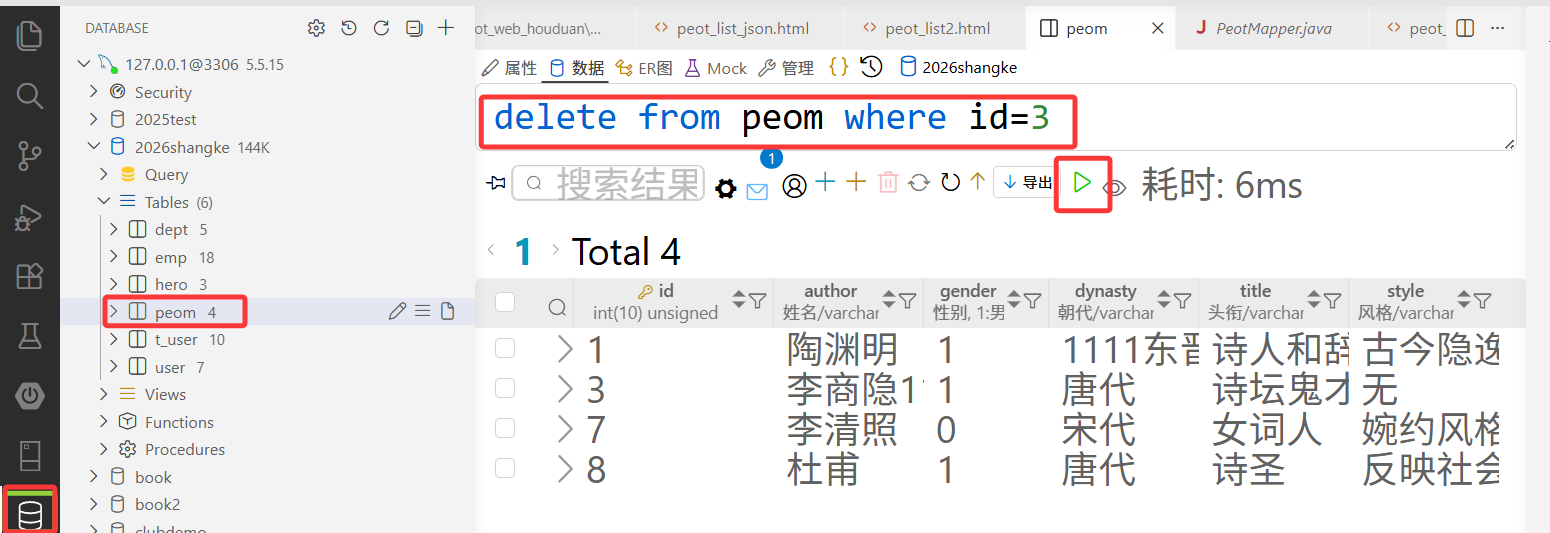
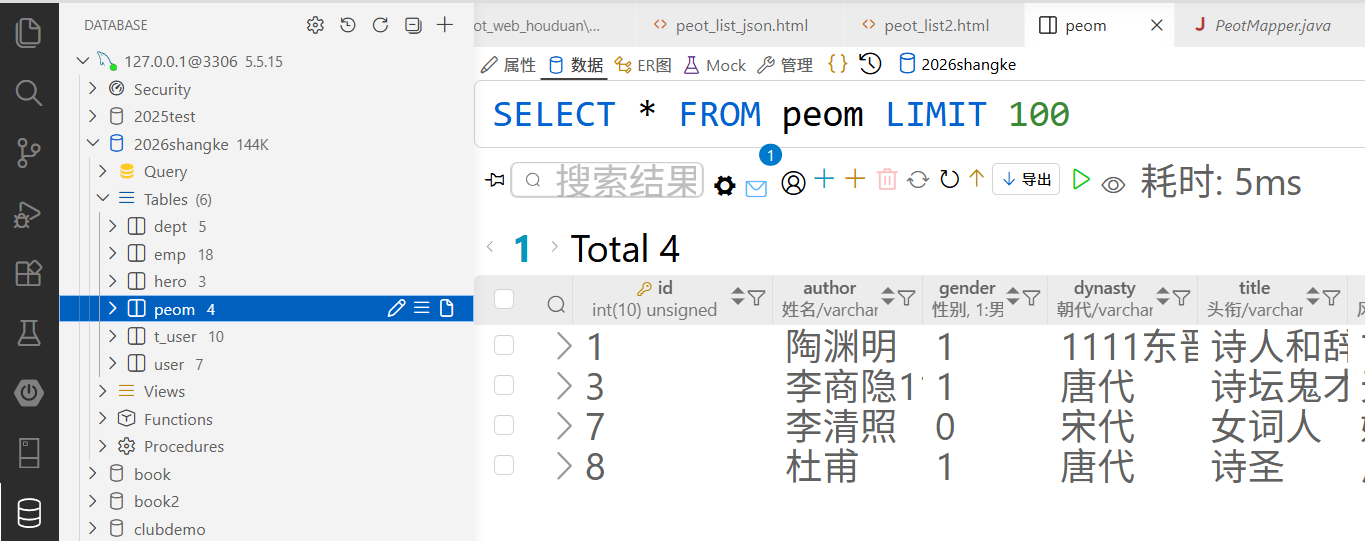
3、编写mapper文件,并测试sql语句是否正确
4、编写service文件
5、编写controller文件
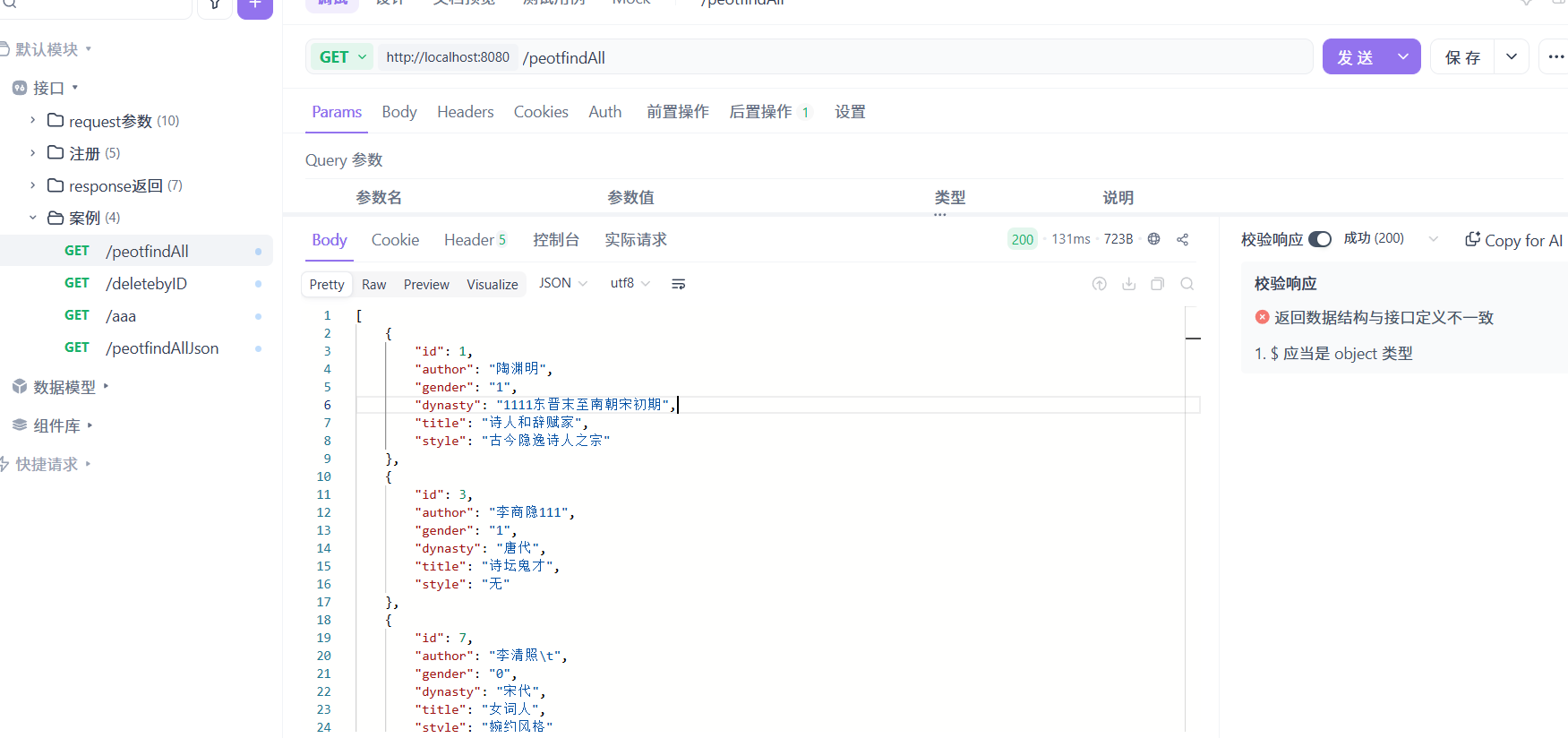
6、测试后端程序是否正确
7、前后端联调
1、建立项目结构文件夹
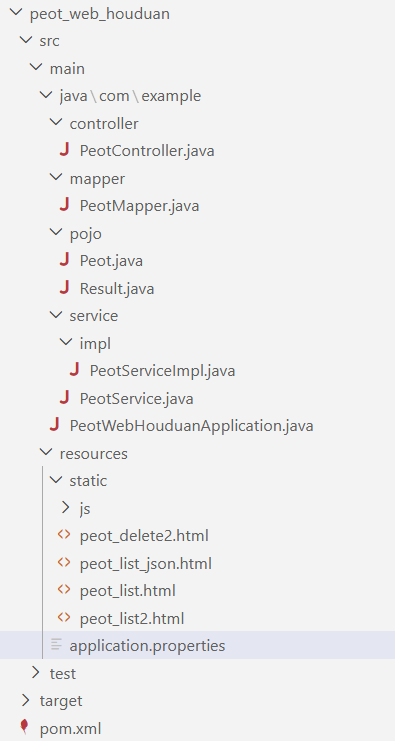
2、编写pojo文件
package com.example.pojo;

import lombok.AllArgsConstructor;
import lombok.Data;
import lombok.NoArgsConstructor;

@Data
@AllArgsConstructor
@NoArgsConstructor
public class Peot {
    private Integer id;
    private String author;
    private String gender;
    private String dynasty;
    private String title;
    private String style;
}
package com.example.pojo;
import lombok.AllArgsConstructor;
import lombok.Data;
import lombok.NoArgsConstructor;

@Data
@NoArgsConstructor
@AllArgsConstructor
public class Result {
    private Integer code;//响应码,1 代表成功; 0 代表失败
    private String msg;  //响应信息 描述字符串
    private Object data; //返回的数据
    //增删改 成功响应
    public static Result success(){
        return new Result(1,"success",null);
    }
    //查询 成功响应
    public static Result success(Object data){
        return new Result(1,"success",data);
    }
    //失败响应
    public static Result error(String msg){
        return new Result(0,msg,null);
    }
}
3、编写mapper文件,并测试sql语句是否正确
package com.example.mapper;

import com.example.pojo.Peot;
import org.apache.ibatis.annotations.Mapper;
import org.apache.ibatis.annotations.Select;

import java.util.List;

@Mapper
//@Mapper: 这个注解一般使用在Dao层接口上,
// 相当于一个mapper.xml文件,它的作用就是将接口生成一个动态代理类。加入了@Mapper注解,
// 目的就是为了不再写mapper映射文件。这个注解就是用来映射mapper.xml文件的。
public interface PeotMapper {

    @Select("select * from peom")
    public List<Peot> findAll();

}
4、编写service文件
package com.example.service;

import com.example.pojo.Peot;
import com.example.pojo.Result;

import java.util.List;

public interface PeotService {

    public List<Peot> findAll();


}
package com.example.service.impl;

import com.example.mapper.PeotMapper;
import com.example.pojo.Peot;
import com.example.pojo.Result;
import com.example.service.PeotService;
import org.springframework.beans.factory.annotation.Autowired;
import org.springframework.stereotype.Service;

import java.util.List;

@Service
//@Service 是 Spring 框架提供的一种注解,用于标识一个类作为服务层组件 (Service)。
// 通过使用 @Service 注解,可以将一个普通的 Java 类标记为服务层组件,并由 Spring 容器进行管理和注入。
public class PeotServiceImpl implements PeotService {
    @Autowired
   private PeotMapper peotMapper;

    //直接返回数据列表
    @Override
    public List<Peot> findAll() {
        return peotMapper.findAll();
    }
}
5、编写controller文件
package com.example.controller;

import com.example.pojo.Peot;
import com.example.pojo.Result;
import com.example.service.PeotService;
import org.springframework.beans.factory.annotation.Autowired;
import org.springframework.web.bind.annotation.RequestMapping;
import org.springframework.web.bind.annotation.RestController;

import java.util.List;

@RestController
//相当于@ResponseBody+@Controller
//Controller中的方法会用于返回页面视图的
//@ResponseBody注解标识后,响应数据可以是文本或者JSON数据类型
public class PeotController {

    @Autowired
    private PeotService peotService;

    //查询全部,返回的是Result类型的json数据。
    @RequestMapping("/peotfindAllJson")
    public Result findAllJson(){
        return Result.success(peotService.findAll());
    }

    //查询全部,返回的是Result类型的json数据。
    @RequestMapping("/peotfindAll")
    public List<Peot> findAll(){
        return peotService.findAll();
    }

}
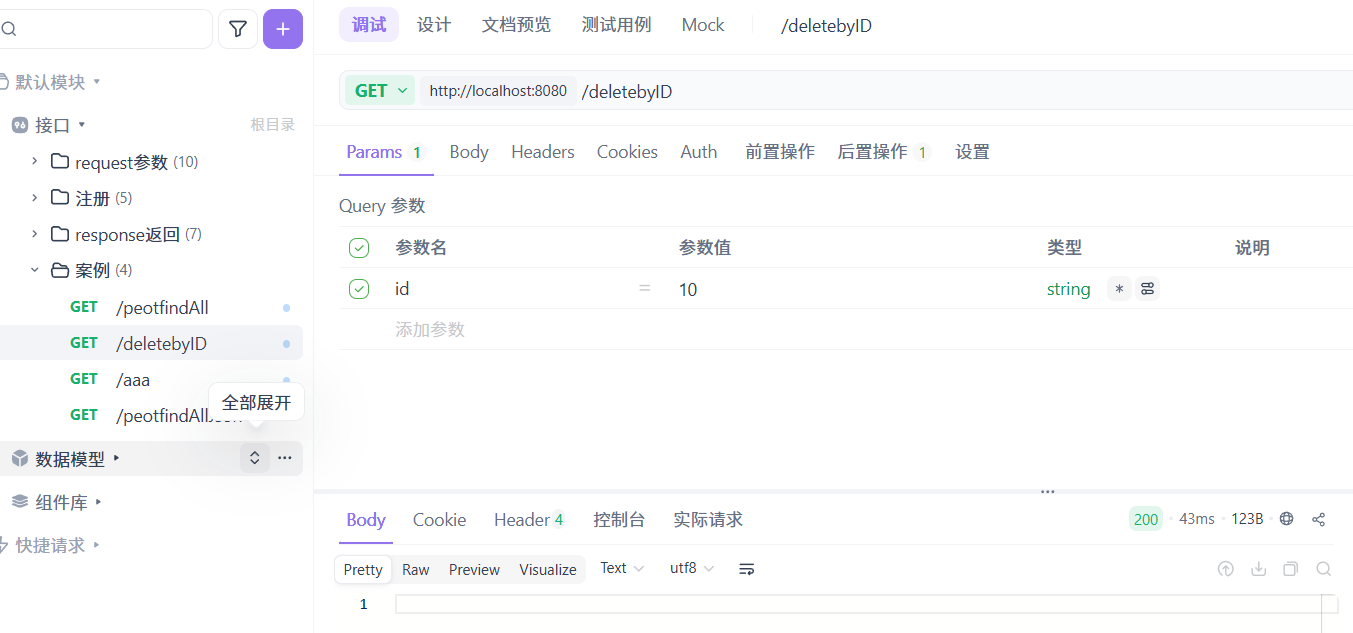
6、测试后端程序是否正确
7、前后端联调
peot_list.html 删除按钮未启用,axios返回的是poem的list数据
<!DOCTYPE html>
<html lang="en">

<head>
  <meta charset="UTF-8">
  <meta http-equiv="X-UA-Compatible" content="IE=edge">
  <meta name="viewport" content="width=device-width, initial-scale=1.0">
  <title>诗人信息</title>
</head>

<script src="./js/vue.js"></script>
<script src="./js/axios-0.18.0.js"></script>

<body>

  <h1 align="center">诗人信息列表展示</h1>

  <div id="app" align="center">
    <table border="1" cellspacing="0" width="60%">
      <tr>
        <th>序号</th>
        <th>姓名</th>
        <th>性别</th>
        <th>朝代</th>
        <th>头衔</th>
        <th>风格</th>
        <th>操作</th>
      </tr>
      <tr align="center" v-for="(peot,index) in tableData">
        <td>{{peot.id}}</td>
        <td>{{peot.author}}</td>
        <td>{{peot.gender}}</td>
        <td>{{peot.dynasty}}</td>
        <td>{{peot.title}}</td>
        <td>{{peot.style}}</td>
        <td class="text-center">修改 删除</td>
      </tr>
    </table>
  </div>
</body>

<script>
  new Vue({
    el: "#app",
    data() {
      return {
        tableData: []
      }
    },
    mounted() {
      //peotfindAll
      axios.get('peotfindAll').then(res => {
        this.tableData = res.data;
      });
    },

  });
</script>

</html>
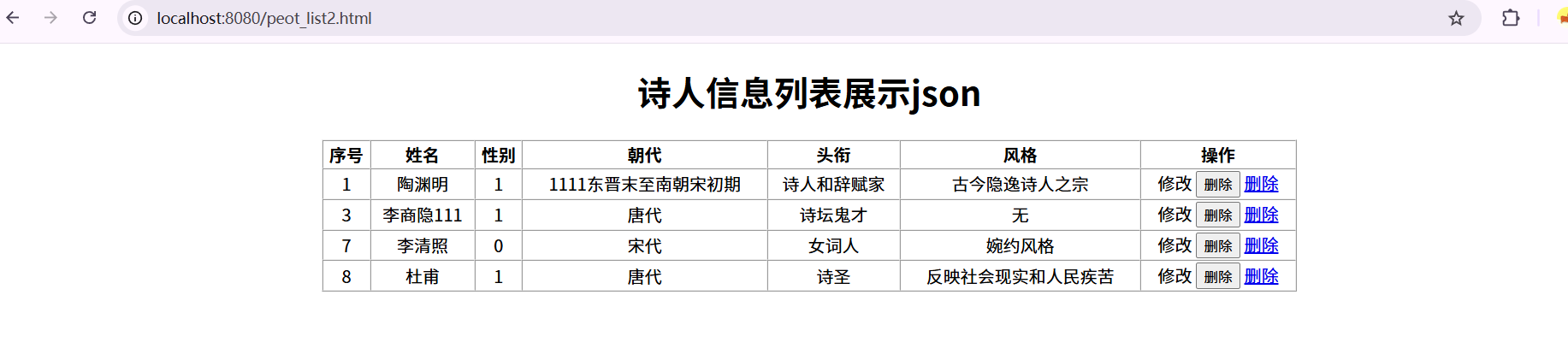
peot_list2.html 删除按钮启用,并且是按钮模式和链接模式。axios返回的是poem的list数据
<!DOCTYPE html>
<html lang="en">

<head>
    <meta charset="UTF-8">
    <meta http-equiv="X-UA-Compatible" content="IE=edge">
    <meta name="viewport" content="width=device-width, initial-scale=1.0">
    <title>诗人信息</title>
</head>

<script src="./js/vue.js"></script>
<script src="./js/axios-0.18.0.js"></script>

<body>
    <h1 align="center">诗人信息列表展示json</h1>
    <div id="app" align="center">
        <table border="1" cellspacing="0" width="60%">
            <tr>
                <th>序号</th>
                <th>姓名</th>
                <th>性别</th>
                <th>朝代</th>
                <th>头衔</th>
                <th>风格</th>
                <th>操作</th>
            </tr>
            <tr align="center" v-for="peot in tableData">
                <td>{{peot.id}}</td>
                <td>{{peot.author}}</td>
                <td>{{peot.gender}}</td>
                <td>{{peot.dynasty}}</td>
                <td>{{peot.title}}</td>
                <td>{{peot.style}}</td>
                <td class="text-center">修改
                    <button type="button" @click="deleteId(peot.id)">删除</button>
                    <a :href="'peot_delete2.html?id='+peot.id">删除</a>
                </td>
            </tr>
        </table>
    </div>
</body>

<script>
    new Vue({
        el: "#app",
        data() {
            return {
                tableData: []
            }
        },
        mounted() {
            //peotfindAllJson  返回类型为Result
            axios.get('peotfindAll').then(res => {
                //  if(res.data.code){
                this.tableData = res.data;
                // }
            });
        },
        methods: {
            findAll: function () {
                var _this = this;
                axios.post('/peotfindAll', {
                })
                    .then(function (response) {
                        _this.peotList = response.data;//响应数据给peotList赋值
                    })
                    .catch(function (error) {
                        console.log(error);
                    });
            },
            deleteId: function (id) {
                var _thisd = this;
                if (window.confirm("确定要删除该条数据吗???")) {
                    axios.post('/deletebyID?id=' + id)
                        .then(function (response) {
                            alert("删除成功")
                            _thisd.findAll();
                        })
                        .catch(function (error) {
                            console.log(error);
                        });
                }
            }

        },
        created() {
            // 获得参数id值
            // this.id = location.href.split("?id=")[1]
            // 通过id查询详情
            this.findAll();
        },
    });
</script>

</html>
peot_list2.html 删除按钮启用,并且是按钮模式和链接模式。axios返回的是poem的list数据
<!DOCTYPE html>
<html lang="en">

<head>
    <meta charset="UTF-8">
    <meta http-equiv="X-UA-Compatible" content="IE=edge">
    <meta name="viewport" content="width=device-width, initial-scale=1.0">
    <title>诗人信息</title>
</head>

<script src="./js/vue.js"></script>
<script src="./js/axios-0.18.0.js"></script>

<body>
    <h1 align="center">诗人信息列表展示json</h1>
    <div id="app" align="center">
        <table border="1" cellspacing="0" width="60%">
            <tr>
                <th>序号</th>
                <th>姓名</th>
                <th>性别</th>
                <th>朝代</th>
                <th>头衔</th>
                <th>风格</th>
                <th>操作</th>
            </tr>
            <tr align="center" v-for="peot in tableData">
                <td>{{peot.id}}</td>
                <td>{{peot.author}}</td>
                <td>{{peot.gender}}</td>
                <td>{{peot.dynasty}}</td>
                <td>{{peot.title}}</td>
                <td>{{peot.style}}</td>
                <td class="text-center">修改
                    <button type="button" @click="deleteId(peot.id)">删除</button>
                    <a :href="'peot_delete2.html?id='+peot.id">删除</a>
                </td>
            </tr>
        </table>
    </div>
</body>

<script>
    new Vue({
        el: "#app",
        data() {
            return {
                tableData: []
            }
        },
        mounted() {
            //peotfindAllJson  返回类型为list
            axios.get('peotfindAll').then(res => {
                //  if(res.data.code){
                this.tableData = res.data;
                // }
            });
        },
        methods: {
            findAll: function () {
                var _this = this;
                axios.post('/peotfindAll', {
                })
                    .then(function (response) {
                        _this.peotList = response.data;//响应数据给peotList赋值
                    })
                    .catch(function (error) {
                        console.log(error);
                    });
            },
            deleteId: function (id) {
                var _thisd = this;
                if (window.confirm("确定要删除该条数据吗???")) {
                    axios.post('/deletebyID?id=' + id)
                        .then(function (response) {
                            alert("删除成功")
                            _thisd.findAll();
                        })
                        .catch(function (error) {
                            console.log(error);
                        });
                }
            }

        },
        created() {
            // 获得参数id值
            // this.id = location.href.split("?id=")[1]
            // 通过id查询详情
            this.findAll();
        },
    });
</script>

</html>
peot_list_json.html
<!DOCTYPE html>
<html lang="en">

<head>
    <meta charset="UTF-8">
    <meta http-equiv="X-UA-Compatible" content="IE=edge">
    <meta name="viewport" content="width=device-width, initial-scale=1.0">
    <title>诗人信息</title>
</head>

<script src="./js/vue.js"></script>
<script src="./js/axios-0.18.0.js"></script>

<body>
    <h1 align="center">诗人信息列表展示json</h1>
    <div id="app" align="center">
        <table border="1" cellspacing="0" width="60%">
            <tr>
                <th>序号</th>
                <th>姓名</th>
                <th>性别</th>
                <th>朝代</th>
                <th>头衔</th>
                <th>风格</th>
                <th>操作</th>
            </tr>
            <tr align="center" v-for="peot in tableData">
                <td>{{peot.id}}</td>
                <td>{{peot.author}}</td>
                <td>{{peot.gender}}</td>
                <td>{{peot.dynasty}}</td>
                <td>{{peot.title}}</td>
                <td>{{peot.style}}</td>
                <td class="text-center">修改 删除</a>
                </td>
            </tr>
        </table>
    </div>
</body>

<script>
    new Vue({
        el: "#app",
        data() {
            return {
                tableData: []
            }
        },
        mounted() {
            //peotfindAllJson  返回类型为Result
            axios.get('peotfindAllJson').then(res => {
                if (res.data.code) {
                    this.tableData = res.data.data;
                }
            });
        },
    });
</script>

</html>
运行结果:

魔乐社区(Modelers.cn) 是一个中立、公益的人工智能社区,提供人工智能工具、模型、数据的托管、展示与应用协同服务,为人工智能开发及爱好者搭建开放的学习交流平台。社区通过理事会方式运作,由全产业链共同建设、共同运营、共同享有,推动国产AI生态繁荣发展。
更多推荐


 8
8 0
0- 0


 已为社区贡献4条内容

所有评论(0)