微信支付 APIv3 商家转账到零钱 使用 wechatpay-apache-httpclient (亲身测试可以使用)
·
找遍了csdn没有找到我想要的文章(使用wechatpay-apache-httpclient的)
于是自己琢磨了两个简单的demo 只需要一个类就可以实现
发起商家转账API
https://api.mch.weixin.qq.com/v3/transfer/batches
批次单号查询批次单API
https://api.mch.weixin.qq.com/v3/transfer/batches/batch-id/{batch_id}
0.名词解释
- 商户API证书,是用来证实商户身份的。证书中包含商户号、证书序列号、证书有效期等信息,由证书授权机构(Certificate Authority ,简称CA)签发,以防证书被伪造或篡改。如何获取请见商户API证书。
- 商户API私钥。商户申请商户API证书时,会生成商户私钥,并保存在本地证书文件夹的文件apiclient_key.pem中。注:不要把私钥文件暴露在公共场合,如上传到Github,写在客户端代码等。
- 微信支付平台证书。平台证书是指由微信支付负责申请的,包含微信支付平台标识、公钥信息的证书。商户可以使用平台证书中的公钥进行应答签名的验证。获取平台证书需通过获取平台证书列表接口下载。
- 证书序列号。每个证书都有一个由CA颁发的唯一编号,即证书序列号。如何查看证书序列号请看这里。
- API v3密钥。为了保证安全性,微信支付在回调通知和平台证书下载接口中,对关键信息进行了AES-256-GCM加密。API v3密钥是加密时使用的对称密钥。商户可以在【商户平台】->【API安全】的页面设置该密钥。
0.先将代码拷贝到项目中
/**
 * @author: LiuDengQu
 * @date: 2022/9/19  17:34
 */

import com.fasterxml.jackson.databind.ObjectMapper;
import com.wechat.pay.contrib.apache.httpclient.WechatPayHttpClientBuilder;
import com.wechat.pay.contrib.apache.httpclient.util.PemUtil;
import lombok.extern.slf4j.Slf4j;
import org.apache.http.client.methods.CloseableHttpResponse;
import org.apache.http.client.methods.HttpGet;
import org.apache.http.client.methods.HttpPost;
import org.apache.http.client.utils.URIBuilder;
import org.apache.http.entity.StringEntity;
import org.apache.http.impl.client.CloseableHttpClient;
import org.apache.http.util.EntityUtils;

import java.io.ByteArrayOutputStream;
import java.io.FileInputStream;
import java.io.FileNotFoundException;
import java.io.IOException;
import java.net.URISyntaxException;
import java.security.PrivateKey;
import java.security.cert.X509Certificate;
import java.util.*;

@Slf4j
public class WechatPay {

    private static final String appId = "wax8ba4ec75c8dfcs7cab71";
    /**
     * 商户号。
     */
    private static final String merchantId = "16123e325393438471154";
    /**
     * 商户API证书的证书序列号。
     */
    private static final String merchantSerialNumber = "662F8C1BBC32455CDGG5CS2FB791739SCA51E89FGH6D9AA85";
    /**
     * apiv3 密钥
     */
    private static final String apiV3Key = "WFcs369963fklSECASGG$SS65QAZpoik";

    /**
     * 商户API私钥,如何加载商户API私钥请看 常见问题。 @link: https://github.com/wechatpay-apiv3/wechatpay-apache-httpclient#%E5%A6%82%E4%BD%95%E5%8A%A0%E8%BD%BD%E5%95%86%E6%88%B7%E7%A7%81%E9%92%A5
     */
    private static PrivateKey merchantPrivateKey = null;

    static {
        try {
            merchantPrivateKey = PemUtil.loadPrivateKey(
                    new ClassPathResource("apiclient_key.pem").getInputStream());
        } catch (IOException e) {
            e.printStackTrace();
        }
    }

    /**
     * 微信支付平台证书列表.
     */
    private static List<X509Certificate> wechatPayCertificates = new ArrayList<>();

    static {

        try {
            wechatPayCertificates.add(PemUtil.loadCertificate(new ClassPathResource("wechatpay.pem").getInputStream()));
        } catch (IOException e) {
            e.printStackTrace();
        }

    }

    public static void main(String[] args) throws Exception {
       // System.out.println(postTransferBatches(IdUtil.getSnowflake(0, 0).nextIdStr(),"oow6i5fhWYlcr1obX3TRtSyk5v4E",100));

        System.out.println(getTransferBatches("1030000026801537090802022101401470563612").contains("\"detail_status\":\"SUCCESS\""));
    }


    /**
     * 发起商家转账API
     * @param outNo 商家批次号(我们定义)
     * @param openId 微信openId
     * @param transfer_amount 提现金额 单位分
     * @return
     * @throws URISyntaxException
     * @throws IOException
     */
    public static String postTransferBatches(String outNo, String openId, Integer transfer_amount) throws URISyntaxException, IOException {
        final CloseableHttpClient httpClient = getHttpClient();
        URIBuilder uriBuilder = new URIBuilder("https://api.mch.weixin.qq.com/v3/transfer/batches");
        HttpPost httpPost = new HttpPost(uriBuilder.build());
        // NOTE: 建议指定charset=utf-8。低于4.4.6版本的HttpCore,不能正确的设置字符集,可能导致签名错误
        httpPost.addHeader("Content-Type", "application/json");
        httpPost.addHeader("Accept", "application/json");
        httpPost.addHeader("Wechatpay-Serial", merchantSerialNumber);

        Map<String, Object> postMap = new HashMap<>(6);

        postMap.put("appid", appId);
        //商家批次单号 长度 1~32
        postMap.put("out_batch_no", outNo);
        //该笔批量转账的名称
        postMap.put("batch_name", "分销佣金提现");
        //转账说明,UTF8编码,最多允许32个字符
        postMap.put("batch_remark", "测试转账");
        //转账金额单位为“分”。 总金额
        postMap.put("total_amount", transfer_amount);
        //转账总笔数
        postMap.put("total_num", 1);

        List<Map> list = new ArrayList<>();
        Map<String, Object> subMap = new HashMap<>(4);
        //商家明细单号
        subMap.put("out_detail_no", outNo);
        //转账金额
        subMap.put("transfer_amount", transfer_amount);
        //转账备注
        subMap.put("transfer_remark", "分销提现");
        //用户在直连商户应用下的用户标示
        subMap.put("openid", openId);
        //收款人的真实姓名 如果填写 微信会进行验证 与身份证不一致会报错
        //subMap.put("user_name", RsaCryptoUtil.encryptOAEP(userName, x509Certificate));
        list.add(subMap);
        postMap.put("transfer_detail_list", list);

        ByteArrayOutputStream bos = new ByteArrayOutputStream();
        ObjectMapper objectMapper = new ObjectMapper();
        objectMapper.writeValue(bos, postMap);
        httpPost.setEntity(new StringEntity(bos.toString("UTF-8"), "UTF-8"));
        CloseableHttpResponse response = httpClient.execute(httpPost);
        log.info("发起商家转账API->openId:{},outNo:{},transfer_amount:{}", openId, outNo,transfer_amount);
        return EntityUtils.toString(response.getEntity());
    }

    /**
     * 微信批次单号查询批次单API
     * @param batch_id 发起商家转账返回值 batch_id
     * @return CloseableHttpResponse.Entity.toString()
     * @throws URISyntaxException
     * @throws IOException
     */
    public static String getTransferBatches(String batch_id) throws URISyntaxException, IOException {
        final CloseableHttpClient httpClient = getHttpClient();
        URIBuilder uriBuilder = new URIBuilder("https://api.mch.weixin.qq.com/v3/transfer/batches/batch-id/" + batch_id + "?need_query_detail=true&detail_status=ALL");
        HttpGet httpGet = new HttpGet(uriBuilder.build());
        httpGet.addHeader("Accept", "application/json");

        CloseableHttpResponse response = httpClient.execute(httpGet);
        log.info("调用微信批次单号查询批次单API->batch_id:{},response:{}", batch_id, response);
        return EntityUtils.toString(response.getEntity());
    }

    /**
     * 获取微信HttpClient
     * @return
     */
    public static CloseableHttpClient getHttpClient()  {
//        // 获取证书管理器实例
//        CertificatesManager certificatesManager = CertificatesManager.getInstance();
//        // 向证书管理器增加需要自动更新平台证书的商户信息
//        certificatesManager.putMerchant(merchantId, new WechatPay2Credentials(merchantId,
//                new PrivateKeySigner(merchantSerialNumber, merchantPrivateKey)), apiV3Key.getBytes(StandardCharsets.UTF_8));
//        // ... 若有多个商户号,可继续调用putMerchant添加商户信息
//
//
//        // 从证书管理器中获取verifier
//        Verifier verifier = certificatesManager.getVerifier(merchantId);
//        WechatPayHttpClientBuilder builder = WechatPayHttpClientBuilder.create()
//                .withMerchant(merchantId, merchantSerialNumber, merchantPrivateKey)
//                .withValidator(new WechatPay2Validator(verifier));
        // ... 接下来,你仍然可以通过builder设置各种参数,来配置你的HttpClient

        // 通过WechatPayHttpClientBuilder构造的HttpClient,会自动的处理签名和验签,并进行证书自动更新
        WechatPayHttpClientBuilder builder = WechatPayHttpClientBuilder.create()
                .withMerchant(merchantId, merchantSerialNumber, merchantPrivateKey)
                .withWechatPay(wechatPayCertificates);
        return builder.build();
    }

}
开始
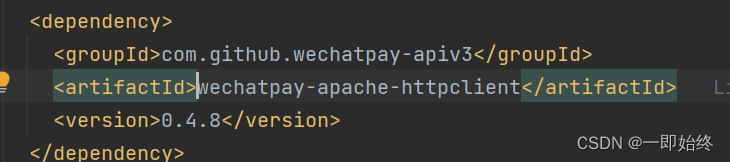
1.Maven 添加依赖
2. 添加resource
注意在运行代码之前要保证这个类下的resource文件包含
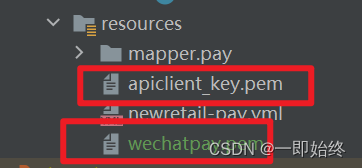
商户API私钥 apiclient_key.pem
支付平台证书 wechatpay_XXXXXXXXXXXXXXXXX.pem
微信支付平台证书下载我用的是 官方的jar包工具 :GitHub - wechatpay-apiv3/CertificateDownloader: Java 微信支付 APIv3 平台证书的命令行下载工具
2. 替换变量
    private static final String appId = "你的小程序apid";
    /**
     * 商户号。
     */
    private static final String merchantId = "你的商户号";
    /**
     * 商户API证书的证书序列号。
     */
    private static final String merchantSerialNumber = "证书序列号";
    /**
     * apiv3 密钥
     */
    private static final String apiV3Key = "用不到";
各位 代码注释已经很明了了 将变量替换即可运行
有什么不明白的欢迎在下方评论

魔乐社区(Modelers.cn) 是一个中立、公益的人工智能社区,提供人工智能工具、模型、数据的托管、展示与应用协同服务,为人工智能开发及爱好者搭建开放的学习交流平台。社区通过理事会方式运作,由全产业链共同建设、共同运营、共同享有,推动国产AI生态繁荣发展。
更多推荐


 4
4 0
0- 0


 已为社区贡献2条内容

所有评论(0)