ffmpeg实现rtmp推流的错误
今天利用./ffmpeg -re -i input.mp4 -vcodec copy -f flv -y rtmp://192.168.1.103:1935/live/desktop
推送本地视频流时,出现以下报错:
Codec mpeg4 is not supported in the official FLV specification,
can’t configure encoder Error initializing output stream 0:0 – Error while…
我便更改命令为:./ffmpeg -re -i input.mp4 -c:v h264 -f flv rtmp://192.168.1.103:1935/live/desktop
但是又出现了新的错误:
can’t configure encoder Error initializing output stream 0:0 – Error while
经查阅资料,发现应该按如下方式解决:
1下载x264
git clone http://git.videolan.org/git/x264.git
2安装x264
cd x264

sudo ./configure --enable-shared --disable-asm

sudo make
3添加环境变量
#在终端输入
vim /etc/profile
#然后添加环境变量
export PKG_CONFIG_PATH=/usr/local/lib/pkgconfig:$PKG_CONFIG_PATH
#按esc加:wq退出
#终端输入
source /etc/profile
#再测试一波
echo $PKG_CONFIG_PATH
4重新编译ffmpeg
/configure --enable-opengl --enable-libx264 --extra-libs='-lGL -lGLU -lGLEW -lglfw -lpng -lm -lz'
又出现错误:
libx264 is gpl and --enable-gpl is not specified.
修改方法:按以下命令编译
/configure --enable-opengl --enable-libx264 --enable-gpl --extra-libs='-lGL -lGLU -lGLEW -lglfw -lpng -lm -lz'
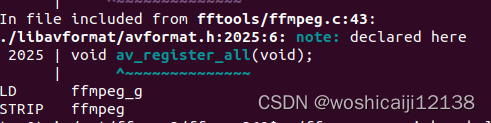
之后
sudo make ffmpeg
编译成功
然后再输入命令:
./ffmpeg -re -i input.mp4 -c:v h264 -f flv rtmp://192.168.1.103:1935/live/desktop
运行成功!

魔乐社区(Modelers.cn) 是一个中立、公益的人工智能社区,提供人工智能工具、模型、数据的托管、展示与应用协同服务,为人工智能开发及爱好者搭建开放的学习交流平台。社区通过理事会方式运作,由全产业链共同建设、共同运营、共同享有,推动国产AI生态繁荣发展。
更多推荐


 1
1 0
0- 0


 已为社区贡献6条内容

所有评论(0)