vue3天地图如何实现自定义信息窗
以上只是给各位一个自定义窗口的思路!MapInfoWindow 组件。默认窗口样式可参考以下css。根据自己的方式去设计。
·
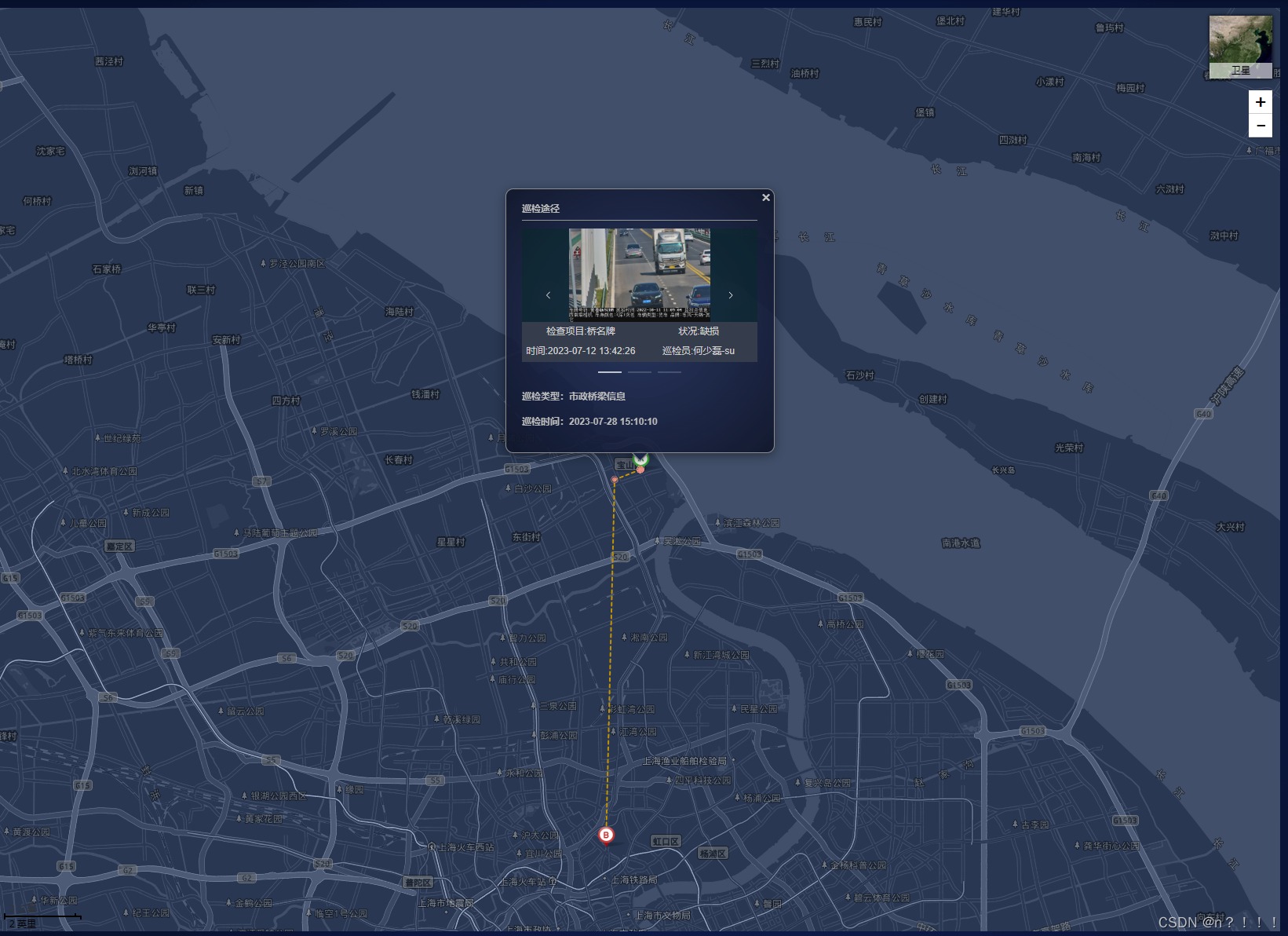
上代码:
//lnglat 数据可以自行创建
//数据模板参考
/*{
    "type": "6",
    "typeText": "",
    "lat": 31.40528426728419,
    "lng": 121.48942597741174,
    "time": "2023-07-28 15:10:10",
    "insp": [
        {
            "itemName": "",
            "type": "bridge",
            "status": "2",
            "statusText": "缺损",
            "image": [],
            "uid": "1",
            "userName": "uu",
            "platform": "wxapp",
            "desc": "",
            "memo": "",
            "option": "1",
            "description": "1",
            "remark": "1",
            "time": "2023-07-12 13:42:26"
        },
        {
            "itemName": "桥",
            "type": "",
            "status": "2",
            "statusText": "",
            "image": [],
            "uid": "1",
            "userName": "",
            "platform": "wxapp",
            "desc": "",
            "memo": "",
            "option": "2",
            "description": "2",
            "remark": "2",
            "time": "2023-07-12 13:42:15"
        },
        {
            "itemName": "",
            "type": "bridge",
            "status": "2",
            "statusText": "",
            "image": [],
            "uid": "1",
            "userName": "",
            "platform": "wxapp",
            "desc": "",
            "memo": "",
            "option": "2",
            "description": "2",
            "remark": "2",
            "time": "2023-07-12 13:42:38"
        }
    ],
    "toType": ""
}*/
const loadTrack = (lnglatList)=>{
  mapRef.value.clearOverLays(); //mapRef.value 天地图实例
  if (lnglatList.length != 0) {
    let view = mapRef.value.getViewport(eval(lnglatList)); //自适应标点可视范围内
    let mapZoom = view.zoom;
    let centerPoint = view.center;
    mapRef.value.centerAndZoom(centerPoint,mapZoom - 1);
  }
  if (lnglatList.length != 0) {
    let icon0 = new T.Icon({
      iconUrl: require('@/assets/images/point.svg'),
      iconSize: new T.Point(15, 15),
      iconAnchor: new T.Point(11, 8)
    });
    let icon1 = new T.Icon({
      iconUrl:require('@/assets/images/markerA.png') ,
      iconSize: new T.Point(38, 28),
      iconAnchor: new T.Point(12, 25)
    });
    let icon2 = new T.Icon({
      iconUrl: require('@/assets/images/markerB.png'),
      iconSize: new T.Point(38, 28),
      iconAnchor: new T.Point(12, 25)
    });
    let iconMakers = lnglatList.map((item, i) => {
      let marker;
      if (i === 0) {
        marker = new T.Marker(new T.LngLat(item.lng, item.lat), { icon: icon1 });
        item.toType = '巡检开始点';
      } else if (i === lnglatList.length - 1) {
        marker = new T.Marker(new T.LngLat(item.lng, item.lat), { icon: icon2 });
        item.toType = '巡检结束点';
      } else {
        marker = new T.Marker(new T.LngLat(item.lng, item.lat), { icon: icon0 });
        item.toType = '巡检途径';
      }
      let infoWindow = createInfoWindow(MapInfoWindow,{ ops: item, preview: (img) => $preview({ file: img }) }); //创建信息窗口
      marker.addEventListener("click", function() {
        mapRef.value.panTo({lng:item.lng,lat:item.lat}); //将坐标中心点 改成 marker 所在位置
        marker.openInfoWindow(infoWindow); //开启信息窗口
      });
      mapRef.value.addOverLay(marker);
      return marker;
    });
  }
}

//创建信息窗口函数
const createInfoWindow = (node,vnodeProps = {})=>{
  const infoWindowContent = createVNode(node,vnodeProps);
  let infoNodeContent = document.createElement('div');
  render(infoWindowContent, infoNodeContent); //利用 vue render 渲染函数 编译成 原始html代码
  let infoWindow = new T.InfoWindow(infoNodeContent,{/* minWidth:300,maxHeight:260 */});// 创建信息窗口对象
  return infoWindow;
}
别忘了引入函数
 MapInfoWindow 组件
<template>
  <h4 style="margin-bottom:5px;">
    {{ ops.toType }}
  </h4>
  <div class="info-main">
    <el-carousel v-if="ops.insp.length" indicator-position="outside" :interval="5000" style="height:190px;">
      <el-carousel-item v-for="(item,index) in ops.insp" :key="index">
        <div class="img-body">
          <template v-if="item.image.length">
            <img v-for="(img,imgIndex) in item.image" :key="imgIndex" :alt="item.itemName" :src="img" @click="preview(img)">
          </template>
          <div v-else class="none-title">
            无图片
          </div>
          <div class="card-img-title">
            <div class="title-div">
              <span>检查项目:{{ item.itemName }}</span>
              <span>状况:{{ item.statusText }}</span>
            </div>
            <div class="title-div">
              <span>时间:{{ item.time }}</span>
              <span>巡检员:{{ item.userName }}</span>
            </div>
          </div>
        </div>
      </el-carousel-item>
    </el-carousel>
    <h4>巡检类型:{{ ops.typeText }}</h4>
    <h4>巡检时间:{{ ops.time }}</h4>
  </div>
</template>
<script name="locusInfoWindow" setup>
import {defineProps} from 'vue'
import {ElCarousel,ElCarouselItem} from 'element-plus'
const props = defineProps({
  ops:{
    type:Object,
    default() {
      return {}
    }
  },
  preview:{
    type:Function,
    default() {
      return function() {}
    }
  }
})

const preview = (img)=>{
  props.preview && props.preview(img)
}
</script>

<style lang="scss" scoped>
.info-main{
  padding-top:10px;
  min-width:300px;
  max-width:300px;
  max-height:290px;
  overflow:overlay;
  border-top:1px solid #959595;
  :deep(.el-carousel__container){
      height:calc(100% - 20px);
      .img-body {
        display: flex;
        flex-direction: column;
        position: relative;
        background: rgba(6, 41, 39, 0.5);
        height: 100%;
        img {
          height: 70%;
          object-fit: scale-down;
        }
        .none-title{
          height:70%;
          line-height:70%;
          font-size: 16px;
          font-weight: bold;
          align-items: center;
          display: flex;
          justify-content: center;
        }
        .card-img-title {
          display: flex;
          flex-direction: column;
          justify-content: space-around;
          position: absolute;
          height: 30%;
          bottom: 0;
          background: #353d4d;
          width: 100%;
          font-size: 12px;
          color: #cfcfcf;

          .title-div {
            display: flex;
            flex-direction: row;
            justify-content: space-around;

            span {
              text-align: center;
              width: 50%;
            }
          }
        }
      }
  }
}
</style>
默认窗口样式可参考以下css
  :deep(.tdt-infowindow){
    background-color:transparent;
    .tdt-infowindow-content-wrapper{
      /*css*/
    }
    .tdt-infowindow-close-button{

    }
  }
  :deep(.tdt-infowindow-tip-container){
    .tdt-infowindow-tip{

    }
  }
根据自己的方式去设计
以上只是给各位一个自定义窗口的思路!

魔乐社区(Modelers.cn) 是一个中立、公益的人工智能社区,提供人工智能工具、模型、数据的托管、展示与应用协同服务,为人工智能开发及爱好者搭建开放的学习交流平台。社区通过理事会方式运作,由全产业链共同建设、共同运营、共同享有,推动国产AI生态繁荣发展。
更多推荐


 3
3 0
0- 0


 已为社区贡献1条内容

所有评论(0)