vue实现游戏方向摇杆界面
vue2实现游戏方向摇杆界面这里用的手指触摸事件
·
解析请看代码 逻辑请看大神佳作
参考大神佳作 :Vue框架|一文教会你如何实现王者荣耀游戏摇杆
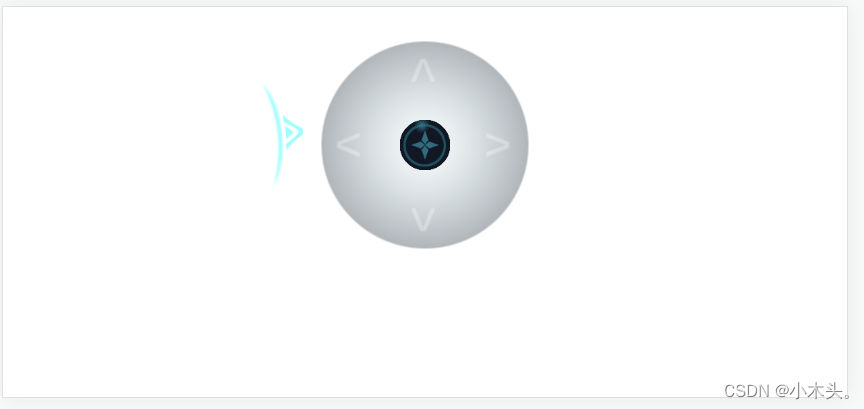
<template>
	<div class="page">
      <div style="margin-top: 90px;margin-left: 50%;position: relative;">
        <!-- 触摸识别区域部分 -->
        <div class='toucharea' @touchstart="onTouchStart" @touchmove="onTouchMove" @touchcancel="onTouchEnd" @touchend="onTouchEnd">
		     <div style="border-radius: 50%;" :style="{width:touchRadius*2+'px',height:touchRadius*2+'px'}"></div>
		    </div>
          <!-- 上部小图 -->
        <div class="ball" :style="{left:left+'px',top:top+'px'}" :class="{animation:inDraging===false&&transition}">
          <div style="width: 50px;height: 50px;">
            <img src="../../static/wangzhe_ball.png" style="width: 100%;height: 100%;">
          </div>
        </div>
        <!-- 底部大图 -->
        <div class="bottom">
          <div style="width: 207px;height: 207px;">
            <img src="../../static/wangzhe_bottom.png" style="width: 100%;height: 100%;">
          </div>
        </div>
      </div>
      <!-- 示例图 -->
			<div style="width: 250px;height: 250px;position: absolute;z-index: 99;transform: translate(1%,-50%);pointer-events: none;">
				<img src="../../static/wangzhe_arrow.png" :style="{transform:'rotate('+wangzheRotate+'deg)'}" style="width: 250px;height: 250px;">
			</div>
	</div>
</template>

<script>
var startLeft,startTop;
// 两点之间的距离函数
	var getDistance=function(x1, y1, x2, y2) {
    // 手指滑动的距离取绝对值Math.abs
		var _x = Math.abs(x1 - x2);
		var _y = Math.abs(y1 - y2);
    // Math.sqrt求平方根
		return Math.sqrt(_x * _x + _y * _y);
	}
	export default {
		data() {
			return {
        beetleLeft:0,//旋转方向
        beetleTop:0,//旋转方向
				wangzheRotate:0,//摇杆旋转角度
        touchRadius:100,//触摸识别区域的半径
        ballMoveRadius:50,//杆头的移动范围半径
        transition:false,
        left:0,//摇杆图标显示位置
				top:0,
				stickHeight:0,//两点之间的距离 (斜边)
				angle:0,//两点之间旋转的夹角
				inDraging:false
			}
		},
    mounted() {
			this.loop();
		},
		methods: {
      /**参数说明 angle 旋转的角度 direction X Y 两个邻边  power 两点之间的距离比上最大摇杆移动距离*/
			onWZJoystickUpdate(obj){
        // this.beetleLeft+=Math.cos(obj.angle)*(obj.power);
				// this.beetleTop+=Math.sin(obj.angle)*(obj.power);
				this.wangzheRotate=obj.angle/(Math.PI/180)+90;
        console.log(this.wangzheRotate);

			},
      // 手指触摸屏幕事件
      onTouchStart(e){
				var curTouch=e.touches[0];
        // 获取触摸坐标
				startLeft=curTouch.clientX-this.left;
				startTop=curTouch.clientY-this.top;
				this.inDraging=true;
			},
      // 手指在屏幕上滑动事件
			onTouchMove(e){
				var curTouch=e.touches[0];
        // 相当于两个点的距离公式中 x2-x1 y2-y1
				var tleft=curTouch.clientX-startLeft;
				var ttop=curTouch.clientY-startTop;
        // 两点之间的距离函数算出斜边距离
				var distance = getDistance(tleft,ttop,0,0);
        // 限制移动范围
				if(distance>=this.ballMoveRadius)distance = this.ballMoveRadius;
        // 移动的夹角Math.atan2 当前坐标移动到目标坐标 之间的夹角
				var angle = Math.atan2((ttop-0), (tleft-0));
        // 知道夹角和斜边 计算出 两个邻边
				this.left=Math.cos(angle)*distance;
				this.top=Math.sin(angle)*distance;
        // 斜边移动的角度赋值
				this.stickHeight = distance;
				this.angle = angle;
			},
      // 手指离开事件
			onTouchEnd(e){
        // 摇杆返回原来位置
				this.stickHeight=this.left=this.top=0;
				this.inDraging=false;
			},
			loop(){
        // 此方法可以将回调函数追加到动画帧请求回调函数列表的末尾。
        // 当执行requestAnimationFrame(callback)时候,不会立刻调用callback函数,只是将其放入队列。
				requestAnimationFrame(this.loop);
				if(this.inDraging){
          this.onWZJoystickUpdate({angle:this.angle,direction:{x:this.left,y:this.top},power:this.stickHeight/this.ballMoveRadius})
				}
			}
		}
	}
</script>

<style>

	.page{
    position: relative;
		width: 100%;
		height: 300px;
		overflow: hidden;
    padding: 40px;
	}
	div
	{
		box-sizing: border-box;
	}
  .toucharea{
		position: absolute;
		z-index: 4;
		transform: translate(-50%,-50%);
		border-radius: 50%;
	}
	.ball{
		position: absolute;
		z-index: 3;
		transform: translate(-50%,-50%);
	}
	.stick
	{
		position: absolute;
		z-index: 2;
	}
	.ball.animation
	{
		transition: left .1s ease-out,top .1s ease-out;
	}
	.stick.animation
	{
		transition: all .2s ease-out;
	}
	.bottom
	{
		position: absolute;
		z-index: 1;
		transform: translate(-50%,-50%);
	}
</style>

魔乐社区(Modelers.cn) 是一个中立、公益的人工智能社区,提供人工智能工具、模型、数据的托管、展示与应用协同服务,为人工智能开发及爱好者搭建开放的学习交流平台。社区通过理事会方式运作,由全产业链共同建设、共同运营、共同享有,推动国产AI生态繁荣发展。
更多推荐


 1
1 0
0- 0


 已为社区贡献1条内容

所有评论(0)