MinIO集群基准测试方法和工具
MinIO集群基准测试方法和工具
MinIO是一个高性能、兼容s3、开源的分布式对象存储。它是为大规模AI/ML、数据湖和数据库工作负载而构建的。它运行在本地和任何云(公共或私有)上,从数据中心到边缘。
本文档描述了我们用于基准测试、监视和分析MinIO集群性能的方法和工具。
测试环境部署
在对集群(尤其是NUMA机器)进行基准测试之前,我们需要决定是使用一个套接字还是两个套接字进行基准测试,然后进行正确的硬盘/网卡/RAM连接。这里有一些命令可以帮助获取硬盘/网卡/RAM信息,并将CPU频率缩放调控器设置为“performance”。
- 检查系统NUMA状态:
numactl --hardware # 显示NUMA节点和节点距离。

numactl --show # 显示当前进程的NUMA策略设置
- 获取PCIE总线和硬盘生成:
dmidecode | grep -ie pci

lspci -vv
- 检查硬盘和网卡连接:
lsblk    # 列出块设备信息

hwloc-ls   # 列出硬盘和网卡连接
- 检查网卡速度(建议使用100GbE组网):
ethtool ${nic_name}
- 获取内存信息:
dmidecode -t memory # 以获得内存连接和速度。
- 将CPU频率调控器设置为“performance”:
cat /sys/devices/system/cpu/cpu0/cpufreq/scaling_governor

cpupower frequency-set -g performance   # 将CPU频率调控器设置为“performance”
- 对于集群基准测试,确认集群中所有存储服务器和测试客户端的时钟同步。
- 在进行基准测试之前,请执行以下命令以确保每个驱动器的性能正常。
write:   dd if=/dev/zero of=/dev/nvme0n1p1 bs=16M count=1024  oflag=direct

read:   dd if=/dev/nvme0n1p1 of=/dev/null bs=16M count=1024 iflag=direct
- 执行“fio”命令获取单个硬盘和多个并发硬盘的IO性能:
fio -name=mytest -filename=/dev/nvme0n1  -direct=1  \
 -iodepth=20 -thread -rw=read|write|randread|randwrite -ioengine=libaio -bs=8m -size=10G  \
-runtime=300 -group_reporting


fio -name=mytest -filename=/dev/nvme0n1:/dev/nvme1n1:/dev/nvme2n1:/dev/nvme3n1 -direct=1  \
 -iodepth=20 -thread -rw=read|write|randread|randwrite -ioengine=libaio -bs=8m -size=10G \
  -runtime=300 -group_reporting
- 由于MinIO运行在文件系统之上,因此在设置文件系统之后,通过运行perf工具或iozone工具确保JBOD(性能正常。
使用dperf测试JBOD
wget https://github.com/minio/dperf/releases/latest/download/dperf-linux-amd64

mv dperf-linux-amd64 dperf

chmod +x dperf

./dperf -b 4MiB /mnt/d{1..4}/t{1..40}
使用iozone测试JBOD:
sudo apt install iozone3

iozone -s 1g -r 4m -i 0 -i 1 -i 2 -I -t 160 -b `hostname`-iozone.out -F /mnt/d1/tmpfile.{1..40}   /mnt/d2/tmpfile.{1..40}  /mnt/d3/tmpfile.{1..40}  /mnt/d4/tmpfile.{1..40}
构建并运行MinIO
从MinIO网站下载最新的MinIO二进制文件。
wget https://dl.min.io/server/minio/release/linux-amd64/minio
注意,二进制文件没有调试符号。如果需要分析MinIO性能,那么在构建MinIO时启用调试符号。确保拥有从https://github.com/minio/minio/blob/master/go.mod构建MinIO所需的最低Go版本,或者通过运行以下命令检查用于编译MinIO发布二进制文件的Go版本:
./minio  --version   # 获取MinIO版本和用于构建MinIO二进制文件的Go版本。
wget https://go.dev/dl/go1.19.9.linux-amd64.tar.gz
rm -rf /usr/local/go/
tar -C /usr/local -xzf go1.19.9.linux-amd64.tar.gz
export PATH=/usr/local/go/bin:$PATH


mkdir ~/minio_src
cd  ~/minio_src
git clone https://github.com/minio/minio.git
cd minio
git tag
git checkout RELEASE.xxxxx
go build -v
使用以下命令确定可用磁盘总数中已使用的奇偶校验磁盘[3]。使用pdsh在服务器上启动MinIO。
export MINIO_STORAGE_CLASS_STANDARD=EC:4

nohup ./minio server http://10.0.0.3{1...4}/mnt/d{1...4} 2>&1 > minio.log &
对MinIO进行基准测试
Warp[4]是一个S3基准测试工具。在每台测试客户端机器上运行warp 客户端,然后在一台测试客户端上运行warp服务器。
mkdir ~/warp

cd ~/warp

wget https://github.com/minio/warp/releases/download/v0.6.9/warp_Linux_x86_64.tar.gz

tar zxvf warp_Linux_x86_64.tar.gz

nohup ./warp client 2>&1 >warp.log &

WARP_ACCESS_KEY=minioadmin WARP_SECRET_KEY=minioadmin warp $op  --warp-client 192.168.0.3{5…8}:7761  --host 192.168.0.3{1...4}:9000 --obj.size $size --concurrent $conn  --autoterm
传输层安全(TLS)配置
由于对象存储是通过网络传输的,因此传输层安全(TLS)对于安全的数据传输非常重要。推荐使用ECDSA签名证书,因为Go语言中RSA解密性能较差[5]。使用以下命令生成ECDSA签名证书:
wget https://github.com/minio/certgen/releases/download/v1.2.1/certgen-linux-amd64

mv certgen-linux-amd64 certgen

chmod +x certgen

./certgen -host "10.0.0.31,10.0.0.32,10.0.0.33,10.0.0.34,192.168.0.31,192.168.0.32, 192,168.0.33,192.168.0.34,127.0.0.1" # 该参数为所有服务器的IP地址。
将公共证书和私钥文件复制到每个服务器:
cp private.key  ~/.minio/certs/
cp public.crt  ~/.minio/certs/
将公共证书文件复制到每个客户端:
cp public.crt /etc/ssl/certs/
启动使用https协议的MinIO:
nohup ./minio server https://10.0.0.3{1...4}/mnt/d{1...4} 2>&1 > minio.log &
将TLS设置为true启动WARP基准测试工具:
WARP_ACCESS_KEY=minioadmin WARP_SECRET_KEY=minioadmin warp $op --warp-client 192.168.0.3{5…8}:7761 --host 192.168.0.3{1...4}:9000 --obj.size $size --concurrent $conn --autoterm --tls=true --disable-http-keepalive=true --autoterm
加密配置
MinIO支持两种类型的服务器端加密(SSE): [7]
- SSE-C: MinIO服务器会用S3客户端提供的密钥对对象进行加密和解密,该密钥作为HTTP请求头的一部分提供。因此,SSE-C要求使用TLS/HTTPS。
- SSE-S3: MinIO服务器使用KMS管理的密钥对对象进行加密和解密。因此,MinIO需要为SSE-S3配置有效的KMS。
MinIO通过我们的KES项目支持多种KMS实现。可以在以下位置运行KES实例https://play.min.io:7373进行实验并快速开始。[8].
curl -sSL --tlsv1.2   -O 'https://raw.githubusercontent.com/minio/kes/master/root.key' \
     -O 'https://raw.githubusercontent.com/minio/kes/master/root.cert'

export MINIO_KMS_KES_ENDPOINT=https://play.min.io:7373
export MINIO_KMS_KES_KEY_FILE=root.key
export MINIO_KMS_KES_CERT_FILE=root.cert
export MINIO_KMS_KES_KEY_NAME=my-minio-key
export MINIO_KMS_AUTO_ENCRYPTION=on

nohup ./minio server http://10.0.0.3{1...4}/mnt/d{1...4} 2>&1 > minio.log &

wget https://dl.min.io/client/mc/release/linux-amd64/archive/mc.RELEASE.2022-02-07T09-25-34Z
mv mc.RELEASE.2022-02-07T09-25-34Z mc
chmod +x mc
./mc alias set myminio http://10.0.0.31:9000 minioadmin minioadmin
./mc encrypt set sse-s3 myminio/bucket/
./mc encrypt info myminio/bucket/
监控MinIO
使用Prometheus[9]和一些Linux工具来监控MinIO工作负载。使用以下命令启动带有Prometheus配置的MinIO服务器:
export MINIO_PROMETHEUS_AUTH_TYPE=”public”
export MINIO_PROMETHEUS_JOB_ID=”minio-job”
export MINIO_PROMETHEUS_URL=http://10.0.0.31:9090


export MINIO_STORAGE_CLASS_STANDARD=EC:4
nohup ./minio server http://10.0.0.3{1…4}/mnt/d{1...4} 2>&1 > minio.log &
在一台MinIO服务器上使用以下命令运行Prometheus:
wget https://github.com/prometheus/prometheus/releases/download/v2.44.0/prometheus-2.44.0.linux-amd64.tar.gz
tar xvfz prometheus-*.tar.gz
cd prometheus-*


vi prometheus.yml

scrape_configs:

- job_name: minio-job

  metrics_path: /minio/v2/metrics/cluster

  scheme: http

  static_configs:

  - targets: ['localhost:9000']


./prometheus –config.file=prometheus.yml
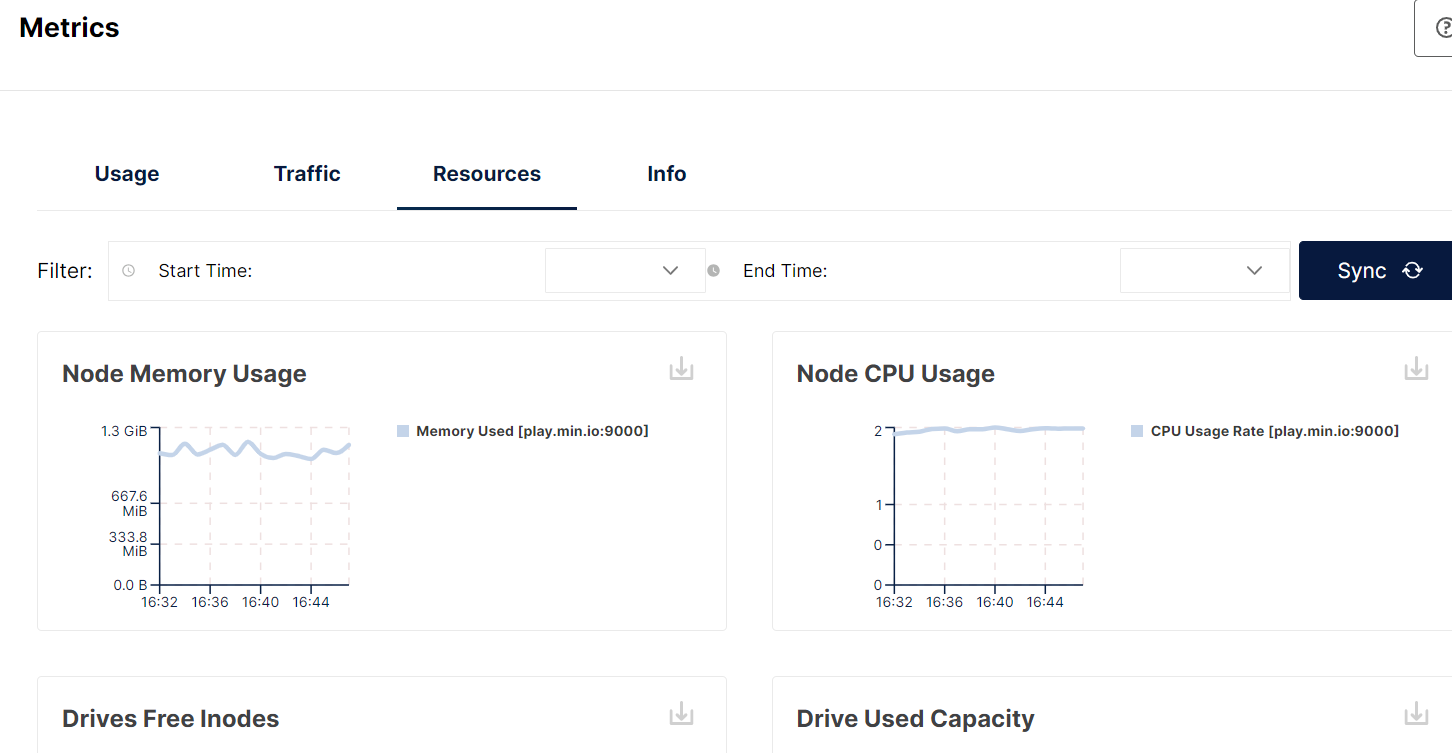
通过导航到Monitoring -> Metrics -> Resources,从MinIO控制台获取MinIO状态,如下面的示例所示:
图1:MinIO状态
也可以使用Linux工具监控MinIO运行时状态,执行以下命令:
pidstat -r -p `pidof minio` 10     # 获取CPU和内存使用情况。

iostat -dxctm 10 # 获取硬盘状态。

sar  -n DEV 10   # 获取网卡状态。
对象MinIO进行分析
使用由MinIO开发的mc[10]工具来分析MinIO。
- 使用以下命令安装mc:
wget https://dl.min.io/client/mc/release/linux-amd64/archive/mc.RELEASE.2022-02-07T09-25-34Z
mv mc.RELEASE.2022-02-07T09-25-34Z mc
chmod +x mc
./mc alias set myminio http://10.0.0.31:9000 minioadmin minioadmin
- 同时启动CPU、内存和块分析:
./mc admin profile start --type cpu,mem,block myminio/
- 停止分析:
./mc admin profile stop myminio
- 查看分析结果:
go tool pprof profile-10.0.0.31\:9000-cpu.pprof

go tool pprof -png profile-10.0.0.30\:9000-cpu.pprof > out.png
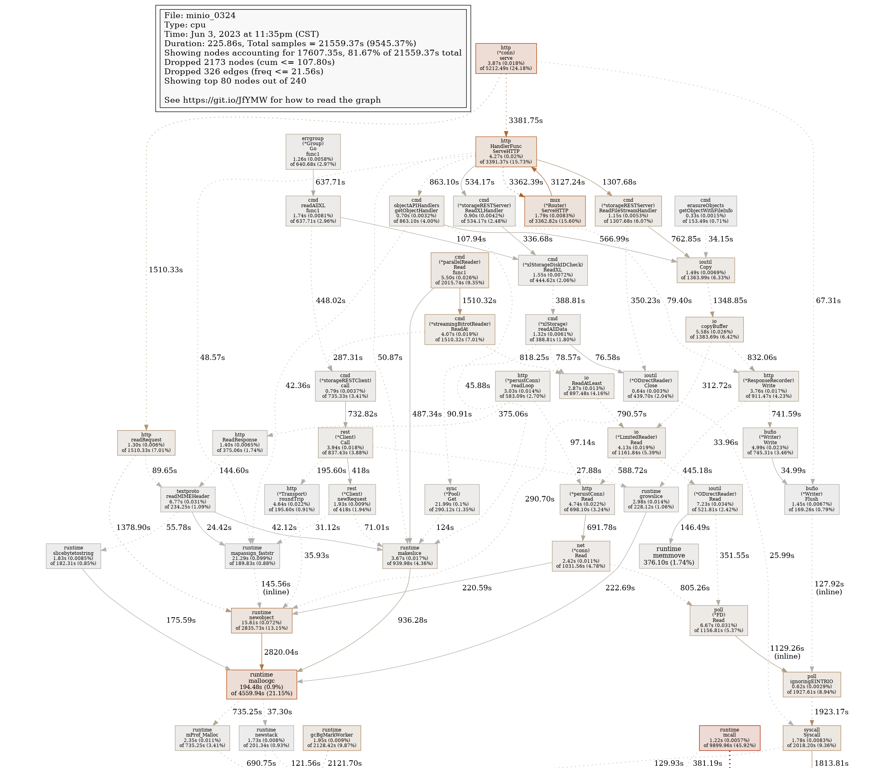
图2:MinIO分析结果
总结
本文介绍了用于基准测试、监视和分析MinIO集群性能的方法和工具。使用fio来检查单个和并发硬盘I/O性能。使用dperf和iozone来测试JBOD性能。Warp[4]是一个用于对MinIO性能进行基准测试的S3基准工具。使用Prometheus和Linux命令(如pidstat、iostat和sar)监视CPU/内存/硬盘/网卡的使用情况。mc10]工具是由MinIO开发的命令行管理工具,用于对MinIO进行分析。
参考资料
- https://blog.min.io/configurable-data-and-parity-drives-on-minio-server/
- https://github.com/minio/minio/tree/master/docs/erasure
- https://min.io/docs/minio/linux/operations/concepts/erasure-coding.html
- https://github.com/minio/warp
- https://github.com/minio/minio/tree/master/docs/tls
- crypto/rsa: Go 1.21 follow-up work #57752
- https://github.com/minio/minio/tree/master/docs/security
- https://github.com/minio/minio/blob/master/docs/kms/README.md
- https://github.com/minio/minio/tree/master/docs/metrics/prometheus

魔乐社区(Modelers.cn) 是一个中立、公益的人工智能社区,提供人工智能工具、模型、数据的托管、展示与应用协同服务,为人工智能开发及爱好者搭建开放的学习交流平台。社区通过理事会方式运作,由全产业链共同建设、共同运营、共同享有,推动国产AI生态繁荣发展。
更多推荐


 0
0 0
0- 0


 已为社区贡献2条内容

所有评论(0)