vue3+ehcarts关系图实现知识图谱
·
需求原本是根据neo4j实现知识图谱,但是数据来源不需要通过neo4j.driver去调用,而是通过接口获取数据,实现效果如下:
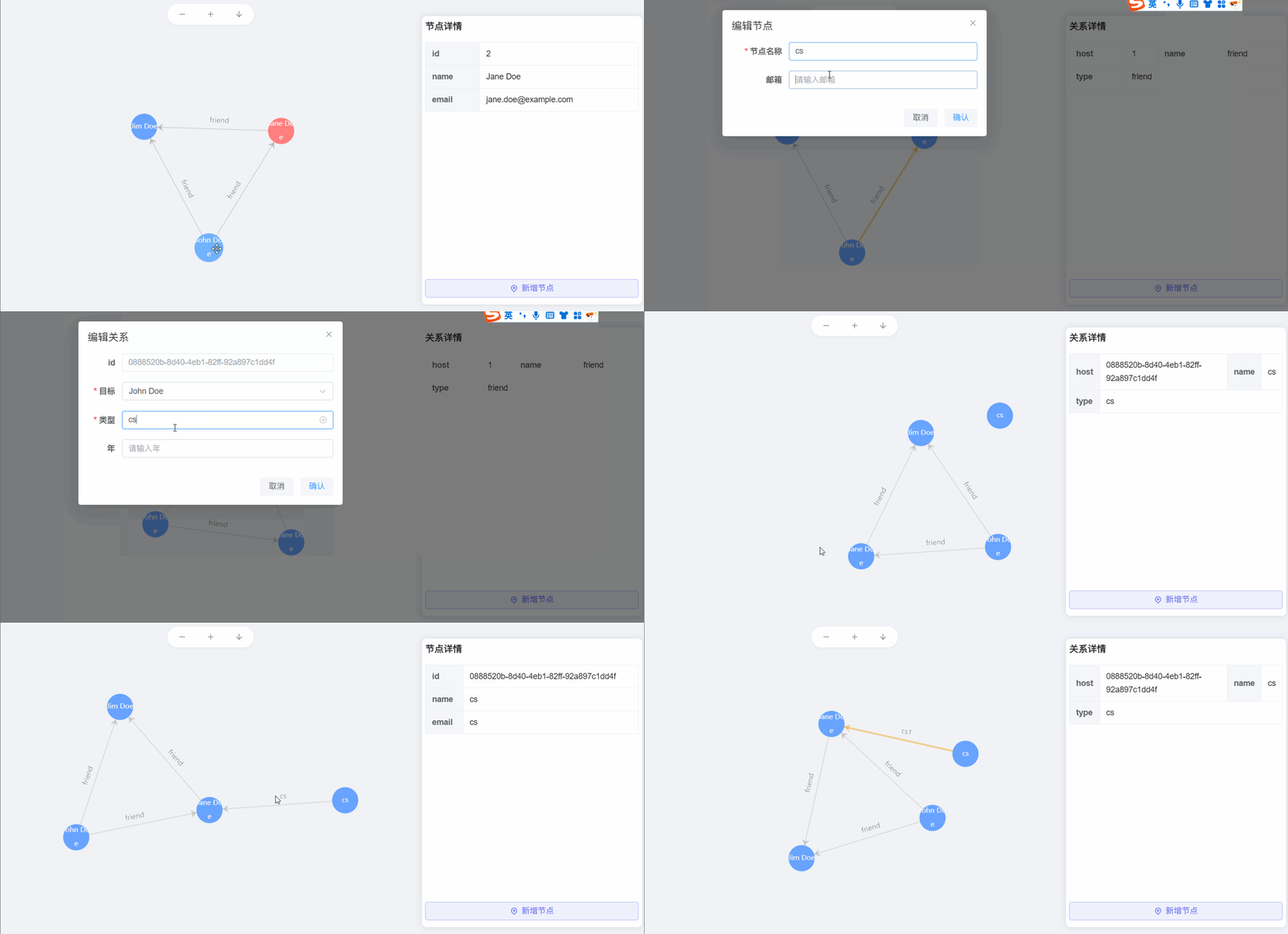
1. 实现对节点的增删改查和对关系的增删改查。
2.实现画布的缩放和对图谱的下载。
主要代码如下:
index.vue(知识图谱数据获取和逻辑处理)
<script setup lang="ts">
import { onMounted, ref } from "vue";
import NeoGraph from "@/views/data-set/neoGraph/index.vue";
import RelationForm from "@/views/data-set/neoGraph/relationForm.vue";
import { message } from "@/utils/message";
import { ElMessageBox } from "element-plus";
import NodeForm from "@/views/data-set/neoGraph/nodeForm.vue";

const clickAction = ref("create");
const showForm = ref(false);
const nodeFormShow = ref(false);
const nodeId = ref("");
const nodeInfo = ref(null);
const relationInfo = ref(null);
const records = ref({
  nodes: [
    {
      id: "1",
      name: "John Doe",
      email: "john.doe@example.com"
    },
    {
      id: "2",
      name: "Jane Doe",
      email: "jane.doe@example.com"
    },
    {
      id: "3",
      name: "Jim Doe",
      email: "jim.doe@example.com"
    }
  ],
  relations: [
    {
      host: "1",
      target: "2",
      type: "friend",
      years: "3"
    },
    {
      host: "1",
      target: "3",
      type: "friend",
      years: "5"
    },
    {
      host: "2",
      target: "3",
      type: "friend",
      years: "2"
    }
  ]
});
// 存储一份原始数据,用于刷新(暂时不要)
// const originalRecords = ref(records.value);
const echartsNode = ref([]);
const category = ref([]);
const nodesRelation = ref([]);
const fullscreenLoading = ref(false);

const executeCypher = async () => {
  // fullscreenLoading.value = true;
  // fullscreenLoading.value = false;
  nodesRelation.value = records.value.relations.map(item => {
    return {
      ...item,
      source: item.host,
      name: item.type
    };
  });
  echartsNode.value = records.value.nodes;
  category.value = records.value.relations.map(item => {
    return {
      name: item.type
    };
  });
};
// 新增节点
const handleAddNode = () => {
  nodeInfo.value = null;
  clickAction.value = "create";
  nodeFormShow.value = true;
};
// 新增节点保存
const handleAddSave = node => {
  records.value.nodes.push(node);
  nodeFormShow.value = false;
  executeCypher();
};
// 修改节点
const handelUpdateNode = node => {
  nodeInfo.value = node;
  clickAction.value = "update";
  nodeFormShow.value = true;
};
// 修改节点保存
const handleEditSave = node => {
  const i = records.value.nodes.findIndex(item => item.id === node.id);
  if (i === -1) return;
  records.value.nodes[i] = node;
  nodeFormShow.value = false;
  executeCypher();
};
// 新增关系
const handelAddRelation = node => {
  clickAction.value = "create";
  nodeId.value = node.id;
  relationInfo.value = null;
  showForm.value = true;
};
// 保存关系
const handleSaveRelation = info => {
  if (info.type === "create") {
    records.value.relations.push(info.data);
  } else {
    const i = records.value.relations.findIndex(
      item => item.host === info.data.host && item.target === info.data.target
    );
    if (i === -1) return;
    records.value.relations[i] = info.data;
  }
  showForm.value = false;
  executeCypher();
};
// 删除节点
const handleDeleteNode = node => {
  // 查看是否有与其他节点的关系
  const relationIndex = records.value.relations.findIndex(
    item => item.host === node.id || item.target === node.id
  );
  if (relationIndex !== -1) {
    return message("该节点存在关系,请先删除关系后再删除节点", {
      type: "error"
    });
  }
  ElMessageBox.confirm("确认删除节点?", "警告", {
    confirmButtonText: "确认",
    cancelButtonText: "取消",
    type: "warning"
  })
    .then(() => {
      const i = records.value.nodes.findIndex(item => item.id === node.id);
      if (i === -1) return;
      records.value.nodes.splice(i, 1);
      executeCypher();
    })
    .catch(() => {});
};
// 修改关系
const handleUpdateRelation = relation => {
  clickAction.value = "update";
  relationInfo.value = relation;
  showForm.value = true;
};
// 删除关系
const handleDeleteRelation = relation => {
  ElMessageBox.confirm("确认删除关系?", "警告", {
    confirmButtonText: "确认",
    cancelButtonText: "取消",
    type: "warning"
  })
    .then(() => {
      const i = records.value.relations.findIndex(
        item => item.host === relation.host && item.target === relation.target
      );
      if (i === -1) return;
      records.value.relations.splice(i, 1);
      executeCypher();
    })
    .catch(() => {});
};
// 右键菜单的功能
const handleSelectMenu = args => {
  switch (args.type) {
    // 新增关系
    case "addRelation":
      handelAddRelation(args.node);
      break;
    // 修改节点
    case "updateNode":
      handelUpdateNode(args.node);
      break;
    //   删除节点
    case "deleteNode":
      handleDeleteNode(args.node);
      break;
    //   修改关系
    case "updateRelation":
      handleUpdateRelation(args.node);
      break;
    //   删除关系
    case "deleteRelation":
      handleDeleteRelation(args.node);
      break;
    default:
      break;
  }
};

onMounted(() => {
  executeCypher();
});
</script>

<template>
  <div v-loading="fullscreenLoading" class="network" style="height: 100%">
    <neo-graph
      :data="echartsNode"
      :links="nodesRelation"
      :category="category"
      @add-node="handleAddNode"
      @select-menu="handleSelectMenu"
    />
    <relation-form
      v-if="showForm"
      :id="nodeId"
      :relation="relationInfo"
      :click-action="clickAction"
      :options="records.nodes.filter(item => item.id !== nodeId)"
      @cancel="showForm = false"
      @save-relation="handleSaveRelation"
    />
    <node-form
      v-if="nodeFormShow"
      :node="nodeInfo"
      :click-action="clickAction"
      @cancel="nodeFormShow = false"
      @add-save="handleAddSave"
      @edit-save="handleEditSave"
    />
  </div>
</template>

<style lang="scss" scoped></style>
neo-graph.vue(知识图谱展示)
<script setup lang="ts">
import { onMounted, onUnmounted, ref, watch } from "vue";
import * as echarts from "echarts";
import ContentMenu from "@/views/data-set/neoGraph/contentMenu.vue";
import NodeDetails from "@/views/data-set/neoGraph/nodeDetails.vue";
import TopTools from "@/views/data-set/neoGraph/topTools.vue";

const props = defineProps({
  id: {
    type: String,
    default: "chart"
  },
  data: {
    type: Array
  },
  links: {
    type: Array
  },
  category: {
    type: Array
  },
  chartsHeight: String
});
const emit = defineEmits(["add-node", "select-menu"]);
const graphRef = ref();
const options = ref({});
const mapcharts = ref<any>(null);
const contextMenuVisible = ref(false);
const contextMenuType = ref("");
const contextMenuLeft = ref(0);
const contextMenuTop = ref(0);
const currentNode = ref(null);
const selectedNode = ref(null);
const highlightedLink = ref(null);

const redrawGraph = () => {
  // 销毁实例
  if (mapcharts.value) {
    mapcharts.value.clear();
  }
  mapcharts.value = echarts.init(graphRef.value);

  options.value = {
    tooltip: {
      show: false
    },
    series: [
      {
        categories: props.category,
        type: "graph",
        layout: "force",
        zoom: 0.6,
        symbolSize: 60,
        draggable: true,
        roam: true,
        legendHoverLink: false,
        nodeScaleRatio: 0.6,

        // 替换弃用属性
        emphasis: {
          focus: "none", // 可选 'none' | 'self' | 'adjacency'
          scale: true // 替代 hoverAnimation
        },

        itemStyle: {
          color: "#67A3FF"
        },
        edgeSymbol: ["", "arrow"],

        // 扁平化 edgeLabel 配置
        edgeLabel: {
          show: true,
          fontSize: 12, // 原 textStyle.fontSize
          formatter(x) {
            return x.data.name;
          }
        },

        // 扁平化 label 配置
        label: {
          show: true,
          fontSize: 12, // 原 textStyle.fontSize
          color: "#f6f6f6", // 原 textStyle.color
          formatter: function (params) {
            // 文本格式化函数保持不变
            var newParamsName = "";
            var paramsNameNumber = params.name.length;
            var provideNumber = 7;
            var rowNumber = Math.ceil(paramsNameNumber / provideNumber);
            if (paramsNameNumber > provideNumber) {
              for (var p = 0; p < rowNumber; p++) {
                var tempStr = "";
                var start = p * provideNumber;
                var end = start + provideNumber;
                if (p == rowNumber - 1) {
                  tempStr = params.name.substring(start, paramsNameNumber);
                } else {
                  tempStr = params.name.substring(start, end) + "\n\n";
                }
                newParamsName += tempStr;
              }
            } else {
              newParamsName = params.name;
            }
            return newParamsName;
          }
        },

        force: {
          repulsion: 200,
          gravity: 0.01,
          edgeLength: 400,
          layoutAnimation: true
        },
        data: props.data,
        links: props.links
      }
    ]
  };
  mapcharts.value.setOption(options.value);
};

const init = () => {
  redrawGraph();
};

const chartEvents = () => {
  // 窗口大小变化时调整图表
  window.addEventListener("resize", () => mapcharts.value.resize());

  // 左键点击事件
  mapcharts.value.on("click", params => {
    // 点击节点
    if (params.componentType === "series") {
      selectedNode.value = { ...params.data, dataType: params.dataType };
      if (params.dataType === "node") {
        resetHighlight();
        highlightNode(params.data.id);
      }
      if (params.dataType === "edge") {
        resetHighlight();
        highlightLink(params.dataIndex);
      }
    }
  });

  // 节点右键点击事件
  mapcharts.value.on("contextmenu", params => {
    if (params.componentType === "series") {
      // 阻止默认右键菜单
      const mouseEvent = event as MouseEvent;
      mouseEvent.preventDefault();

      // 使用指定类型后的 event
      currentNode.value = params.data;
      contextMenuType.value = params.dataType;
      contextMenuLeft.value = mouseEvent.pageX;
      contextMenuTop.value = mouseEvent.pageY;
      contextMenuVisible.value = true;
    }
  });

  // 点击页面其他区域关闭右键菜单
  document.addEventListener("click", handleDocumentClick);
};

// 高亮指定节点
const highlightNode = nodeId => {
  const option = mapcharts.value.getOption();
  const nodes = option.series[0].data;

  nodes.forEach(node => {
    node.itemStyle = node.itemStyle || {};
    node.itemStyle.color = node.id === nodeId ? "#FF7E7E" : "#67A3FF";
  });

  mapcharts.value.setOption(option);
};

// 高亮指定连接线
const highlightLink = linkIndex => {
  const option = mapcharts.value.getOption();
  const links = option.series[0].links;

  links.forEach((link, index) => {
    link.lineStyle = link.lineStyle || {};
    link.lineStyle.width = index === linkIndex ? 3 : 1;
    link.lineStyle.color = index === linkIndex ? "#F5A623" : "#999";
  });

  highlightedLink.value = linkIndex;
  mapcharts.value.setOption(option);
};

// 重置所有高亮状态
const resetHighlight = () => {
  const option = mapcharts.value.getOption();
  const nodes = option.series[0].data;
  const links = option.series[0].links;

  // 重置节点颜色
  nodes.forEach(node => {
    node.itemStyle = node.itemStyle || {};
    node.itemStyle.color = "#67A3FF";
  });

  // 重置连接线样式
  links.forEach(link => {
    link.lineStyle = link.lineStyle || {};
    link.lineStyle.width = 1;
    link.lineStyle.color = "#999";
  });

  highlightedLink.value = null;
  mapcharts.value.setOption(option);
};

// 关闭右键菜单
const handleDocumentClick = () => {
  contextMenuVisible.value = false;
};
// 右键菜单选择事件
const handleSelectMenu = args => {
  emit("select-menu", {
    node: currentNode.value,
    type: args
  });
};
// 新增节点
const handleAddNode = () => {
  emit("add-node");
};
// 缩小
const handleZoomOut = () => {
  if (mapcharts.value) {
    const option = mapcharts.value.getOption();
    const currentZoom = option.series[0].zoom || 1;
    mapcharts.value.setOption({
      series: [
        {
          zoom: Math.max(currentZoom - 0.1, 0.5) // 最小缩小到0.5倍
        }
      ]
    });
  }
};
// 放大
const handleZoomIn = () => {
  if (mapcharts.value) {
    const option = mapcharts.value.getOption();
    const currentZoom = option.series[0].zoom || 1;
    mapcharts.value.setOption({
      series: [
        {
          zoom: Math.min(currentZoom + 0.1, 2) // 最大放大到2倍
        }
      ]
    });
  }
};
// 下载
const handleDownload = () => {
  if (mapcharts.value) {
    const dataURL = mapcharts.value.getDataURL({
      type: "png",
      pixelRatio: 2,
      backgroundColor: "#fff"
    });
    const link = document.createElement("a");
    link.href = dataURL;
    link.download = "知识图谱.png";
    link.click();
    link.remove();
  }
};

watch(
  () => [props.data, props.links, props.category],
  val => {
    console.log("watch", val);
    redrawGraph();
  },
  { deep: true }
);

onMounted(() => {
  init();
  chartEvents();
});
onUnmounted(() => {
  // 清理事件监听和图表实例
  if (mapcharts.value) {
    mapcharts.value.dispose();
    mapcharts.value = null;
  }
  document.removeEventListener("click", handleDocumentClick);
});

defineOptions({
  name: "NeoGraph"
});
</script>

<template>
  <div class="graph-container">
    <div ref="graphRef" style="height: calc(100vh - 140px); width: 100%" />
    <top-tools
      @zoom-out="handleZoomOut"
      @zoom-in="handleZoomIn"
      @download="handleDownload"
    />
    <node-details
      class="graph-details"
      :selectedNode="selectedNode"
      @add-node="handleAddNode"
    />
    <content-menu
      v-show="contextMenuVisible"
      :context-menu-type="contextMenuType"
      :context-menu-left="contextMenuLeft"
      :context-menu-top="contextMenuTop"
      @selectMenu="handleSelectMenu"
    />
  </div>
</template>

<style scoped lang="scss"></style>
toolBox.vue(上方的放大缩小下载工具栏)
<script setup lang="ts">
import { ref } from "vue";
import Add from "@iconify-icons/ri/add-fill";
import Subtract from "@iconify-icons/ri/subtract-line";
import Down from "@iconify-icons/ri/arrow-down-line";
import Fresh from "@iconify-icons/ri/refresh-line";
// import Save from "@iconify-icons/ri/save-line";

const emit = defineEmits(["zoomOut", "zoomIn", "download"]);
defineOptions({
  name: "TopTools"
});
</script>

<template>
  <div class="top-tools">
    <IconifyIconOffline
      v-tippy="{
        content: '缩小'
      }"
      class="tool-icon"
      :icon="Subtract"
      @click="emit('zoomOut')"
    />
    <IconifyIconOffline
      v-tippy="{
        content: '放大'
      }"
      class="tool-icon"
      :icon="Add"
      @click="emit('zoomIn')"
    />
    <IconifyIconOffline
      v-tippy="{
        content: '下载'
      }"
      class="tool-icon"
      :icon="Down"
      @click="emit('download')"
    />
    <!--    <IconifyIconOffline-->
    <!--      v-tippy="{-->
    <!--        content: '刷新'-->
    <!--      }"-->
    <!--      class="tool-icon"-->
    <!--      :icon="Fresh"-->
    <!--      @click="emit('refresh')"-->
    <!--    />-->
    <!--    <IconifyIconOffline-->
    <!--      v-tippy="{-->
    <!--        content: '保存'-->
    <!--      }"-->
    <!--      class="tool-icon"-->
    <!--      :icon="Save"-->
    <!--    />-->
  </div>
</template>

<style scoped lang="scss">
.top-tools {
  position: absolute;
  top: 10px;
  left: 50%;
  transform: translateX(-50%);
  height: 36px;
  width: 150px;
  padding: 0 16px;
  background: rgba(255, 255, 255, 0.6);
  border-radius: 20px;
  border: 2px solid var(--el-bg-color);
  box-shadow: 0 2px 4px rgba(0, 0, 0, 0.03);
  display: flex;
  justify-content: space-between;
  align-items: center;
  .tool-icon {
    color: var(--el-text-color-secondary);
    cursor: pointer;
    &:hover {
      color: var(--el-primary-color);
    }
  }
}
</style>
nodeDetails.vue(详情展示面板)
<script setup lang="ts">
import { useRenderIcon } from "@/components/ReIcon/src/hooks";
import Add from "@iconify-icons/ri/map-pin-add-line";

const props = defineProps({
  selectedNode: {
    type: Object,
    required: true
  }
});
const emit = defineEmits(["add-node"]);
// 新增节点
const handleAddNode = () => {
  emit("add-node");
};
defineOptions({
  name: "NodeDetails"
});
</script>

<template>
  <div class="graph-details">
    <el-scrollbar class="graph-info">
      <el-descriptions
        v-if="selectedNode !== null && selectedNode.dataType === 'node'"
        title="节点详情"
        border
        :column="1"
      >
        <el-descriptions-item label="id">{{
          selectedNode.id
        }}</el-descriptions-item>
        <el-descriptions-item label="name">{{
          selectedNode.name
        }}</el-descriptions-item>
        <el-descriptions-item label="email">{{
          selectedNode.email
        }}</el-descriptions-item>
      </el-descriptions>
      <el-descriptions
        v-if="selectedNode !== null && selectedNode.dataType === 'edge'"
        title="关系详情"
        border
        :column="2"
      >
        <el-descriptions-item label="host">{{
          selectedNode.host
        }}</el-descriptions-item>
        <el-descriptions-item label="name">{{
          selectedNode.name
        }}</el-descriptions-item>
        <el-descriptions-item label="type">{{
          selectedNode.name
        }}</el-descriptions-item>
      </el-descriptions>
    </el-scrollbar>
    <el-button
      color="#626aef"
      plain
      class="w-full"
      :icon="useRenderIcon(Add)"
      @click="handleAddNode"
      >新增节点</el-button
    >
  </div>
</template>

<style scoped lang="scss">
.graph-details {
  position: absolute;
  right: 1%;
  top: 5%;
  width: 24rem;
  height: calc(100vh - 200px);
  border-radius: 8px;
  padding: 6px;
  background: var(--el-bg-color);
  box-shadow: 0 0 10px rgba(0, 0, 0, 0.1);
  .graph-info {
    height: calc(100vh - 250px);
    overflow-y: auto;
  }
}
</style>
contentMenu.vue(右键菜单)
<script setup lang="ts">
import { computed } from "vue";
import Add from "@iconify-icons/ri/add-fill";
import EditPen from "@iconify-icons/ep/edit-pen";
import EditLine from "@iconify-icons/ri/edit-2-line";
import Del from "@iconify-icons/ri/close-line";
import DelLine from "@iconify-icons/ri/delete-bin-4-line";

const props = defineProps({
  contextMenuType: {
    type: String,
    required: true
  },
  contextMenuLeft: {
    type: Number,
    required: true
  },
  contextMenuTop: {
    type: Number,
    required: true
  }
});
const emit = defineEmits(["selectMenu"]);
// 是否节点
const isNode = computed(() => {
  return props.contextMenuType === "node";
});
// 菜单点击事件
const handleClick = val => {
  emit("selectMenu", val);
};

defineOptions({
  name: "ContentMenu"
});
</script>

<template>
  <div>
    <ul
      class="graph-menu"
      :style="{ left: contextMenuLeft + 'px', top: contextMenuTop + 'px' }"
    >
      <li v-if="isNode" class="menu-item" @click="handleClick('addRelation')">
        <el-icon>
          <IconifyIconOffline :icon="Add" />
        </el-icon>
        <div class="ml-1">新增关系</div>
      </li>
      <li v-if="isNode" class="menu-item" @click="handleClick('updateNode')">
        <el-icon>
          <IconifyIconOffline :icon="EditLine" />
        </el-icon>
        <div class="ml-1">修改节点</div>
      </li>
      <li v-if="isNode" class="menu-item" @click="handleClick('deleteNode')">
        <el-icon>
          <IconifyIconOffline :icon="Del" />
        </el-icon>
        <div class="ml-1">删除节点</div>
      </li>
      <li
        v-if="!isNode"
        class="menu-item"
        @click="handleClick('updateRelation')"
      >
        <el-icon>
          <IconifyIconOffline :icon="EditPen" />
        </el-icon>
        <div class="ml-1">修改关系</div>
      </li>
      <li
        v-if="!isNode"
        class="menu-item"
        @click="handleClick('deleteRelation')"
      >
        <el-icon>
          <IconifyIconOffline :icon="DelLine" />
        </el-icon>
        <div class="ml-1">删除关系</div>
      </li>
    </ul>
  </div>
</template>

<style scoped lang="scss">
.graph-menu {
  color: var(--el-text-color-regular);
  position: fixed;
  background-color: white;
  border: 1px solid var(--el-fill-color-light);
  border-radius: 4px;
  box-shadow: 2px 2px 5px rgba(0, 0, 0, 0.2);
  z-index: 1000;
  .menu-item {
    padding: 6px 16px;
    cursor: pointer;
    font-size: 14px;
    display: flex;
    align-items: center;
    &:hover {
      color: var(--el-color-primary);
      background-color: var(--el-color-primary-light-9);
    }
  }
}
</style>
form表单的代码可根据需求自行实现。

魔乐社区(Modelers.cn) 是一个中立、公益的人工智能社区,提供人工智能工具、模型、数据的托管、展示与应用协同服务,为人工智能开发及爱好者搭建开放的学习交流平台。社区通过理事会方式运作,由全产业链共同建设、共同运营、共同享有,推动国产AI生态繁荣发展。
更多推荐


 3
3 0
0- 0


 已为社区贡献2条内容

所有评论(0)