NodeMcu arduino ESP8266WIFI 模块 例程HTTPSRequest(NodeMcu进行https网络请求)
NodeMcu arduino ESP8266WIFI 模块 例程HTTPSRequest(NodeMcu进行https网络请求)
·
详解说明官方示例 使用物联网开发板进行https网络请求
/*
    HTTP over TLS (HTTPS) example sketch

    This example demonstrates how to use
    WiFiClientSecure class to access HTTPS API.
    We fetch and display the status of
    esp8266/Arduino project continuous integration
    build.
   此示例演示如何使用用于访问HTTPS API的WiFiClientSecure类。我们获取并显示esp8266/Arduino项目部分内容


*/

#include <ESP8266WiFi.h>
#include <WiFiClientSecure.h>

#ifndef STASSID
#define STASSID "dajiating"
#define STAPSK  "xxxxx"
#endif

const char* ssid = STASSID;
const char* password = STAPSK;

const char* host = "api.github.com";
const int httpsPort = 443;

// Use web browser to view and copy
// SHA1 fingerprint of the certificate
//使用web浏览器查看和复制
//证书的SHA1指纹
//把你需要调用的请求地址用浏览器访问,然后打开调试工具选择“安全”即可看到对应请求的fingerprint,复制到这个地方即可,类似于入网凭证一样

const char fingerprint[] PROGMEM = "29 70 30 74 CA 3C 48 F5 4A 79 C6 2D 11 57 A2 41 2A 2D 7D 5C";
fingerprint 查看说明一下
获取浏览器唯一标识_探讨浏览器指纹 fingerprint
物联网模块需要一个上网指纹凭证
获取https服务器指纹码的步骤火狐浏览器如下查看网址服务器指纹码如下图所示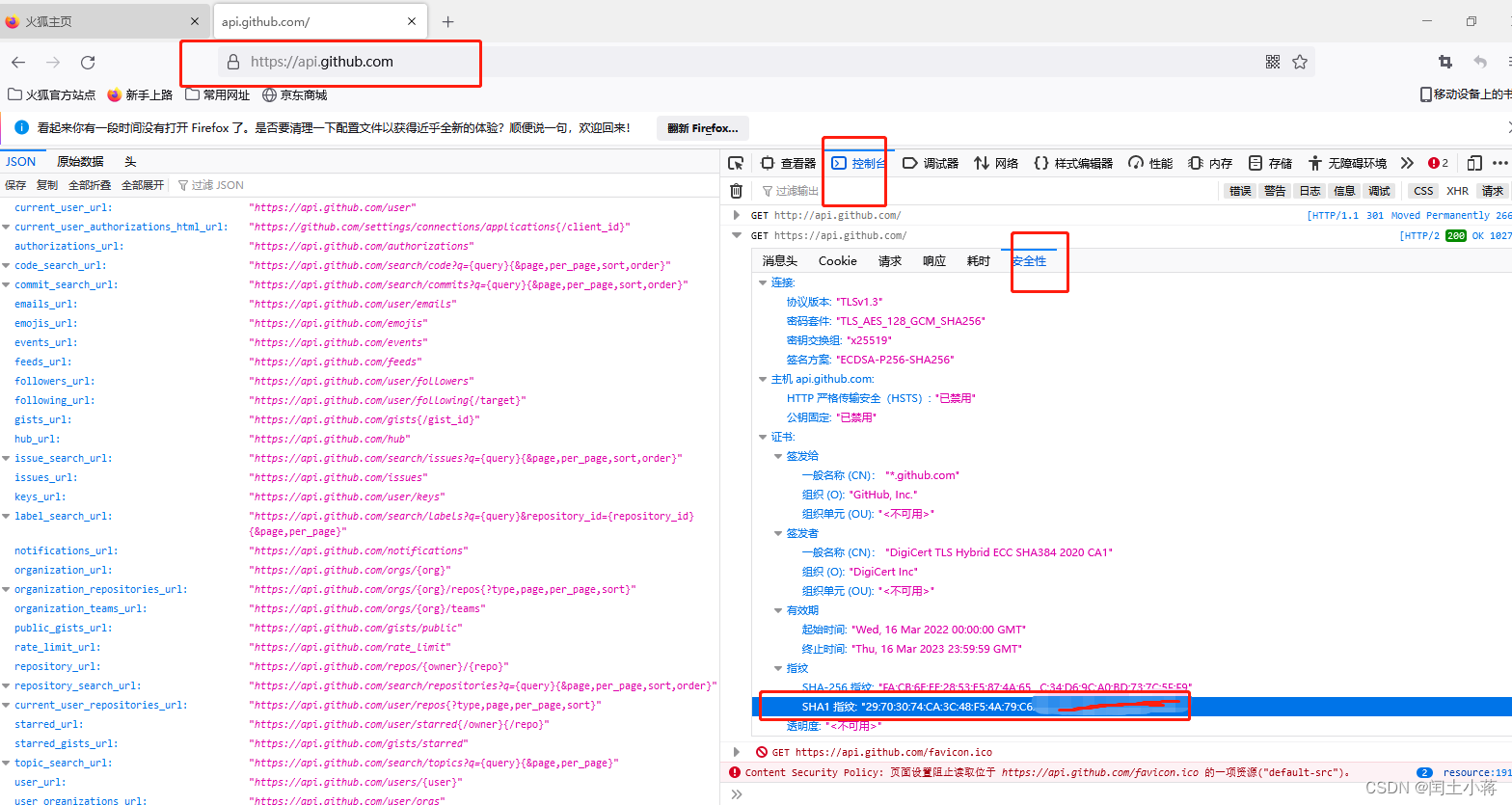
void setup() {
  Serial.begin(115200);
  Serial.println();
  Serial.print("connecting to ");
  Serial.println(ssid);
  WiFi.mode(WIFI_STA); //设置sta
  WiFi.begin(ssid, password);
  while (WiFi.status() != WL_CONNECTED) { //检查连接状态
    delay(500);
    Serial.print(".");
  }
  Serial.println("");
  Serial.println("WiFi connected");
  Serial.println("IP address: ");
  Serial.println(WiFi.localIP());

  // Use WiFiClientSecure class to create TLS connection
  //使用WiFiClientSecure类创建TLS连接

  WiFiClientSecure client;
  Serial.print("connecting to ");
  Serial.println(host);

  Serial.printf("Using fingerprint '%s'\n", fingerprint);
  client.setFingerprint(fingerprint);  //设置指纹码

  //链接服务器
  if (!client.connect(host, httpsPort)) {
    Serial.println("connection failed");
    return;
  }

  String url = "/repos/esp8266/Arduino/commits/master/status";
  Serial.print("requesting URL: ");
  Serial.println(url);

  //发送客户端请求信息
  client.print(String("GET ") + url + " HTTP/1.1\r\n" +
               "Host: " + host + "\r\n" +
               "User-Agent: BuildFailureDetectorESP8266\r\n" +
               "Connection: close\r\n\r\n");

  Serial.println("request sent");
  //等待服务器响应信息
  while (client.connected()) {
    String line = client.readStringUntil('\n'); //获取返回值
    if (line == "\r") {
      Serial.println("headers received");
      break;
    }
  }
  String line = client.readStringUntil('\n');
  if (line.startsWith("{\"state\":\"success\"")) { //判断检测返回的字符串是否包含该内容
    Serial.println("esp8266/Arduino CI successfull!");
  } else {
    Serial.println("esp8266/Arduino CI has failed");
  }
  Serial.println("reply was:");
  Serial.println("==========");
  Serial.println(line);
  Serial.println("==========");
  client.stop();
  Serial.println("closing connection");
}
void loop() {
}
总结
- 使模块上网进行网络连接
- 初始化WiFiClientSecure 进行配置
- 响应服务器数,接受并打印,
以上demo 是官网示例,可以个人根据习惯进行函数模块的整理,如下所示
/*
    HTTP over TLS (HTTPS) example sketch

    This example demonstrates how to use
    WiFiClientSecure class to access HTTPS API.
    We fetch and display the status of
    esp8266/Arduino project continuous integration
    build.

    Limitations:
      only RSA certificates
      no support of Perfect Forward Secrecy (PFS)
      TLSv1.2 is supported since version 2.4.0-rc1

    Created by Ivan Grokhotkov, 2015.
    This example is in public domain.
*/

#include <ESP8266WiFi.h>
#include <WiFiClientSecure.h>

#ifndef STASSID
#define STASSID "dajiating"
#define STAPSK  "DJT13619252979"
#endif

const char* ssid = STASSID;
const char* password = STAPSK;


// Use web browser to view and copy
// SHA1 fingerprint of the certificate
//使用web浏览器查看和复制
//证书的SHA1指纹
//把你需要调用的请求地址用浏览器访问,然后打开调试工具选择“安全”即可看到对应请求的fingerprint,复制到这个地方即可,类似于入网凭证一样

const char fingerprint[] PROGMEM = "29 70 30 74 CA 3C 48 F5 4A 79 C6 2D 11 57 A2 41 2A 2D 7D 5C";

void setup() {
  Serial.begin(115200);
  Serial.println();
  Serial.print("connecting to ");
  wificonf();
  Serial.println("");
  Serial.println("WiFi connected");
  Serial.println("IP address: ");
  Serial.println(WiFi.localIP());


}


//配置上网
void wificonf(){
  Serial.println(ssid);
  WiFi.mode(WIFI_STA); //设置sta
  WiFi.begin(ssid, password);
  while (WiFi.status() != WL_CONNECTED) { //检查连接状态
    delay(500);
    Serial.print(".");
  }
}

//发送网络请求
void httprequest() {

  const char* host = "api.github.com";
  const int httpsPort = 443;

  WiFiClientSecure client;
  Serial.print("connecting to ");
  Serial.println(host);

  Serial.printf("Using fingerprint '%s'\n", fingerprint);
  client.setFingerprint(fingerprint);  //设置指纹码

  //链接服务器
  if (!client.connect(host, httpsPort)) {
    Serial.println("connection failed");
    return;
  }

  String url = "/repos/esp8266/Arduino/commits/master/status";
  Serial.print("requesting URL: ");
  Serial.println(url);

  //发送客户端请求信息
  client.print(String("GET ") + url + " HTTP/1.1\r\n" +
               "Host: " + host + "\r\n" +
               "User-Agent: BuildFailureDetectorESP8266\r\n" +
               "Connection: close\r\n\r\n");

  Serial.println("request sent");
  //等待服务器响应信息
  while (client.connected()) {
    String line = client.readStringUntil('\n'); //获取返回值
    if (line == "\r") {
      Serial.println("headers received");
      break;
    }
  }
  String line = client.readStringUntil('\n');
  if (line.startsWith("{\"state\":\"success\"")) { //判断检测返回的字符串是否包含该内容
    Serial.println("esp8266/Arduino CI successfull!");
  } else {
    Serial.println("esp8266/Arduino CI has failed");
  }
  Serial.println("reply was:");
  Serial.println("==========");
  Serial.println(line);
  Serial.println("==========");
  client.stop();
  Serial.println("closing connection");
}

void loop() {
  // Use WiFiClientSecure class to create TLS connection
  //使用WiFiClientSecure类创建TLS连接
  httprequest();
  delay(5000);
}

魔乐社区(Modelers.cn) 是一个中立、公益的人工智能社区,提供人工智能工具、模型、数据的托管、展示与应用协同服务,为人工智能开发及爱好者搭建开放的学习交流平台。社区通过理事会方式运作,由全产业链共同建设、共同运营、共同享有,推动国产AI生态繁荣发展。
更多推荐


 2
2 0
0- 0


 已为社区贡献1条内容

所有评论(0)