解决Android Studio的“org.gradle.api.internal.artifacts.ivyservice.DefaultLenientConfiguration$Artifact”
前言太久没有搞过android app,今天更新Android Studio到 3.6.3版本,git clone一个网上项目,直接出现解决思路在build.gradle文件中加入 阿里云Maven仓库镜像。// Top-level build file where you can add configuration options common to all sub-projects/modul
·
前言
太久没有搞过android app,今天更新Android Studio到 3.6.3版本,git clone一个网上项目,直接出现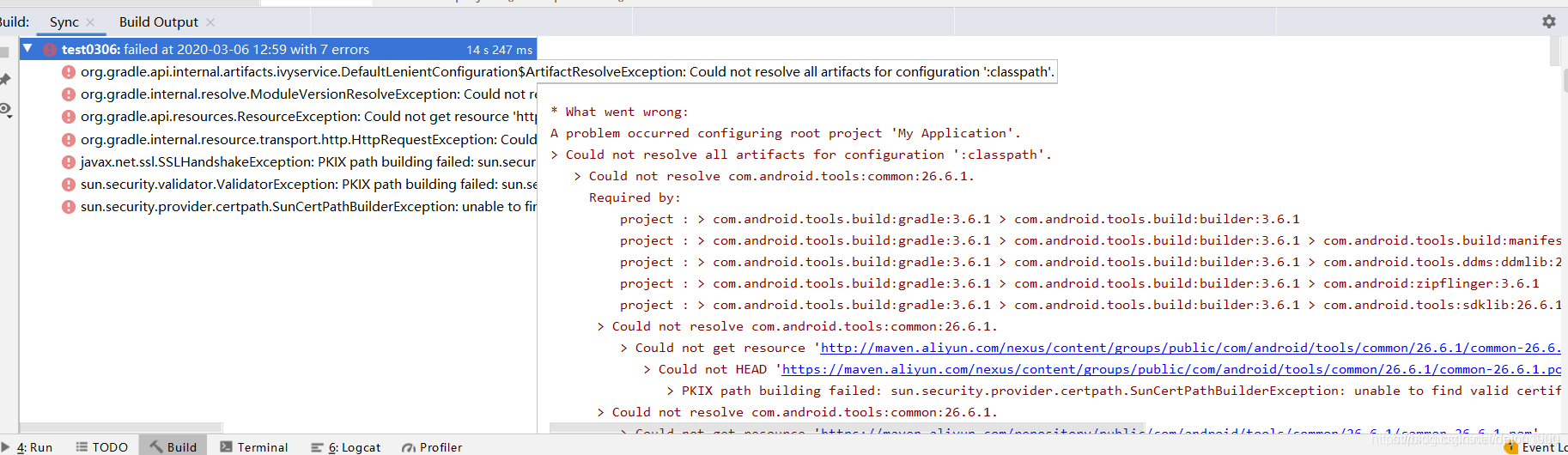
解决思路
在build.gradle文件中加入 阿里云Maven仓库镜像。
// Top-level build file where you can add configuration options common to all sub-projects/modules.
apply from: "config.gradle"
buildscript {
    repositories {
        google()
        maven { url 'http://maven.aliyun.com/nexus/content/groups/public/'}
        maven { url'https://maven.aliyun.com/repository/public/' }
        maven { url'https://maven.aliyun.com/repository/google/' }
        maven { url'https://maven.aliyun.com/repository/jcenter/' }
        maven { url'https://maven.aliyun.com/repository/central/' }
        jcenter()
    }
    dependencies {
        classpath 'com.google.gms:google-services:4.0.1'
        classpath 'com.android.tools.build:gradle:3.3.2'
//        classpath 'com.github.dcendents:android-maven-gradle-plugin:1.3'
//        classpath 'com.github.dcendents:android-maven-gradle-plugin:1.5'
//        classpath 'com.jfrog.bintray.gradle:gradle-bintray-plugin:1.7.3'

        // NOTE: Do not place your application dependencies here; they belong
        // in the individual module build.gradle files
    }
}

allprojects {
    repositories {
        google()
        maven { url 'http://maven.aliyun.com/nexus/content/groups/public/'}
        maven { url'https://maven.aliyun.com/repository/public/' }
        maven { url'https://maven.aliyun.com/repository/google/' }
        maven { url'https://maven.aliyun.com/repository/jcenter/' }
        maven { url'https://maven.aliyun.com/repository/central/' }
        jcenter()
        maven { url 'https://jitpack.io' }
    }
}

task clean(type: Delete) {
    delete rootProject.buildDir
}
以下代码即可解决gradle构建问题。

魔乐社区(Modelers.cn) 是一个中立、公益的人工智能社区,提供人工智能工具、模型、数据的托管、展示与应用协同服务,为人工智能开发及爱好者搭建开放的学习交流平台。社区通过理事会方式运作,由全产业链共同建设、共同运营、共同享有,推动国产AI生态繁荣发展。
更多推荐



 3
3 0
0- 0


 已为社区贡献9条内容

所有评论(0)