前端词云
现在很火的动态词云效果,自己也用JS做了一个简易的词云,下面是实现效果和源码。下面是主要代码,需要jquery库。<!DOCTYPE html><html><head lang="en"><meta charset="utf-8"><title>Michael An's Word cloud D...
·
现在很火的动态词云效果,自己也用JS做了一个简易的词云,下面是实现效果和源码。
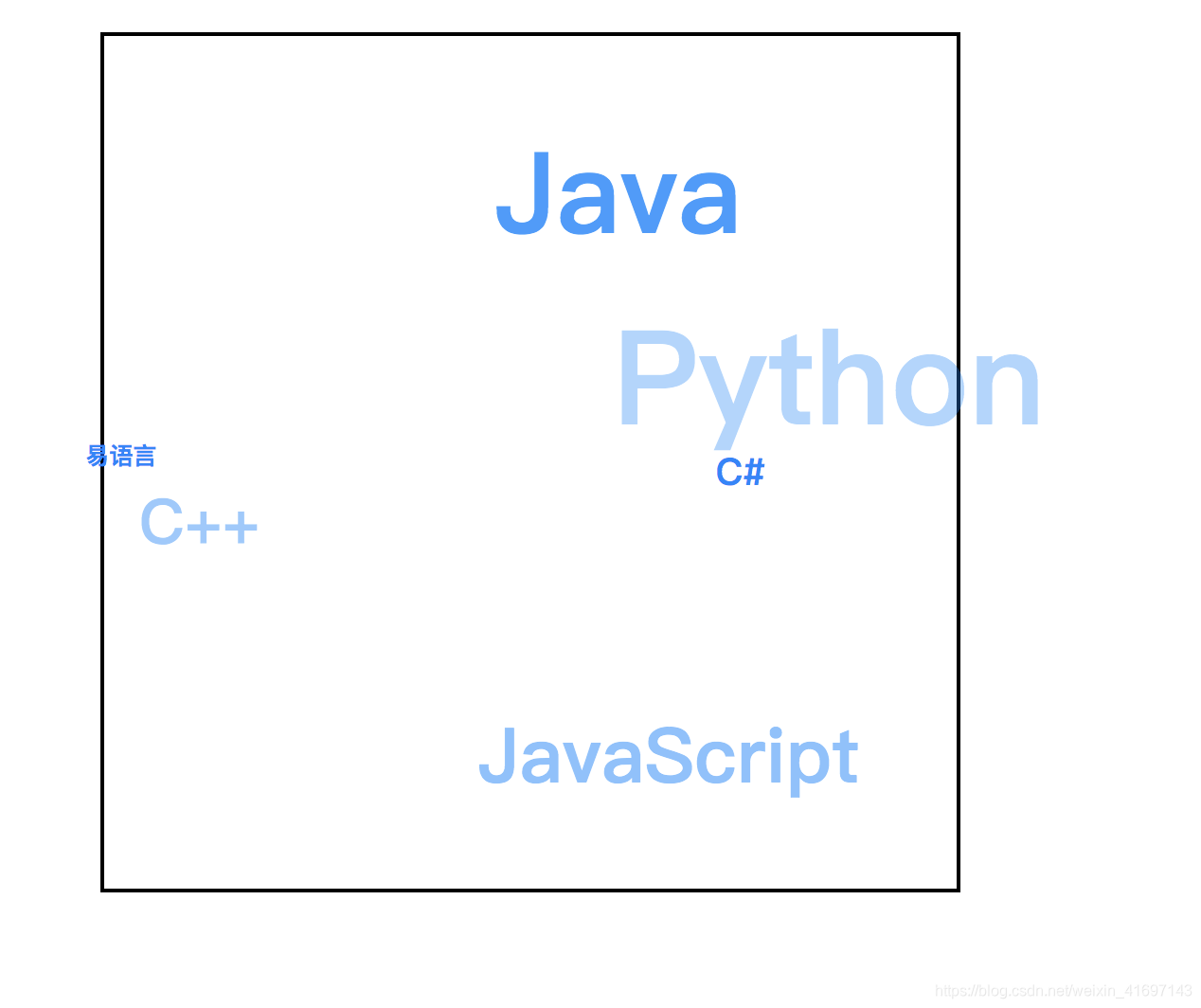
下面是主要代码,需要jquery库。
<!DOCTYPE html>
<html>

  <head lang="en">
    <meta charset="utf-8">
    <title>Michael An's Word cloud Demo</title>
    <link rel="stylesheet" type="text/css" href="miaov_style.css" />
  </head>

  <body>
    <script type="text/javascript" src="./jquery-3.4.1.min.js"></script>
    <script type="text/javascript" src="./miaov.js"></script>
  </body>

</html>
这是基本的结构和样式(生成的效果可以根据设备宽度实际设置)
body {
  background: #ffffff center 230px;
}

#div1 {
  position: relative;
  width: 600px;
  height: 600px;
  margin: 20px auto 0;
}

#div1 a {
  position: absolute;
  top: 0px;
  left: 0px;
  color: #0b85ff;
  font-weight: bold;
  text-decoration: none;
  padding: 3px 6px;
}

#div1 .blue {
  color: blue;
}

#div1 .red {
  color: red;
}

#div1 .yellow {
  color: yellow;
}

p {
  font: 16px;
  text-align: center;
  color: #0f0f3b;
}

p a {
  font-size: 14px;
  color: #ba0c0c;
}
下面是主要逻辑代码:词云的配置(速度更新频率等可以设置,不建议设置成全局变量)
// default setting
var radius = 180; // 3D global radius
var dtr = Math.PI / 180;
var d = 600;

var mcList = [];
var active = false;
var lasta = 1;
var lastb = 1;
var distr = true;
var tspeed = 20; //word speed
var size = 250;

var mouseX = 0;
var mouseY = 0;

var howElliptical = 1;

var aA = null;
var oDiv = null;


function main() {
  var a;
  var b;

  if (active) {
    a = (-Math.min(Math.max(-mouseY, -size), size) / radius) * tspeed;
    b = (Math.min(Math.max(-mouseX, -size), size) / radius) * tspeed;
  } else {
    a = lasta * 0.98;
    b = lastb * 0.98;
  }

  lasta = a;
  lastb = b;

  if (Math.abs(a) <= 0.01 && Math.abs(b) <= 0.01) {
    return;
  }

  var c = 0;
  sineCosine(a, b, c);
  for (var j = 0; j < mcList.length; j++) {
    var rx1 = mcList[j].cx;
    var ry1 = mcList[j].cy * ca + mcList[j].cz * (-sa);
    var rz1 = mcList[j].cy * sa + mcList[j].cz * ca;

    var rx2 = rx1 * cb + rz1 * sb;
    var ry2 = ry1;
    var rz2 = rx1 * (-sb) + rz1 * cb;

    var rx3 = rx2 * cc + ry2 * (-sc);
    var ry3 = rx2 * sc + ry2 * cc;
    var rz3 = rz2;

    mcList[j].cx = rx3;
    mcList[j].cy = ry3;
    mcList[j].cz = rz3;

    per = d / (d + rz3);

    mcList[j].x = (howElliptical * rx3 * per) - (howElliptical * 2);
    mcList[j].y = ry3 * per;
    mcList[j].scale = per;
    mcList[j].alpha = per;

    mcList[j].alpha = (mcList[j].alpha - 0.6) * (10 / 6);
  }

  doPosition();
  depthSort();
}

function depthSort() {
  var i = 0;
  var aTmp = [];

  for (i = 0; i < aA.length; i++) {
    aTmp.push(aA[i]);
  }

  aTmp.sort( function(vItem1, vItem2) {
    if (vItem1.cz > vItem2.cz) {
      return -1;
    } else if (vItem1.cz < vItem2.cz) {
      return 1;
    } else {
      return 0;
    }
  });
  for (i = 0; i < aTmp.length; i++) {
    aTmp[i].style.zIndex = i;
  }
}

function positionAll() {
  var phi = 0;
  var theta = 0;
  var max = mcList.length;
  var i = 0;

  var aTmp = [];
  var oFragment = document.createDocumentFragment();

  for (i = 0; i < aA.length; i++) {
    aTmp.push(aA[i]);
  }

  aTmp.sort(function() {
    return Math.random() < 0.5 ? 1 : -1;
  });
  for (i = 0; i < aTmp.length; i++) {
    oFragment.appendChild(aTmp[i]);
  }

  oDiv.appendChild(oFragment);

  for (var i = 1; i < max + 1; i++) {
    if (distr) {
      phi = Math.acos(-1 + (2 * i - 1) / max);
      theta = Math.sqrt(max * Math.PI) * phi;
    } else {
      phi = Math.random() * (Math.PI);
      theta = Math.random() * (2 * Math.PI);
    }
    mcList[i - 1].cx = radius * Math.cos(theta) * Math.sin(phi);
    mcList[i - 1].cy = radius * Math.sin(theta) * Math.sin(phi);
    mcList[i - 1].cz = radius * Math.cos(phi);

    aA[i - 1].style.left = mcList[i - 1].cx + oDiv.offsetWidth / 2 - mcList[i - 1].offsetWidth / 2 + 'px';
    aA[i - 1].style.top = mcList[i - 1].cy + oDiv.offsetHeight / 2 - mcList[i - 1].offsetHeight / 2 + 'px';
  }
}

function doPosition() {
  var l = oDiv.offsetWidth / 2;
  var t = oDiv.offsetHeight / 2;
  for (var i = 0; i < mcList.length; i++) {
    aA[i].style.left = mcList[i].cx + l - mcList[i].offsetWidth / 2 + 'px';
    aA[i].style.top = mcList[i].cy + t - mcList[i].offsetHeight / 2 + 'px';
    //aA[i].style.fontSize=Math.ceil(12*mcList[i].scale/2)+8+'px';
    aA[i].style.filter = "alpha(opacity=" + 100 * mcList[i].alpha + ")";
    aA[i].style.opacity = mcList[i].alpha;
  }
}

function sineCosine(a, b, c) {
  sa = Math.sin(a * dtr);
  ca = Math.cos(a * dtr);
  sb = Math.sin(b * dtr);
  cb = Math.cos(b * dtr);
  sc = Math.sin(c * dtr);
  cc = Math.cos(c * dtr);
}

$(document).ready(function() {
  var i = 0;
  var oTag = null;

  // from server or get file form local
  let data = { "Python": 69.153, "Java": 59.546, "JavaScript": 40.135, "C++": 32.78, "C#": 19.546, "others": 12.6 };

  var items = [];
  $.each(data, function(key, val) {
    items.push("<a href=#  style=font-size:" + val + "px>" + key + "</a>");
  });
  $("<div/>", {
    "id": "div1",
    style: "border:solid 2px black",
    ALIGN: "center",
    html: items.join("")
  }).appendTo("body");

  oDiv = document.getElementById('div1');
  aA = oDiv.getElementsByTagName('a');

  for (i = 0; i < aA.length; i++) {
    oTag = {};
    oTag.offsetWidth = aA[i].offsetWidth;
    oTag.offsetHeight = aA[i].offsetHeight;
    mcList.push(oTag);
  }

  sineCosine(0, 0, 0);

  positionAll();

  oDiv.οnmοuseοver = function() {
    active = true;
  };

  oDiv.οnmοuseοut = function() {
    active = false;
  };

  oDiv.οnmοusemοve = function(ev) {
    var oEvent = window.event || ev;
    mouseX = oEvent.clientX - (oDiv.offsetLeft + oDiv.offsetWidth / 2);
    mouseY = oEvent.clientY - (oDiv.offsetTop + oDiv.offsetHeight / 2);
    mouseX /= 5;
    mouseY /= 5;
  };

  setInterval(main, 30);
});
当然,还有python实现词云的方法。这里的案例直接从本地Excel文件中读取。如果是其他类型的数据,需要使用不同的转换器。当然可以直接从网站上爬取数据,然后进行词云制作。
#coding=utf-8
from wordcloud import WordCloud  # word cloud
import matplotlib.pyplot as plt # paint
import jieba
import pandas as pd
import matplotlib.image as mpimg
import numpy as np
from PIL import Image

text= pd.read_excel('C:/Users/Michael/Desktop/test.xlsx',header=0)

cnt=''
for rows in text[1]:
  cnt=cnt+rows

cnt.replace(' ','')
wordlist = jieba.cut(cnt,cut_all=False)
wl='/'.join(wordlist)
imreceive=np.array(Image.open('C:/Users/Michael/Desktop/code.png'))

wc = WordCloud(
  background_color="white",
  max_words=3000,
  font_path='C:\Windows\Fonts\STHUPO.TTF', # font in PC
  #   height= 1200,
  #   width= 1600,
  max_font_size=200,
  random_state=40, # set random state
  mask=imreceive  # if you set mask, height and width in invalid
  )
myword = wc.generate(wl) # generate word cloud

plt.imshow(myword)
plt.axis("off")
plt.show()
wc.to_file('C:/Users/Michael/Desktop/Michael-words-cloud.png')

魔乐社区(Modelers.cn) 是一个中立、公益的人工智能社区,提供人工智能工具、模型、数据的托管、展示与应用协同服务,为人工智能开发及爱好者搭建开放的学习交流平台。社区通过理事会方式运作,由全产业链共同建设、共同运营、共同享有,推动国产AI生态繁荣发展。
更多推荐



 0
0 0
0- 0


 已为社区贡献3条内容

所有评论(0)