vue 图片上传,不回显,实时刷新
·
vue 图片上传,不回显,实时刷新
- 背景
一个问题,多个选项,但是选项的内容在问题里,结构就是: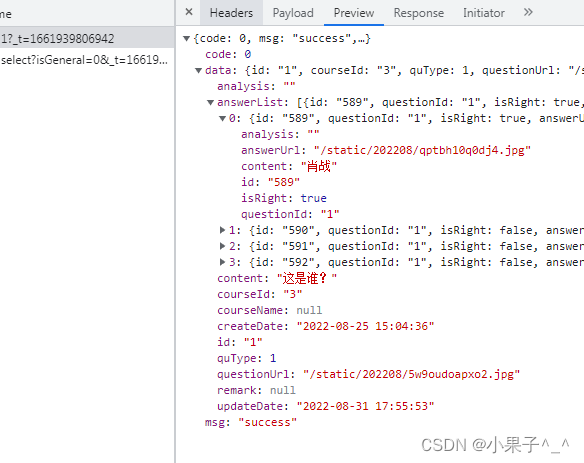
我上传图片后,会返回图片路径,需要回显上传的图片,问题的图片可以正常显示,但是选项的图片不能正常显示 - 代码
<template>
<el-form ref="form" :rules="rules" :model="form" label-position="left" label-width="150px">
   <el-form-item :label="$t('question.quType')" prop="quType">
    <el-select clearable v-model="form.quType" placeholder="请选择" @change="handleTypeChange">
        <el-option label="单选题" :value="1"></el-option>
        <el-option label="多选题" :value="2"></el-option>
        <el-option label="判断题" :value="3"></el-option>
    </el-select>
  </el-form-item>
  <el-form-item :label="$t('question.courseId')" prop="courseId">
    <el-select v-model="form.courseId" placeholder="请选择">
      <el-option v-for="item in courseList" :key="item.id" :label="item.courseName" :value="item.id">
      </el-option>
    </el-select>
  </el-form-item>
  <el-form-item :label="$t('question.content')" prop="content">
    <el-input type="textarea" v-model="form.content"></el-input>
  </el-form-item>
  <el-form-item :label="$t('question.questionUrl')" prop="questionUrl">
    <img style="width:80px;height:80px;border:none;" :src="quUrl" @click="uploadHandle()">
  </el-form-item>
  <el-form-item :label="$t('question.analysis')" >
    <el-input type="textarea" v-model="form.analysis"></el-input>
  </el-form-item>
  <div v-if="form.quType!==4" class="filter-container" style="margin-top: 25px">
        <el-button class="filter-item" type="primary" icon="el-icon-plus" size="small" plain @click="handleAdd">
          添加
        </el-button>
        <el-table :data="form.answerList" v-if="isRouterAlive" :border="true" style="width: 100%;" >
          <el-table-column :label="$t('answer.isRight')" width="120" align="center">
            <template slot-scope="scope">
              <el-checkbox v-model="scope.row.isRight">答案</el-checkbox>
            </template>
          </el-table-column>
          <el-table-column :label="$t('answer.answerUrl')" prop="answerUrl"  align="center">
            <template slot-scope="scope">
              <img style="width:80px;height:80px;border:none;" :src="scope.row.anUrl"  @click="uploadHandle(scope.row.id)">
            </template>
          </el-table-column>
          <el-table-column :label="$t('answer.content')"  align="center">
            <template slot-scope="scope">
              <el-input v-model="scope.row.content" type="textarea" />
            </template>
          </el-table-column>
          <el-table-column :label="$t('answer.analysis')"  align="center">
            <template slot-scope="scope">
              <el-input v-model="scope.row.analysis" type="textarea" />
            </template>
          </el-table-column>
          <el-table-column label="操作" align="center" width="100px">
            <template slot-scope="scope">
              <el-button type="danger" icon="el-icon-delete" circle @click="removeItem(scope.$index)" />
            </template>
          </el-table-column>
        </el-table>
      </div>
  <div style="margin-top: 20px">
    <el-button type="primary" @click="onSubmit">{{ $t('confirm') }}</el-button>
    <el-button>取消</el-button>
  </div>
  <upload v-if="uploadVisible" ref="upload" @uploadback="getResourceVal"></upload>
</el-form>
</template>
<script>
import upload from './upload.vue'
  export default {
  components: { upload },
    data () {
      return {
        isRouterAlive:true,
          // 不是通用课程
        isGeneral: 0,
        uploadVisible: false,
        courseList: [],
        quUrl: '',
        form: {
          id: this.$route.query.questionId,
          userId:'',
          quType: '',
          questionUrl: '',
          content: '',
          courseId: '',
          analysis: '',
          answerList: []
        },
        rules: {
          content: [
            { required: true, message: '题目内容不能为空!' }
          ],

          quType: [
            { required: true, message: '题目类型不能为空!' }
          ],

          courseId: [
            { required: true, message: '至少要选择一个题库!' }
          ]
        },
        filters: {
          quTypeFilter (quType) {
            if (quType === 1) {
              return '单选题'
            } else if (quType === 2) {
              return '多选题'
            } else {
              return '判断题'
            }
          }
        }
      }
    },
    mounted () {
      if (this.form.id !== null && this.form.id !== undefined) {
        this.$http.get(`/cd/question/info/${this.form.id}`).then(({ data:res }) => {
          if (res && res.code === 0) {
            let prefixUrl = `${window.SITE_CONFIG['apiURL']}`
            this.form.quType = res.data.quType
            this.quUrl = prefixUrl + res.data.questionUrl
            this.form.questionUrl = res.data.questionUrl
            this.form.content = res.data.content
            this.form.courseId = res.data.courseId
            this.form.analysis = res.data.analysis
            this.form.answerList = res.data.answerList
            if (this.form.answerList != null && this.form.answerList.length > 0) {
              let prefixUrl = `${window.SITE_CONFIG['apiURL']}`
              this.form.answerList.forEach(answer => {
                answer.anUrl = prefixUrl + answer.answerUrl
              })
            }
          }
        })
      }
    },
    activated () {
      this.getCourseList()
    },
    methods: {
      // 获取题库列表
      getCourseList () {
        return this.$http.get('/cd/course/select', {
            params:{
                'isGeneral': this.isGeneral
            }
        }).then(({ data: res }) => {
            if (res.code !== 0) {
                return this.$message.error(res.msg)
            }
         this.courseList = res.data
        })
      },
      handleTypeChange (v) {
        this.form.answerList = []
        if (parseInt(v) === 3) {
          this.form.answerList.push({ isRight: true, content: '正确', analysis: '' })
          this.form.answerList.push({ isRight: false, content: '错误', analysis: '' })
        }
        if (parseInt(v) === 1 || parseInt(v) === 2) {
          this.form.answerList.push({ isRight: false, content: '', analysis: '' })
          this.form.answerList.push({ isRight: false, content: '', analysis: '' })
          this.form.answerList.push({ isRight: false, content: '', analysis: '' })
          this.form.answerList.push({ isRight: false, content: '', analysis: '' })
        }
      },
      // 添加子项
      handleAdd () {
        this.form.answerList.push({ isRight: false, content: '', analysis: '' })
      },
      removeItem (index) {
        this.form.answerList.splice(index, 1)
      },
      onSubmit () {
        let rightCount = 0
        this.form.answerList.forEach(function (item) {
          if (item.isRight) {
            rightCount += 1
          }
        })
        // 单选答案判断
        if (parseInt(this.form.quType) === 1) {
          if (rightCount !== 1) {
            this.$message({
              message: '单选题答案只能有一个',
              type: 'warning'
            })
            return
          }
        }
        // 多选答案判断
        if (parseInt(this.form.quType) === 2) {
          if (rightCount < 2) {
            this.$message({
              message: '多选题至少要有两个正确答案!',
              type: 'warning'
            })

            return
          }
        }
        // 判断题的答案判断
        if (parseInt(this.form.quType) === 3) {
          if (rightCount !== 1) {
            this.$message({
              message: '判断题只能有一个正确项!',
              type: 'warning'
            })
            return
          }
        }
        this.$refs.form.validate((valid) => {
          if (valid) {
            this.$http[!this.form.id ? 'post' : 'put']('/cd/question', {...this.form}).then(({ data: res }) => {
              if (res && res.code === 0) {
                this.$message({
                  message: '操作成功',
                  type: 'success',
                  duration: 500,
                  onClose: () => {
                    this.visible = false
                  //  this.$emit('refreshDataList')
                    this.$emit('refreshDataList', true);
                  }
                })
                this.$router.push({ name: 'user-question' })
              } else {
                this.$message.error(res.msg)
              }
            })
          }
        })
      },
      // 上传题目图片
    uploadHandle (answerId) {
        this.uploadVisible = true
        this.$nextTick(() => {
            this.$refs.upload.init(answerId)
        })
    },
    // 上传文件成功后,子组件回传到父组件资源id
    getResourceVal (val) {
      let prefixUrl = `${window.SITE_CONFIG['apiURL']}`
      if(val.answerId != null && val.answerId.length != 0) {
        // 选项图片
        for (let answer of this.form.answerList) {
          if(answer.id === val.answerId) {
            answer.answerUrl = val.resourceUrl
            answer.anUrl = prefixUrl + val.resourceUrl
          }
        }
        this.isRouterAlive = false;
        this.$nextTick(() => {
          this.isRouterAlive = true;
        })
        // this.form.answerList.forEach(answer => {
        //   if(answer.id === val.answerId) {
        //     answer.answerUrl = val.resourceUrl
        //     answer.anUrl = prefixUrl + val.resourceUrl
        //   }
        // })
      } else {
        this.form.questionUrl = val.resourceUrl
        this.quUrl = prefixUrl + val.resourceUrl
      }
      this.$forceUpdate();
    },
    }
  }
</script>
<style scoped>
.filter-item {
   margin: 10px 10px 10px 0;
}
</style>
- 解决方法
(1)在data中定义属性:isRouterAlive,必须为false
(2)在table上用v-if = 'isRouterAlive'
(3)在上传图片进行赋值后,需要的操作:
this.isRouterAlive = false;
  this.$nextTick(() => {
    this.isRouterAlive = true;
 })
就会实现不会空白页的刷新

魔乐社区(Modelers.cn) 是一个中立、公益的人工智能社区,提供人工智能工具、模型、数据的托管、展示与应用协同服务,为人工智能开发及爱好者搭建开放的学习交流平台。社区通过理事会方式运作,由全产业链共同建设、共同运营、共同享有,推动国产AI生态繁荣发展。
更多推荐


 2
2 0
0- 0


 已为社区贡献15条内容

所有评论(0)