uniapp+vue3 自定义数字键盘
·
1.首先,你需要创建一个数字键盘的组件。可以在 components 文件夹下新建一个 NumericKeyboard.vue 文件。
NumericKeyboard.vue
<template>
  <view class="keyboard">
    <view class="row" v-for="(row, rowIndex) in keys" :key="rowIndex">
      <button
        v-for="(key, index) in row"
        :key="index"
        class="key"
        @click="handleKeyClick(key)"
		:style="{ backgroundColor: (key === 'Back' || key === '返回') ? '#DFEFFD' : '#AFCCFE',color:(key === 'Back' || key === '返回') ? '#777' : '#fff' }"
      >
        {{ key }}
      </button>
    </view>
  </view>
</template>

<script setup>
import { ref } from 'vue';
// 键盘数据
const keys = [
  ['1', '2', '3'],
  ['4', '5', '6'],
  ['7', '8', '9'],
  ['返回','0' , 'Back']
];

const emit = defineEmits(['keyClick']);
// 按钮点击
const handleKeyClick = (key) => {
  emit('keyClick', key);
};
</script>

<style lang="scss" scoped>
.keyboard {
  display: flex;
  flex-direction: column;
}
.row {
  display: flex;
}
.key {
  flex: 1;
  margin:2rpx 4rpx;
  padding: 0rpx 40rpx;
  font-size: 28rpx;
  text-align: center;
  border-radius: 5rpx;
  cursor: pointer;
  font-weight: 600;
}
.key:hover {
  background-color: #e0e0e0;
}
</style>
2.然后在你的页面中使用这个数字键盘组件。假设你在 pages 文件夹下有一个 index.vue 文件。
index.vue
<template>
	<!-- 输入部分 -->
	<view class="inp">
		<input type="text" class="inp_input" v-model="inputValue"/>
	</view>
	<!-- 红字提醒 -->
	<view class="redText">
		请输入密码,请输入
	</view>
	<!-- 键盘 -->
	<view class="container">
		 <NumericKeyboard @keyClick="onKeyClick" />
	</view>
</template>
<script setup>
 import { ref } from 'vue';
 import NumericKeyboard from '@/components/NumericKeyboard.vue';
 // 输入框
 const inputValue = ref('');
 // 点击键盘
 const onKeyClick = (key) => {
   if (key === '返回') {
     inputValue.value = '';
   } else if (key === 'Back') {
     inputValue.value = inputValue.value.slice(0, -1);
   } else {
     inputValue.value += key;
   }
 };
</script>
<style lang="scss" scoped>
	// 输入部分
	.inp{
		width: 90%;
		margin: 40rpx auto 20rpx;
			.inp_input{
				width: 100%;
				border-radius: 20rpx;
				background-color: #575D93;
				text-align: center;
				color: #fff;
			}
		}
		// 红色字体
		.redText{
			color: #B41925;
			font-size: 24rpx;
			font-weight: 600;
			text-align: center;
		}
		// 键盘
		.container {
			margin: 80rpx 0;
			padding: 20rpx;
		}
</style>
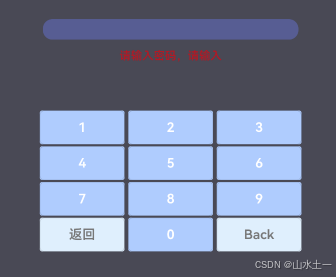
成果:

魔乐社区(Modelers.cn) 是一个中立、公益的人工智能社区,提供人工智能工具、模型、数据的托管、展示与应用协同服务,为人工智能开发及爱好者搭建开放的学习交流平台。社区通过理事会方式运作,由全产业链共同建设、共同运营、共同享有,推动国产AI生态繁荣发展。
更多推荐


 2
2 0
0- 0


 已为社区贡献1条内容

所有评论(0)