flutter getx弹起底部弹窗 监听关闭
·
场景
当调用getx的底部弹窗 Get.bottomSheet 弹起后 关闭弹窗没有相应的回调
方式一
isDismissible 是 关闭点击空白区域自动关闭 设置为flase,然后
在内部添加 关闭按钮Get.back(); 的时候执行父组件传递进来的onClose 自定义事件
上面这种方式有缺陷: 系统返回键也可关闭弹窗。返回事件没有调用;
方式二
Get.bottomSheet 返回一个future
在await Get.bottomSheet 之后进行弹窗判断 Get.isBottomSheetOpen == false 说明弹窗已经关闭了 然后做逻辑处理
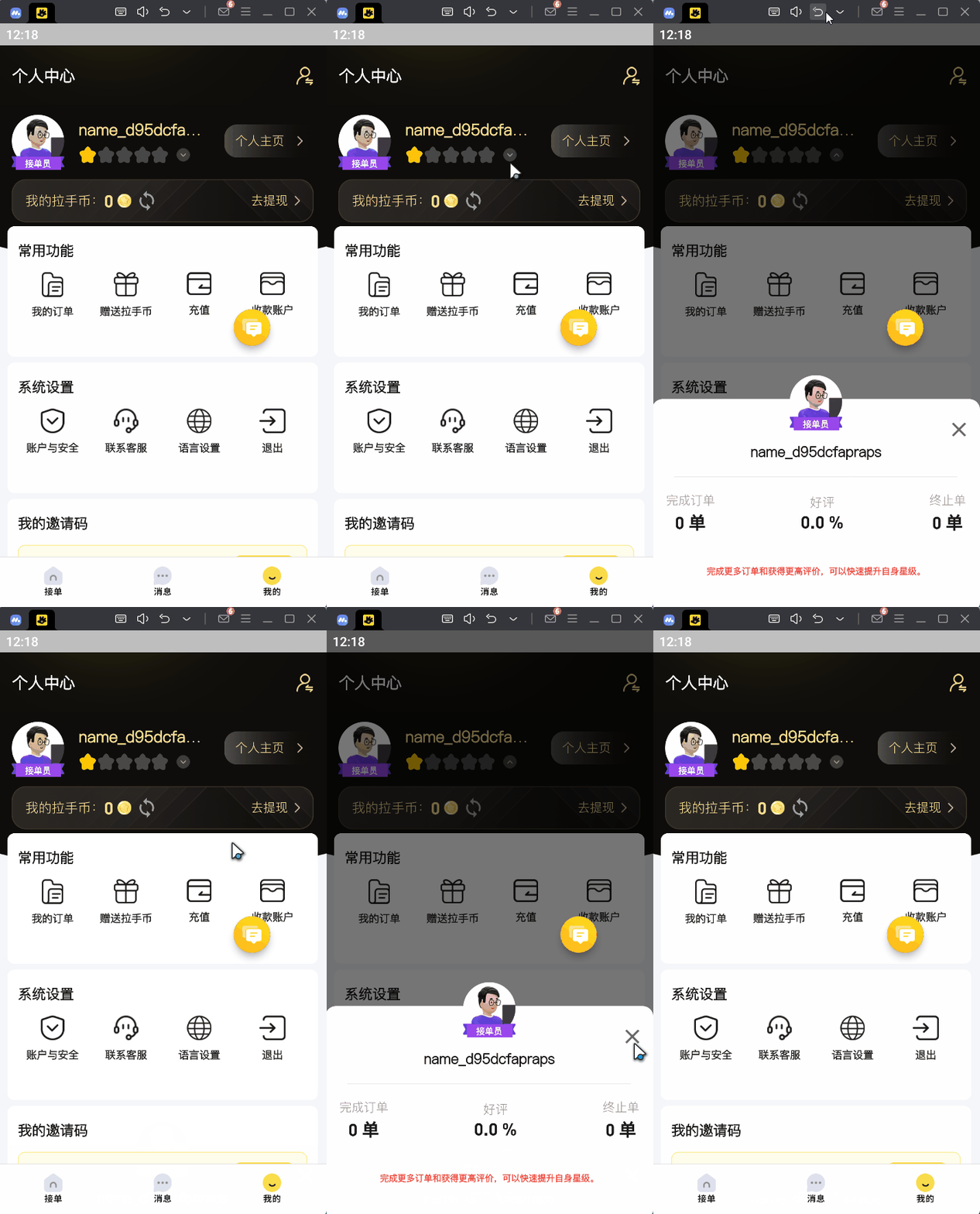
代码如下(因为有封装 有点复杂)
Alert class
class Alert {
  static final ClickHandler clickHandler = ClickHandler();

  //
  static showPersonInfo(
    SelfController cc, {
    Function()? onClose,
  }) {
    return AppToast.showAlert(height: 290.h, title: "", onClose: () {
      onClose?.call();
    },
        Column(
          mainAxisSize: MainAxisSize.min,
          children: [
            Container(
              height: 60.w,
              // color: Colors.red,
              clipBehavior: Clip.none,
              child: Transform.translate(
                offset: Offset(0, -100.h),
                child: RoleHead(
                  avatar: cc.userInfo.avatar ?? "",
                  type: cc.curRole.value,
                ),
              ),
            ),
            Transform.translate(
              offset: Offset(0, -80.h),
              child: Row(
                mainAxisAlignment: MainAxisAlignment.center,
                children: [
                  Text(
                    cc.userInfo.nickname ?? "",
                    style: TextStyle(
                      color: HexColor("#1A1A1A"),
                      fontSize: 16.sp,
                      fontWeight: FontWeight.w800,
                    ),
                  ),
                ],
              ),
            ),
            Transform.translate(
              offset: Offset(0, -60.h),
              child: Opacity(
                opacity: 0.08,
                child: Container(
                  width: 324.w,
                  height: 1.h,
                  color: Colors.black,
                ),
              ),
            ),
            Transform.translate(
              offset: Offset(0, -40.h),
              child: Row(
                mainAxisAlignment: MainAxisAlignment.spaceBetween,
                children: [
                  Column(
                    crossAxisAlignment: CrossAxisAlignment.center,
                    children: [
                      Text(
                        "完成订单".tr,
                        style: TextStyle(
                          color: HexColor("#999999"),
                          fontSize: 14.sp,
                          fontWeight: FontWeight.w500,
                        ),
                      ),
                      // info.completeCount
                      Text(
                        "${cc.userInfo.completeCount} ${'单'.tr}",
                        style: TextStyle(
                          color: HexColor("#1A1A1A"),
                          fontSize: 20.sp,
                          fontWeight: FontWeight.bold,
                          fontFamily: FontFamily.din,
                        ),
                      ),
                    ],
                  ),
                  Column(
                    crossAxisAlignment: CrossAxisAlignment.center,
                    children: [
                      Text("好评".tr,
                          style: TextStyle(
                            color: HexColor("#999999"),
                            fontSize: 14.sp,
                            fontWeight: FontWeight.w500,
                          )),
                      // info.score
                      Text(
                          "@a 分".trParams({
                            "a":
                                "${cc.userInfo.goodRadio == null ? 0 : cc.userInfo.goodRadio! / 100}"
                          }).tr,
                          // "${info.score} 拉手币",
                          style: TextStyle(
                            color: HexColor("#1A1A1A"),
                            fontSize: 20.sp,
                            fontWeight: FontWeight.bold,
                            fontFamily: FontFamily.din,
                          )),
                    ],
                  ),
                  Column(
                    children: [
                      Text("终止单".tr,
                          style: TextStyle(
                            color: HexColor("#999999"),
                            fontSize: 14.sp,
                            fontWeight: FontWeight.w500,
                          )),
                      // info.terminationCount
                      Text("${cc.userInfo.terminationCount} ${'单'.tr}",
                          style: TextStyle(
                            color: HexColor("#1A1A1A"),
                            fontSize: 20.sp,
                            fontWeight: FontWeight.bold,
                            fontFamily: FontFamily.din,
                          )),
                    ],
                  ),
                ],
              ),
            ),
            SizedBox(height: 2.w),
            Text(
              '完成更多订单和获得更高评价,可以快速提升自身星级。'.tr,
              style: TextStyle(
                color: Colors.red,
                fontSize: 10.sp,
                fontWeight: FontWeight.bold,
              ),
            ),
          ],
        ));
  }
}
AppToast class
class AppToast {

    // 提示弹窗
  static showAlert(
    Widget child, {
    double? height,
    String title = "提示",
    Color bgColor = Colors.white,
    // 是否允许关闭
    bool enableDrag = false,
    // 是否允许关闭
    bool isDismissible = false,
    Function? onClose,
    //
  }) {
    return Get.bottomSheet(
      isDismissible: isDismissible,
      enableDrag: enableDrag,
      isScrollControlled: true,
      AppToast.bottomSheetContainer(
        // padding: EdgeInsets.zero,
        height: height ?? 0.5.sh,
        isNeedBar: false,
        bgColor: bgColor,
        child: Column(
          children: [
            SizedBox(
              width: double.infinity,
              height: 38.w,
              child: Stack(
                children: [
                  Center(
                    child: Text(
                      title.tr,
                      style: TextStyle(
                        fontSize: 16.sp,
                        fontWeight: FontWeight.bold,
                        color: HexColor("#1A1A1A"),
                      ),
                      maxLines: 2,
                      textAlign: TextAlign.center,
                    ),
                  ),
                  Positioned(
                    right: 0.w,
                    top: 10.w,
                    child: InkWell(
                      onTap: () {
                        onClose?.call();
                        Get.back();
                      },
                      child: Assets.icon.close.image(width: 16.w),
                    ),
                  ),
                ],
              ),
            ),
            child,
          ],
        ),
      ),
    );
  }


}
逻辑 重点
 onTap: () async {
                    setState(() {
                      isOpenPersonDialog = true;
                    });
                    await Alert.showPersonInfo(cc, onClose: () {
                      setState(() {
                        isOpenPersonDialog = false;
                      });
                    });
                    if (Get.isBottomSheetOpen == false) {
                      setState(() {
                        isOpenPersonDialog = false;
                      });
                    }
                  },

魔乐社区(Modelers.cn) 是一个中立、公益的人工智能社区,提供人工智能工具、模型、数据的托管、展示与应用协同服务,为人工智能开发及爱好者搭建开放的学习交流平台。社区通过理事会方式运作,由全产业链共同建设、共同运营、共同享有,推动国产AI生态繁荣发展。
更多推荐


 6
6 0
0- 0


 已为社区贡献1条内容

所有评论(0)