前端电子签名在vue3中使用
·
主要使用插件vue-esign,通过上方调整颜色背景线条粗细
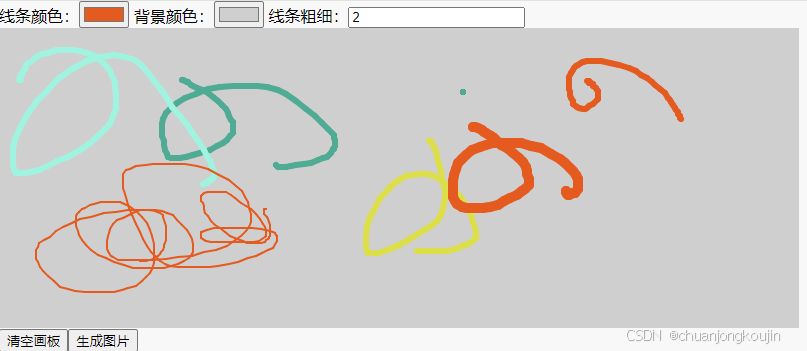
以下是使用步骤
1.npm install vue-esign --save
2.在main.js中引入
import vueEsign from 'vue-esign'
Vue.use(vueEsign)
3.页面中使用
<template>
  线条颜色:<input type="color" v-model="lineColor">
  背景颜色:<input type="color" v-model="bgColor">
  <vue-esign ref="esign" :width="800" :height="300" :isCrop="isCrop" :lineWidth="lineWidth" :lineColor="lineColor"
    :bgColor.sync="bgColor" />
  <button @click="handleReset">清空画板</button>
  <button @click="handleGenerate">生成图片</button>
  <img :src="resultImg"/>
  <a :href="href" download="aaa.png" ref="downloadFile" style="height:0px;"></a>
</template>

<script lang="ts" setup>
import { ref,nextTick } from 'vue'
const href = ref()//a链接接口地址
const downloadFile = ref()//aDom元素
const lineWidth = ref(6)//线条宽度
const lineColor = ref('')//线条颜色
const bgColor = ref('')//背景颜色
const resultImg = ref('')//拿到的图片的base64
const isCrop = ref(false)//是否可裁剪
const esign = ref()//组件dom
// 清空组件
function handleReset() {
  esign.value.reset()
  resultImg.value = ''
}
//生成图片,并下载图片
function handleGenerate() {
  esign.value.generate().then((res: any) => {
    resultImg.value = res
    // 下载图片
    href.value = res
    nextTick(() => {
      downloadFile.value.click()
    })
  }).catch(err => {
    alert(err) // 画布没有签字时会执行这里 'Not Signned'
  })
}


</script>

魔乐社区(Modelers.cn) 是一个中立、公益的人工智能社区,提供人工智能工具、模型、数据的托管、展示与应用协同服务,为人工智能开发及爱好者搭建开放的学习交流平台。社区通过理事会方式运作,由全产业链共同建设、共同运营、共同享有,推动国产AI生态繁荣发展。
更多推荐


 2
2 0
0- 0


 已为社区贡献1条内容

所有评论(0)