VueJS如何使用axios.post()或者axios.get()请求下载文件、音频、视频?并且显示下载进度,后端是SpringBoot
·
前端如何使用axios下载文件呢?最近遇到了前端下载音频及文件的功能,记录下,因为通过传统的window.location.href=xxx链接下载不能携带Token参数,后端无法验证请求放行,所以就用了axios。前端下载需要注意的是axios.interceptors.request的拦截器不要设置响应超时设置,不然由于网速慢,文件还没下载完就中断了。
下面是axios的HTTP请求的统一封装方法,数据接收使用了Blob对象:
    import axios from 'axios';

    let base = '/api';

    /**
     * 文件下载请求封装方法,POST请求
     *
     * @param this_ 外部this对象,用于更新下载进度
     * @param url 请求API
     * @param params 参数对象
     * @returns {Promise<AxiosResponse<T>>} Promise
     */
    downloadFileRequestPost: (this_, url, params) => {
        return axios.post(base + url, params, {
            responseType: 'blob',
            headers: {
                'Authorization': "Bearer " + window.sessionStorage.getItem('token')//设置token
            },
            onDownloadProgress: function (progressEvent) {//允许为下载处理进度事件
                this_.$nextTick(() => {//下载进度计算,这里使用Vuejs的$nextTick函数,请自行百度其作用
                    this_.downloadProgress = parseInt(100 * (progressEvent.loaded / progressEvent.total));
                });
            }
        });
    },

    /**
     * 文件下载请求封装方法,GET请求
     *
     * @param this_ 外部this对象,用于更新下载进度
     * @param url 请求API
     * @param params 参数对象
     * @returns {Promise<AxiosResponse<T>>} Promise
     */
    downloadFileRequestGet: (this_, url, params) => {
        return axios.get(base + url, {
            params: params,
            responseType: 'blob',
            headers: {
                'Authorization': "Bearer " + window.sessionStorage.getItem('token')//设置token
            },
            onDownloadProgress: function (progressEvent) {//允许为下载处理进度事件
                this_.$nextTick(() => {//下载进度计算,这里使用Vuejs的$nextTick函数,请自行百度其作用
                    this_.downloadProgress = parseInt(100 * (progressEvent.loaded / progressEvent.total));
                });
            }
        });
    }
以下是Vue组件页面的调用示例,HTML部分就不完整放出来了,进度条用了el-progress组件:
<template>
    <div>
        <el-row>
            <el-col :span="24">
                <el-form :inline="true" style="float: left;margin-top: 9px;">
                    <el-form-item>
                        <el-button v-if="downloadProgress===0||downloadProgress===100" type="success"
                                   @click="goDownBatch()" icon="el-icon-finished">批量打包下载
                        </el-button>
                        <el-progress type="circle" v-else
                                     :width="40" :percentage="downloadProgress" status="success"></el-progress>
                    </el-form-item>
                    <div v-if="downloadProgress===0||downloadProgress===100">
                        <el-button @click="downloadFile(scope.row)"
                                   type="text" size="small">下载
                        </el-button>
                    </div>
                    <el-progress type="circle" v-else :width="40" :percentage="downloadProgress" status="success"></el-progress>
                </el-form>
            </el-col>
        </el-row>
    </div>
</template>
<!--Vue前端下载示例,删除了table列表组件
  @author QC班长
  @since 2019-12-07
  -->
<script>
    export default {
        name: "downloadFile",
        data() {
            return {
                textSpeechRecordsIds: [],//批量下载多选ID值
                downloadProgress: 0,//下载进度值
            }
        },
        methods: {
            /**
             * 下载文件
             * @param row 表单对象
             */
            downloadFile(row) {
                let this_=this;
                let fileName = row.fileName + '.mp3';
                let param = {
                    filePath: row.filePath,
                    fileName: fileName
                };
                this.$rpc.downloadFileRequestPost(this_, '/text-speech-records/downloadFile', param).then(
                    (response) => {
                        if (!response) {
                            return false;
                        }
                        let blob = new Blob([response], {type: 'audio/mpeg;charset=utf-8'});
                        if ('download' in window.document.createElement('a')) { // 非IE下载
                            let href = window.URL.createObjectURL(blob); //创建下载的链接
                            const downloadElement = window.document.createElement('a');
                            downloadElement.href = href;
                            downloadElement.download = fileName; //下载后文件名
                            window.document.body.appendChild(downloadElement);
                            downloadElement.click(); //点击下载
                            window.document.body.removeChild(downloadElement); //下载完成移除元素
                            window.URL.revokeObjectURL(href); //释放掉blob对象
                        } else { // IE10+下载
                            window.navigator.msSaveBlob(blob, fileName)
                        }
                    }
                ).catch(error => {
                    this.$message.error('下载数据失败-' + error);
                    // eslint-disable-next-line no-console
                    console.log(error);
                })
            },
            //多选处理
            handleSelectionChange(val) {
                if (val.length !== 0) {
                    val.forEach(val => {
                        this.textSpeechRecordsIds.push(val.textSpeechRecordsId);
                    });
                } else {
                    this.textSpeechRecordsIds = [];
                }
            },
            //批量下载文件
            goDownBatch() {
                if (this.textSpeechRecordsIds.length === 0) {
                    this.$message.error('请选勾选要下载语音的文件!');
                    return false;
                }
                let this_=this;
                this.$confirm('确定批量下载语音文件?').then(() => {
                    // let param = {textSpeechRecordsIds: this.textSpeechRecordsIds.toString()};//如果使用get方法数组必须格式化为字符串,不然后端无法接受数组会报错
                    this.$rpc.downloadFileRequestPost(this_, '/text-speech-records/downloadBatchFile', this.textSpeechRecordsIds).then(
                        (response) => {
                            if (!response) {
                                return false;
                            }
                            let fileName = "MP3-" + new Date().getFullYear() + new Date().getMonth() + new Date().getDay() + ".zip";
                            let blob = new Blob([response], {type: 'application/zip;charset=utf-8'});
                            if ('download' in window.document.createElement('a')) { // 非IE下载
                                let downloadElement = window.document.createElement('a');
                                let href = window.URL.createObjectURL(blob); //创建下载的链接
                                downloadElement.href = href;
                                downloadElement.download = fileName; //下载后文件名
                                window.document.body.appendChild(downloadElement);
                                downloadElement.click(); //点击下载
                                window.document.body.removeChild(downloadElement); //下载完成移除元素
                                window.URL.revokeObjectURL(href); //释放掉blob对象
                            } else { // IE10+下载
                                window.navigator.msSaveBlob(blob, fileName)
                            }
                        }
                    ).catch(error => {
                        this.$message.error('下载数据失败-' + error);
                        // eslint-disable-next-line no-console
                        console.log(error);
                    })
                }).catch(() => {
                })
            },
        },
    }
</script>
下面是后端Java SpringBoot接收Post响应的处理方法,Get的只需要改变参数接收注解 就行了。后端关键的是要设置response.setHeader("Content-Length", String.valueOf(file.length()));//设置文件长度,用于计算下载进度,不然前端无法计算进度值。
 /**
     * 下载文件
     *
     * @param textSpeechRecords 文件表单对象
     */
    @PostMapping("/downloadFile")
    public void downloadFile(@RequestBody TextSpeechRecords textSpeechRecords, HttpServletResponse response) {
        if (textSpeechRecords != null && textSpeechRecords.getFilePath() != null && textSpeechRecords.getFileName() != null) {
            String location = System.getProperty("user.dir");
            File file = new File(location + File.separator + textSpeechRecords.getFilePath());
            response.setHeader("content-type", "audio/mpeg");
            response.setContentType("audio/mpeg");
            response.setHeader("Content-Length", String.valueOf(file.length()));//设置文件长度,用于计算下载进度
            try {
                response.setHeader("Content-Disposition", "attachment;filename=" + java.net.URLEncoder.encode(textSpeechRecords.getFileName(), "UTF-8"));
            } catch (UnsupportedEncodingException e) {
                e.printStackTrace();
            }
            byte[] buffer = new byte[1024];//代表一次最多读取1KB的内容
            BufferedInputStream bufferedInputStream = null;//缓冲流
            OutputStream outputStream = null; //输出流
            FileInputStream fileInputStream = null; //文件输入流
            try {
                outputStream = response.getOutputStream();
                fileInputStream = new FileInputStream(file);
                bufferedInputStream = new BufferedInputStream(fileInputStream);
                int i = bufferedInputStream.read(buffer);
                while (i != -1) {
                    outputStream.write(buffer);
                    i = bufferedInputStream.read(buffer);
                }
            } catch (IOException e) {
                e.printStackTrace();
            } finally {
                if (bufferedInputStream != null) {
                    try {
                        bufferedInputStream.close();
                    } catch (IOException e) {
                        e.printStackTrace();
                    }
                }
                if (fileInputStream != null) {
                    try {
                        fileInputStream.close();
                    } catch (IOException e) {
                        e.printStackTrace();
                    }
                }
                if (outputStream != null) {
                    try {
                        outputStream.close();
                    } catch (IOException e) {
                        e.printStackTrace();
                    }
                }
            }
        }
    }
下面是后端批量下载打包的方法:
   /**
     * 批量下载文件
     * 步骤:
     * 1、先根据文件名找到文件,添加到list中
     * 2、创建下载文件对象xxx.zip
     * 3、把文件列表写入xxx.zip中
     * 4、把xxx.zip输出到输出流中
     * 5、删除xxx.zip文件
     *
     * @param textSpeechRecordsIds IDS
     * @param response             文件路径
     */
    @PostMapping("/downloadBatchFile")
    public void downloadBatchFile(@RequestBody List<Integer> textSpeechRecordsIds, HttpServletResponse response) throws IOException {
        if (textSpeechRecordsIds != null && !textSpeechRecordsIds.isEmpty()) {
            List<TextSpeechRecords> results = textSpeechRecordsService.list(new QueryWrapper<TextSpeechRecords>().in("text_speech_records_id", textSpeechRecordsIds));//这里涉及到具体业务,也就是根据ID查询文件保存信息
            List<File> files = new ArrayList<>();
            if (!results.isEmpty()) {
                String location = System.getProperty("user.dir");
                for (TextSpeechRecords textSpeechRecords : results) {
                    File file = new File(location + File.separator + textSpeechRecords.getFilePath());
                    files.add(file);
                }
            }
            SimpleDateFormat simpleDateFormat = new SimpleDateFormat("yyyyMMdd");
            String zipFilename = System.getProperty("user.dir") + File.separator + "ZIP-" + simpleDateFormat.format(new Date()) + ".zip";
            File zipFile = new File(zipFilename);
            if (!zipFile.exists()) {
                zipFile.createNewFile();
            }
            // 创建文件输出流
            FileOutputStream fileOutputStream = new FileOutputStream(zipFile);
            ZipOutputStream zipOutputStream = new ZipOutputStream(fileOutputStream);
            zipFile(files, zipOutputStream);
            zipOutputStream.close();
            fileOutputStream.close();
            response.setHeader("content-type", "application/zip");
            response.setHeader("Content-Length", String.valueOf(zipFile.length()));//设置文件长度,用于计算下载进度
            response.setContentType("application/zip");
            try {
                response.setHeader("Content-Disposition", "attachment;filename=" + java.net.URLEncoder.encode(zipFilename, "UTF-8"));
            } catch (UnsupportedEncodingException e) {
                e.printStackTrace();
            }
            byte[] buffer = new byte[1024];//代表一次最多读取1KB的内容
            BufferedInputStream bufferedInputStream = null;//缓冲流
            OutputStream outputStream = null; //输出流
            FileInputStream fileInputStream = null; //文件输入流
            try {
                outputStream = response.getOutputStream();
                fileInputStream = new FileInputStream(zipFile);
                bufferedInputStream = new BufferedInputStream(fileInputStream);
                int i = bufferedInputStream.read(buffer);
                while (i != -1) {
                    outputStream.write(buffer);
                    i = bufferedInputStream.read(buffer);
                }

            } catch (IOException e) {
                e.printStackTrace();
            } finally {
                if (bufferedInputStream != null) {
                    try {
                        bufferedInputStream.close();
                    } catch (IOException e) {
                        e.printStackTrace();
                    }
                }
                if (fileInputStream != null) {
                    try {
                        fileInputStream.close();
                    } catch (IOException e) {
                        e.printStackTrace();
                    }
                }
                if (outputStream != null) {
                    try {
                        outputStream.close();
                    } catch (IOException e) {
                        e.printStackTrace();
                    }
                }

                deleteFile(zipFile);//删除打包文件
            }
        }
    }

    /**
     * 把接受的全部文件打成压缩包
     *
     * @param files           文件列表
     * @param zipOutputStream zip输出流
     */
    private static void zipFile(List files, ZipOutputStream zipOutputStream) {
        if (files != null && !files.isEmpty()) {
            for (Object o : files) {
                File file = (File) o;
                zipFile(file, zipOutputStream);
            }
        }
    }

    /**
     * 根据输入的文件与输出流对文件进行打包
     *
     * @param inputFile       输入文件
     * @param zipOutputStream 压缩流
     */
    private static void zipFile(File inputFile, ZipOutputStream zipOutputStream) {
        try {
            if (inputFile.exists()) {
                if (inputFile.isFile()) {
                    FileInputStream IN = new FileInputStream(inputFile);
                    BufferedInputStream bins = new BufferedInputStream(IN, 1024);
                    ZipEntry entry = new ZipEntry(inputFile.getName());
                    zipOutputStream.putNextEntry(entry);
                    // 向压缩文件中输出数据
                    int nNumber;
                    byte[] buffer = new byte[1024];
                    while ((nNumber = bins.read(buffer)) != -1) {
                        zipOutputStream.write(buffer, 0, nNumber);
                    }
                    // 关闭创建的流对象
                    bins.close();
                    IN.close();
                } else {
                    try {
                        File[] files = inputFile.listFiles();
                        for (File file : files) {
                            zipFile(file, zipOutputStream);
                        }
                    } catch (Exception e) {
                        e.printStackTrace();
                    }
                }
            }
        } catch (Exception e) {
            e.printStackTrace();
        }
    }

    /**
     * 删除文件
     *
     * @param file 文件
     */
    private static void deleteFile(File file) {
        if (file.isDirectory()) {
            File[] subFiles = file.listFiles();
            if (subFiles != null) {
                for (File subFile : subFiles) {
                    deleteFile(subFile);
                }
            }
            if (file.exists())
                file.delete(); // 删除文件夹
        } else {
            if (file.exists())
                file.delete();
        }
    }
以上是完整示例,Get请求的Java后端方法就不写了,效果图如图:
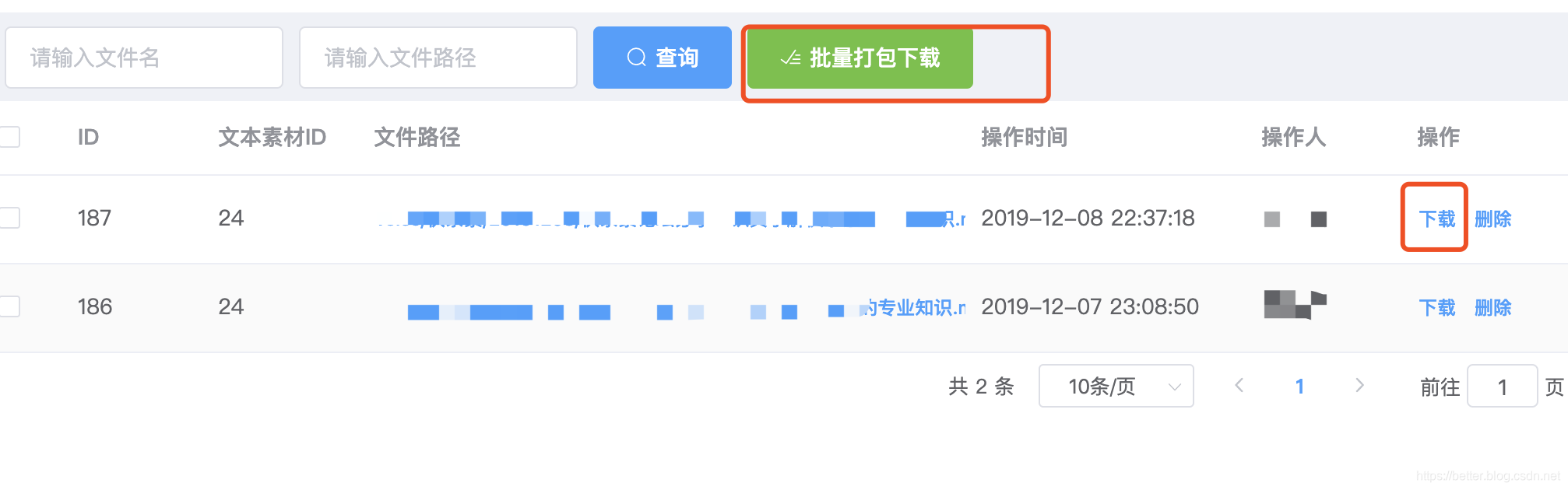
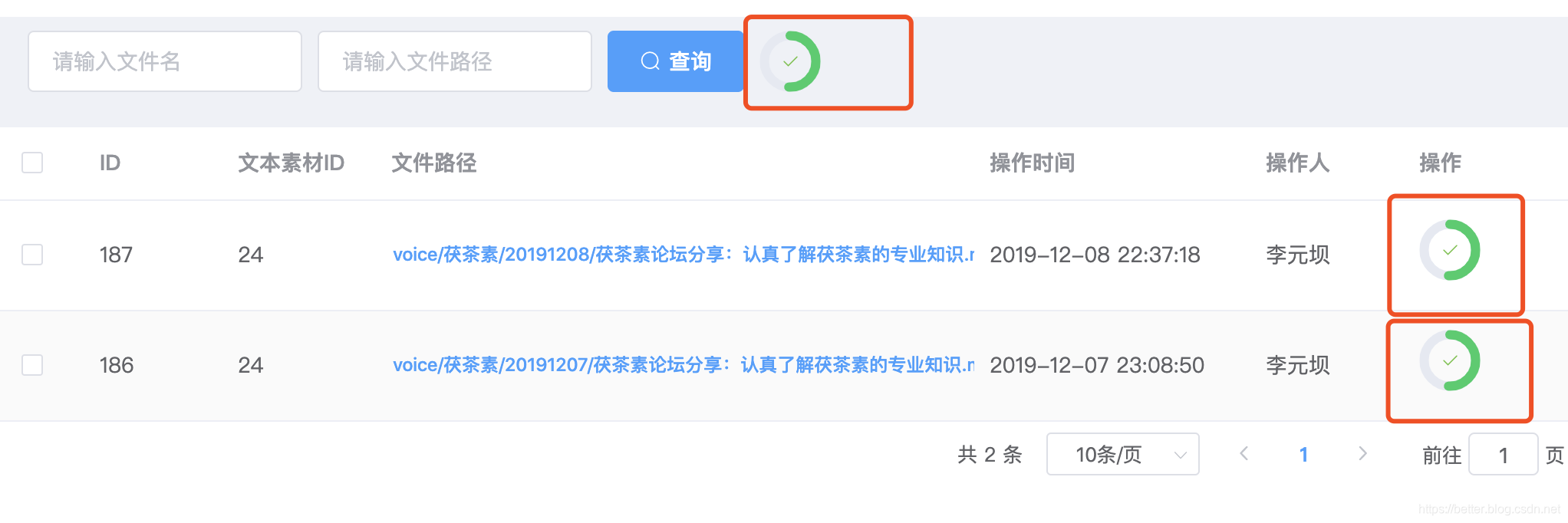
点击下载按钮后,就通过判断downloadProgress的值来实现隐藏或者显示进度条或者按钮,上面的示例代码中已经有了。当然进度条样式你也可换成其他的。

魔乐社区(Modelers.cn) 是一个中立、公益的人工智能社区,提供人工智能工具、模型、数据的托管、展示与应用协同服务,为人工智能开发及爱好者搭建开放的学习交流平台。社区通过理事会方式运作,由全产业链共同建设、共同运营、共同享有,推动国产AI生态繁荣发展。
更多推荐


 0
0 0
0- 0


 已为社区贡献3条内容

所有评论(0)