(七十)c#Winform自定义控件-饼状图
·
前提
入行已经7,8年了,一直想做一套漂亮点的自定义控件,于是就有了本系列文章。
官网:https://www.hzhcontrols.cn
GitHub:https://github.com/kwwwvagaa/NetWinformControl
如果觉得写的还行,请点个 star 支持一下吧
欢迎前来交流探讨: 企鹅群568015492 
麻烦博客下方点个【推荐】,谢谢
NuGet
Install-Package HZH_Controls
目录
c#Winform自定义控件-目录_c#winform自定义控件-有图标的按钮-CSDN博客
用处及效果
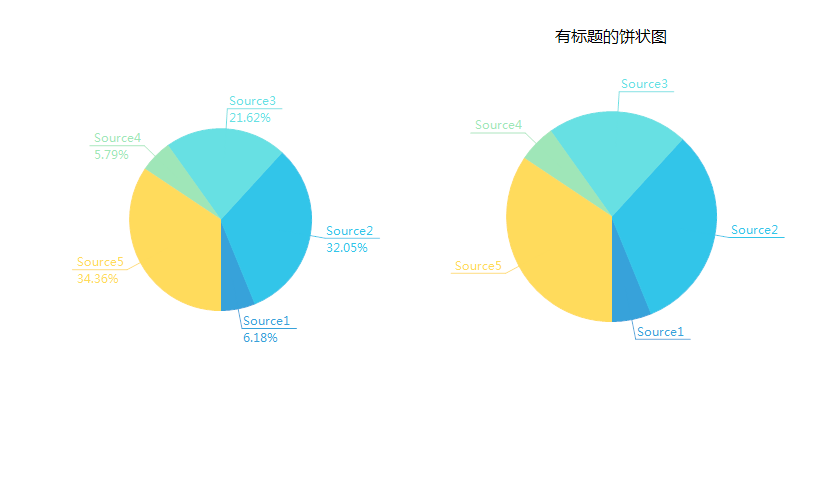
准备工作
使用GDI+画的控件,不了解可以先百度下
开始
添加一个类UCPieChart ,继承UserControl
添加一些属性

  1  /// <summary>
  2         /// The pie items
  3         /// </summary>
  4         private PieItem[] pieItems = new PieItem[0];
  5
  6         /// <summary>
  7         /// The random
  8         /// </summary>
  9         private Random random = null;
 10
 11         /// <summary>
 12         /// The format center
 13         /// </summary>
 14         private StringFormat formatCenter = null;
 15
 16         /// <summary>
 17         /// The margin
 18         /// </summary>
 19         private int margin = 50;
 20
 21         /// <summary>
 22         /// The m is render percent
 23         /// </summary>
 24         private bool m_IsRenderPercent = false;
 25
 26         /// <summary>
 27         /// The percen format
 28         /// </summary>
 29         private string percenFormat = "{0:F2}%";
 30
 31         /// <summary>
 32         /// The components
 33         /// </summary>
 34         private IContainer components = null;
 35
 36         /// <summary>
 37         /// Gets or sets a value indicating whether this instance is render percent.
 38         /// </summary>
 39         /// <value><c>true</c> if this instance is render percent; otherwise, <c>false</c>.</value>
 40         [Browsable(true)]
 41         [Category("自定义")]
 42         [DefaultValue(false)]
 43         [Description("获取或设置是否显示百分比占用")]
 44         public bool IsRenderPercent
 45         {
 46             get
 47             {
 48                 return m_IsRenderPercent;
 49             }
 50             set
 51             {
 52                 m_IsRenderPercent = value;
 53                 Invalidate();
 54             }
 55         }
 56
 57
 58         /// <summary>
 59         /// Gets or sets the text margin.
 60         /// </summary>
 61         /// <value>The text margin.</value>
 62         [Browsable(true)]
 63         [Category("自定义")]
 64         [Description("获取或设置文本距离,单位为像素,默认50")]
 65         [DefaultValue(50)]
 66         public int TextMargin
 67         {
 68             get
 69             {
 70                 return margin;
 71             }
 72             set
 73             {
 74                 margin = value;
 75                 Invalidate();
 76             }
 77         }
 78
 79
 80         /// <summary>
 81         /// Gets or sets the percent format.
 82         /// </summary>
 83         /// <value>The percent format.</value>
 84         [Browsable(true)]
 85         [Category("自定义")]
 86         [Description("获取或设置文百分比文字的格式化信息")]
 87         [DefaultValue("{0:F2}%")]
 88         public string PercentFormat
 89         {
 90             get
 91             {
 92                 return percenFormat;
 93             }
 94             set
 95             {
 96                 percenFormat = value;
 97                 Invalidate();
 98             }
 99         }
100
101         /// <summary>
102         /// The center of circle color
103         /// </summary>
104         private Color centerOfCircleColor = Color.White;
105         /// <summary>
106         /// Gets or sets the color of the center of circle.
107         /// </summary>
108         /// <value>The color of the center of circle.</value>
109         [Browsable(true)]
110         [Category("自定义")]
111         [Description("获取或设置圆心颜色")]
112         public Color CenterOfCircleColor
113         {
114             get { return centerOfCircleColor; }
115             set
116             {
117                 centerOfCircleColor = value;
118                 Invalidate();
119             }
120         }
121
122         /// <summary>
123         /// The center of circle width
124         /// </summary>
125         private int centerOfCircleWidth = 0;
126         /// <summary>
127         /// Gets or sets the width of the center of circle.
128         /// </summary>
129         /// <value>The width of the center of circle.</value>
130         [Browsable(true)]
131         [Category("自定义")]
132         [Description("获取或设置圆心宽度")]
133         public int CenterOfCircleWidth
134         {
135             get { return centerOfCircleWidth; }
136             set
137             {
138                 if (value < 0)
139                     return;
140                 centerOfCircleWidth = value;
141                 Invalidate();
142             }
143         }
144
145         /// <summary>
146         /// The title
147         /// </summary>
148         private string title;
149         /// <summary>
150         /// Gets or sets the ti tle.
151         /// </summary>
152         /// <value>The ti tle.</value>
153         [Browsable(true)]
154         [Category("自定义")]
155         [Description("获取或设置标题")]
156         public string TiTle
157         {
158             get { return title; }
159             set
160             {
161                 title = value;
162                 ResetTitleHeight();
163                 Invalidate();
164             }
165         }
166         /// <summary>
167         /// The title font
168         /// </summary>
169         private Font titleFont = new Font("微软雅黑", 12);
170         /// <summary>
171         /// Gets or sets the title font.
172         /// </summary>
173         /// <value>The title font.</value>
174         [Browsable(true)]
175         [Category("自定义")]
176         [Description("获取或设置标题字体")]
177         public Font TitleFont
178         {
179             get { return titleFont; }
180             set
181             {
182                 titleFont = value;
183                 ResetTitleHeight();
184                 Invalidate();
185             }
186         }
187
188         /// <summary>
189         /// The title froe color
190         /// </summary>
191         private Color titleFroeColor = Color.Black;
192         /// <summary>
193         /// Gets or sets the color of the title froe.
194         /// </summary>
195         /// <value>The color of the title froe.</value>
196         [Browsable(true)]
197         [Category("自定义")]
198         [Description("获取或设置标题颜色")]
199         public Color TitleFroeColor
200         {
201             get { return titleFroeColor; }
202             set
203             {
204                 titleFroeColor = value;
205                 Invalidate();
206             }
207         }
208
209         /// <summary>
210         /// The title size
211         /// </summary>
212         private SizeF titleSize = SizeF.Empty;
213         /// <summary>
214         /// Resets the height of the title.
215         /// </summary>
216         private void ResetTitleHeight()
217         {
218             if (string.IsNullOrEmpty(title))
219                 titleSize = SizeF.Empty;
220             else
221             {
222                 using (var g = this.CreateGraphics())
223                 {
224                     titleSize = g.MeasureString(title, titleFont);
225                 }
226             }
227         }
228
229         /// <summary>
230         /// Gets or sets the data source.
231         /// </summary>
232         /// <value>The data source.</value>
233         [Browsable(true)]
234         [Category("自定义")]
235         [Description("获取或设置标题颜色")]
236         [Localizable(true)]
237         public PieItem[] DataSource
238         {
239             get { return pieItems; }
240             set
241             {
242                 pieItems = value;
243                 Invalidate();
244             }
245         }
重绘
  1  protected override void OnPaint(PaintEventArgs e)
  2         {
  3             e.Graphics.SetGDIHigh();
  4
  5             int width;
  6             Point centerPoint = GetCenterPoint(out width);
  7             Rectangle rectangle = new Rectangle(centerPoint.X - width, centerPoint.Y - width, width * 2, width * 2);
  8             if (width > 0 && pieItems.Length != 0)
  9             {
 10                 if (!string.IsNullOrEmpty(title))
 11                     e.Graphics.DrawString(title, titleFont, new SolidBrush(titleFroeColor), new PointF((this.Width - titleSize.Width) / 2, 5));
 12                 Rectangle rect = new Rectangle(rectangle.X - centerPoint.X, rectangle.Y - centerPoint.Y, rectangle.Width, rectangle.Height);
 13                 e.Graphics.TranslateTransform(centerPoint.X, centerPoint.Y);
 14                 e.Graphics.RotateTransform(90f);
 15                 int num = pieItems.Sum((PieItem item) => item.Value);
 16                 float num2 = 0f;
 17                 float num3 = -90f;
 18                 for (int i = 0; i < pieItems.Length; i++)
 19                 {
 20                     Color cItem = pieItems[i].PieColor ?? ControlHelper.Colors[i];
 21                     Pen pen = new Pen(cItem, 1f);
 22                     SolidBrush solidBrush = new SolidBrush(cItem);
 23                     SolidBrush solidBrush2 = new SolidBrush(cItem);
 24                     Brush percentBrush = new SolidBrush(cItem);
 25                     float num4 = e.Graphics.MeasureString(pieItems[i].Name, Font).Width + 3f;
 26                     float num5 = (num != 0) ? Convert.ToSingle((double)pieItems[i].Value * 1.0 / (double)num * 360.0) : ((float)(360 / pieItems.Length));
 27                     e.Graphics.FillPie(solidBrush, rect, 0f, 0f - num5);
 28                     e.Graphics.DrawPie(new Pen(solidBrush), rect, 0f, 0f - num5);
 29                     e.Graphics.RotateTransform(0f - num5 / 2f);
 30                     if (num5 < 2f)
 31                     {
 32                         num2 += num5;
 33                     }
 34                     else
 35                     {
 36                         num2 += num5 / 2f;
 37                         int num6 = 15;
 38                         if (num2 < 45f || num2 > 315f)
 39                         {
 40                             num6 = 20;
 41                         }
 42                         if (num2 > 135f && num2 < 225f)
 43                         {
 44                             num6 = 20;
 45                         }
 46                         e.Graphics.DrawLine(pen, width * 2 / 3, 0, width + num6, 0);
 47                         e.Graphics.TranslateTransform(width + num6, 0f);
 48                         if (num2 - num3 < 5f)
 49                         {
 50                         }
 51                         num3 = num2;
 52                         if (num2 < 180f)
 53                         {
 54                             e.Graphics.RotateTransform(num2 - 90f);
 55                             e.Graphics.DrawLine(pen, 0f, 0f, num4, 0f);
 56                             e.Graphics.DrawString(pieItems[i].Name, Font, solidBrush2, new Point(0, -Font.Height));
 57                             if (IsRenderPercent)
 58                             {
 59                                 e.Graphics.DrawString(string.Format(percenFormat, num5 * 100f / 360f), Font, percentBrush, new Point(0, 1));
 60                             }
 61                             e.Graphics.RotateTransform(90f - num2);
 62                         }
 63                         else
 64                         {
 65                             e.Graphics.RotateTransform(num2 - 270f);
 66                             e.Graphics.DrawLine(pen, 0f, 0f, num4, 0f);
 67                             e.Graphics.TranslateTransform(num4 - 3f, 0f);
 68                             e.Graphics.RotateTransform(180f);
 69                             e.Graphics.DrawString(pieItems[i].Name, Font, solidBrush2, new Point(0, -Font.Height));
 70                             if (IsRenderPercent)
 71                             {
 72                                 e.Graphics.DrawString(string.Format(percenFormat, num5 * 100f / 360f), Font, percentBrush, new Point(0, 1));
 73                             }
 74                             e.Graphics.RotateTransform(-180f);
 75                             e.Graphics.TranslateTransform(0f - num4 + 3f, 0f);
 76                             e.Graphics.RotateTransform(270f - num2);
 77                         }
 78                         e.Graphics.TranslateTransform(-width - num6, 0f);
 79                         e.Graphics.RotateTransform(0f - num5 / 2f);
 80                         num2 += num5 / 2f;
 81                     }
 82                     solidBrush.Dispose();
 83                     pen.Dispose();
 84                     solidBrush2.Dispose();
 85                     percentBrush.Dispose();
 86                 }
 87                 e.Graphics.ResetTransform();
 88
 89                 if (centerOfCircleWidth > 0)
 90                 {
 91                     Rectangle rectCenter = new Rectangle(rect.Left + rect.Width / 2 - centerOfCircleWidth / 2, rect.Top + rect.Height / 2 - centerOfCircleWidth / 2, centerOfCircleWidth, centerOfCircleWidth);
 92                     e.Graphics.FillEllipse(new SolidBrush(centerOfCircleColor), rectCenter);
 93                 }
 94             }
 95             else
 96             {
 97                 e.Graphics.FillEllipse(Brushes.AliceBlue, rectangle);
 98                 e.Graphics.DrawEllipse(Pens.DodgerBlue, rectangle);
 99                 e.Graphics.DrawString("无数据", Font, Brushes.DimGray, rectangle, formatCenter);
100             }
101             base.OnPaint(e);
102         }
一些辅助函数
 1  /// <summary>
 2         /// Sets the data source.
 3         /// </summary>
 4         /// <param name="source">The source.</param>
 5         public void SetDataSource(PieItem[] source)
 6         {
 7             if (source != null)
 8             {
 9                 DataSource = source;
10             }
11         }
12         /// <summary>
13         /// Sets the data source.
14         /// </summary>
15         /// <param name="names">The names.</param>
16         /// <param name="values">The values.</param>
17         /// <exception cref="System.ArgumentNullException">
18         /// names
19         /// or
20         /// values
21         /// </exception>
22         /// <exception cref="System.Exception">两个数组的长度不一致!</exception>
23         public void SetDataSource(string[] names, int[] values)
24         {
25             if (names == null)
26             {
27                 throw new ArgumentNullException("names");
28             }
29             if (values == null)
30             {
31                 throw new ArgumentNullException("values");
32             }
33             if (names.Length != values.Length)
34             {
35                 throw new Exception("两个数组的长度不一致!");
36             }
37             pieItems = new PieItem[names.Length];
38             for (int i = 0; i < names.Length; i++)
39             {
40                 pieItems[i] = new PieItem
41                 {
42                     Name = names[i],
43                     Value = values[i]
44                 };
45             }
46             Invalidate();
47         }
完整代码
// ***********************************************************************
// Assembly : HZH_Controls
// Created : 2019-09-23
//
// ***********************************************************************
// <copyright file="UCPieChart.cs">
// Copyright by Huang Zhenghui(黄正辉) All, QQ group:568015492 QQ:623128629 Email:623128629@qq.com
// </copyright>
//
// Blog: https://www.cnblogs.com/bfyx
// GitHub:https://github.com/kwwwvagaa/NetWinformControl
// gitee:https://gitee.com/kwwwvagaa/net_winform_custom_control.git
//
// If you use this code, please keep this note.
// ***********************************************************************
using System;
using System.ComponentModel;
using System.ComponentModel.Design;
using System.Drawing;
using System.Drawing.Drawing2D;
using System.Drawing.Text;
using System.Linq;
using System.Windows.Forms;
namespace HZH_Controls.Controls
{
/// <summary>
/// Class UCPieChart.
/// Implements the <see cref="System.Windows.Forms.UserControl" />
/// </summary>
/// <seealso cref="System.Windows.Forms.UserControl" />
public class UCPieChart : UserControl
{
/// <summary>
/// The pie items
/// </summary>
private PieItem[] pieItems = new PieItem[0];
/// <summary>
/// The random
/// </summary>
private Random random = null;
/// <summary>
/// The format center
/// </summary>
private StringFormat formatCenter = null;
/// <summary>
/// The margin
/// </summary>
private int margin = 50;
/// <summary>
/// The m is render percent
/// </summary>
private bool m_IsRenderPercent = false;
/// <summary>
/// The percen format
/// </summary>
private string percenFormat = "{0:F2}%";
/// <summary>
/// The components
/// </summary>
private IContainer components = null;
/// <summary>
/// Gets or sets a value indicating whether this instance is render percent.
/// </summary>
/// <value><c>true</c> if this instance is render percent; otherwise, <c>false</c>.</value>
[Browsable(true)]
[Category("自定义")]
[DefaultValue(false)]
[Description("获取或设置是否显示百分比占用")]
public bool IsRenderPercent
{
get
{
return m_IsRenderPercent;
}
set
{
m_IsRenderPercent = value;
Invalidate();
}
}
/// <summary>
/// Gets or sets the text margin.
/// </summary>
/// <value>The text margin.</value>
[Browsable(true)]
[Category("自定义")]
[Description("获取或设置文本距离,单位为像素,默认50")]
[DefaultValue(50)]
public int TextMargin
{
get
{
return margin;
}
set
{
margin = value;
Invalidate();
}
}
/// <summary>
/// Gets or sets the percent format.
/// </summary>
/// <value>The percent format.</value>
[Browsable(true)]
[Category("自定义")]
[Description("获取或设置文百分比文字的格式化信息")]
[DefaultValue("{0:F2}%")]
public string PercentFormat
{
get
{
return percenFormat;
}
set
{
percenFormat = value;
Invalidate();
}
}
/// <summary>
/// The center of circle color
/// </summary>
private Color centerOfCircleColor = Color.White;
/// <summary>
/// Gets or sets the color of the center of circle.
/// </summary>
/// <value>The color of the center of circle.</value>
[Browsable(true)]
[Category("自定义")]
[Description("获取或设置圆心颜色")]
public Color CenterOfCircleColor
{
get { return centerOfCircleColor; }
set
{
centerOfCircleColor = value;
Invalidate();
}
}
/// <summary>
/// The center of circle width
/// </summary>
private int centerOfCircleWidth = 0;
/// <summary>
/// Gets or sets the width of the center of circle.
/// </summary>
/// <value>The width of the center of circle.</value>
[Browsable(true)]
[Category("自定义")]
[Description("获取或设置圆心宽度")]
public int CenterOfCircleWidth
{
get { return centerOfCircleWidth; }
set
{
if (value < 0)
return;
centerOfCircleWidth = value;
Invalidate();
}
}
/// <summary>
/// The title
/// </summary>
private string title;
/// <summary>
/// Gets or sets the ti tle.
/// </summary>
/// <value>The ti tle.</value>
[Browsable(true)]
[Category("自定义")]
[Description("获取或设置标题")]
public string TiTle
{
get { return title; }
set
{
title = value;
ResetTitleHeight();
Invalidate();
}
}
/// <summary>
/// The title font
/// </summary>
private Font titleFont = new Font("微软雅黑", 12);
/// <summary>
/// Gets or sets the title font.
/// </summary>
/// <value>The title font.</value>
[Browsable(true)]
[Category("自定义")]
[Description("获取或设置标题字体")]
public Font TitleFont
{
get { return titleFont; }
set
{
titleFont = value;
ResetTitleHeight();
Invalidate();
}
}
/// <summary>
/// The title froe color
/// </summary>
private Color titleFroeColor = Color.Black;
/// <summary>
/// Gets or sets the color of the title froe.
/// </summary>
/// <value>The color of the title froe.</value>
[Browsable(true)]
[Category("自定义")]
[Description("获取或设置标题颜色")]
public Color TitleFroeColor
{
get { return titleFroeColor; }
set
{
titleFroeColor = value;
Invalidate();
}
}
/// <summary>
/// The title size
/// </summary>
private SizeF titleSize = SizeF.Empty;
/// <summary>
/// Resets the height of the title.
/// </summary>
private void ResetTitleHeight()
{
if (string.IsNullOrEmpty(title))
titleSize = SizeF.Empty;
else
{
using (var g = this.CreateGraphics())
{
titleSize = g.MeasureString(title, titleFont);
}
}
}
/// <summary>
/// Gets or sets the data source.
/// </summary>
/// <value>The data source.</value>
[Browsable(true)]
[Category("自定义")]
[Description("获取或设置标题颜色")]
[Localizable(true)]
public PieItem[] DataSource
{
get { return pieItems; }
set
{
pieItems = value;
Invalidate();
}
}
/// <summary>
/// Initializes a new instance of the <see cref="UCPieChart"/> class.
/// </summary>
public UCPieChart()
{
InitializeComponent();
random = new Random();
formatCenter = new StringFormat();
formatCenter.Alignment = StringAlignment.Center;
formatCenter.LineAlignment = StringAlignment.Center;
SetStyle(ControlStyles.UserPaint | ControlStyles.SupportsTransparentBackColor, true);
SetStyle(ControlStyles.ResizeRedraw, true);
SetStyle(ControlStyles.OptimizedDoubleBuffer, true);
SetStyle(ControlStyles.AllPaintingInWmPaint, true);
pieItems = new PieItem[0];
if (GetService(typeof(IDesignerHost)) != null || LicenseManager.UsageMode == LicenseUsageMode.Designtime)
{
pieItems = new PieItem[5];
for (int i = 0; i < 5; i++)
{
pieItems[i] = new PieItem
{
Name = "Source" + (i + 1),
Value = random.Next(10, 100)
};
}
}
}
/// <summary>
/// Gets the center point.
/// </summary>
/// <param name="width">The width.</param>
/// <returns>Point.</returns>
private Point GetCenterPoint(out int width)
{
width = Math.Min(base.Width, base.Height - (titleSize != SizeF.Empty ? ((int)titleSize.Height) : 0)) / 2 - margin - 8;
return new Point(base.Width / 2 - 1, base.Height / 2 + (titleSize != SizeF.Empty ? ((int)titleSize.Height) : 0) - 1);
}
/// <summary>
/// 引发 <see cref="E:System.Windows.Forms.Control.Paint" /> 事件。
/// </summary>
/// <param name="e">包含事件数据的 <see cref="T:System.Windows.Forms.PaintEventArgs" />。</param>
protected override void OnPaint(PaintEventArgs e)
{
e.Graphics.SetGDIHigh();
int width;
Point centerPoint = GetCenterPoint(out width);
Rectangle rectangle = new Rectangle(centerPoint.X - width, centerPoint.Y - width, width * 2, width * 2);
if (width > 0 && pieItems.Length != 0)
{
if (!string.IsNullOrEmpty(title))
e.Graphics.DrawString(title, titleFont, new SolidBrush(titleFroeColor), new PointF((this.Width - titleSize.Width) / 2, 5));
Rectangle rect = new Rectangle(rectangle.X - centerPoint.X, rectangle.Y - centerPoint.Y, rectangle.Width, rectangle.Height);
e.Graphics.TranslateTransform(centerPoint.X, centerPoint.Y);
e.Graphics.RotateTransform(90f);
int num = pieItems.Sum((PieItem item) => item.Value);
float num2 = 0f;
float num3 = -90f;
for (int i = 0; i < pieItems.Length; i++)
{
Color cItem = pieItems[i].PieColor ?? ControlHelper.Colors[i];
Pen pen = new Pen(cItem, 1f);
SolidBrush solidBrush = new SolidBrush(cItem);
SolidBrush solidBrush2 = new SolidBrush(cItem);
Brush percentBrush = new SolidBrush(cItem);
float num4 = e.Graphics.MeasureString(pieItems[i].Name, Font).Width + 3f;
float num5 = (num != 0) ? Convert.ToSingle((double)pieItems[i].Value * 1.0 / (double)num * 360.0) : ((float)(360 / pieItems.Length));
e.Graphics.FillPie(solidBrush, rect, 0f, 0f - num5);
e.Graphics.DrawPie(new Pen(solidBrush), rect, 0f, 0f - num5);
e.Graphics.RotateTransform(0f - num5 / 2f);
if (num5 < 2f)
{
num2 += num5;
}
else
{
num2 += num5 / 2f;
int num6 = 15;
if (num2 < 45f || num2 > 315f)
{
num6 = 20;
}
if (num2 > 135f && num2 < 225f)
{
num6 = 20;
}
e.Graphics.DrawLine(pen, width * 2 / 3, 0, width + num6, 0);
e.Graphics.TranslateTransform(width + num6, 0f);
if (num2 - num3 < 5f)
{
}
num3 = num2;
if (num2 < 180f)
{
e.Graphics.RotateTransform(num2 - 90f);
e.Graphics.DrawLine(pen, 0f, 0f, num4, 0f);
e.Graphics.DrawString(pieItems[i].Name, Font, solidBrush2, new Point(0, -Font.Height));
if (IsRenderPercent)
{
e.Graphics.DrawString(string.Format(percenFormat, num5 * 100f / 360f), Font, percentBrush, new Point(0, 1));
}
e.Graphics.RotateTransform(90f - num2);
}
else
{
e.Graphics.RotateTransform(num2 - 270f);
e.Graphics.DrawLine(pen, 0f, 0f, num4, 0f);
e.Graphics.TranslateTransform(num4 - 3f, 0f);
e.Graphics.RotateTransform(180f);
e.Graphics.DrawString(pieItems[i].Name, Font, solidBrush2, new Point(0, -Font.Height));
if (IsRenderPercent)
{
e.Graphics.DrawString(string.Format(percenFormat, num5 * 100f / 360f), Font, percentBrush, new Point(0, 1));
}
e.Graphics.RotateTransform(-180f);
e.Graphics.TranslateTransform(0f - num4 + 3f, 0f);
e.Graphics.RotateTransform(270f - num2);
}
e.Graphics.TranslateTransform(-width - num6, 0f);
e.Graphics.RotateTransform(0f - num5 / 2f);
num2 += num5 / 2f;
}
solidBrush.Dispose();
pen.Dispose();
solidBrush2.Dispose();
percentBrush.Dispose();
}
e.Graphics.ResetTransform();
if (centerOfCircleWidth > 0)
{
Rectangle rectCenter = new Rectangle(rect.Left + rect.Width / 2 - centerOfCircleWidth / 2, rect.Top + rect.Height / 2 - centerOfCircleWidth / 2, centerOfCircleWidth, centerOfCircleWidth);
e.Graphics.FillEllipse(new SolidBrush(centerOfCircleColor), rectCenter);
}
}
else
{
e.Graphics.FillEllipse(Brushes.AliceBlue, rectangle);
e.Graphics.DrawEllipse(Pens.DodgerBlue, rectangle);
e.Graphics.DrawString("无数据", Font, Brushes.DimGray, rectangle, formatCenter);
}
base.OnPaint(e);
}
/// <summary>
/// Sets the data source.
/// </summary>
/// <param name="source">The source.</param>
public void SetDataSource(PieItem[] source)
{
if (source != null)
{
DataSource = source;
}
}
/// <summary>
/// Sets the data source.
/// </summary>
/// <param name="names">The names.</param>
/// <param name="values">The values.</param>
/// <exception cref="System.ArgumentNullException">
/// names
/// or
/// values
/// </exception>
/// <exception cref="System.Exception">两个数组的长度不一致!</exception>
public void SetDataSource(string[] names, int[] values)
{
if (names == null)
{
throw new ArgumentNullException("names");
}
if (values == null)
{
throw new ArgumentNullException("values");
}
if (names.Length != values.Length)
{
throw new Exception("两个数组的长度不一致!");
}
pieItems = new PieItem[names.Length];
for (int i = 0; i < names.Length; i++)
{
pieItems[i] = new PieItem
{
Name = names[i],
Value = values[i]
};
}
Invalidate();
}
/// <summary>
/// Releases unmanaged and - optionally - managed resources.
/// </summary>
/// <param name="disposing">为 true 则释放托管资源和非托管资源;为 false 则仅释放非托管资源。</param>
protected override void Dispose(bool disposing)
{
if (disposing && components != null)
{
components.Dispose();
}
base.Dispose(disposing);
}
/// <summary>
/// Initializes the component.
/// </summary>
private void InitializeComponent()
{
SuspendLayout();
base.AutoScaleMode = System.Windows.Forms.AutoScaleMode.None;
BackColor = System.Drawing.Color.Transparent;
base.Name = "UCPieChart";
ResumeLayout(false);
}
}
}最后的话

魔乐社区(Modelers.cn) 是一个中立、公益的人工智能社区,提供人工智能工具、模型、数据的托管、展示与应用协同服务,为人工智能开发及爱好者搭建开放的学习交流平台。社区通过理事会方式运作,由全产业链共同建设、共同运营、共同享有,推动国产AI生态繁荣发展。
更多推荐


 4
4 0
0- 0


 已为社区贡献16条内容

所有评论(0)