基于stm32的光照强度检测智能窗帘系统
资料编号:098 下面是相关功能视频演示:
98-基于stm32的光照强度检测智能窗帘系统Proteus仿真(源码+仿真+全套资料)
功能介绍:
检测当前的光照强度,LCD1602显示,并且可以自动打开关闭窗帘,也可以通过手动按键打开关闭窗帘,全套资料齐全,程序采用C语言,仿真采用Proteus,程序有中文注释,更容易理解;
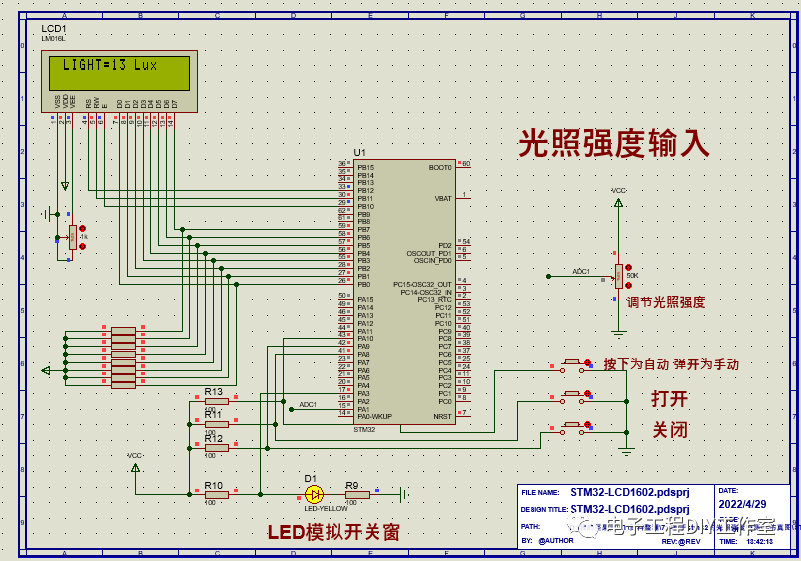
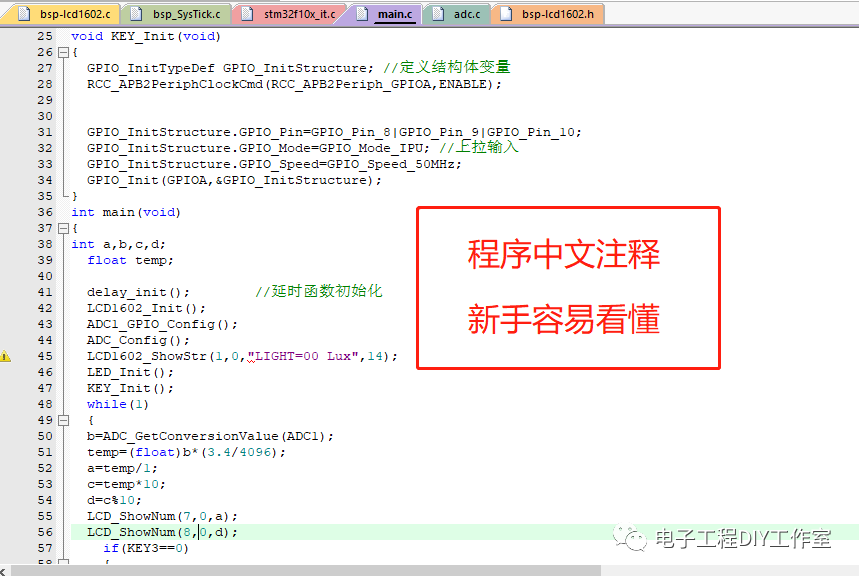
下面是程序部分展示:
void LED_Init(void)
{
GPIO_InitTypeDef GPIO_InitStructure;
RCC_APB2PeriphClockCmd(RCC_APB2Periph_GPIOA, ENABLE); //使能P端口时钟
GPIO_InitStructure.GPIO_Pin = GPIO_Pin_3; //LED0 端口配置
GPIO_InitStructure.GPIO_Mode = GPIO_Mode_Out_PP; //推挽输出
GPIO_InitStructure.GPIO_Speed = GPIO_Speed_50MHz;
GPIO_Init(GPIOA, &GPIO_InitStructure);
GPIO_SetBits(GPIOA,GPIO_Pin_3); //输出高
}
void KEY_Init(void)
{
GPIO_InitTypeDef GPIO_InitStructure; //定义结构体变量
RCC_APB2PeriphClockCmd(RCC_APB2Periph_GPIOA,ENABLE);
GPIO_InitStructure.GPIO_Pin=GPIO_Pin_8|GPIO_Pin_9|GPIO_Pin_10;
GPIO_InitStructure.GPIO_Mode=GPIO_Mode_IPU; //上拉输入
GPIO_InitStructure.GPIO_Speed=GPIO_Speed_50MHz;
GPIO_Init(GPIOA,&GPIO_InitStructure);
}
int main(void)
{
int a,b,c,d;
float temp;
delay_init(); //延时函数初始化
LCD1602_Init();
ADC1_GPIO_Config();
ADC_Config();
LCD1602_ShowStr(1,0,"LIGHT=00 Lux",14);
LED_Init();
KEY_Init();
while(1)
{
b=ADC_GetConversionValue(ADC1);
temp=(float)b*(3.4/4096);
a=temp/1;
c=temp*10;
d=c%10;
LCD_ShowNum(7,0,a);
LCD_ShowNum(8,0,d);
if(KEY3==0)
{
if(temp>2) LED=1;
else LED=0;
}
else
{
if(KEY1==0) LED=1;
if(KEY2==0) LED=0;
}
delay_ms(200);
}
}
下面是该资料的分享下载链接:

魔乐社区(Modelers.cn) 是一个中立、公益的人工智能社区,提供人工智能工具、模型、数据的托管、展示与应用协同服务,为人工智能开发及爱好者搭建开放的学习交流平台。社区通过理事会方式运作,由全产业链共同建设、共同运营、共同享有,推动国产AI生态繁荣发展。
更多推荐


 2
2 0
0- 0


 已为社区贡献13条内容

所有评论(0)