读取jar包中resources 目录下json配置文件两种方法
从jar包中读取json配置文件
·
在做测试工具平台时,经常会在测试服务器发送http请求,而有时消息体内容会比较多,这时可以将消息体保存到json文件中,需求时按照JSONObject 格式获取即可。
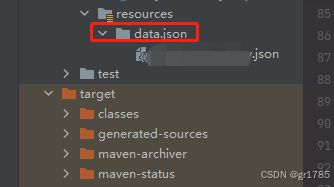
json文件放置路径如下:
方法1:如果是springboot工程
import com.alibaba.fastjson.JSONObject;
import org.springframework.beans.factory.annotation.Autowired;
import org.springframework.core.io.Resource;
import org.springframework.core.io.ResourceLoader;
import org.springframework.stereotype.Component;
import java.io.BufferedReader;
import java.io.IOException;
import java.io.InputStream;
import java.io.InputStreamReader;
import java.util.HashMap;
import java.util.List;
import java.util.Map;
import java.util.stream.Collectors;

@Component
public class Utils {
    private  static ResourceLoader myResourceLoader;

    @Autowired
    public Utils(ResourceLoader resourceLoader)
    {
        myResourceLoader=resourceLoader;
    }

	// 从 resources 目录读取json文件内容
    public static String getJsonString(String filePath) throws IOException
    {
        Resource resource = myResourceLoader.getResource("classpath:" + filePath);
        try (InputStream inputStream = resource.getInputStream();
             BufferedReader bufferedReader = new BufferedReader(new InputStreamReader(inputStream))) {

            return bufferedReader.lines().collect(Collectors.joining("\n"));
        }
    }
}
调用方式:
public static void main(String [] args)
{
	String myTestFilePath = "/data/json/test.json";
	String myTestStr = Utils.getJsonString(myTestFilePath);
	JSONObject myTestJsonObject = JSONObject.parseObject(myTestStr);
}
方法2:普通java工程
import com.alibaba.fastjson.JSONObject;
import com.alibaba.fastjson.JSON;
import com.alibaba.fastjson.parser.Feature;
import java.io.*;
import java.util.*;
import java.util.stream.Collectors;

public class Utils {
	private static JSONObject getJsonObject(String myFilePath) throws IOException {
		try(InputStream inputStream = Utils.class.getClassLoader().getResourceAsStream(myFilePath);
		BufferedReader bufferedReader = new BufferedReader(new InputStreamReader(inputStream)))
		{
			String myJsonString = bufferedReader.lines().collect(Collectors.joining("\n"));
			JSONObject myJObject = JSONObject.parseObject(myJsonString);
			return myJObject;
		}
}
}
调用方式:
public static void main(String [] args)
{
	String myTestFilePath = "/data/json/test.json";
	JSONObject myTestJsonObject =Utils.getJsonObject(myTestFilePath);
}
注意:上面代码中数据流的对象实例化都在try()中进行的,这是jdk7的特性,可以自动关闭流,不用再手动关闭。

魔乐社区(Modelers.cn) 是一个中立、公益的人工智能社区,提供人工智能工具、模型、数据的托管、展示与应用协同服务,为人工智能开发及爱好者搭建开放的学习交流平台。社区通过理事会方式运作,由全产业链共同建设、共同运营、共同享有,推动国产AI生态繁荣发展。
更多推荐


 8
8 0
0- 0


 已为社区贡献2条内容

所有评论(0)