asp.net web api2设置默认启动登录页面
·
1.在Global.asax文件中添加Application_BeginRequest方法,如下如所示:
public class WebApiApplication : HttpApplication
{
    protected void Application_Start()
    {
        log4net.Config.XmlConfigurator.Configure(new FileInfo(Server.MapPath("~/Web.config")));
        AreaRegistration.RegisterAllAreas();
        GlobalConfiguration.Configure(WebApiConfig.Register);
        FilterConfig.RegisterGlobalFilters(GlobalFilters.Filters);
        RouteConfig.RegisterRoutes(RouteTable.Routes);
        BundleConfig.RegisterBundles(BundleTable.Bundles);
    }


    protected void Application_BeginRequest(object sender, EventArgs e)
    {
        if (Context.Request.FilePath == "/")
            Context.RewritePath("home/page/login.html");
    }
}
静态页面的目录结构如下所示:
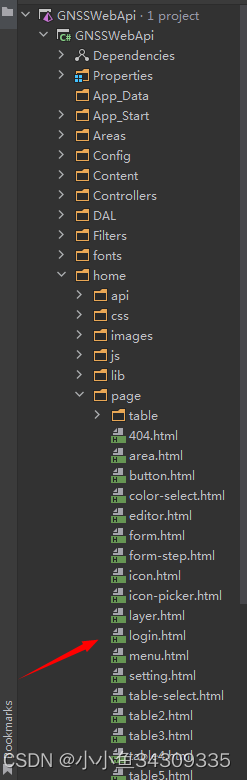
2.等启动项目后,到了登录页,有可能会发现静态资源,如图片,css,js文件全部加载失败,这个时候需要修改一下路径,如下所示:
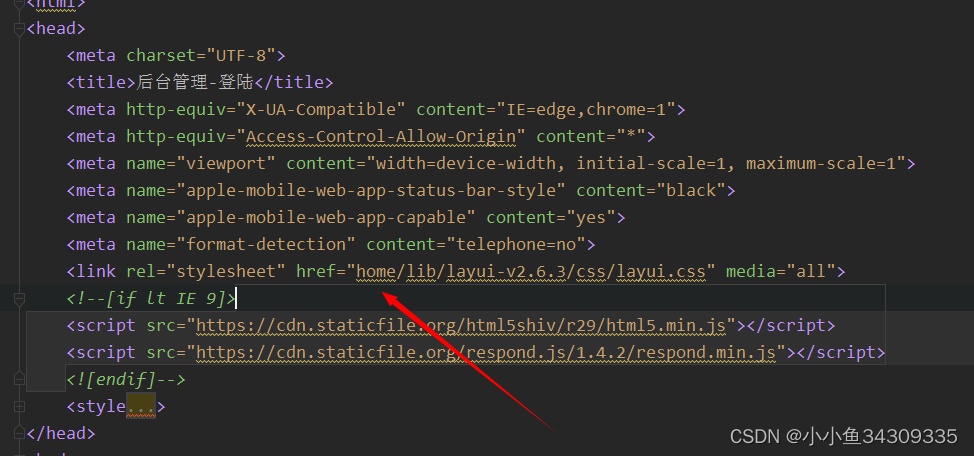
登录成功跳转的页面也要注意下。
备注:项目使用rider2022.2.3开发

魔乐社区(Modelers.cn) 是一个中立、公益的人工智能社区,提供人工智能工具、模型、数据的托管、展示与应用协同服务,为人工智能开发及爱好者搭建开放的学习交流平台。社区通过理事会方式运作,由全产业链共同建设、共同运营、共同享有,推动国产AI生态繁荣发展。
更多推荐


 1
1 0
0- 0


 已为社区贡献3条内容

所有评论(0)