vue+element实现试卷答题组件(支持单选,多选以及并带有答题进度)
·
演示实例:
代码复制就可以直接用,大家可以在此基础上根据后端数据格式以及需求自定义添加内容以及样式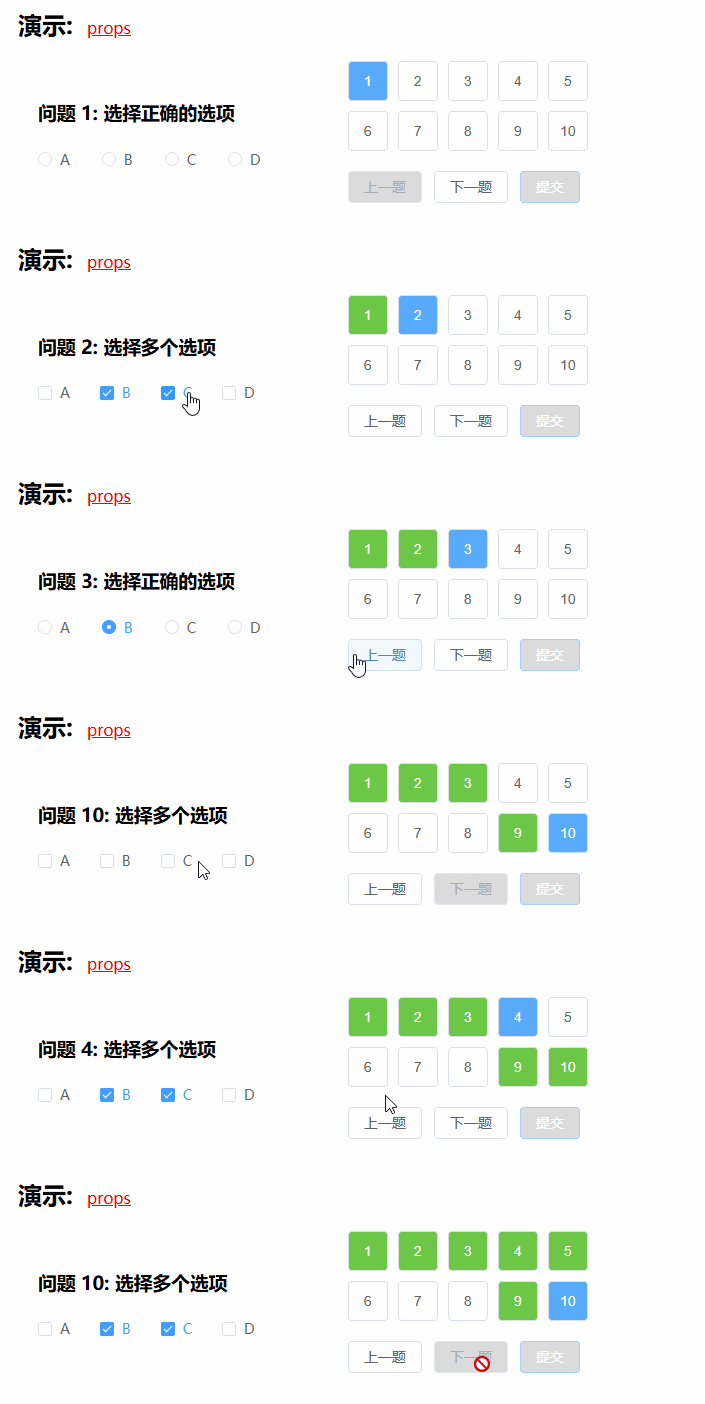
<template>
  <el-row style="width: 35%">
    <!-- 左侧当前题目 -->
    <el-col :span="12">
      <div class="question-container">
        <h3>{{ currentQuestion.title }}</h3>
        <div v-if="currentQuestion.type === 'single'">
          <el-radio-group v-model="currentAnswer" @change="onAnswerChange">
            <el-radio
                v-for="(option, index) in currentQuestion.options"
                :key="index"
                :label="option"
            >
              {{ option }}
            </el-radio>
          </el-radio-group>
        </div>
        <div v-if="currentQuestion.type === 'multiple'">
          <el-checkbox-group v-model="currentAnswer" @change="onAnswerChange">
            <el-checkbox
                v-for="(option, index) in currentQuestion.options"
                :key="index"
                :label="option"
            >
              {{ option }}
            </el-checkbox>
          </el-checkbox-group>
        </div>
      </div>
    </el-col>

    <!-- 右侧题目号 -->
    <el-col :span="12">
      <div class="question-nav">
        <!-- 使用 grid 布局显示题目编号,每行 5 个 -->
        <div class="question-grid">
          <el-button
              v-for="(question, index) in questions"
              :key="index"
              :class="{
              'answered': question.answered,
              'current': currentQuestionIndex === index
            }"
              @click="goToQuestion(index)"
          >
            {{ index + 1 }} <!-- 显示题号 -->
          </el-button>
        </div>
      </div>

      <!-- 导航按钮 -->
      <div class="navigation-buttons">
        <el-button @click="previousQuestion" :disabled="currentQuestionIndex === 0">
          上一题
        </el-button>
        <el-button @click="nextQuestion" :disabled="currentQuestionIndex === questions.length - 1">
          下一题
        </el-button>
        <el-button
            @click="submit"
            :disabled="isSubmitDisabled"
            type="primary"
        >
          提交
        </el-button>
      </div>
    </el-col>
  </el-row>
</template>

<script>
export default {
  data() {
    return {
      // 题库数据
      questions: [
        { title: "问题 1: 选择正确的选项", type: "single", options: ["A", "B", "C", "D"], answered: false, answer: null },
        { title: "问题 2: 选择多个选项", type: "multiple", options: ["A", "B", "C", "D"], answered: false, answer: [] },
        { title: "问题 3: 选择正确的选项", type: "single", options: ["A", "B", "C", "D"], answered: false, answer: null },
        { title: "问题 4: 选择多个选项", type: "multiple", options: ["A", "B", "C", "D"], answered: false, answer: [] },
        { title: "问题 5: 选择正确的选项", type: "single", options: ["A", "B", "C", "D"], answered: false, answer: null },
        { title: "问题 6: 选择多个选项", type: "multiple", options: ["A", "B", "C", "D"], answered: false, answer: [] },
        { title: "问题 7: 选择正确的选项", type: "single", options: ["A", "B", "C", "D"], answered: false, answer: null },
        { title: "问题 8: 选择多个选项", type: "multiple", options: ["A", "B", "C", "D"], answered: false, answer: [] },
        { title: "问题 9: 选择正确的选项", type: "single", options: ["A", "B", "C", "D"], answered: false, answer: null },
        { title: "问题 10: 选择多个选项", type: "multiple", options: ["A", "B", "C", "D"], answered: false, answer: [] },
      ],
      currentQuestionIndex: 0, // 当前题目索引
      currentAnswer: [], // 当前题目的答案
    };
  },
  computed: {
    // 获取当前显示的题目
    currentQuestion() {
      return this.questions[this.currentQuestionIndex];
    },
    // 是否禁用提交按钮
    isSubmitDisabled() {
      // 如果有任何题目未答,则禁用提交按钮
      return this.questions.some(question => !question.answered);
    }
  },
  methods: {
    // 跳转到指定题目
    goToQuestion(index) {
      this.currentQuestionIndex = index;
      const currentQuestion = this.questions[index];

      // 如果题目已答过,恢复答案
      if (currentQuestion.answered) {
        this.currentAnswer = Array.isArray(currentQuestion.answer) ? [...currentQuestion.answer] : currentQuestion.answer;
      } else {
        // 否则,不显示任何答案(保持空白状态)
        this.currentAnswer = Array.isArray(currentQuestion.answer) ? [] : null;
      }
    },
    // 下一题
    nextQuestion() {
      if (this.currentQuestionIndex < this.questions.length - 1) {
        this.autoSaveAnswer(); // 自动保存答案
        this.currentQuestionIndex++; // 跳转到下一题
        this.restoreAnswerIfNeeded(); // 恢复下一个题目的答案(如果有)
      }
    },
    // 上一题
    previousQuestion() {
      if (this.currentQuestionIndex > 0) {
        this.autoSaveAnswer(); // 自动保存答案
        this.currentQuestionIndex--; // 跳转到上一题
        this.restoreAnswerIfNeeded(); // 恢复上一个题目的答案(如果有)
      }
    },
    // 自动保存答案
    autoSaveAnswer() {
      const currentQuestion = this.questions[this.currentQuestionIndex];
      // 只有在当前题目有答案时才保存
      if (this.currentAnswer !== null && this.currentAnswer.length > 0) {
        currentQuestion.answer = this.currentAnswer; // 保存答案
        currentQuestion.answered = true; // 标记为已答
      }
    },
    // 恢复答案,如果已经答过
    restoreAnswerIfNeeded() {
      const currentQuestion = this.questions[this.currentQuestionIndex];
      if (currentQuestion.answered) {
        this.currentAnswer = Array.isArray(currentQuestion.answer) ? [...currentQuestion.answer] : currentQuestion.answer;
      } else {
        this.currentAnswer = Array.isArray(currentQuestion.answer) ? [] : null;
      }
    },
    // 回答选项变化时,自动保存
    onAnswerChange() {
      this.autoSaveAnswer();
      // 移除自动跳转的逻辑,完全由用户控制
    },
    // 提交答案
    submit() {
      if (this.isSubmitDisabled) {
        this.$message.warning("请完成所有题目后再提交!");
      } else {
        alert("已提交答案!");
      }
    }
  }
};
</script>

<style scoped>
/* 左侧题目 */
.question-container {
  padding: 20px;
  background-color: #fff;
}

.navigation-buttons {
  margin-top: 20px;
}

.question-grid {
  width: 200px;
  display: grid;
  grid-template-columns: repeat(5, 1fr); /* 每行 5 个题目 */
  grid-gap: 10px;
  .el-button{
    margin-left: 0;
  }
}

.question-grid .el-button {
  width: 40px; /* 使按钮宽度自适应 */
  height: 40px; /* 统一按钮高度 */
  padding: 0;
}

.answered {
  background-color: #6CC747; /* 已答题按钮绿色 */
  color: #fff;
}

.current {
  background-color: #58AAFB; /* 当前题目按钮蓝色 */
  color: #fff;
}

.el-button[disabled] {
  background-color: #dcdcdc;
}

.el-radio-group,
.el-checkbox-group {
  display: block;
}
</style>

魔乐社区(Modelers.cn) 是一个中立、公益的人工智能社区,提供人工智能工具、模型、数据的托管、展示与应用协同服务,为人工智能开发及爱好者搭建开放的学习交流平台。社区通过理事会方式运作,由全产业链共同建设、共同运营、共同享有,推动国产AI生态繁荣发展。
更多推荐


 5
5 0
0- 0


 已为社区贡献3条内容

所有评论(0)