前端分享 || facebook,linkedin,twitter,浏览器自带
前端分享 || facebook,linkedin,twitter,浏览器自带
·
// facebook,linkedin,twitter分享
let obj = {
  href: "http://www.facebook.com/sharer.php?u=" + encodeURIComponent(window.location.href),
  target: "_blank",
  specs: "toolbar=yes, location=yes, directories=no, status=no, menubar=yes, scrollbars=yes, resizable=no, copyhistory=yes, width=600, height=450,top=100,left=350"
};
switch (value) {
  case "facebook":
    obj.href = "http://www.facebook.com/sharer.php?u=" + encodeURIComponent(window.location.href);
    break;
  case "linkedin":
    obj.href = "http://www.linkedin.com/shareArticle?mini=true&url=" + encodeURIComponent(window.location.href);
    break;
  case "twitter":
    obj.href = "https://twitter.com/intent/tweet?text=&url=" + encodeURIComponent(window.location.href);
    break;
  default:
    break;
}
window.open(obj.href, obj.target, obj.specs);
还需要以下的内容在<head></head>里边加(时间久了有点忘了需要重新试下)
<meta property="og:url" content="分享链接的url" />
<meta property="og:description" content="分享的description" />
<meta property="og:image" content="分享图片的url" />
<meta property="og:title" content="分享内容的title" />
浏览器自带的分享
let title = document.querySelector("title") ? document.querySelector("title").innerText : "";
    let text = document.querySelector('meta[name="description"]') ? document.querySelector('meta[name="description"]').getAttribute("content") : "";
    let url = window.location.href;
    if (navigator.share) {
      navigator
        .share({
          title: title,
          text: text,
          url: url
        })
        .then(() => {})
        .catch(console.error);
    }
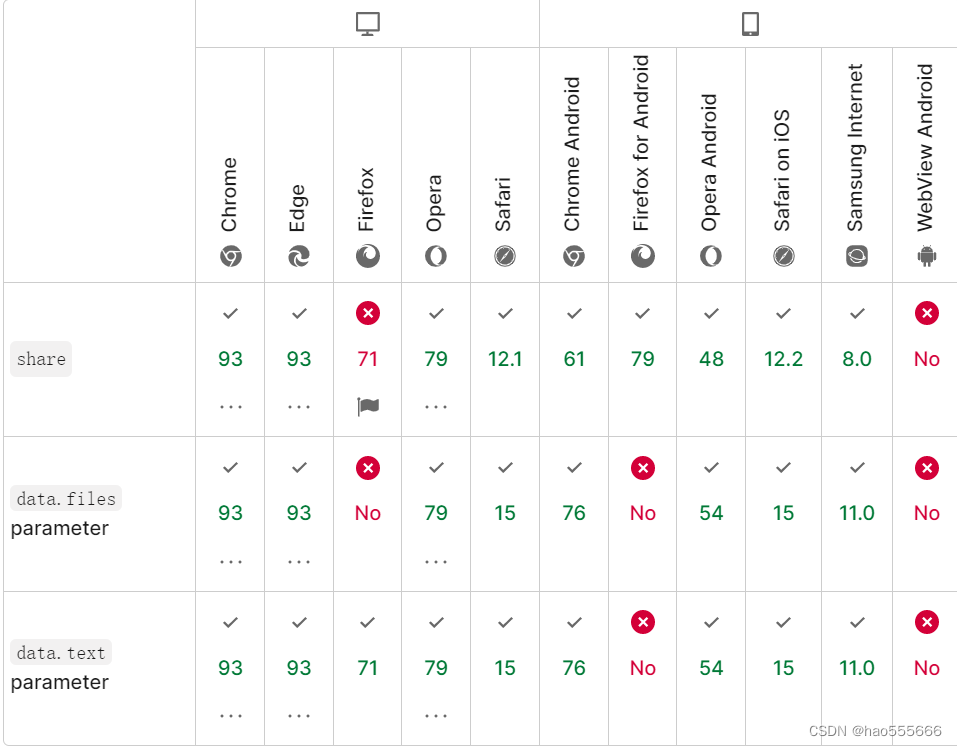
浏览器自带的分享适配
Navigator.share - Web API 接口参考 | MDN (mozilla.org)

魔乐社区(Modelers.cn) 是一个中立、公益的人工智能社区,提供人工智能工具、模型、数据的托管、展示与应用协同服务,为人工智能开发及爱好者搭建开放的学习交流平台。社区通过理事会方式运作,由全产业链共同建设、共同运营、共同享有,推动国产AI生态繁荣发展。
更多推荐

 0
0 0
0- 0


 已为社区贡献1条内容

所有评论(0)