Linux内存测试---构造消耗内存shell脚本
实现思想:借鉴虚拟内存的思想,创建虚拟内存文件系统,不断写入数据达到消耗内存的目的,需要清除内存时,删除创建的虚拟内存目录即可。#使用虚拟内存构造内存消耗mkdir /tmp/memorymount -t tmpfs -o size=1024M tmpfs /tmp/memorydd if=/dev/zero of=/tmp/memory/block#释放消耗的虚拟内存rm /tmp/memory
·
实现思想:借鉴虚拟内存的思想,创建虚拟内存文件系统,不断写入数据达到消耗内存的目的,需要清除内存时,删除创建的虚拟内存目录即可。
#使用虚拟内存构造内存消耗
mkdir /tmp/memory
mount -t tmpfs -o size=1024M tmpfs /tmp/memory
dd if=/dev/zero of=/tmp/memory/block
#释放消耗的虚拟内存
rm /tmp/memory/block
umount /tmp/memory
rmdir /tmp/memory
下面的代码为自己平时在测试过程中需要构造linux内存使用率的场景内存测试:
#!/bin/bash
# Destription: testing memory usage
# Example    : sh memory_usage.sh 500M | sh memory_usage.sh 1G | sh memory_usage.sh release

FILE_NAME=`basename $0`
memsize=$2
function usage()
{
echo "Usage:$FILE_NAME consume memory_size|release -----the value of memory_size like 100M 2G and etc"
echo "Example: $FILE_NAME consume 1G"
echo "         $FILE_NAME release"
}
function consume()
{
if [ -d  /tmp/memory ];then
    echo "/tmp/memory already exists"
else
    mkdir /tmp/memory
fi
mount -t tmpfs -o size=$1 tmpfs /tmp/memory
dd if=/dev/zero of=/tmp/memory/block

}

function release()
{
rm /tmp/memory/block;ret=$?
if [ $ret != 0 ]; then
    echo "remove memory data failed"
    return $ret
fi

umount /tmp/memory;ret=$?
if [ $ret != 0 ]; then
    echo "umount memory filedir failed"
    return $ret
fi

rmdir /tmp/memory;ret=$?
if [ $ret != 0 ]; then
    echo "remove memory filedir failed"
    return $ret
fi

}

function main()
{
case "$1" in
    consume) consume $memsize;;
    release) release;;
          *) usage;exit 1;;
esac
}

main $*
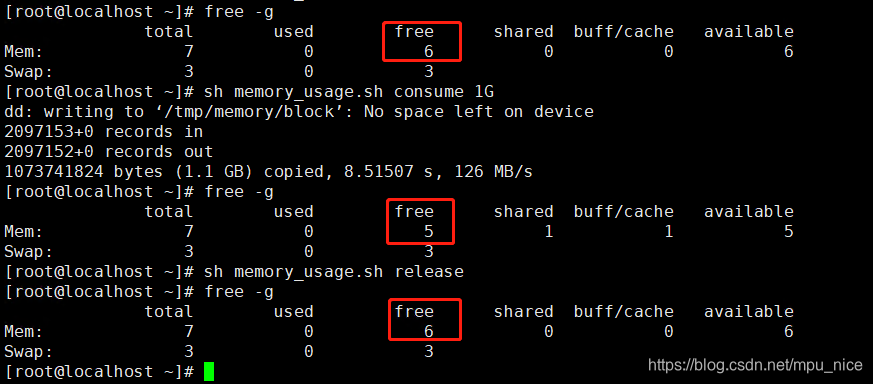
测试结果:

魔乐社区(Modelers.cn) 是一个中立、公益的人工智能社区,提供人工智能工具、模型、数据的托管、展示与应用协同服务,为人工智能开发及爱好者搭建开放的学习交流平台。社区通过理事会方式运作,由全产业链共同建设、共同运营、共同享有,推动国产AI生态繁荣发展。
更多推荐



 2
2 0
0- 0


 已为社区贡献1条内容

所有评论(0)