python 获取窗口句柄_Python爬虫进阶(五):Selenium爬取微博
爬取对象
我们的爬取目标是(登陆状况下的)新浪微博的首页。也就是下图:
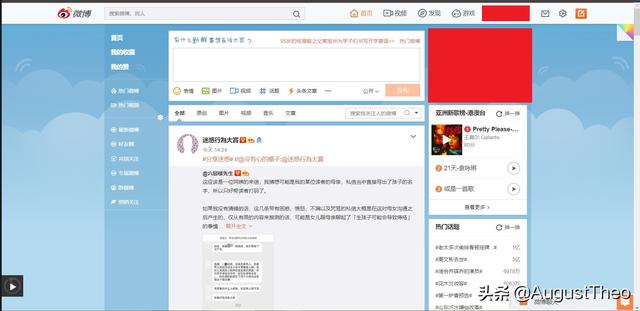
爬取目标
首先,我们要模拟登陆。
其次,我们要下拉滚动条两次,让微博加载新的动态。
第三,作为良好公民我会给我关注的所有博主点赞,所以我们给所有微博点一次赞。
第四,我们把获取到的所有博文保存到文件里。
第五,我们发一条微博,内容为“Hello World!”。
那么,我们的上述行为用到了:
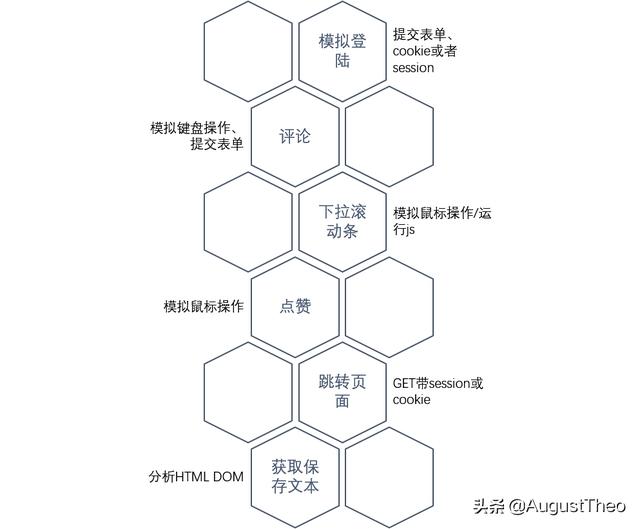
准备工作-分析页面
1 模拟登陆
微博的登录按钮对应的html文本如图所示:
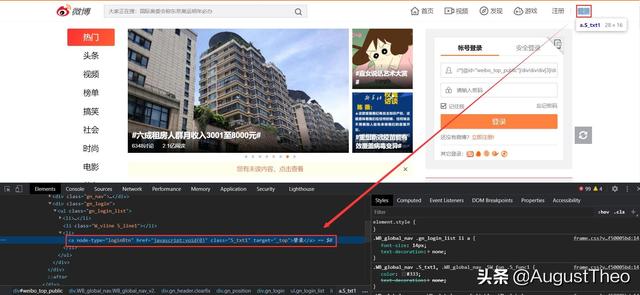
我们使用find_element_by_link_text("登录")获取此元素然后click(ele)点击它。
跳出的登录界面如图:
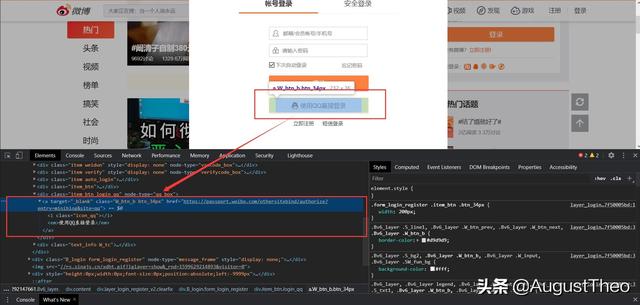
因为使用帐号密码登录会有验证码,所以我们直接使用qq登录。在查找元素之前我们还要变更driver指向的窗口为最新的窗口。
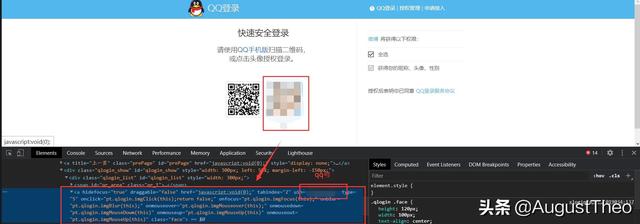
在直接查找qq登录的元素之前我们要先定位进外面的iframe元素,不然会报查找不到。
2 下拉滚动条
直接让selenium运行下拉滚动条的JS就可以,至于滚动像素我们使用document.body.clientHeight获取(这个函数返回body元素的高度,还有一个document.documentElement.clientHeight返回屏幕中可见的高度)。下拉滚动条的JS为Window_scrollBy(right,down)。
3 点赞
获取所有点赞对应的元素(node-type="like_status"),然后依次执行点击操作(记得设置间隔时间)。
4 保存博文
本步骤的原理很简单,即获取所有满足条件的元素然后保存到文件内。但是微博的页面元素较为复杂,我们要保存所有博文的所有内容,也包括图片,并且要把所有折叠的内容展开。
所以我们的步骤分为五步:首先我们要点击页面中的所有“展开全文”,然后获取所有node-type=”feed_list_item”元素,之后遍历确认其是否含有node-type=”feed_list_content_full”或node-type=”feed_list_content”的内容标签,再遍历确认是否含有图片。最后我们根据图片的链接下载图片。
5 发表微博
找到发表微博的textarea,使用sendKeys发送微博内容,然后对提交按钮使用click()。
代码部分
#0️⃣.准备工作-----------------------------------------------------------------------------from selenium import webdriverfrom selenium.webdriver.common.action_chains import ActionChainsfrom time import sleepfrom selenium.webdriver.support import expected_conditions as ECfrom selenium.webdriver.support.ui import WebDriverWait from selenium.webdriver.common.by import Byimport requestsDRIVERPATH="chromedriver.exe"driver=webdriver.Chrome(DRIVERPATH)driver.get("https://weibo.com/")driver.implicitly_wait(10) #等待加载#----------------------------------------------------------------------------------------#1️⃣.登录---------------------------------------------------------------------------------_handle=driver.current_window_handle #记录当前的句柄login1=driver.find_element_by_css_selector('[node-type="loginBtn"]') #登录按钮login1.click() #执行点击动作 点击登录login2=driver.find_element_by_css_selector('[node-type="qq_box"]')login2.click() #点击切换到qq登陆#此时,微博会跳出一个新标签页来完成qq登陆,所以我们要切换selenium的句柄handlel=driver.window_handles while(len(handlel)==1): sleep(1) handlel=driver.window_handles #等待 直到有多个句柄driver.switch_to.window(handlel[-1]) #切换到新窗口#但是新的窗口中包含了一个iframe,所以我们还得先定位进framedriver.switch_to.frame("ptlogin_iframe")login3=driver.find_element_by_css_selector('a[uin="2223216740"]')login3.click() #点击头像 登陆#----------------------------------------------------------------------------------------#2️⃣.下拉滚动条---------------------------------------------------------------------------sleep(6) #等待跳转height=driver.execute_script("return document.body.clientHeight") #获取长度driver.execute_script("window.scrollTo(0,arguments[0])",height) #下拉height=driver.execute_script("return document.body.clientHeight")-heightdriver.execute_script("window.scrollTo(0,arguments[0])",height) #下拉#---------------------------------------------------------------------------------------#3️⃣.点赞--------------------------------------------------------------------------------like=driver.find_elements_by_css_selector('[node-type="like_status"]') #找到所有喜欢的按钮for i in like: try: driver.execute_script("window.scrollBy(arguments[0])",i) #可视过程,极致享受 i.click() sleep(1) except: driver.find_element_by_css_selector('[node-type="ok"]').click() break #如果提示操作频繁就点掉,然后跳出去 #这里会有个问题,点赞过快或者过多会弹出“操作频繁”页面(有时候我正常浏览都会弹,只能说emmm)#---------------------------------------------------------------------------------------#4️⃣.保存博文----------------------------------------------------------------------------text_expand=driver.find_elements_by_link_text("展开全文")for i in text_expand: i.click() #点击所有展开全文text=driver.find_elements_by_class_name("WB_detail") #找到所有微博正文内容# #----------------------------------------------------------------------------# #Weibo类 定义,用于存储微博的内容# #----------------------------------------------------------------------------class Weibo: img=[] def setAuthor(self,author): self.author=author def setTime(self,time): self.time=time def setText(self,text): self.text=text def addImg(self,img): self.img.append(img)re=[] #用于存储微博数据的Weibo对象列表for i in text: try: i.find_element_by_css_selector('[node-type="feed_list_item_date"]') #广告是没有时间的 except: continue a=Weibo() a.setAuthor(i.find_element_by_class_name("WB_info").text) a.setTime(i.find_element_by_css_selector('[node-type="feed_list_item_date"]').get_attribute("title")) if len(i.find_elements_by_css_selector('[node-type="feed_list_content"]'))>0: #不用展开的博文的node-text if len(i.find_elements_by_css_selector('[node-type="feed_list_forwardContent"]'))>0: #注意转发之前是否有引用 a.setText(i.find_element_by_css_selector('[node-type="feed_list_content"]').text+ i.find_element_by_css_selector('[node-type="feed_list_forwardContent"]').text) else: a.setText(i.find_element_by_css_selector('[node-type="feed_list_content"]').text) elif len(i.find_elements_by_css_selector('[node-type="feed_list_forwardContent"]'))>0: #展开了博文 有前置的情况下 a.setText(i.find_element_by_css_selector('[node-type="feed_list_content_full"]').text+ i.find_element_by_css_selector('[node-type="feed_list_forwardContent"]').text) else: a.setText(i.find_element_by_css_selector('[node-type="feed_list_content_full"]').text) if len(i.find_elements_by_class_name("media_box")[0].find_elements_by_tag_name("img"))>0: #获取图片 for m in i.find_element_by_class_name("media_box").find_elements_by_tag_name("img"): a.addImg(m.get_attribute("src")) re.append(a)with open("output.txt","w",encoding="utf-8",errors="ignore") as f: for i in re: f.write("作者:"+i.author+"") f.write("时间:"+i.time+"") f.write("内容:"+i.text+"") f.write("图片链接:") for m in i.img: #这里可以用正则表达式直接变成文件名之类的,我们就不详细写了 f.write(m+",") f.write("")def getImg(url): imgname=url.spilt("")[-1] with open("img/"+imgname,'w') as f: f.write(requests.get(i).read()) #用requests是因为快速而且方便 return imgnamefor i in re: #下载图片 for m in i.img: print(getImg(m)+"下载完成。")#---------------------------------------------------------------------------------------#5️⃣.发布新微博--------------------------------------------------------------------------driver.find_element_by_css_selector('[node-type="textEL"]').sendKeys("Hello World!")driver.find_element_by_css_selector('[node-type="submit"]').click()#---------------------------------------------------------------------------------------
魔乐社区(Modelers.cn) 是一个中立、公益的人工智能社区,提供人工智能工具、模型、数据的托管、展示与应用协同服务,为人工智能开发及爱好者搭建开放的学习交流平台。社区通过理事会方式运作,由全产业链共同建设、共同运营、共同享有,推动国产AI生态繁荣发展。
更多推荐


 0
0 0
0- 0


 已为社区贡献6条内容

所有评论(0)