微信小程序客服自动回复消息后端实现
1. 使用 ngrok 进行内网穿透 (或者花生壳…)下载并解压注册账号并授权 ./ngrok authtoken YOURTOKEN如果不注册就会过期 8h之后生成的链接即会失效本地端口内网穿透$ ./ngrok http 8553访问 http://127.0.0.1:40402. 微信消息推送配置消息推送配置本地实现 /v1/wx/c...
·
1. 使用 ngrok 进行内网穿透 (Serveo或者花生壳)
-
注册账号并授权 ./ngrok authtoken YOURTOKEN
如果不注册就会过期 8h之后生成的链接即会失效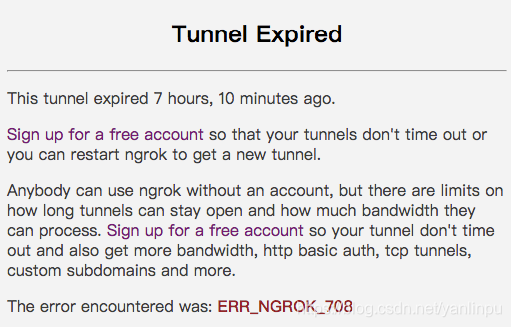
-
本地端口内网穿透
$ ./ngrok http 8553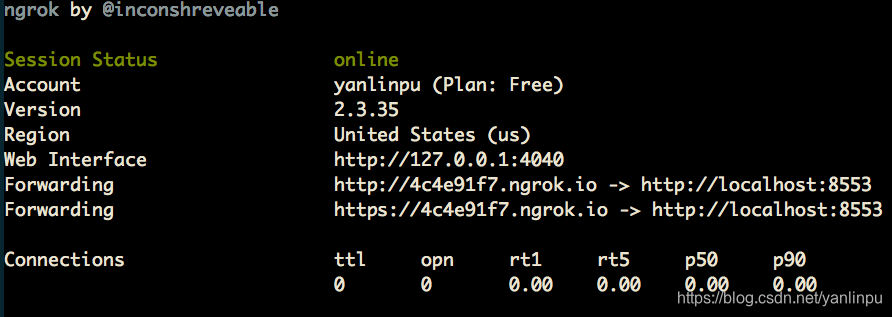
-
访问 http://127.0.0.1:4040
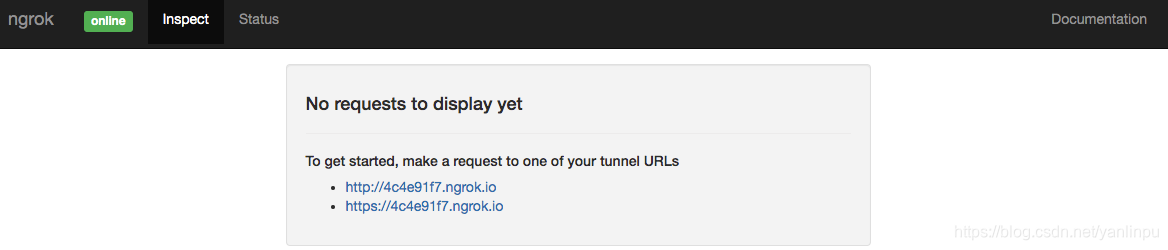
-
重新启动之后更新域名 可
$ ./ngrok http 8553 -subdomain 4c4e91f7
如何使用ngrok生成固定的URL中提到也可以使用Serveo$ ssh -R youruniquesubdomain:80:localhost:8000 serveo.net
2. 微信消息推送配置
- 消息推送配置
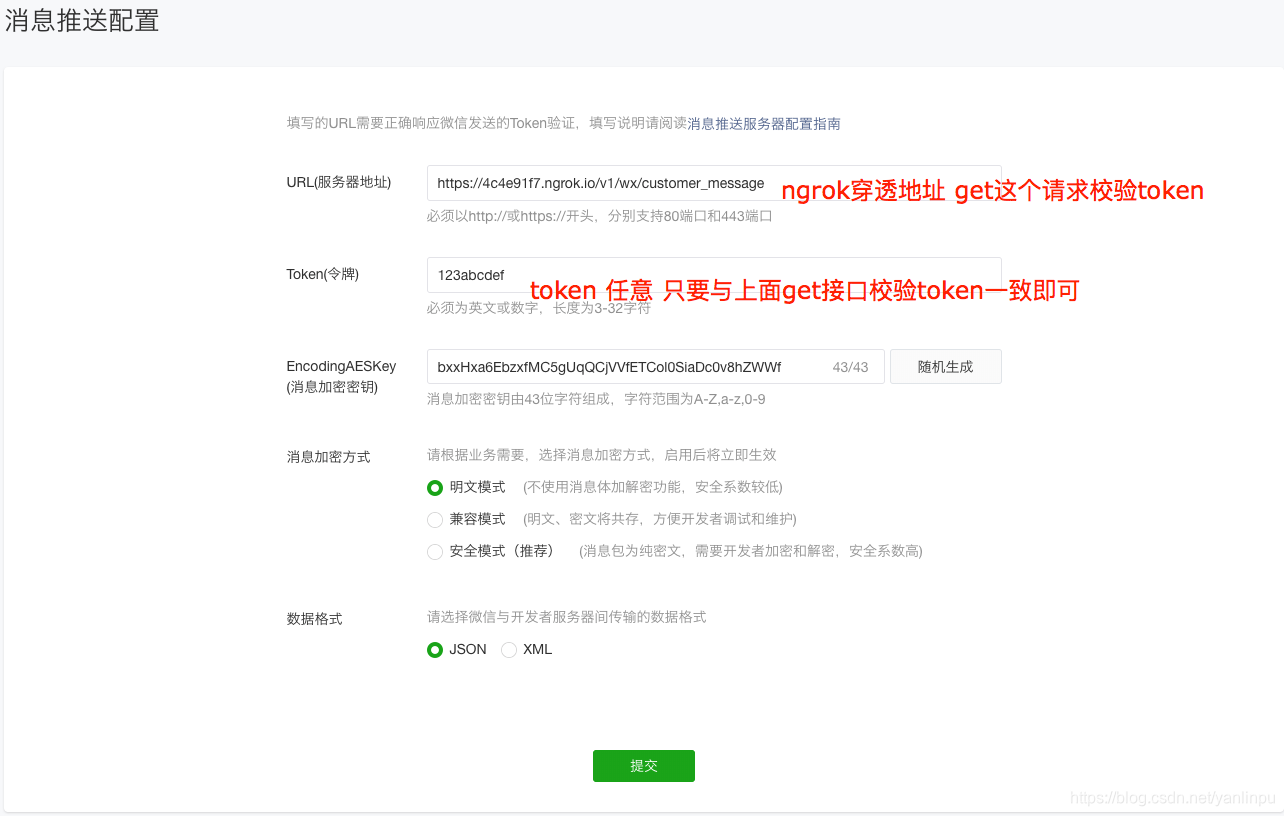
- 本地实现 /v1/wx/customer_message GET接口
    // 1. 校验消息推送token
    // /v1/wx/customer_message?
    // signature=***&
    // echostr=***&
    // timestamp=***&
    // nonce=165725****
    @RequestMapping(value = "customer_message",
            method = RequestMethod.GET, produces = "application/json;charset=utf-8")
    public String customerMessage(HttpServletRequest request,
                                    @RequestParam(required = false, defaultValue = "") String signature,
                                    @RequestParam(required = false, defaultValue = "") String timestamp,
                                    @RequestParam(required = false, defaultValue = "") String nonce,
                                    @RequestParam(required = false, defaultValue = "") String echostr){
        // first 校验服务器地址UR
        if (StringUtils.hasText(echostr)) {
            boolean tokenOk = false;
            try{
                tokenOk = checkWxToken(signature, timestamp, nonce);
            } catch (Exception e){
                e.printStackTrace();
            }
            if (tokenOk) {
            	// 返回echostr 即可 表示接口校验通过
                return echostr;
            }
        }
        return null;
    }
    private boolean checkWxToken(String signature, String timestamp, String nonce) throws Exception{
        if (!StringUtils.hasText(signature) || !StringUtils.hasText(timestamp) || !StringUtils.hasText(nonce)) {
            return false;
        }
        String token = "123abcdef";
        String[] arr = {token, timestamp, nonce};
        Arrays.sort(arr);
        String strTmp = String.join("", arr);
        strTmp = toSha1(strTmp);
        if (signature.equals(strTmp)){
            return true;
        }
        return false;
    }

    private String toSha1(String str) throws Exception{
        String sha1 = "";
        try
        {
            MessageDigest crypt = MessageDigest.getInstance("SHA-1");
            crypt.reset();
            crypt.update(str.getBytes("UTF-8"));
            sha1 = byteToHex(crypt.digest());
        }
        catch(NoSuchAlgorithmException e)
        {
            e.printStackTrace();
        }
        catch(UnsupportedEncodingException e)
        {
            e.printStackTrace();
        }
        return sha1;
    }

    private static String byteToHex(final byte[] hash){
        Formatter formatter = new Formatter();
        for (byte b : hash)
        {
            formatter.format("%02x", b);
        }
        String result = formatter.toString();
        formatter.close();
        return result;
    }
   ...
- 提交第一步消息推送配置(方才通过)
- 本地实现 /v1/wx/customer_message POST接口(自动回复)
   // "Content" -> "1"
    // "CreateTime" -> {Integer@9175} 1576062970
    // "ToUserName" -> "***"
    // "FromUserName" -> "***" //发送者openid
    // "MsgType" -> "text"
    // "MsgId" -> {Long@9183} 22563797906949896
    @RequestMapping(value = "customer_message",
            method = RequestMethod.POST, produces = "application/json;charset=utf-8")
    @RequestMapping(value = "customer_message",
            method = RequestMethod.POST, produces = "application/json;charset=utf-8")
    public String sendCustomerMessage(HttpServletRequest request, @RequestBody JSONObject body) {
        System.out.println(body);
        String msgType = body.getString("MsgType");
        String fromUserName = body.getString("FromUserName");
        if ("event".equals(msgType) && "user_enter_tempsession".equals(body.getString("Event"))){
            JSONObject parameter = new JSONObject();
            parameter.put("touser", fromUserName);
            parameter.put("msgtype", "text");
            JSONObject content = new JSONObject();
            content.put("content", "请联系客服");
            parameter.put("text", content);
            wxService.customSend(parameter);
        } else if ("text".equals(msgType) && "1".equals(body.getString("Content"))) {
            JSONObject parameter = new JSONObject();
            parameter.put("touser", fromUserName);
            parameter.put("msgtype", "link");
            JSONObject link = new JSONObject();
            link.put("title", "title");
            link.put("description", "desc");
            link.put("url", "https://www.baidu.com");
            link.put("thumb_url", "http://www.baidu.com/100.png");
            parameter.put("link", link);
            wxService.customSend(parameter);
        } else {
            // 开启客服消息
            JSONObject result = new JSONObject();
            result.put("ToUserName", body.getString("FromUserName"));
            result.put("FromUserName", body.getString("ToUserName"));
            result.put("CreateTime", body.getLong("CreateTime"));
            result.put("MsgType", "transfer_customer_service");
            System.out.println(result.toString());
            return result.toString();
        }
        return "";
    }
- wxService.customSend API

魔乐社区(Modelers.cn) 是一个中立、公益的人工智能社区,提供人工智能工具、模型、数据的托管、展示与应用协同服务,为人工智能开发及爱好者搭建开放的学习交流平台。社区通过理事会方式运作,由全产业链共同建设、共同运营、共同享有,推动国产AI生态繁荣发展。
更多推荐


 0
0 0
0- 0


 已为社区贡献4条内容

所有评论(0)