251. 简单的生活记录个人博客网页设计实例 大学生期末大作业 Web前端网页制作 html+css+js
目录
一、网页概述
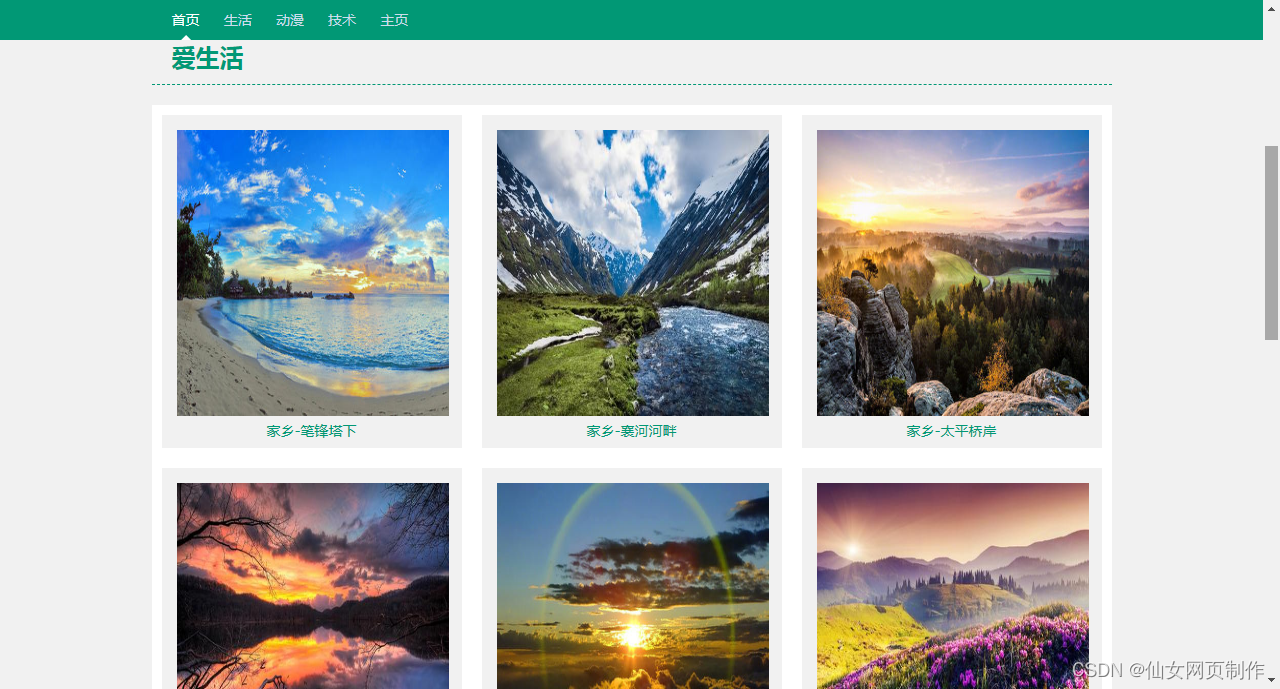
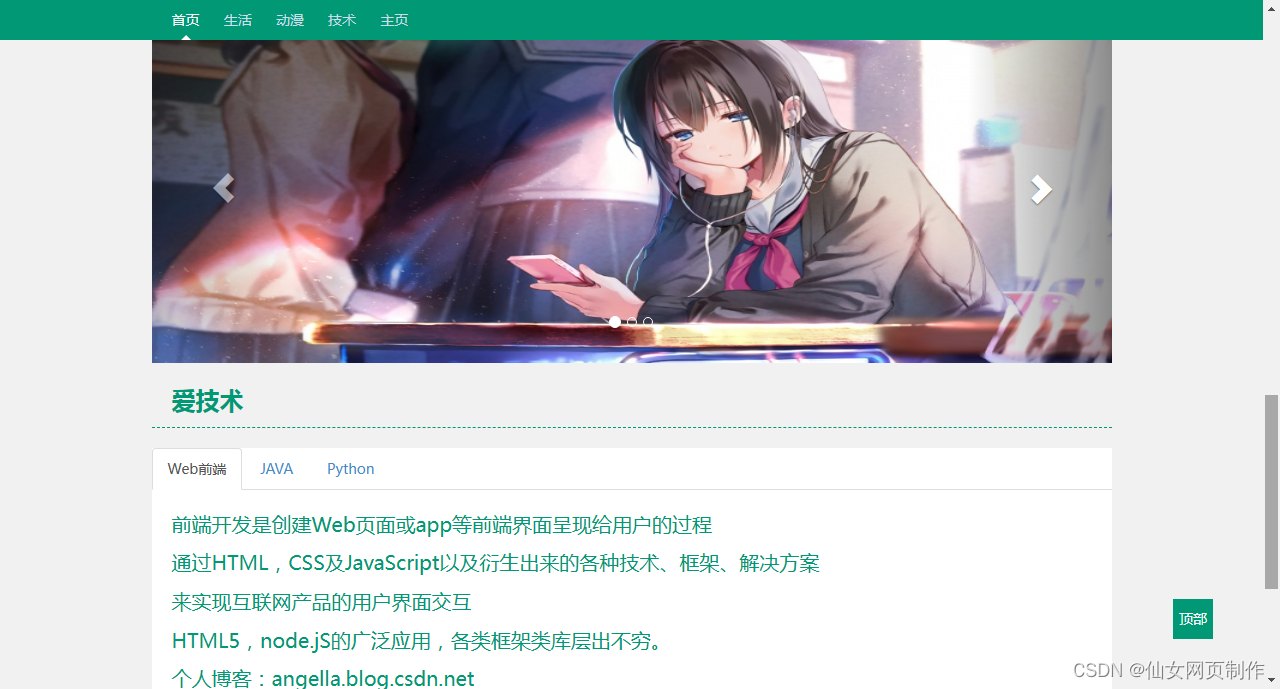
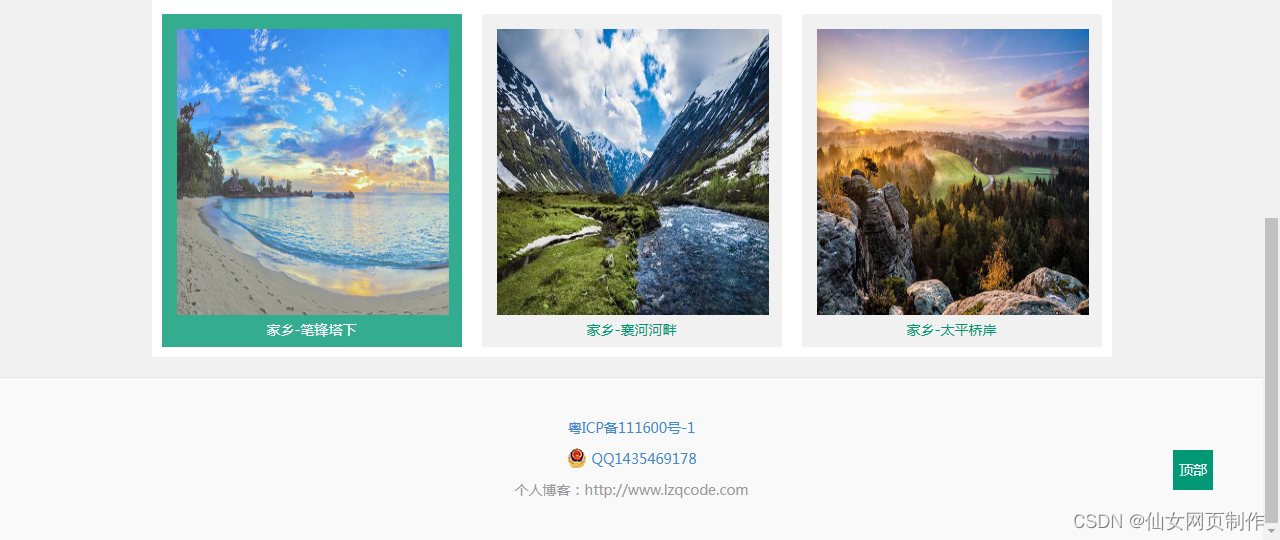
简单的生活记录个人博客网页设计实例,应用html+css+js: Div、导航栏、图片轮翻效果等。适用于大学生网页课程作业设计。网页支持如Dreamweaver、HBuilder、Text 、Vscode 等任意html编辑软件进行编辑修改;支持包括IE、Firefox、Chrome、Safari主流浏览器浏览。
网页设计、大学生网页课程设计、期末大作业、毕业设计、网页模板,网页成品源代码等,优质模板源码,优质文章,关注作者获取更多源码,点赞收藏博文,您的支持是我创作的动力!3Q!
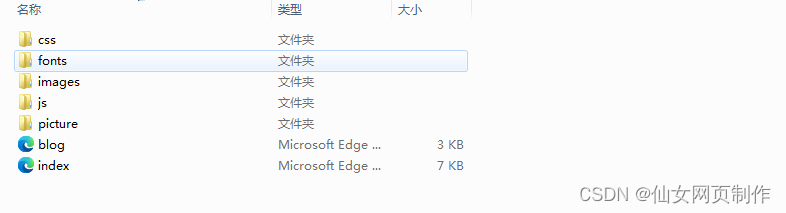
二、网页文件
三、网页效果
以下是本篇文章正文内容,下面案例仅供参考(节选示例):

四、代码展示
1.html
<!DOCTYPE html>
<html lang="en">
<head>
<meta charset="utf-8">
<meta http-equiv="X-UA-Compatible" content="IE=edge">
<meta name="viewport" content="width=device-width, initial-scale=1">
<meta name="description" content="">
<meta name="author" content="">
<title>个人主页</title>
<!-- CSS -->
<link href="css/bootstrap.css" rel="stylesheet">
<link href="css/blog.css" rel="stylesheet">
</head>
<body>
<div class="blog-masthead">
<div class="container">
<nav class="blog-nav">
<a class="blog-nav-item active" href="index.html">首页</a>
<a class="blog-nav-item" href="index.html#part1">生活</a>
<a class="blog-nav-item" href="index.html#part2">动漫</a>
<a class="blog-nav-item" href="index.html#part3">技术</a>
<a class="blog-nav-item" href="blog.html">主页</a>
</nav>
</div>
</div>
<div class="intr">
<span class="avtar"></span>
<p class="peointr">世界那么大 我想去看看</p>
<p class="peointr">爱生活,爱旅行,爱技术。喜欢喧闹繁华,也喜欢安静的一人独处</p>
<p class="peointr">个人博客:angella.blog.csdn.net</p>
</div>
<div class="title" id="part1">爱生活</div>
<div class="content">
<div class="pic pic1">
<img src="picture/h1.jpg" alt="">
<p>家乡-笔锋塔下</p>
</div>
<div class="pic pic2">
<img src="picture/h2.jpg" alt="">
<p>家乡-襄河河畔</p>
</div>
<div class="pic pic3">
<img src="picture/h3.jpg" alt="">
<p>家乡-太平桥岸</p>
</div>
<div class="pic pic3">
<img src="picture/h4.jpg" alt="">
<p>家乡-太平桥岸</p>
</div>
<div class="pic pic3">
<img src="picture/h5.jpg" alt="">
<p>家乡-太平桥岸</p>
</div><div class="pic pic3">
<img src="picture/h6.jpg" alt="">
<p>家乡-太平桥岸</p>
</div>
</div>
<div class="title" id="part2">爱动漫</div>
<div class="content">
<div id="carousel-example-generic" class="carousel slide" data-ride="carousel">
<ol class="carousel-indicators">
<li data-target="#carousel-example-generic" data-slide-to="0" class="active"></li>
<li data-target="#carousel-example-generic" data-slide-to="1"></li>
<li data-target="#carousel-example-generic" data-slide-to="2"></li>
</ol>
<div class="carousel-inner" role="listbox">
<div class="item active">
<img src="picture/s1.jpg" alt="...">
</div>
<div class="item">
<img src="picture/s2.jpg" alt="...">
</div>
<div class="item">
<img src="picture/s3.jpg" alt="...">
</div>
</div>
<a class="left carousel-control" href="#carousel-example-generic" role="button" data-slide="prev">
<span class="glyphicon glyphicon-chevron-left"></span>
<span class="sr-only">Previous</span>
</a>
<a class="right carousel-control" href="#carousel-example-generic" role="button" data-slide="next">
<span class="glyphicon glyphicon-chevron-right"></span>
<span class="sr-only">Next</span>
</a>
</div>
</div>
<div class="title" id="part3">爱技术</div>
<div class="content">
<ul class="nav nav-tabs" role="tablist">
<li class="active"><a href="#home" role="tab" data-toggle="tab">Web前端</a></li>
<li><a href="#profile" role="tab" data-toggle="tab">JAVA</a></li>
<li><a href="#messages" role="tab" data-toggle="tab">Python</a></li>
</ul>
<div class="tab-content">
<div class="tab-pane active" id="home">
<p class="text">前端开发是创建Web页面或app等前端界面呈现给用户的过程</p>
<p class="text">通过HTML,CSS及JavaScript以及衍生出来的各种技术、框架、解决方案</p>
<p class="text">来实现互联网产品的用户界面交互</p>
<p class="text">HTML5,node.jS的广泛应用,各类框架类库层出不穷。</p>
<p class="text">个人博客:angella.blog.csdn.net</p>
</div>
<div class="tab-pane" id="profile">
<p class="text"> Java是一门面向对象编程语言,不仅吸收了C++语言的各种优点,还摒弃了C++里难以理解的多继承、指针等概念</p>
<p class="text">因此Java语言具有功能强大和简单易用两个特征</p>
<p class="text">Java语言作为静态面向对象编程语言的代表,</p>
<p class="text">极好地实现了面向对象理论,允许程序员以优雅的思维方式进行复杂的编程</p>
<p class="text">个人博客:angella.blog.csdn.net</p>
</div>
<div class="tab-pane" id="messages">
<p class="text">Python是一种跨平台的计算机程序设计语言。 </p>
<p class="text">是一个高层次的结合了解释性、编译性、互动性和面向对象的脚本语言。</p>
<p class="text">最初被设计用于编写自动化脚本(shell),随着版本的不断更新和语言新功能的添加,越多被用于独立的、大型项目的开发。</p>
<p class="text">个人博客:angella.blog.csdn.net</p>
</div>
</div>
</div>
<div class="blog-footer">
<p><a href="#" target="_blank">粤ICP备xxx号-1</a></p>
<p class="text-center"><img src="picture/beianicon.png" alt="" style="display:inline-block;vertical-align:sub;margin-right:5px"><a href="#" target="_blank">wweixin:5201314168</a></p>
<p class="text-center">个人博客:angella.blog.csdn.net</p>
</div>
<a href="index.html" class="btt">顶部</a>
<!-- Js-->
<script src="js/jquery-1.9.1.min.js"></script>
<script src="js/bootstrap.min.js"></script>
<script src="js/plugin.js"></script>
</body>
</html>
...
2.CSS
代码如下(节选示例):
/*
* Globals
*/
body {
font-family: 'Microsoft Yahei','微软雅黑',Arial,'Hiragino Sans GB','宋体';
color: #555;
}
h1, .h1,
h2, .h2,
h3, .h3,
h4, .h4,
h5, .h5,
h6, .h6 {
margin-top: 0;
font-family: "Helvetica Neue", Helvetica, Arial, sans-serif;
font-weight: normal;
color: #333;
}
/*
* Override Bootstrap's default container.
*/
@media (min-width: 1200px) {
.container {
width: 970px;
}
}
/*
* Masthead for nav
*/
.blog-masthead {
background-color: #019875;
position:fixed;
width: 100%;
z-index:999;
/*-webkit-box-shadow: inset 0 -2px 5px rgba(0,0,0,.1);
box-shadow: inset 0 -2px 5px rgba(0,0,0,.1);*/
}
/* Nav links */
.blog-nav-item {
position: relative;
display: inline-block;
padding: 10px;
font-weight: 500;
color: #cdddeb;
}
.blog-nav-item:hover,
.blog-nav-item:focus {
color: #fff;
text-decoration: none;
}
/* Active state gets a caret at the bottom */
.blog-nav .active {
color: #fff;
}
.blog-nav .active:after {
position: absolute;
bottom: 0;
left: 50%;
width: 0;
height: 0;
margin-left: -5px;
vertical-align: middle;
content: " ";
border-right: 5px solid transparent;
border-bottom: 5px solid;
border-left: 5px solid transparent;
}
/*
* Blog name and description
*/
.blog-header {
padding-top: 20px;
padding-bottom: 20px;
}
.blog-title {
margin-top: 30px;
margin-bottom: 0;
font-size: 60px;
font-weight: normal;
}
.blog-description {
font-size: 20px;
color: #999;
}
/*
* Main column and sidebar layout
*/
.blog-main {
font-size: 18px;
line-height: 1.5;
}
/* Sidebar modules for boxing content */
.sidebar-module {
padding: 15px;
margin: 0 -15px 15px;
}
.sidebar-module-inset {
padding: 15px;
background-color: #f5f5f5;
border-radius: 4px;
}
.sidebar-module-inset p:last-child,
.sidebar-module-inset ul:last-child,
.sidebar-module-inset ol:last-child {
margin-bottom: 0;
}
/* Pagination */
.pager {
margin-bottom: 60px;
text-align: left;
}
.pager > li > a {
width: 140px;
padding: 10px 20px;
text-align: center;
border-radius: 30px;
}
/*
* Blog posts
*/
.blog-post {
margin-bottom: 60px;
}
.blog-post-title {
margin-bottom: 5px;
font-size: 40px;
}
.blog-post-meta {
margin-bottom: 20px;
color: #999;
}
/*
* Footer
*/
.blog-footer {
padding: 40px 0;
color: #999;
text-align: center;
background-color: #f9f9f9;
border-top: 1px solid #e5e5e5;
}
.blog-footer p:last-child {
margin-bottom: 0;
}
...
3.JS
代码如下(节选示例):
if("undefined"==typeof jQuery)throw new Error("Bootstrap's JavaScript requires jQuery");+function(a){"use strict";function b(){var a=document.createElement("bootstrap"),b={WebkitTransition:"webkitTransitionEnd",MozTransition:"transitionend",OTransition:"oTransitionEnd otransitionend",transition:"transitionend"};for(var c in b)if(void 0!==a.style[c])return{end:b[c]};return!1}a.fn.emulateTransitionEnd=function(b){var c=!1,d=this;a(this).one("bsTransitionEnd",function(){c=!0});var e=function(){c||a(d).trigger(a.support.transition.end)};return setTimeout(e,b),this},a(function(){a.support.transition=b(),a.support.transition&&(a.event.special.bsTransitionEnd={bindType:a.support.transition.end,delegateType:a.support.transition.end,handle:function(b){return a(b.target).is(this)?b.handleObj.handler.apply(this,arguments):void 0}})})}(jQuery),+function(a){"use strict";function b(b){return this.each(function(){var c=a(this),e=c.data("bs.alert");e||c.data("bs.alert",e=new d(this)),"string"==typeof b&&e[b].call(c)})}var c='[data-dismiss="alert"]',d=function(b){a(b).on("click",c,this.close)};d.VERSION="3.2.0",d.prototype.close=function(b){function c(){f.detach().trigger("closed.bs.alert").remove()}var d=a(this),e=d.attr("data-target");e||(e=d.attr("href"),e=e&&e.replace(/.*(?=#[^\s]*$)/,""));var f=a(e);b&&b.preventDefault(),f.length||(f=d.hasClass("alert")?d:d.parent()),f.trigger(b=a.Event("close.bs.alert")),b.isDefaultPrevented()||(f.removeClass("in"),a.support.transition&&f.hasClass("fade")?f.one("bsTransitionEnd",c).emulateTransitionEnd(150):c())};var e=a.fn.alert;a.fn.alert=b,a.fn.alert.Constructor=d,a.fn.alert.noConflict=function(){return a.fn.alert=e,this},a(document).on("click.bs.alert.data-api",c,d.prototype.close)}(jQuery),+function(a){"use strict";function b(b){return this.each(function(){var d=a(this),e=d.data("bs.button"),f="object"==typeof b&&b;e||d.data("bs.button",e=new c(this,f)),"toggle"==b?e.toggle():b&&e.setState(b)})}var c=function(b,d){this.$element=a(b),this.options=a.extend({},c.DEFAULTS,d),this.isLoading=!1};c.VERSION="3.2.0",c.DEFAULTS={loadingText:"loading..."},c.prototype.setState=function(b){var c="disabled",d=this.$element,e=d.is("input")?"val":"html",f=d.data();b+="Text",null==f.resetText&&d.data("resetText",d[e]()),d[e](null==f[b]?this.options[b]:f[b]),setTimeout(a.proxy(function(){"loadingText"==b?(this.isLoading=!0,d.addClass(c).attr(c,c)):this.isLoading&&(this.isLoading=!1,d.removeClass(c).removeAttr(c))},this),0)},c.prototype.toggle=function(){var a=!0,b=this.$element.closest('[data-toggle="buttons"]');if(b.length){var c=this.$element.find("input");"radio"==c.prop("type")&&(c.prop("checked")&&this.$element.hasClass("active")?a=!1:b.find(".active").removeClass("active")),a&&c.prop("checked",!this.$element.hasClass("active")).trigger("change")}a&&this.$element.toggleClass("active")}
...
五、总结
一个优秀的网页应具备以下几个特点:
1.简洁实用
尽量以最高效率的方式将用户所要想得到的信息传送给他就是最好的,要去掉所有的冗余的东西;
2.使用方便
要满足使用者的要求,网页适合使用,显示出其功能美;
3.整体性好
围绕一个统一的目标设计,强调整体的功能性;
4.形象突出
尽量符合网页美的标准,能够使网站的形象得到最大限度的提升,追求雅俗共赏。页面用色协调,布局符合形式美的要求:布局有条理,充分利用美的形式,使网页富有可欣赏性,提高档次。
5.交互式强
发挥网络的优势,想方设法使每个使用者都参与到其中来。
六、更多推荐
【关注作者|获取更多源码(2000+个网页源码)|优质文章】;您的支持是我创作的动力!看到这里就【点赞收藏博文】,三连支持下吧,3Q!
Web前端网页制作、整站模板、3D炫酷效果、图片展示、文字效果、大学生毕业HTML、期末大作业模板案例等技术内容,有兴趣的联系我交流学习!
更多优质博客文章、网页模板点击以下链接查阅:仙女网页设计-CSDN博客。

魔乐社区(Modelers.cn) 是一个中立、公益的人工智能社区,提供人工智能工具、模型、数据的托管、展示与应用协同服务,为人工智能开发及爱好者搭建开放的学习交流平台。社区通过理事会方式运作,由全产业链共同建设、共同运营、共同享有,推动国产AI生态繁荣发展。
更多推荐


 13
13 0
0- 0


 已为社区贡献16条内容

所有评论(0)