计算机课程设计:基于MATLAB的水果分级系统(色泽,直径,GUI,通过设置直径和色泽,测试水果的这些参数,从而得出该水果所属等级)
·
- 课题介绍
现在商业行为中,在水果出厂前都需要进行质量检测,需要将不同等级的水果进行分级包装,以保证商业利益最大化。可是传统方法都是依靠人工进行检测,效率低下,主观成分大,并不能很好客观地评价出货质量,导致工厂损失利益,增加客户投诉,从而造成品牌效率损失,造成隐形的损失。
该课题为基于MATLAB的水果分级系统。适用圆形水果,如苹果,橘子,柚子,柿子等,统计水果图片的面积,圆形度和色泽等多参数进行评价。该设计带一个GUI界面,通过设置直径和色泽,测试水果的这些参数,从而得出该水果所属等级。
- GUI界面设计
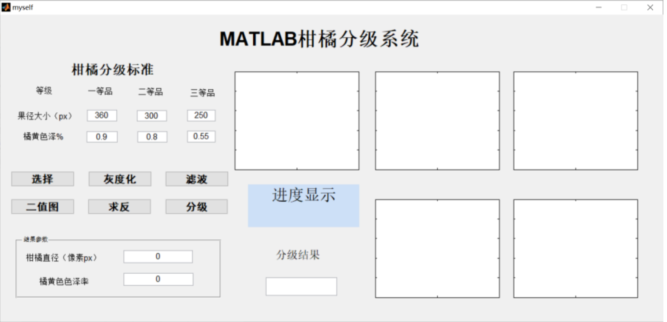
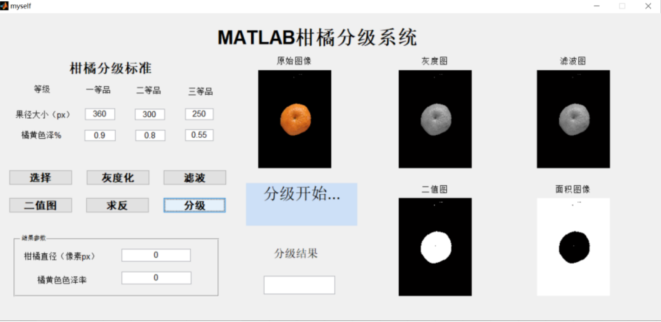
部分matlab源码展示:
% Edit the above text to modify the response to help myself

% Last Modified by GUIDE v2.5 14-May-2020 13:04:33

% Begin initialization code - DO NOT EDIT
gui_Singleton = 1;
gui_State = struct('gui_Name',       mfilename, ...
    'gui_Singleton',  gui_Singleton, ...
    'gui_OpeningFcn', @myself_OpeningFcn, ...
    'gui_OutputFcn',  @myself_OutputFcn, ...
    'gui_LayoutFcn',  [] , ...
    'gui_Callback',   []);
if nargin && ischar(varargin{1})
    gui_State.gui_Callback = str2func(varargin{1});
end

if nargout
    [varargout{1:nargout}] = gui_mainfcn(gui_State, varargin{:});
else
    gui_mainfcn(gui_State, varargin{:});
end
% End initialization code - DO NOT EDIT
global   d1v1  d1v2 d1v3 d2v1 d2v2 d2v3 d3v1 d3v2 d3v3


% --- Executes just before myself is made visible.
function myself_OpeningFcn(hObject, eventdata, handles, varargin)
% This function has no output args, see OutputFcn.
% hObject    handle to figure
% eventdata  reserved - to be defined in a future version of MATLAB
% handles    structure with handles and user data (see GUIDATA)
% varargin   command line arguments to myself (see VARARGIN)
% im=imread('apple1.jpg');
%
% axes(handles.axes1);
%
% imshow(im);%在坐标axes1显示原图像
%
% title('原始水印');
% % Choose default command line output for myself
% handles.output = hObject;
%
% % Update handles structure
% guidata(hObject, handles);

% UIWAIT makes myself wait for user response (see UIRESUME)
% uiwait(handles.figure1);


% --- Outputs from this function are returned to the command line.
function varargout = myself_OutputFcn(hObject, eventdata, handles)
% varargout  cell array for returning output args (see VARARGOUT);
% hObject    handle to figure
% eventdata  reserved - to be defined in a future version of MATLAB
% handles    structure with handles and user data (see GUIDATA)

% Get default command line output from handles structure
% varargout{1} = handles.output;


% --- Executes on button press in pushbutton1.
function pushbutton1_Callback(hObject, eventdata, handles)
% hObject    handle to pushbutton1 (see GCBO)
% eventdata  reserved - to be defined in a future version of MATLAB
% handles    structure with handles and user data (see GUIDATA)


function edit1_Callback(hObject, eventdata, handles)
% hObject    handle to edit1 (see GCBO)
% eventdata  reserved - to be defined in a future version of MATLAB
% handles    structure with handles and user data (see GUIDATA)

% Hints: get(hObject,'String') returns contents of edit1 as text
%        str2double(get(hObject,'String')) returns contents of edit1 as a double


% --- Executes during object creation, after setting all properties.
function edit1_CreateFcn(hObject, eventdata, handles)
% hObject    handle to edit1 (see GCBO)
% eventdata  reserved - to be defined in a future version of MATLAB
% handles    empty - handles not created until after all CreateFcns called

% Hint: edit controls usually have a white background on Windows.
%       See ISPC and COMPUTER.
if ispc && isequal(get(hObject,'BackgroundColor'), get(0,'defaultUicontrolBackgroundColor'))
    set(hObject,'BackgroundColor','white');
end


function edit2_Callback(hObject, eventdata, handles)
% hObject    handle to edit2 (see GCBO)
% eventdata  reserved - to be defined in a future version of MATLAB
% handles    structure with handles and user data (see GUIDATA)

% Hints: get(hObject,'String') returns contents of edit2 as text
%        str2double(get(hObject,'String')) returns contents of edit2 as a double


% --- Executes during object creation, after setting all properties.
function edit2_CreateFcn(hObject, eventdata, handles)
% hObject    handle to edit2 (see GCBO)
% eventdata  reserved - to be defined in a future version of MATLAB
% handles    empty - handles not created until after all CreateFcns called

% Hint: edit controls usually have a white background on Windows.
%       See ISPC and COMPUTER.
if ispc && isequal(get(hObject,'BackgroundColor'), get(0,'defaultUicontrolBackgroundColor'))
    set(hObject,'BackgroundColor','white');
end
完整项目地址:https://download.csdn.net/download/zy_dreamer/87887420

魔乐社区(Modelers.cn) 是一个中立、公益的人工智能社区,提供人工智能工具、模型、数据的托管、展示与应用协同服务,为人工智能开发及爱好者搭建开放的学习交流平台。社区通过理事会方式运作,由全产业链共同建设、共同运营、共同享有,推动国产AI生态繁荣发展。
更多推荐


 0
0 0
0- 0


 已为社区贡献31条内容

所有评论(0)