WIN11 + CUDA11.7配置深度学习开发环境(一)
·
视频截取模型开发笔记
环境配置记录
开发电脑PC(RTX 3050 + Windows 11)已预装CUDA 11.7环境,为避免重复安装,决定在此进行笔记记录。后续若遇问题再针对性解决。
CUDA环境验证
1.通过终端执行 nvidia-smi 命令
Thu Dec 15 14:25:46 2022
+-----------------------------------------------------------------------------+
| NVIDIA-SMI 517.48       Driver Version: 517.48       CUDA Version: 11.7     |
|-------------------------------+----------------------+----------------------+
| GPU  Name            TCC/WDDM | Bus-Id        Disp.A | Volatile Uncorr. ECC |
| Fan  Temp  Perf  Pwr:Usage/Cap|         Memory-Usage | GPU-Util  Compute M. |
|                               |                      |               MIG M. |
|===============================+======================+======================|
|   0  NVIDIA GeForce ... WDDM  | 00000000:01:00.0 Off |                  N/A |
| N/A   43C    P3    17W /  N/A |      0MiB /  4096MiB |      0%      Default |
|                               |                      |                  N/A |
+-------------------------------+----------------------+----------------------+

+-----------------------------------------------------------------------------+
| Processes:                                                                  |
|  GPU   GI   CI        PID   Type   Process name                  GPU Memory |
|        ID   ID                                                   Usage      |
|=============================================================================|
|  No running processes found                                                 |
+-----------------------------------------------------------------------------+
2.找到Nvidia control Panel
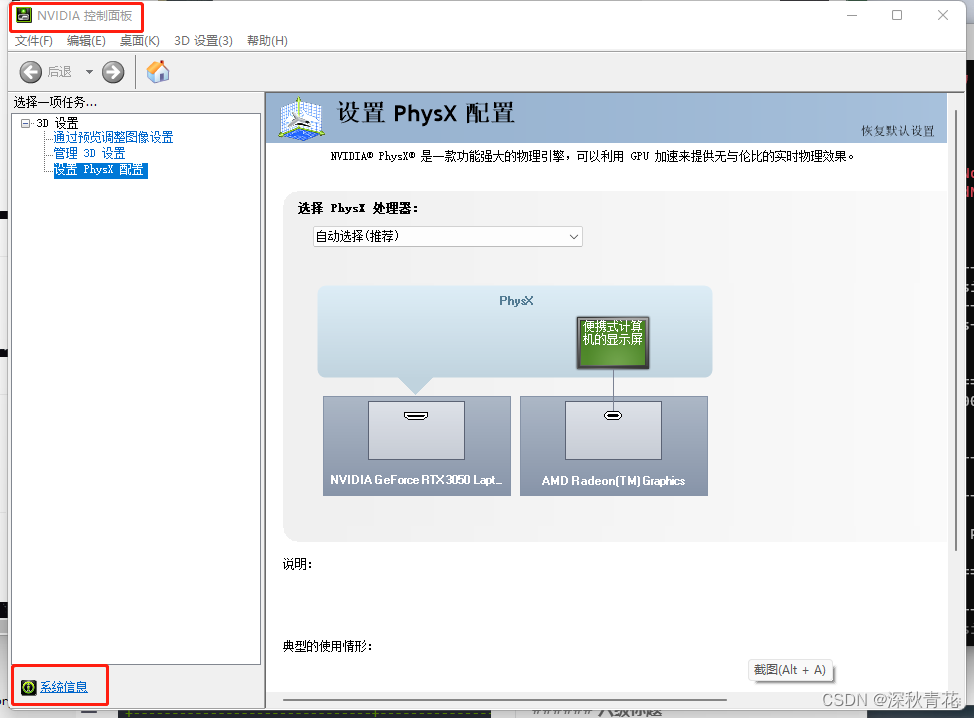
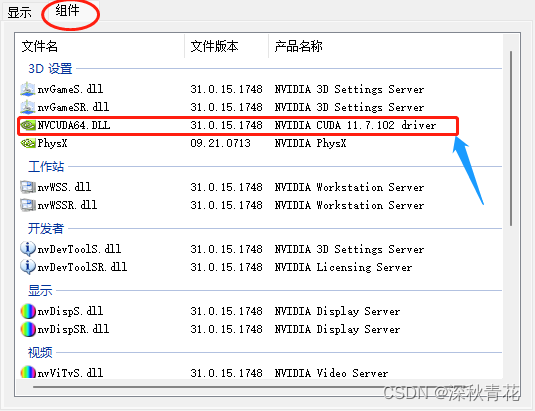
3. 运行时API(Runtime API)
通过命令行输入nvcc -V命令

也可以参考这篇文章cuda基础。
参考这两篇文章(Win11和Win11 + RTX3060 配置Cuda等深度学习环境),先按照别人的经验走一遍,在最后搞自己的版本
环境变量配置
C:\Program Files\NVIDIA GPU Computing Toolkit\CUDA\v11.7\include

C:\Program Files\NVIDIA GPU Computing Toolkit\CUDA\v11.7\lib
环境检查,在配置安装完成后,cmd运行此命令
cd C:\Program Files\NVIDIA GPU Computing Toolkit\CUDA\v11.7

cd extras\demo_suite

.\bandwidthTest.exe
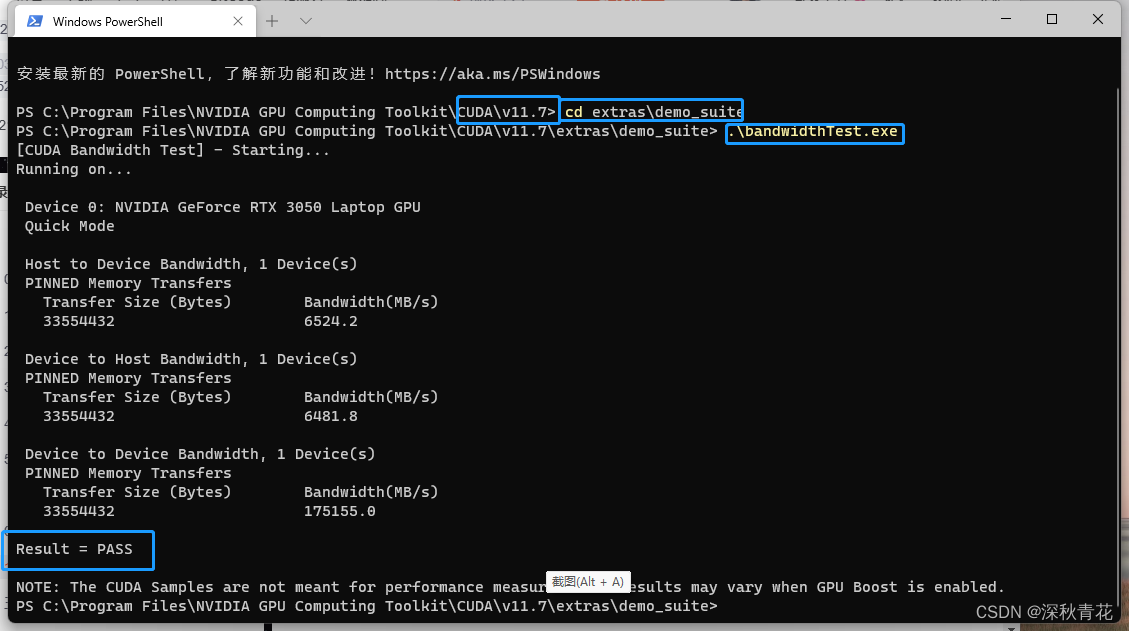
下载相对应的python包,
>>> import tensorflow as tf
>>> tf.reduce_sum(tf.random.normal([1000, 1000])
结果是这个东西
WARNING:tensorflow:From <stdin>:1: is_gpu_available (from tensorflow.python.framework.test_util) is deprecated and will be removed in a future version.
Instructions for updating:
Use `tf.config.list_physical_devices('GPU')` instead.
2022-12-16 08:54:52.073841: I tensorflow/core/platform/cpu_feature_guard.cc:142] This TensorFlow binary is optimized with oneAPI Deep Neural Network Library (oneDNN) to use the following CPU instructions in performance-critical operations:  AVX AVX2
To enable them in other operations, rebuild TensorFlow with the appropriate compiler flags.
2022-12-16 08:54:55.279269: I tensorflow/core/common_runtime/gpu/gpu_device.cc:1510] Created device /device:GPU:0 with 1666 MB memory:  -> device: 0, name: NVIDIA GeForce RTX 3050 Laptop GPU, pci bus id: 0000:01:00.0, compute capability: 8.6
这个显示一下GPU,这里还没有搞懂怎么回事
>>> tf.config.list_physical_devices('GPU')
[PhysicalDevice(name='/physical_device:GPU:0', device_type='GPU')]
>>> version = tf.version
>>> gpu_ok = tf.test.is_gpu_available()
打印自己的GPU,这样应该没问题啦
>>> print("tf version:",version,"\nuse GPU",gpu_ok)
tf version: <module 'tensorflow._api.v2.version' from 'C:\\Program Files\\Anaconda\\lib\\site-packages\\tensorflow\\_api\\v2\\version\\__init__.py'>
use GPU True

魔乐社区(Modelers.cn) 是一个中立、公益的人工智能社区,提供人工智能工具、模型、数据的托管、展示与应用协同服务,为人工智能开发及爱好者搭建开放的学习交流平台。社区通过理事会方式运作,由全产业链共同建设、共同运营、共同享有,推动国产AI生态繁荣发展。
更多推荐


 0
0 0
0- 0


 已为社区贡献1条内容

所有评论(0)