iText2KG:使用大型语言模型构建增量知识图谱(安装、使用中文指导)
iText2KG:使用大型语言模型构建增量知识图谱(安装、使用中文指导)
原标题:iText2KG: Incremental Knowledge Graphs Construction Using Large Language Models
Overview 概述
iText2KG is a Python package designed to incrementally construct consistent knowledge graphs with resolved entities and relations by leveraging large language models for entity and relation extraction from text documents. It features zero-shot capability, allowing for knowledge extraction across various domains without specific training. The package includes modules for document distillation, entity extraction, and relation extraction, ensuring resolved and unique entities and relationships. It continuously updates the KG with new documents and integrates them into Neo4j for visual representation.
iText2KG 是一个 Python 软件包,旨在通过利用大型语言模型从文本文档中提取实体和关系,逐步构建一致的知识图谱。它具备零样本学习能力,可以在无需特定训练的情况下实现跨领域的知识提取。该软件包包括文档提炼、实体提取和关系提取模块,确保提取的实体和关系是唯一且已解析的。iText2KG 能够随着新文档的加入持续更新知识图谱,并将其集成到 Neo4j 中进行可视化展示。
🔥 News 新版特点
-
[07/10/2024] Latest features:
- The entire iText2KG code has been refactored by adding data models that describe an Entity, a Relation, and a KnowledgeGraph.
- Each entity is embedded using both its name and label to avoid merging concepts with similar names but different labels. For example, Python:Language and Python:Snake.
- The weights for entity name embedding and entity label are configurable, with defaults set to 0.4 for the entity label and 0.6 for the entity name.
- A max_tries parameter has been added to the iText2KG.build_graph function for entity and relation extraction to prevent hallucinatory effects in structuring the output. Additionally, a max_tries_isolated_entities parameter has been added to the same method to handle hallucinatory effects when processing isolated entities.
最新功能:
- 对整个 iText2KG 代码进行了重构,新增了数据模型,用于描述实体(Entity)、关系(Relation)和知识图谱(KnowledgeGraph)。
- 每个实体都会同时使用其名称和标签进行嵌入,以避免合并具有相似名称但不同标签的概念。例如:Python:Language 和 Python:Snake。
- 实体名称嵌入和实体标签的权重是可配置的,默认设置为实体标签权重 0.4,实体名称权重 0.6。
- 在 iText2KG.build_graph 函数中新增了
max_tries参数,用于限制实体和关系提取时的尝试次数,以防止在生成输出结构时出现幻觉效应。此外,还在该方法中新增了max_tries_isolated_entities参数,用于处理孤立实体处理时的幻觉效应问题。
-
[17/09/2024] Latest features:
-
Now, iText2KG is compatible with all the chat/embeddings models supported by LangChain. For available chat models, refer to the options listed at: https://python.langchain.com/v0.2/docs/integrations/chat/. For embedding models, explore the choices at: https://python.langchain.com/v0.2/docs/integrations/text_embedding/.
-
The constructed graph can be expanded by passing the already extracted entities and relationships as arguments to the
build_graphfunction in iText2KG. -
iText2KG is compatible with all Python versions above 3.9.
最新功能:
- 现在,iText2KG 与 LangChain 支持的所有聊天/嵌入模型兼容。有关可用的聊天模型,请参阅以下链接:LangChain聊天模型。有关嵌入模型的选择,请查看:LangChain嵌入模型。
- 通过将已提取的实体和关系作为参数传递给 iText2KG 中的
build_graph函数,可以扩展构建的图谱。 - iText2KG 兼容所有 3.9 版本及以上的 Python 版本。
-
-
[16/07/2024] We have addressed two major LLM hallucination issues related to KG construction with LLMs when passing the entities list and context to the LLM. These issues are:
- The LLM might invent entities that do not exist in the provided entities list. We handled this problem by replacing the invented entities with the most similar ones from the input entities list.
- The LLM might fail to assign a relation to some entities from the input entities list, causing a “forgetting effect.” We handled this problem by reprompting the LLM to extract relations for those entities.
[16/07/2024] 我们已解决了与使用 LLM 构建知识图谱时传递实体列表和上下文相关的两个主要幻觉问题。这些问题包括:
- LLM 可能会发明在提供的实体列表中不存在的实体。我们通过将发明的实体替换为输入实体列表中最相似的实体来解决此问题。
- LLM 可能无法为某些来自输入实体列表的实体分配关系,导致“遗忘效应”。我们通过重新提示 LLM 提取这些实体的关系来解决此问题。
Installation 安装步骤
To install iText2KG, ensure you have Python installed, then use pip to install
要安装 iText2KG,确保您的系统已安装 Python,然后使用 pip 安装:
pip install itext2kg
The Overall Architecture 总体架构
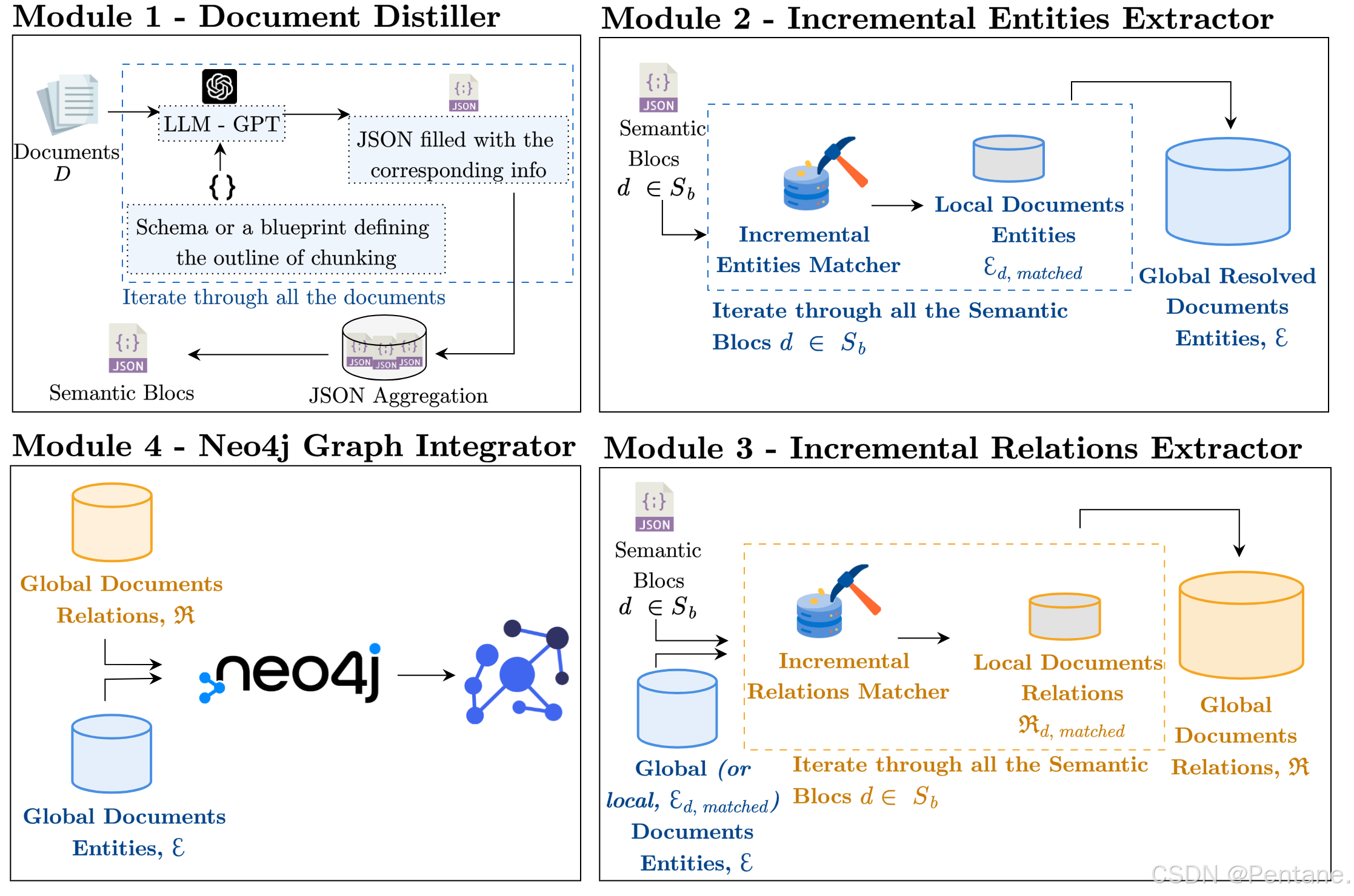
The iText2KGpackage consists of four main modules that work together to construct and visualize knowledge graphs from unstructured text. An overview of the overall architecture:
- Document Distiller: This module processes raw documents and reformulates them into semantic blocks based on a user-defined schema. It improves the signal-to-noise ratio by focusing on relevant information and structuring it in a predefined format.
- Incremental Entity Extractor: This module extracts unique entities from the semantic blocks and resolves ambiguities to ensure each entity is clearly defined. It uses cosine similarity measures to match local entities with global entities.
- Incremental Relation Extractor: This module identifies relationships between the extracted entities. It can operate in two modes: using global entities to enrich the graph with potential information or using local entities for more precise relationships.
- Graph Integrator and Visualization: This module integrates the extracted entities and relationships into a Neo4j database, providing a visual representation of the knowledge graph. It allows for interactive exploration and analysis of the structured data.
iText2KG 包含四个主要模块,这些模块协同工作,从非结构化文本中构建和可视化知识图谱。以下是整体架构的概述:
- 文档提炼器 (Document Distiller):该模块处理原始文档,并根据用户定义的架构将其重新表述为语义块。它通过关注相关信息并将其结构化为预定义格式,从而提高信噪比。
- 增量实体提取器 (Incremental Entity Extractor):该模块从语义块中提取独特的实体,并解决歧义,确保每个实体都有明确的定义。它使用余弦相似度度量来将本地实体与全局实体进行匹配。
- 增量关系提取器 (Incremental Relation Extractor):该模块识别提取实体之间的关系。它可以在两种模式下运行:使用全局实体丰富图谱中的潜在信息,或使用本地实体进行更精确的关系提取。
- 图谱整合与可视化 (Graph Integrator and Visualization):该模块将提取的实体和关系整合到 Neo4j 数据库中,提供知识图谱的可视化表示。它允许对结构化数据进行交互式探索和分析。
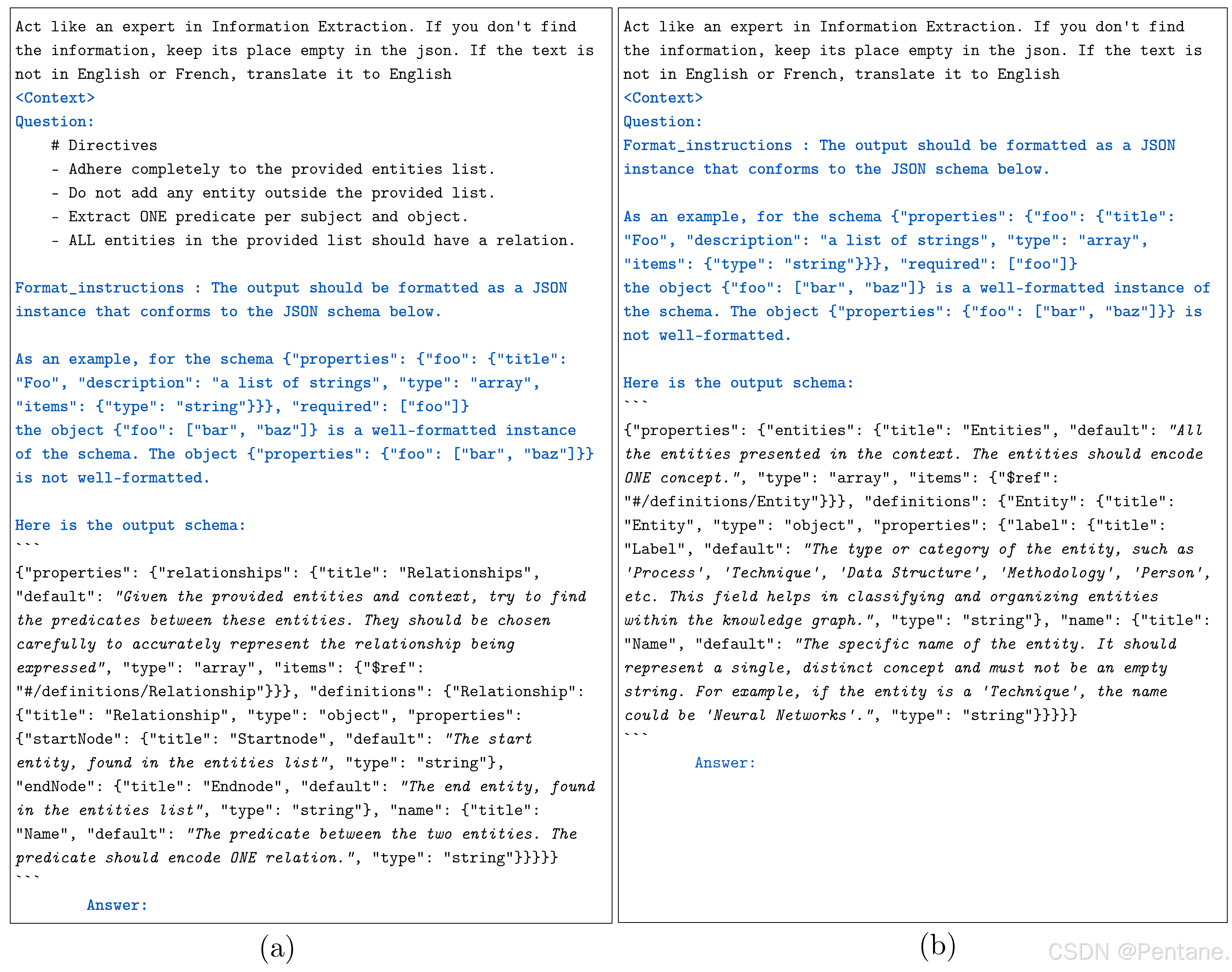
The LLM is prompted to extract entities representing one unique concept to avoid semantically mixed entities. The following figure presents the entity and relation extraction prompts using the Langchain JSON Parser. They are categorized as follows: Blue - prompts automatically formatted by Langchain; Regular - prompts we have designed; and Italic - specifically designed prompts for entity and relation extraction. (a) prompts for relation extraction and (b) prompts for entity extraction.
LLM 被提示提取表示唯一概念的实体,以避免语义混合的实体。下图展示了使用 Langchain JSON 解析器进行实体和关系提取的提示。它们按以下类别进行分类:蓝色 - Langchain 自动格式化的提示;常规 - 我们设计的提示;斜体 - 专门为实体和关系提取设计的提示。(a)关系提取的提示和(b)实体提取的提示。
Modules and Examples 模型和样例
All the examples are provided in the following jupyter notebook example.
Now, iText2KG is compatible with all language models supported by LangChain.
To use iText2KG, you will need both a chat model and an embeddings model.
For available chat models, refer to the options listed at: https://python.langchain.com/v0.2/docs/integrations/chat/. For embedding models, explore the choices at: https://python.langchain.com/v0.2/docs/integrations/text_embedding/.
Please ensure that you install the necessary package for each chat model before use.
所有示例都提供在以下 Jupyter notebook 中:example。
现在,iText2KG 与 LangChain 支持的所有语言模型兼容。
要使用 iText2KG,您需要同时使用聊天模型和嵌入模型。
有关可用聊天模型,请参阅以下链接:LangChain聊天模型。有关嵌入模型的选择,请查看:LangChain嵌入模型。
在使用之前,请确保已为每个聊天模型安装必要的包。
Mistral
For Mistral, please set up your model using the tutorial here: https://python.langchain.com/v0.2/docs/integrations/chat/mistralai/. Similarly, for the embedding model, follow the setup guide here: https://python.langchain.com/v0.2/docs/integrations/text_embedding/mistralai/ .
对于 Mistral,请按照以下教程设置您的模型:Mistral设置教程。
同样,对于嵌入模型,请按照以下指南进行设置:Mistral嵌入模型设置教程。
from langchain_mistralai import ChatMistralAI
from langchain_mistralai import MistralAIEmbeddings

mistral_api_key = "##"
mistral_llm_model = ChatMistralAI(
    api_key = mistral_api_key,
    model="mistral-large-latest",
    temperature=0,
    max_retries=2,
)


mistral_embeddings_model = MistralAIEmbeddings(
    model="mistral-embed",
    api_key = mistral_api_key
)
The Document Distiller module reformulates raw documents into predefined and semantic blocks using LLMs. It utilizes a schema to guide the extraction of specific information from each document.
文档提炼器模块使用 LLM 将原始文档重新表述为预定义的语义块。它利用一个架构来指导从每个文档中提取特定信息。
OpenAI
The same applies for OpenAI.
please setup your model using the tutorial : https://python.langchain.com/v0.2/docs/integrations/chat/openai/ The same for embedding model : https://python.langchain.com/v0.2/docs/integrations/text_embedding/openai/
对于 OpenAI,请按照以下教程设置您的模型:OpenAI设置教程。
同样,对于嵌入模型,请按照以下指南进行设置:OpenAI嵌入模型设置教程。
from langchain_openai import ChatOpenAI, OpenAIEmbeddings

openai_api_key = "##"

openai_llm_model = llm = ChatOpenAI(
    api_key = openai_api_key,
    model="gpt-4o",
    temperature=0,
    max_tokens=None,
    timeout=None,
    max_retries=2,
)

openai_embeddings_model = OpenAIEmbeddings(
    api_key = openai_api_key ,
    model="text-embedding-3-large",
)
The DocumentDistiller文档提炼器 (Document Distiller)
Example 样例
# 从itext2kg库导入DocumentDistiller类
from itext2kg import DocumentDistiller
# 你可以定义一个模式(schema)或者上传一些预定义的模式。
from itext2kg.utils import Article

# 使用LLM模型初始化DocumentDistiller。
document_distiller = DocumentDistiller(llm_model=openai_llm_model)

# 需要提取信息的文档列表。
documents = ["doc1", "doc2", "doc3"]

# 信息提取查询。
IE_query = '''
# 指令:
- 扮演一个经验丰富的信息提取专家。
- 你将会处理一段科学论文的内容。
- 如果未找到合适的信息,请保留其位置为空。
'''

# 使用定义的查询和输出数据结构提取文档信息。
distilled_doc = document_distiller.distill(documents=documents, IE_query=IE_query, output_data_structure=Article)
The schema depends on the user’s specific requirements, as it outlines the essential components to extract or emphasize during the knowledge graph construction. Since there is no universal blueprint for all use cases, its design is subjective and varies by application or context. This flexibility is crucial to making the iText2KGmethod adaptable across a wide range of scenarios.
You can define a custom schema using pydantic. Some example schemas are available in utils. You can use these or create new ones depending on your use-case.
架构(schema)取决于用户的具体需求,因为它概述了在构建知识图谱过程中需要提取或强调的关键组件。由于没有适用于所有使用场景的通用蓝图,其设计是主观的,且根据应用或上下文的不同而有所变化。这种灵活性对于使 iText2KG 方法能够适应广泛的场景至关重要。
您可以使用 pydantic 定义自定义架构。部分示例架构可以在 utils 中找到。您可以根据您的使用场景使用这些示例架构或创建新的架构。
from typing import List, Optional
from pydantic import BaseModel, Field

# 定义一个包含姓名和所属机构字段的作者模型。
class Author(BaseModel):
    name: str = Field(description="作者的姓名")
    affiliation: str = Field(description="作者的所属机构")

# 定义一个包含多个字段来描述科学文章的模型。
class Article(BaseModel):
    title: str = Field(description="科学文章的标题")
    authors: List[Author] = Field(description="文章作者及其所属机构的列表")
    abstract: str = Field(description="文章的摘要")
    key_findings: str = Field(description="文章的主要发现")
    limitation_of_sota: str = Field(description="现有工作的局限性")
    proposed_solution: str = Field(description="详细描述提出的解决方案")
    paper_limitations: str = Field(description="论文中所提出解决方案的局限性")
The iText2KG
The iText2KG module is the core component of the package, responsible for integrating various functionalities to construct the knowledge graph. It uses the distilled semantic sections from documents to extract entities and relationships, and then builds the knowledge graph incrementally.
Although it is highly recommended to pass the documents through the Document Distillermodule, it is not required for graph creation. You can directly pass your chunks into the build_graphfunction of the iText2KGclass; however, your graph may contain some noisy information.
iText2KG 模块是该软件包的核心组件,负责整合各种功能以构建知识图谱。它利用文档中提炼出的语义部分来提取实体和关系,然后逐步构建知识图谱。
虽然强烈建议通过 Document Distiller 模块处理文档,但这对于图谱的创建并不是必需的。您可以直接将文档的块传递到 iText2KG 类的 build_graph 函数中;然而,这样构建的图谱可能会包含一些噪声信息。
from itext2kg import iText2KG

# 使用LLM模型和嵌入模型初始化iText2KG。
itext2kg = iText2KG(llm_model=openai_llm_model, embeddings_model=openai_embeddings_model)

# 将提取后的文档格式化为语义块。
semantic_blocks = [f"{key} - {value}".replace("{", "[").replace("}", "]") for key, value in distilled_doc.items()]

# 使用语义块构建知识图谱。
kg = itext2kg.build_graph(sections=semantic_blocks)
The Arguments of iText2KG:
llm_model: The language model instance to be used for extracting entities and relationships from text.embeddings_model: The embeddings model instance to be used for creating vector representations of extracted entities.sleep_time (int): The time to wait (in seconds) when encountering rate limits or errors (for OpenAI only). Defaults to 5 seconds.
iText2KG 的参数说明:
llm_model:用于从文本中提取实体和关系的语言模型实例。embeddings_model:用于创建提取实体的向量表示的嵌入模型实例。sleep_time (int):遇到速率限制或错误时的等待时间(仅适用于 OpenAI)。默认值为 5 秒。
——————————————————————————————————
The Argument of iText2KGmethod build_graph:
sections (List[str]): A list of strings (semantic blocks) where each string represents a section of the document from which entities and relationships will be extracted.ent_threshold (float, optional): The threshold for entity matching, used to merge entities from different sections. Default is 0.7.rel_threshold (float, optional): The threshold for relationship matching, used to merge relationships from different sections. Default is 0.7.existing_knowledge_graph (KnowledgeGraph, optional): An existing knowledge graph to merge the newly extracted entities and relationships into. Default is None.entity_name_weight (float): The weight of the entity name in the entity embedding process. Default is 0.6.entity_label_weight (float): The weight of the entity label in the entity embedding process. Default is 0.4.max_tries (int, optional): The maximum number of attempts to extract entities and relationships. Defaults to 5.max_tries_isolated_entities (int, optional): The maximum number of attempts to process isolated entities (entities without relationships). Defaults to 3.
iText2KG 方法 build_graph 的参数说明:
sections (List[str]):字符串列表(语义块),每个字符串代表一个文档部分,从中将提取实体和关系。ent_threshold (float, optional):实体匹配的阈值,用于合并来自不同部分的实体。默认值为 0.7。rel_threshold (float, optional):关系匹配的阈值,用于合并来自不同部分的关系。默认值为 0.7。existing_knowledge_graph (KnowledgeGraph, optional):现有的知识图谱,用于将新提取的实体和关系合并到其中。默认值为 None。entity_name_weight (float):实体名称在实体嵌入过程中的权重。默认值为 0.6。entity_label_weight (float):实体标签在实体嵌入过程中的权重。默认值为 0.4。max_tries (int, optional):提取实体和关系的最大尝试次数。默认值为 5。max_tries_isolated_entities (int, optional):处理孤立实体(没有关系的实体)的最大尝试次数。默认值为 3。
The GraphIntegrator图谱整合
It integrates the extracted entities and relationships into a Neo4j graph database and provides a visualization of the knowledge graph. This module allows users to easily explore and analyze the structured data using Neo4j’s graph capabilities.
它将提取的实体和关系整合到 Neo4j 图数据库中,并提供知识图谱的可视化。该模块使用户能够利用 Neo4j 的图形功能轻松地探索和分析结构化数据。
from itext2kg.graph_integration import GraphIntegrator


URI = "bolt://localhost:7687"
USERNAME = "neo4j"
PASSWORD = "###"

GraphIntegrator(uri=URI, username=USERNAME, password=PASSWORD).visualize_graph(knowledge_graph=kg)
Some iText2KGuse-cases 一些使用iText2KG的使用场景
In the figure below, we have constructed a KG for the article seasonal and for the company company, with its permission to publish it publicly. Additionally, the Curriculum Vitae (CV) KG is based on the following generated CV.
在下图中,我们为文章 seasonal 和公司 company 构建了知识图谱,并获得了该公司允许公开发布的授权。此外,简历(CV)知识图谱基于以下生成的 CV。

Dataset 数据集
The dataset consists of five generated CVs using GPT-4, five randomly selected scientific articles representing various domains of study with diverse structures, and five company websites from different industries of varying sizes. Additionally, we have included distilled versions of the CVs and scientific articles based on predefined schemas.
Another dataset has been added, consisting of 1,500 similar entity pairs and 500 relationships, inspired by various domains (e.g., news, scientific articles, HR practices), to estimate the threshold for merging entities and relationships based on cosine similarity.
该数据集包括五份使用 GPT-4 生成的简历、五篇随机选取的代表不同学科领域的科学文章(具有不同结构)、以及来自不同行业、不同规模的五个公司网站。此外,我们还包括了基于预定义架构的简历和科学文章的精炼版本。
另一个数据集已经添加,包含 1,500 对相似实体对和 500 个关系,灵感来源于各种领域(例如新闻、科学文章、人力资源实践),用于估算基于余弦相似度的实体和关系合并阈值。
Public Collaboration 公共协作
We welcome contributions from the community to improve iText2KG.
我们欢迎社区的贡献,以帮助改进 iText2KG。
Citation 引用
@article{lairgi2024itext2kg,
  title={iText2KG: Incremental Knowledge Graphs Construction Using Large Language Models},
  author={Lairgi, Yassir and Moncla, Ludovic and Cazabet, R{\'e}my and Benabdeslem, Khalid and Cl{\'e}au, Pierre},
  journal={arXiv preprint arXiv:2409.03284},
  year={2024},
  note={Accepted at The International Web Information Systems Engineering conference (WISE) 2024},
  url={https://arxiv.org/abs/2409.03284},
  eprint={2409.03284},
  archivePrefix={arXiv},
  primaryClass={cs.AI}
}
Anounce 声明
本文翻译自iText2KG项目中README部分,经过删改,留下重要的部分,方便学习交流。
项目地址:https://github.com/AuvaLab/itext2kg

魔乐社区(Modelers.cn) 是一个中立、公益的人工智能社区,提供人工智能工具、模型、数据的托管、展示与应用协同服务,为人工智能开发及爱好者搭建开放的学习交流平台。社区通过理事会方式运作,由全产业链共同建设、共同运营、共同享有,推动国产AI生态繁荣发展。
更多推荐


 1
1 0
0- 0


 已为社区贡献1条内容

所有评论(0)